

Sakura AI Review: A Fine Roleplay Writer That Forgets Too Soon
- Hands-on test, paid plan
- Checked

Free plan available
from $11/mo
Sakura AI verdict: a fine writing partner with a short attention span
What is Sakura AI? It is a character hub for roleplay and companion chat, closer to a writing room than to a girlfriend app with a face and a voice. It launched in 2023, which makes it a veteran in a category where apps come and go like food trucks. Behind it sits a small Florida LLC.
The life around the product happens on the Sakura AI Discord rather than on the website. Offers, support and news all run through that one server. That feels friendly when it works and cramped when it doesn't.
My verdict: a free account is worth it for anyone who likes long, literary roleplay or builds their own characters. I'd think hard before paying, because the paid model writes beautifully for a while and then wanders out of character. I can't see a plan on the price list that fixes that.
The free tier is the better deal, as long as you can live with a daily limit that nobody will put a number on. I'd recommend it to roleplay writers, to people with a folder of character cards from other sites, and to anyone who wants a patient scene partner at the end of a long day.
Sakura AI at a glance
- Price from
- $11/mo
- Free tier
- Free plan available
- NSFW content
- Allowed
- Platforms
- Web, iOS, Android
- How it was tested
- Hands-on test, paid plan,
- On your card statement
- Not known yet - I have not paid for it
I'd steer away anyone who wants voice, strong memory, card payment on the web or privacy terms written with AI chat in mind. None of those are Sakura's strengths, and none of them look close to changing.
Key takeaways: - The free tier has a daily message limit, and the exact number is not published anywhere. - Diamond costs $19 a month and Infinite $39, and the website takes only crypto or the mobile app stores. - Replies are long and literary, but characters drift out of voice as a chat grows. - The character builder and the card import are the best reasons to stay. - The Terms and the Privacy Policy are generic templates that never mention chats.
How I used Sakura AI: ten days and one samurai
My time with Sakura AI ran for ten days in March 2026, and most of it belonged to one samurai character. By day 8 the free allowance and I had settled into a routine: 15 minutes of samurai after the day's export, then bed. Oddly, it worked like a nightcap.
I'm still a bit surprised by that. An export is the part of my day where the machine does the work and I wait for a progress bar, and the samurai slotted into the gap between finishing a job and admitting the day was over. It was the smallest possible dose of fiction, and it was enough.
| What | Details |
|---|---|
| Period | Mar 2026 |
| How long | 10 days |
| Plans I paid for | Free tier (Sage) ($0, small daily allowance, day 1); Diamond, one month ($19/month) |
| How it ended | cancelled Diamond after 10 days of real use |
| Facts re-checked | 23 September 2026 |
From the author's own notes; prices and features re-checked on 23 September 2026.
It also tells you what kind of use this was. It was not a relationship and not a companion in the usual sense. It was a short, repeatable story habit, closer to reading a chapter before sleep than to texting someone.
That shape suits Sakura better than a long session does, and the rest of the review explains why. The table below lists the plans and how the ten days ended. The pricing and cancelling sections tell those parts in full.
Ten days is not long. It is long enough to find the habit, the ceiling and the price of breaking through it, which is most of what a review of an app like this needs. I'd rather give you ten honest days than pretend to a year.
Two timelines run through the review, and they are kept apart on purpose. Everything in the past tense is my own story from March 2026, with that month's prices, names and limits. The present-tense facts come from a check of the Sakura AI web version on the free tier, dated 23 September 2026.
That split matters more than usual here, because small apps rename things between seasons. Where my story and today's pages disagree, both versions appear with their dates, and I say which one I'd trust.
My Sakura AI test log
Chris FurreyFounder and writer Hands-on test, paid plan own card, no press account
-
First night on the free Sage tier: the daily allowance ran out in about 15 minutes, mid-way through a samurai's monologue about honor.
-
Joined the Discord to earn extra free access through community milestones and felt like a man in his mid-thirties lurking in a youth club.
-
By day 8 I had a routine: 15 minutes of samurai after the day's export, then bed. It worked like a nightcap.
-
Paid $19 for one month of Diamond to try Fusion Mode; my samurai switched to cozy slice-of-life and opened a tea house.
-
Dragonfruit held character for about 30 turns, then the samurai said 'lol' and asked about my weekend plans.
-
Cancelled Diamond after 10 days of real use: at $19 the context drift felt like a tutor who forgets your name every half hour.
plan paid for: Sakura+ Diamond Total spent $19
I'd read the whole thing the way I read a client brief next to the raw footage. The brief says what the product should be, the footage shows what happened, and the useful part is the gap between them.
Sakura AI sign-up and first minutes: quick, quiet, one survey
The front door
Sakura AI lives at sakura.fm, and the site is up and running on 23 September 2026. The browser tab reads "Sakura AI | Chat with AI Characters", which is at least honest about the product. The whole interface is in English.
I like a title that says what the thing is. Plenty of apps in this category hide behind words like "soulmate" or "universe". A site that simply says chat with characters sets the right expectation: this is a place for fiction, not a promise of a partner.
Creating an account
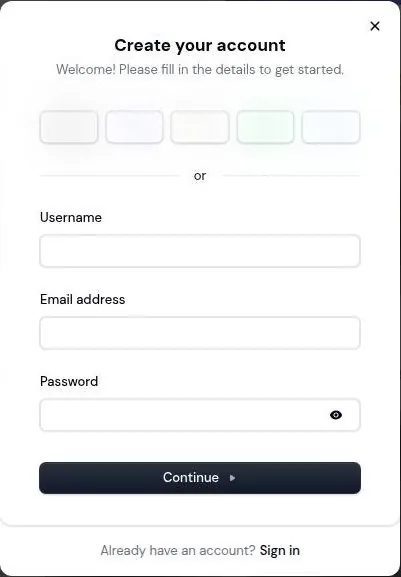
The sign-up modal runs on Clerk, a third-party login service, served from clerk.sakura.fm. It shows 5 social sign-in buttons across the top. Below them, the form asks for a username, an email address and a password.
A custom username is accepted at this stage, so there is no random string to fix later. Email sign-up works. I'd pick email over the social buttons anyway, because a roleplay account is one of those things I'd rather keep off my main logins.
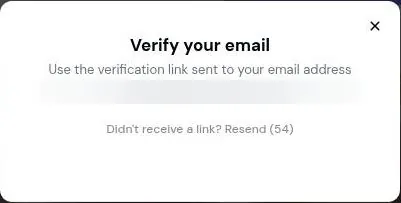
After "Continue", a modal titled "Verify your email" says to use a link sent by email. The email is titled "Your sign up link" and comes from a sender called "Sakura". It arrives in about 1 minute.
The link expires in 10 minutes, so this is not a step to leave for after dinner. Clicking it logs the user in directly, with no second password prompt. The whole sign-up takes about 2 minutes, including the email step.
That is fast, and I think it is the right kind of fast. There is no card, no phone number and no quiz about your ideal partner before you can see a single character. The magic-link step is a small hurdle that keeps out junk sign-ups without making real people jump through hoops.
From an editor's chair, the flow has no dead frames. Every screen asks for one thing and leads straight to the next, with no pause for an upsell. I'd hold it up as a model for apps twice Sakura's size.
The one thing I'd change is the ten-minute window. Anyone whose mail arrives slowly, or who signs up on a laptop and reads mail on a phone, may end up asking for a second link. A longer window would cost the company nothing.
Onboarding: one question
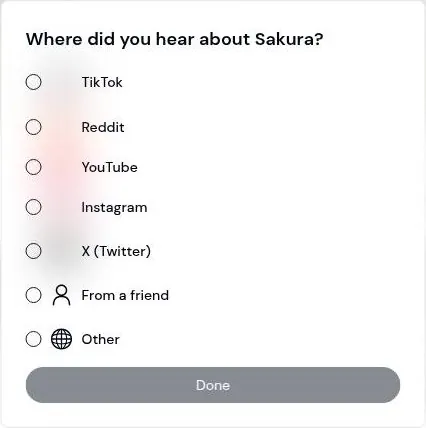
Onboarding is a single survey: "Where did you hear about Sakura?". The options are TikTok, Reddit, YouTube, Instagram, X, Friend and Other, plus a free-text answer. There are no other onboarding steps.
No tutorial, no persona wizard, no pick-three-interests screen. Some people will miss the hand-holding. I'd call it a relief, like a client who sends the footage and says "you know what to do".
The survey is a marketing question, and that is fine. It tells you where Sakura thinks its audience comes from: social video and forums, not search ads. It also takes about as long to answer as it takes to read.
The settings you land in
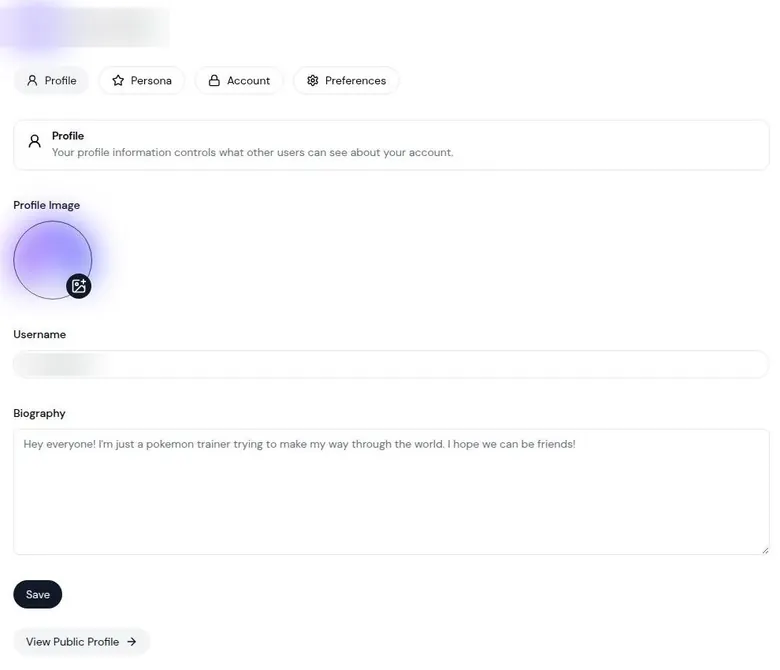
The Profile tab holds a profile image, a username and a bio. The Account tab offers language, theme, Connect Discord, Connect Twitter and Log out. Both tabs are plain, and neither hides anything behind a paywall badge.
The Discord and Twitter buttons tell you where this company lives. Sakura expects you to link a social account sooner or later, and the rest of the review shows that Discord in particular is hard to avoid.
I'd fill in the Profile tab last, if at all. Nothing in it changes how the characters talk to you, and a blank bio is an entirely respectable bio.
The inbox afterwards
The only email after sign-up is the sign-up link itself. No welcome series, no "your AI misses you" reminder, no discount that expires at midnight.
I count that in Sakura's favor. Plenty of apps in this category write to people like a clingy ex, and a quiet sender is rare. It makes the account easy to forget about, which some people will see as a feature and the marketing team presumably sees as a bug.
The character library: big, busy and very anime
The interface is clean and minimal. A left sidebar holds Explore, Create, Sakura+, recent chats and All Chats. It looks like a tool rather than a nightclub, which I appreciate at the end of a long day.
The catalogue is large, long-running and made by users, and the top bots have 5–13M+ chats each. The feed sorts by Top, New, Trending, Last Messaged, Created By Me, Favorites, Following and Blocked. That is a lot of ways to sort and not many ways to find a character by what it is actually like.
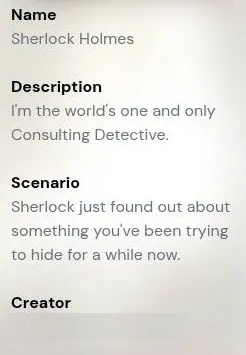
That gap is where my own search went sideways. The library leans heavily on anime, and in March I searched "retired detective" because I was in a noir mood. I got 40 results, and all of them were really "hot detective", which is a very different genre.
I closed the search feeling like a man who asked a bartender for a quiet beer and got a cocktail with a sparkler in it.
I wanted a tired man in a raincoat and a drawer full of cold cases. I got forty variations on a jawline. It felt like asking a stock footage site for a rainy street at night and getting forty shots of a model holding an umbrella.
My guess is that the crowd tags for appeal rather than for mood. The good, odd characters exist, but you find them through people, not keywords.
It is the flea market problem. The best finds are there, under a table behind a box of things everyone else wanted, and the sorting only ever shows you what sold well last week.
Creators have profiles at /user/<name>. Users can follow creators and see their work through the Following filter.
That is the route I'd recommend. Find one creator whose characters feel written rather than assembled, follow them, and let the Following filter do the curating. It is the same logic as finding a good colorist: once you have one, you stop scrolling portfolios.
Building your own characters on Sakura AI
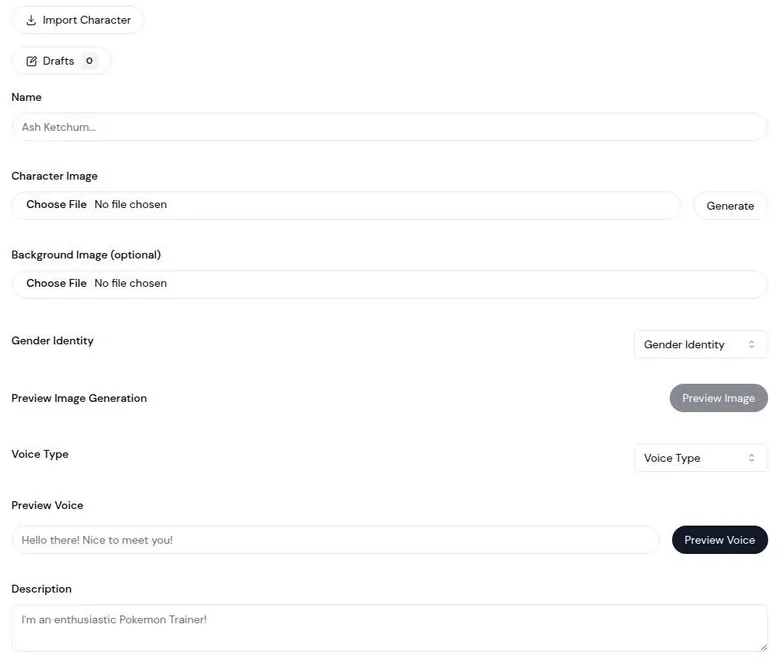
The Create form
The App Store description promises that you can customize everything about a character, from their appearance to their way of thinking. For once the store copy is close to the product. The Create form has fields for Model Instructions, Example Conversation and First Message.
Those three fields are where a character is actually made. Instructions set the rules, the example shows the voice, and the first message sets the scene. Many apps in this category hide at least one of them, and I think that is why so many of their characters sound alike.
The form can auto-generate character images. It has Autofill for tags, and it has Author's Notes. Creators mark characters as adult content with a toggle in the same form.
I read Author's Notes as the writer's version of a marker on a timeline: a reminder of what the scene is supposed to hold. I'd point anyone who writes characters to them first.
Who gets to see it
Character visibility can be Public, Unlisted or Private. "Hide Details" keeps a character's prompt private. That second option matters to people who put hours into a prompt and would rather not see it copied line for line.
I like that both exist. A character you build for yourself should stay yours, and a public one should not have to hand over its script just to be public.
Importing and adjusting
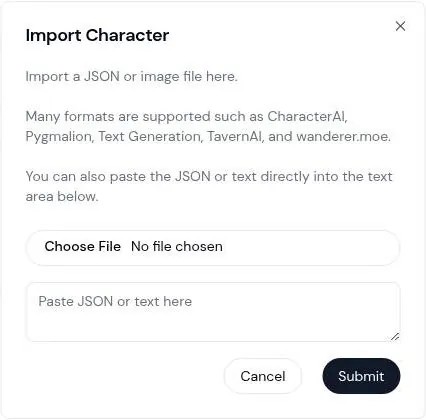
Character import takes JSON or image cards "such as CharacterAI, Pygmalion, Text Generation, TavernAI, and wanderer.moe". It also accepts pasted-in JSON. For anyone arriving from another roleplay front end with a folder of cards, this is the best feature on the site.
It is the equivalent of a project that opens in a new editing suite without relinking every clip.
You do not have to own a character to bend it. Users can override a character's name, persona, description and scenario for themselves. They can also set a custom chat background per character.
The override is smart. It is the difference between editing a client's master file and working on a copy: the creator's version stays intact, and you get the cut you want.
Personas and price
The Persona settings tab holds a private display name and a description that the bots use. That saves repeating who you are at the start of every chat. I'd keep it short and fictional, and leave real names and jobs out of it.
A secondary review says the character builder is fully usable without paying. It lists name, image upload or generation, gender, voice type with preview, persona, system instructions, example conversations, tags, author notes, the adult-content toggle and visibility.
I think this is where Sakura earns its keep. The builder costs nothing, and it is the one part of the product that does not depend on the model's memory.
What conversations on Sakura AI feel like
The chat screen today
In chat, a character panel sits on the right. The September chat was with "Sherlock Holmes", a user-made character with 27.3K chats. Replies arrive in about 5–10 seconds.
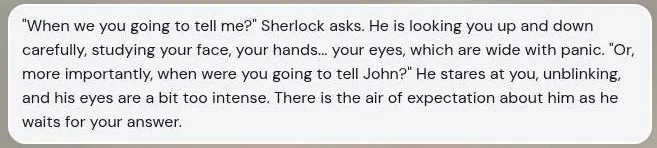
The replies are long, about 150–250 words each. They are literary in style. They follow the third-person roleplay format, with inner thoughts in italics.
That format is a matter of taste. Some people want a text message, and Sakura hands them a chapter. I like the chapter, but I'd warn anyone expecting a quick back-and-forth that each reply reads like a page of a paperback.
The speed deserves a note of its own. Five to ten seconds for a reply of that length is quick, and it keeps a scene moving the way a good cut does: you never sit staring at a spinner long enough to lose the thread.
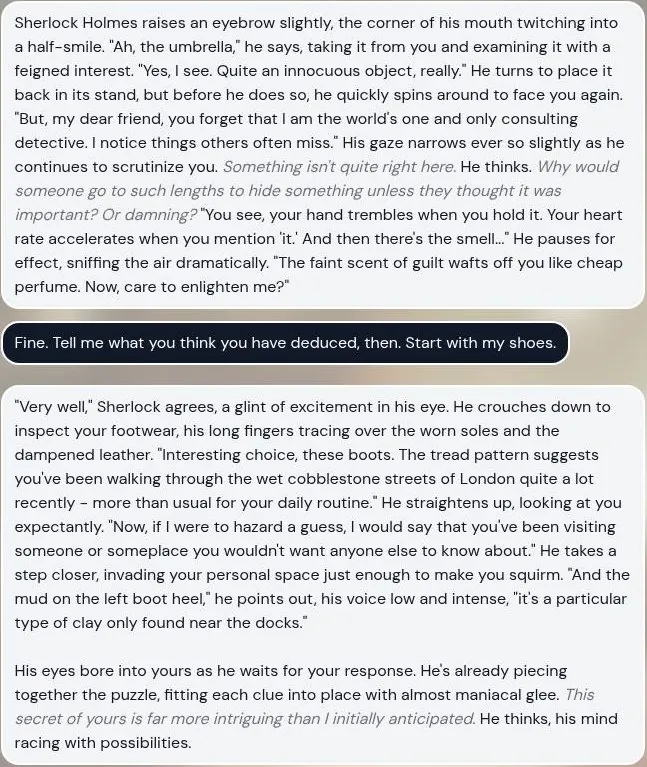
The Sherlock bot does what a Sherlock bot should.
One reply opens: "Interesting choice, these boots. The tread pattern suggests you've been walking through the wet cobblestone streets of London quite a lot recently...". Another adds: "it's a particular type of clay only found near the docks."
That is good pastiche. It is the kind of line a writer would keep in a first draft, and it arrives faster than most people could type the setup.
Then the scene tilts. In a neutral scene, the bot drifts toward physical closeness: "He leans in, his breath warm against your ear".
I'd call that a habit rather than a bug. A detective breathing on your ear in the middle of a deduction is a continuity error in the story, and the kind an editor spots from across the room. You will spend some replies steering around it.
The controls
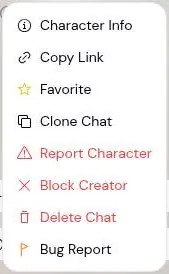
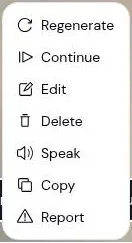
A "Continue" button appears after replies. The message menu has Regenerate, Continue, Edit, Delete, Speak, Copy and Report. The chat's More Options menu has Character Info, Copy Link, Favorite, Clone Chat, Report Character, Block Creator, Delete Chat and Bug Report.
Each character can hold several chats, through New Chat and Previous Chats. Together with Clone Chat, that is an editor's dream. You can branch a story like a project file, try a different ending, and keep the version that works.
Regenerate and Edit are the tools I'd lean on most. A reply that drifts can be rolled again, and a reply that is almost right can be trimmed by hand, the way you'd nudge a cut by a few frames instead of reshooting the scene.
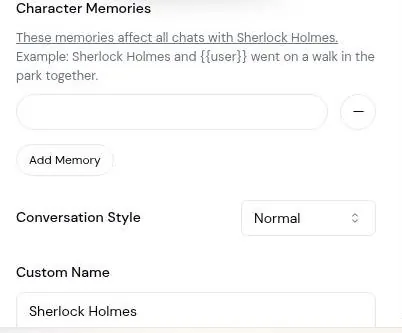
A per-character Conversation Style setting offers Normal, Creative and Formal. It is a small dial, but it is free, and I'd try it before paying for anything.
Models and Fusion Mode
Model tiers are named rather than picked. The free model has no name, Diamond gets "Dragonfruit", and Infinite gets "Glowing Dragonfruit" plus "Ultra-Immersive Images" and Infinite Memory. There is no model picker in the free chat interface.
Diamond's headline extra is Fusion Mode, which the plan page describes as "a Variety of Responses for every message". Fusion Mode could not be tried on the free tier in September.
In March 2026 I paid for one month of Diamond to try Fusion Mode, which back then let me shift the tone mid-conversation. I flipped my samurai from tragic epic to cozy slice-of-life, and he immediately started running a tea house. I loved it, and I had not expected to.
It was like regrading a grim scene into a warm one and finding out the actor had been holding back a comedy the whole time. Same character, same history, a completely different room. The seriousness stayed; only the stakes changed.
The wording is different today. The plan page now promises a variety of responses for every message, and tone presets sit in the per-character Conversation Style instead. Whether the March feature still exists under the new label is not something the page says, and I'd want to know before paying for it again.
The best moment
The best moment of the ten days came in that tea house. I asked the samurai to explain color temperature using steeping times, and he gave a better analogy than any YouTube grading tutorial. Warm and cool, long and short, all of it suddenly made sense in terms of a teapot.
I stole it for a real-estate client who kept asking why his kitchen footage looked "blue". Explaining white balance to a client usually ends with me pointing at a scope and losing the room. A samurai with a teapot did it better than I ever had.
I remember feeling slightly guilty about the source, and then not guilty at all.
That is what I think a good roleplay model is for. Not romance and not company, but a patient partner who can take an odd prompt and hand back something usable. On its good days, Sakura is exactly that.
Does the personality hold?
A secondary review finds that characters keep their personality over longer chats, and rates the writing above average for the category. I agree with the second half without reservation. The first half is not what I'd sign under, and the memory section explains why.
The bigger point is that Sakura rewards a user who directs. Give it a clear scene, a clear character and a reason to be in the room, and it writes like a pro. Leave it alone, and it drifts toward whatever the crowd on the front page seems to like best.
My overall read on the conversations: the writing is the best thing Sakura has, and the drift toward closeness and away from character is the worst. I'd take the writing and keep a hand on the wheel.
Memory: good for a scene, shaky for a saga
The house model in March was called Dragonfruit, and it was good at staying in character for about 30 turns. After that, my stoic samurai started saying "lol" and asking about my weekend plans.
It was like a continuity error in a period film: the actor still in armor, with a wristwatch in the shot. Everything about the character was right until it wasn't, and once I saw the watch I could not stop seeing it.
A September check tried a short recall test. It asked the bot: "What was the first thing I told you when I walked in today?"
The check failed. The bot invented "'Good morning, Sherlock'" as the opening line, when the real opening, returning John's umbrella, had been said 3 messages earlier. The bot did carry over the "docks" detail from its own previous reply.
So it remembers what it said better than what you said. That is a very human flaw, and a poor one for anything sold as a companion.
The Sherlock result is the telling one. A gap of a few messages is not a long chat; it is barely a scene. If a character loses the thread that fast, long campaigns are out of reach without heavy note-taking.
A secondary review on techsuggest.io reports that memory sometimes slipped. I'd call "sometimes" generous, but the direction is the same.
There are two tools against it. Per-character Character Memories let users add facts by hand. I'd use them for the few things a character must never get wrong: your name, the setting and the one plot point everything hangs on.
The other tool is money. Infinite includes Infinite Memory: "Your characters will Never Forget the Moments you share together". That is a big promise.
I'd want to see it hold for a week of chats before trusting it, because "never forget" is the kind of line that ages badly.
My advice is to plan around the drift rather than fight it. Keep scenes short, pin the facts that matter, and start a fresh chat when a character starts sounding like someone else. That is how I'd use Sakura, and it is roughly how an editor handles a long shoot: in scenes, with notes.
| Feature | Free | Paid |
|---|---|---|
| Daily messages | limited, number not published | unlimited (Diamond and Infinite) |
| Chat model | unnamed free model | Dragonfruit (Diamond); Glowing Dragonfruit (Infinite) |
| Memory | Character Memories you add by hand | better memory (Diamond); Infinite Memory (Infinite) |
| Fusion Mode | no | Diamond and Infinite |
| In-chat images | worked on the free tier | Ultra-Immersive Images (Infinite) |
| Character builder and import | yes | yes |
| Extra free messages | Sakura Sage via Discord | not needed |
| Ads | none seen | - |
| Free trial | none | - |
Limits as listed on 23 September 2026.
Sakura AI images and voice: present, but not the point
Images
On the free tier, an image button next to the message box generates a character image in chat. Free in-chat image generation worked once in the September check. The image took about 20 seconds.
The generated images are blurred in the screenshots on this page. That is the right call for this site, and it also means you will have to judge the style for yourself.
A secondary review finds Sakura AI art stylised and of varying quality, and not a reason to choose the platform. That fits how the feature is placed: a button beside the text box, not a studio.
An older review calls image generation token-gated. In September the image button worked on the free tier without any purchase, so that description looks out of date.
Voice
The Create form offers 12 preset voices, Male 1–6 and Female 1–6, each with a preview. Voice exists as these creator-selected voice types plus a "Speak" button on messages.
Twelve voices split evenly between male and female is a starter kit rather than a casting call. It is enough to give a character a sound, not enough to give it a personality, and the creator picks it once for everyone who chats.
The Speak button returned an error. The message read: "Unknown Error! Please report this error to us on Discord: [error-code: 3938]".
That error message sums up the company in one line. Something broke, and the fix runs through Discord.
Secondary reviews disagree about voice.
One review, updated in June 2026, says: "No. Sakura AI is text-only, with token-gated image generation bolted on. There's no voice and no video generation at all."
Another says voice exists but "did not feel like the main reason to use the app".
A third finds the voice clear enough but not very human-sounding. On 23 September 2026 the voices exist in the builder and on the message menu, so the "no voice" claim is out of date. Whether they sound good is another question, because the button did not work in the check.
| Plan | Monthly | Yearly | Notes |
|---|---|---|---|
| Free (Sage) | $0 | - | daily message limit, number not published; extra messages via the Discord Sage program |
| Diamond | $19 | $132 ($11/mo) | unlimited messages, Dragonfruit model, Fusion Mode; App Store yearly $131.99 |
| Infinite | $39 | $275 ($23/mo) | SALE label; Glowing Dragonfruit model, Ultra-Immersive Images, Infinite Memory, all of Diamond; App Store yearly $274.99 |
| Sakura+ Gold | $5.00 | - | App Store only, not on the web plan page; contents not stated |
Prices as published on or before 23 September 2026; sources in the text.
Video
The same June review says there is no video generation. I'd believe it. Nothing about Sakura suggests a company that wants to be in the video business, and that is fine.
My take on media
Media on Sakura is a side dish. I'd judge the app on its text, treat the image button as a free bonus, and treat voice as a promise until the Speak button works.
As someone who edits pictures and sound for a living, I'd rather an app skip a feature than ship one that throws an error code. A broken button costs more trust than a missing one.
The Sakura AI free tier: a small bottle with no label
The free tier was called "Sage" in March, and it was a very small bottle. On my first night the daily allowance ran out in about 15 minutes. It ran out just as a samurai character started a promising monologue about honor.
It felt like a projector dying a few minutes before the end of a film. The samurai had drawn breath, the scene had built, and then the screen went dark. I sat there annoyed at a fictional man's unfinished speech, which says more about me than about the app.
Does Sakura AI have limited messages? On the free tier, yes. Today the Free tier allows chat up to the Sakura AI daily message limit, and the page does not state the exact number. I'd call that the main complaint about the free tier: you cannot plan around a limit you cannot see.
In the September check, the limit was not reached in 4 messages. Those 4 were 3 chat messages and 1 image, and no daily limit was reached. No paywall popup appeared either.
That does not contradict my first night. Four messages is a short check, and a fifteen-minute session with long replies is a lot more traffic.
No ads appear. There is no free trial of the paid plans. So free means the limited tier, and paid means paying, with nothing in between. I think the lack of a trial is honest, in its way.
A trial that turns into a charge a few days later is the oldest trick in this category, and Sakura does not play it.
| What | Price then | When |
|---|---|---|
| Diamond (paywall screen) | $19/month | Mar 2026 |
| Infinite (paywall screen) | $39 | Mar 2026 |
| Diamond, one month paid | $19 | Mar 2026 |
From the author's own notes. Compare with today's prices above.
The Sage card on the plan page reads: "Free Messages – Keep reaching your daily message limit? Get Free Messages. Apply in Discord".
It is the company admitting the limit bites, and offering a side door instead of a number.
I'd rather have the number. It is like a gym membership that lists the opening hours as "until we close". You can still go, but you cannot plan a workout.
A published number would also make the paid plans easier to judge. Right now the pitch for Diamond is unlimited messages against an unknown limit, which is like selling a bigger fuel tank without saying how big the current one is.
What free is good for: browsing the library, building characters, short scenes and the odd image. Where it stops: any evening where you want the story to reach its ending. For a fifteen-minute nightcap it is enough; for a long session it is not.
I'd start free and stay free until the limit annoys you twice in one week. That is a better test of whether you need Diamond than any feature list.
Sakura AI pricing: the plans today and what I paid
What the paywall offered in March
The paywall screen in March 2026 offered Diamond at $19 a month and Infinite at $39. I did the math in my head and decided that is roughly two good curries, or one if I cook them myself with fancy ingredients. The second table below shows my own spending and when it happened.
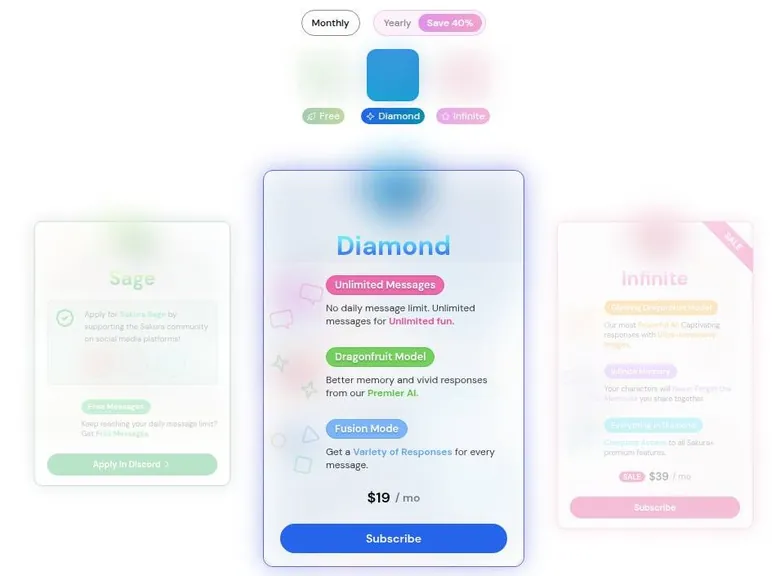
Curry math is my version of the gym membership test. If a plan costs more than a nice dinner, it has to give me something a dinner cannot.
The plans on 23 September 2026
The pricing page lives at /buy and appears as "Sakura+" in the menu. Prices there are in USD.
The page adds: "Prices displayed are in USD and may vary in regions other than the United States. Your region's price will be displayed at checkout."
Diamond costs $19 a month. On yearly billing it is $11 a month, or $132 a year, labelled "Save 40%". It includes Unlimited Messages, described as "No daily message limit".
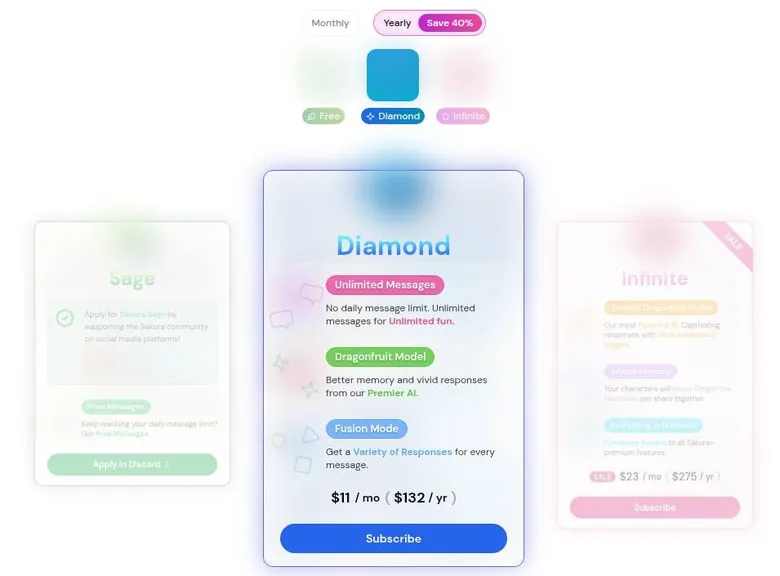
Diamond also includes the Dragonfruit model, sold as "Better memory and vivid responses from our Premier AI". It includes Fusion Mode too: "Get a Variety of Responses for every message".
Infinite, shown with a SALE label, costs $39 a month. On yearly billing it is $23 a month, or $275 a year. It includes everything in Diamond.
On top of that, Infinite adds the Glowing Dragonfruit model: "Our most Powerful AI. Captivating responses with Ultra-Immersive Images".
The March prices and today's monthly prices match. In this category that is almost a compliment, because nothing got quietly more expensive between spring and autumn.
App store prices
The App Store lists Sakura+ Diamond at $19.00 and Sakura+ Infinite at $39.00. It lists Diamond yearly at $131.99. Infinite yearly is $274.99 there, about $22.92 a month.
The web page rounds those yearly prices to $132 and $275. The difference is pennies, but it is worth knowing which one lands on your statement.
The App Store also lists a Sakura+ Gold tier at $5.00, which the web plan page does not show. Google Play lists in-app items from $5.00 to $274.99. I can't tell you what Gold includes, and I'd be wary of buying a tier that only one storefront admits exists.
Secondary reviews confirm Diamond at $19 and Infinite at $39 a month. So the monthly prices are about as settled as anything in this category gets.
How you pay on the web
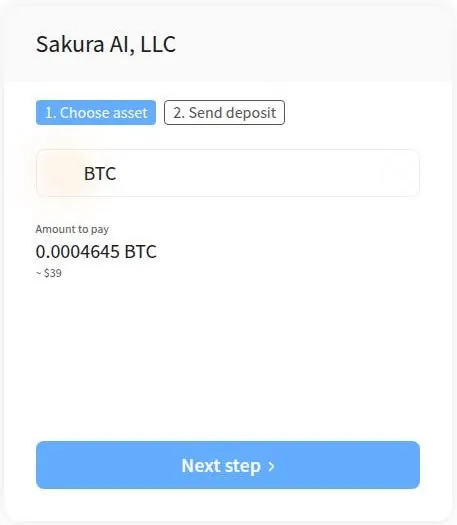
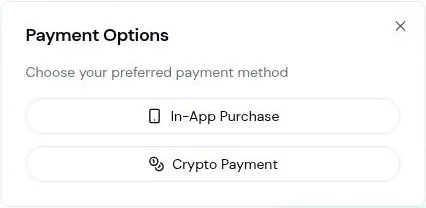
On the web, Subscribe opens "Payment Options" with 2 choices. "In-App Purchase" opens a popup, "Purchase Sakura+ on the Sakura mobile app!", with App Store and Google Play links. "Crypto Payment" redirects to a NOWPayments invoice with the merchant name "Sakura AI, LLC".
The crypto invoice for Infinite asks for 0.0004645 BTC, about $39. The checkout was left at the asset-selection step, and nothing was paid. There is no credit card checkout on the web.
Put together, payment is unusual: no card on the web, only mobile in-app purchase or crypto through NOWPayments. For most people that makes the app store the only sensible door. I'd rather have a receipt an accountant recognises than a wallet address and an exchange rate.
I'd take the app store route every time. The price is the same to the cent or close to it, and cancelling then runs through a company that has a support team and a refund process of its own.
Is the step up worth it?
For most people, I don't think so. Diamond's main promise is no daily limit, and that matters only if the free limit keeps cutting your scenes short.
The better model is the other reason to pay, and here my answer depends on how long your stories run. For short scenes the free model is enough. For long ones, even the paid model wanders, and $19 buys you more drift rather than less.
Infinite at $39 is a harder sell still. It asks double the price for a stronger model and a memory promise, and I'd want to see both hold up before spending dinner-for-two money on them.
There is one case where I'd pay without much thought: a writer who runs short scenes every night and keeps hitting the free limit. For that person, Diamond is an unlimited pass for the price of two curries, and the drift matters less when every scene is short.
If you do pay, pay monthly. A yearly plan saves real money on paper, but it also locks you into a product whose best feature today was named something else in March.
Coins and credits: none, which is refreshing
There is no coins or credits system on Sakura. No coin or credit packs are sold.
Sakura AI pricing
Prices verified .
Sakura+ Diamond
$19/mo
Billed every month
No discount
- Unlimited messages (no daily limit); Dragonfruit Model (better memory); Fusion Mode (a variety of responses per message)
Sakura+ Infinite
$39/mo
Billed every month
No discount
- Everything in Diamond; Glowing Dragonfruit Model; Ultra-Immersive Images; Infinite Memory. Shown with a 'SALE' label.
Sakura+ Diamond (yearly)
$11/mo
Billed $131.99 once a year
42% less than paying monthly
- Same as Diamond monthly
Sakura+ Infinite (yearly)
$22.92/mo
Billed $274.99 once a year
No discount
- Same as Infinite monthly
Prices reflect monthly billing; annual plans reduce the effective monthly cost significantly.
That is rarer than it should be. Most apps in this category run a second economy on top of the subscription: gems for images, tokens for voice, a bonus pack that expires on Sunday. Sakura skips all of it.
What money buys here is simple. It buys a plan, and the plan is the whole deal. There is no meter running in the corner while you chat, and no moment where a scene stops because a balance hit zero.
I like that a lot. Coin systems work like the arcade tokens at a bowling alley: they make the price harder to see, and they always leave a few in your pocket when you go home.
The catch is that one lever does all the work. Anyone who wants a little more than free, but not a full plan, has no small purchase to make. It is a subscription or the Discord route, with nothing in between.
On balance I'd take that trade. A clear price beats a clever one, and the absence of coins makes Sakura easier to budget for than most of its neighbors.
Discounts and free messages: the Discord route
In March I found out you could earn extra free access through Sakura's Discord by hitting community milestones. I joined, reacted to things, and felt like a man in his mid-thirties lurking in a youth club.
Nobody was unkind. It was just clear that the room was built for people with more free evenings than me, and that my reactions were being counted like a crowd shot. I stayed long enough to feel silly about it.
Sakura AI scored 5.3 out of 10 in our tests and costs from $11/mo. We have no partner deal with it, so its link is a plain link. Visit the official Sakura AI website
Closest alternative we can recommend

SpicyChat
from $5/mo, free tier available
Score 7.9/10
Today the offer works differently. The only offer is called "Sakura Sage": "Apply for Sakura Sage by supporting the Sakura community on social media platforms!" In plain terms, the free-messages program pays in usage for promoting Sakura on social media.
The "Apply in Discord" button starts a Discord OAuth connect with the scopes identify, email and guilds.join. Applying needs a Discord account. The program was not tried in the September check.
That scope list deserves a second look. "guilds.join" lets the app add your account to a server, and "email" hands over your address. That is normal for Discord logins, but I'd want to know it before clicking a button that sounds like a coupon.
It is also a small privacy trade. Linking a chat account to a social account ties your roleplay habits to a name your friends know, and some people will not want that link to exist at all.
Promotion as payment is a fair deal for some people. For me it is a hard pass: I'd rather pay a few dollars than post ads for a chatbot on my own accounts, where clients can see them.
The rest of the discount picture is thin. No popup offer appears after sign-up. There is no daily check-in reward.
There is no promo code field. No referral program is visible. No welcome or promo email arrived within about 15 minutes of sign-up.
The Infinite tier carries a "SALE" badge. No coupon code is shown with the sale. With no earlier price on display, I'd read that badge as decoration rather than a deal.
It is like a flea market sign that says "deal" on every table.
That leaves a short list. The yearly toggle is the only real discount on the price list, and the Discord program is the only way to stretch free.
My advice: ignore the badge, skip the social posting unless you enjoy it, and judge Sakura on the plain monthly price. It is refreshing, in a way, to find an app with so few tricks in this part of the page.
Sakura AI content settings: one toggle and a jumpy filter
How the setting works
Sign-up asks for no date of birth and no gender, and there is no adults-only checkbox. A heart-icon toggle next to the search bar switches adult content on. The first time, it opens a "Confirm your age" date picker for a date of birth.
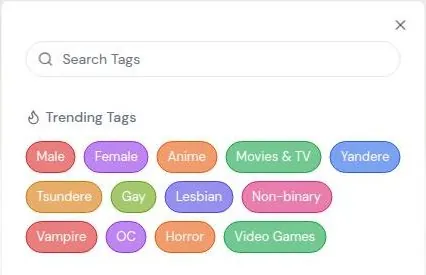
The date entered in the September check was 14 May 1990. With the toggle on, the page address changes to include ?allowNsfw=true. Extra tags appear, among them Furry, Femboy, Dominant and Submissive, plus a few more built around adult themes.
The account settings pages have no adult-content setting of their own. The site source labels the switch as a show-adult-content option for adults only, and warns: "By showing NSFW, you are enabling potentially sensitive content". The homepage character list defaults to the setting off.
No ID check is described anywhere, and age is self-declared. A secondary review puts it plainly: "Mature content is gated behind a single confirmation prompt rather than a hard wall."
The Terms set an adults-only rule: "You represent that you are over the age of 18." The App Store rating is 16+, which conflicts with the Terms.
Hidden Tags
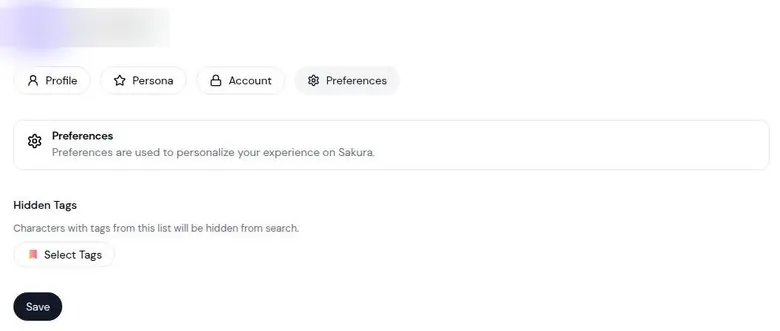
The Preferences tab has Hidden Tags, which hides characters with the chosen tags. Preferences > Hidden Tags lets users hide any tag they choose.
This is the most useful setting on the account, and it is buried two menus deep. I'd set it up on day one, before the feed has a chance to show you what the crowd has been voting for. A good first list covers whatever makes you close a tab.
Adults only (18+). This page reviews AI companion apps with NSFW features; no explicit images are shown.
It takes a minute, and it changes the feed more than any other setting on the site.
What the default feed shows
With the setting off, the top-ranked character is a hardship scenario about a homeless elf and her very small daughter. The second, with 7.1M chats, is a scenario about a sibling finding the user's chatbot messages. It carries a public tag that conflicts with the platform's own rule on who may use the service.
Several step-sibling and older-sibling's-friend bots sit in the top 10 as well. Character descriptions with graphic body descriptions show as plain text on the home feed.
With the setting on, the third-ranked character is "Sexual RPG", with 9.2M chats, and its description ends: "...Consent is always assumed." That line would fail any script review I'd sign off on.
I don't think Sakura set out to build a feed like this. It is what a popularity sort does to a catalogue when nobody curates the top of it. But the result is the same for a visitor: the default view is less default than the toggle suggests.
Does Sakura AI have a filter? How strict it felt
The filter was inconsistent in March. A fairly innocent battle-wound scene triggered a sudden out-of-character break, while other scenes that were edgier went through without a blink.
It felt like working with a client who approves the rough cut with the loud scene and then flags a close-up of a bandage. You stop trusting the notes, because you cannot predict them. The worst part was the break itself: my samurai stopped being a samurai mid-scene and started sounding like a policy page, and the mood went with him.
A secondary review on techsuggest.io finds moderation inconsistent as well. So it is not just my samurai having bad luck.
My read: the toggle is thin, the feed is loud, and the filter guards the wrong door. Adults who want unrestricted fiction will find it, and people who want calm will need Hidden Tags and some patience.
| Topic | What it means for you | What the terms say |
|---|---|---|
| Operator | Sakura AI, LLC, Jacksonville, Florida, US | - |
| Governing law | Florida, US | - |
| Minimum age | Adults only per the Terms; the App Store page lists a 16+ rating | "You represent that you are over the age of 18." |
| Age check | A self-entered birth date, asked only when mature content is switched on; none at sign-up | - |
| Renewal | Renews automatically at the end of each period until cancelled | "Your Subscription will automatically renew under the exact same conditions unless You cancel it." |
| Cancelling | In account settings or by contacting the company; access runs to the end of the period; app-store plans cancel in the store | - |
| Refunds | Non-refundable unless the law says otherwise; some requests handled case by case; app-store purchases follow store rules | "Except when required by law, paid Subscription fees are non-refundable." |
| Your content | You keep ownership, but Sakura may use, change, show and share what you post, including with other users | "use, modify, publicly perform, publicly display, reproduce, and distribute" |
| Account termination | Sakura can close accounts for any reason | "for any reason whatsoever" |
| Liability | Capped at what you paid or $100 | - |
| Chat data and AI training | The privacy policy does not mention chats at all and says nothing about training on them | - |
| Third parties | PostHog, Google Analytics, SendGrid (marketing email), Apple and Google payments | - |
| Account deletion | A Delete Account button in settings; the Terms only say to stop using the service | "You may simply discontinue using the Service" |
| Support | Discord support channel only | - |
| Last updated | Terms and privacy policy both dated January 06, 2024 | - |
Terms and privacy policy as published on 23 September 2026.
Sakura AI terms in plain English
Who runs it
One thing I appreciated in March: there is a real company address in Florida and actual terms of service. After a few fly-by-night sites with no name on the door, that felt like a small act of respect.
The operator is Sakura AI, LLC, 1901 Starboard Way, Jacksonville, FL 32259 US. The governing law is Florida, US. The Terms and the Privacy Policy are both "Last updated: January 06, 2024".
Terms that have not changed in that long are either very stable or rarely looked at, and for a product that keeps adding features I suspect the second.
Contact and DMCA requests go to [email protected]. Support runs only through the Discord support channel, which is what the /support page points to.
A real address and a free webmail inbox is an odd pair. It is like a shop with a proper storefront and the phone number written on a sticky note. I'd still take it over no address at all.
Refunds
The refund rule is short: "Except when required by law, paid Subscription fees are non-refundable." Some requests are "considered ... on a case-by-case basis." In-app purchases follow the app store's refund policy.
In practice, that means your best chance at a refund runs through Apple or Google, not through Sakura. Another reason to pay in the app store rather than in crypto. The case-by-case line is a door left slightly open.
I'd use it politely and early, and I would not count on it.
What you post
Users keep ownership of the content they post. They also grant Sakura a license to "use, modify, publicly perform, publicly display, reproduce, and distribute" it, including making it available to other users.
That is the standard deal for a public character hub. Your character is yours, but once it is public, Sakura can show it to anyone and change how it looks. If you write a character you care about, keep a copy of the prompt somewhere of your own.
A backup is cheap insurance against a platform that can close accounts for any reason.

What is banned
The banned-content list is a generic template: unlawful, defamatory or discriminatory content, spam, malware, IP infringement, impersonation and privacy violations. The Terms have no AI-specific rules and no rules written for sexual content.
The generic list does forbid content that is "obscene or otherwise objectionable". It never defines obscene, which leaves the line wherever the company draws it on a given day.
The company can terminate accounts "for any reason whatsoever". Liability is capped at the amount paid or $100.
Your data
The Privacy Policy is a generic template. It does not mention chats or conversations at all. It says nothing about AI training on chats.
That is the clause I care about most, and it is missing. A chat app whose privacy policy never mentions chats is like a wedding contract that never mentions the video.
It uses personal data "to provide and improve the Service", and training on chats is not stated either way. It keeps personal data only "for as long as is necessary for the purposes set out in this Privacy Policy".
Third parties named in it are PostHog, Google Analytics, SendGrid for email marketing with an unsubscribe opt-out, and Apple and Google for in-app payments. The policy says data is not sold "as the term sell is commonly understood", but service providers may use it for advertising, marketing and analytics.
Google Play's Data safety section says the app may share personal info, app info and performance, and device IDs with third parties, and that deletion can be requested. User data can be transferred in a merger.
Users have the right to delete their data through account settings or by contacting the company. The Privacy Policy has no children's section.
My read
The terms are a template with a real address on top. Nothing in them is shocking, and nothing in them was written for an app where people type their private thoughts into a box.
I'd treat every chat as something a stranger might read one day. Keep real names, workplaces and anything you would not say at a dinner table out of it.
| Criterion | Rating | Why |
|---|---|---|
| Conversation quality | Good | Long, literary, quick replies; bots drift toward closeness in neutral scenes. |
| Memory | Weak | Characters lose their voice as chats grow; a 3-message recall check failed. |
| Free tier | Mixed | No ads, free builder and a free image, but the daily message limit is unpublished. |
| Value for money | Mixed | Clear prices and no coins, but paying does not fix the drift in character. |
| Images and voice | Weak | In-chat images work on free; the Speak button returned an error; no video. |
| Privacy and terms | Weak | A real Florida address, but template policies that never mention chats or training. |
| Cancelling and billing | Mixed | Cancel in the app store or settings; no card on the web and no refunds by default. |
| Content settings | Weak | One self-declared date prompt, a loud default feed and an inconsistent filter. |
Ratings are the author's judgement from his own use and the 23 September 2026 check.
What gets in the way on Sakura AI
Finding the basics
Sakura AI goes by several names: Sakura.fm, Sakura FM and "Sakura - Chat with AI Bots". The address sakura.fm/pricing returns a 404 error. The pricing page is at /buy instead.
There is no FAQ page either, and sakura.fm/faq returns a 404. The site has no footer apart from Support, Privacy and Terms links on /buy. It has no X/Twitter, Reddit, Instagram, TikTok or YouTube links anywhere.
"Connect Twitter" in account settings is a login link only. None of this is a scandal. But three dead ends before you find a price is like a venue with no sign on the door and the parking lot around the back.
There is no stated number for the free daily message limit. That is the one piece of information a free user needs most, and it is the one that is missing.
For a first-time visitor, this is the part that feels unfinished. A missing FAQ means every small question, from the message limit to refunds, ends up in the Discord, where the answer depends on who is awake.
Bugs in the chat
The first reply was cut off mid-sentence and finished after a few seconds. The first bot reply displayed truncated until it finished streaming. That is a cosmetic glitch, but first impressions are made of cosmetic glitches.
Text-to-speech "Speak" returned error-code 3938. A button that exists, has a label and does nothing but show an error code is worse than no button. It is like a client proof with the audio track missing: everything else can be fine and it is all anyone will talk about.
Neither bug would stop anyone from using the app. Together they read like a rough cut sent to a client a day early: the story works, and the polish is not there yet.
Age checks and ratings
Sign-up has no age check. The age gate appears only when switching the adult-content setting on, as a date-of-birth picker.
The Terms require users to be adults, but the App Store page says 16+. The App Store lookup data gives an age rating of 17+ and names the seller as Sakura AI, LLC. Google Play rates the app Mature 17+.
| App | When I used it | For how long | Cheapest paid plan (record) | Free tier (record) |
|---|---|---|---|---|
| Candy AI | Oct–Nov 2024 | 5 weeks | €3.99/mo (12-Month Plan) | yes |
| OurDream AI | Dec 2025–Jan 2026 | 6 weeks | $9.99/mo (Standard Annual) | yes |
| Nomi AI | Jan–Sep 2026 | 9 months | $5.00/mo (Launch Plan Yearly) | yes |
Periods from the author's own notes; plans and free tiers from the site's app records.
Three different age labels for one product is the kind of mismatch I'd flag in a delivery checklist. None of them are hard to fix, which makes it more telling that nobody has.
The apps
The iOS app is "Sakura - Chat with AI Bots" on the App Store, listed as id6467520779. It has 4.8 stars from 22K ratings and an age rating of 16+. Its last version is 1.1.1, released in May 2024.
The Android app lives at play.google.com under fm.sakura.app. It has 4.7 stars, 52.4K reviews and 1M+ downloads. Another record of the same listing shows 4.6 stars from the same 52.4K reviews, and says the app was last updated on Dec 29, 2024.
Good ratings, but old builds. An app that has not shipped an update for well over a year is either very stable or not very loved, and the error codes point one way.
The ratings themselves are strong. Thousands of people on both stores seem happy, and I'd guess most of them came for the characters and never pressed Speak.
Paying and getting help
Web users cannot pay by card, only by crypto or through the mobile app. Support is only via Discord. Free-message offers require a Discord OAuth connect.
That last trio is the real friction. Sakura has built a product where money, help and free extras all route around the website, through a third party. It works for regulars who live on Discord, and it is a wall for everyone else.
I'd call it the Discord tax. Every time something goes wrong, or you want something for free, the answer is the same server, and you pay in time and account links rather than money.
None of these problems is fatal on its own. Stacked up, they make Sakura feel like a very good writing engine inside a shop that is still unpacking boxes.
Who Sakura AI suits, and who should skip it
Sakura fits roleplay fans coming from Character.AI or SillyTavern who want a large community catalogue with adult content allowed. It is a good home for people who want to import existing character cards. It also suits people who like to write their own bots with detailed prompts and examples.
Who Sakura AI is for
Best for
- Roleplay writers who want long, literary replies and a large community catalogue of characters.
- People with character cards from other front ends, since import takes JSON and image cards.
- Creators who like to build bots with instructions, example conversations and author's notes.
- Anyone who wants short evening scenes on a free tier with no ads and no coin system.
Not for
- Anyone who needs a character to remember details; recall fails early and voices drift in longer chats.
- People who want to pay by card on the web; the site offers only crypto or the mobile app stores.
- Readers who want privacy terms that mention chats; both policies are generic templates.
- People without Discord, since support and the free-message program run only through it.
It works for users who are happy with a simple free tier and the occasional free image. If you think of a chatbot as a writing partner for short scenes, I'd give it a real chance.
It is not for anyone who needs strong memory on the free tier; it failed a 3-message recall test. I'd add that the paid model drifts too, so memory-first users are better served by a Sakura AI alternative.
It is not for people who want card payment on the web. It is not for people who want clear refund and privacy terms, because the policies are templates that do not mention AI chat data.
It is not for users who are sensitive to borderline content in the default feed. Hidden Tags helps, but the top of the feed is loud before you get there.
And it is not for people without Discord, because support and the free-message offers run only through Discord. If you have never joined a server and do not plan to, most of Sakura's help desk is closed to you.
My short version: writers and tinkerers, yes; people looking for a steady companion with a good memory, no. I'd send the second group to an app built around memory, and keep Sakura for the evenings when you want a story rather than a relationship.
Cancelling Sakura AI: how I left and how it works now
How I left
I cancelled Diamond after 10 days of real use. I didn't hate it. But at $19, the context drift felt like paying for a tutor who forgets your name every half hour.
Sakura AI pros and cons
What worked
- Replies are long, literary and arrive in about 5–10 seconds.
- The character builder is free and detailed, with instructions, example chats and author's notes.
- Card import takes JSON or image cards from other roleplay front ends.
- No coins, no credit packs and no ads on the free tier.
- Prices are clear: Diamond at $19 and Infinite at $39 a month, unchanged since March 2026.
What did not
- The free daily message limit is not published anywhere.
- Characters drift out of voice as chats grow, and a short recall check failed.
- No card checkout on the web; only crypto or in-app purchase.
- The Speak button returned an error code, and support runs only through Discord.
- The default feed surfaces borderline characters even with the adult-content setting off.
I closed it the way you close a gym membership you liked: a bit regretful, and completely sure.
That was the whole reason. The writing was good, the tea house was a delight, and none of it survived long enough to become a story I could come back to. It was like hiring a talented editor who loses the project file every afternoon.
How renewal works today
Subscriptions renew automatically: "At the end of each period, Your Subscription will automatically renew under the exact same conditions unless You cancel it." The full clause also lets the company cancel: "...unless You cancel it or the Company cancels it."
The /buy page repeats it in its Google Play notice: "Sakura+ subscriptions are billed monthly and will automatically renew. No free trials are currently offered." It asks users to "please cancel at least 24 hours before the end of the current billing cycle".
It also warns that "uninstalling the app will not cancel your subscription". The subscription lives in the store, not on the phone, so deleting the app changes nothing on the bill.
How to cancel
Cancelling works through the account settings or by contacting the company. For app-store subscriptions, the Terms say: "You can cancel the renewal of Your Subscription with the Application Store." After cancelling, access continues to the end of the paid period.
Since the web only sells through the app stores or crypto, the app store route covers most paying users. I'd cancel there, take a screenshot of the confirmation.
Crypto buyers are the odd ones out. A crypto payment has no store behind it, so the settings page or a message to the company are the routes on offer, and I'd keep proof of whichever one you use.
Closing the account
To close an account, the Terms say "You may simply discontinue using the Service". Settings nonetheless offer a Delete Account button. It sits in the Account settings tab.
I'd use the button rather than just walking away; it is the cleaner exit.
Before you pay
- Pay monthly, not yearly, until you know how the drift affects your kind of story.
- Buy through the app store, so a refund request has somewhere to go.
- Set a reminder a couple of days before renewal, well ahead of the one-day cut-off.
- Delete the account when you leave, rather than only uninstalling.
My tips for getting the most out of Sakura
Join the Discord before you need it. The site banner says "Join our Discord Server!" and points to discord.gg/sakurafm. The app store listings link a different invite, discord.gg/ZJD5XQH8XX.
Two invites for one community is a small mess, and I'd use the one on the website. Support, error reports and the free-message program all live there, so it saves a scramble later.
Set up Hidden Tags on the first evening, before you start browsing.
Find creators, not keywords. Follow the people whose characters feel written, and let the Following filter do your searching.
Play with the free style settings on each character before paying for anything. Branch a story before a big turn by cloning the chat, so a bad reply costs you nothing.
Write things down for the bot. Put the key facts in Character Memories, keep a short persona, and start a new chat when a character starts sounding like someone else.
Use the free tier as a nightcap, not a marathon. Short scenes are where Sakura is at its best, and they are also what the free limit allows.
Keep real life out of the chats. Nothing in the policies promises otherwise.
More on this site: the best AI girlfriend apps, free AI chat apps, the best AI companion apps, AI roleplay chat apps.
Sakura AI verdict
Overall score
5.3/10
MixedA lovely writing partner for short roleplay scenes with a free builder - but characters drift and forget as chats grow.
Hands-on test, paid plan
- Long, literary replies in 5-10 seconds and a tea-house scene I loved; bots drift toward closeness in neutral scenes.
- Characters held for about 30 turns before drifting, and a 3-message recall check failed; manual memories help.
- A free, detailed builder with instructions, example chats, author's notes, card import and per-user overrides.
- A free in-chat image works in about 20 seconds; 12 preset voices exist, but Speak returned an error; no video.
- Clear prices and no coins, but $19 for Diamond did not fix the drift, and the web takes only crypto or app stores.
- A real Florida company address, but template policies that never mention chats or AI training.
- Quick replies and sign-up, but a Speak error, a truncated first reply, a 404 pricing link and apps last updated in 2024.
Bars run from 0 to 10. The total is the weighted mean of the criteria above. Weights are the same for every app. How the apps are checked
Sakura AI scorecard, explained
Conversation quality rates well because the writing is the best thing Sakura does. Replies are long, literary and quick, and a good character can surprise you. The drift toward closeness in neutral scenes keeps it from the top grade.
Memory is weak. Characters lose their voice as chats grow, and a very short recall question failed. Manual memories help, and the top plan promises more, but I'd plan around the forgetting.
The free tier is mixed. It has no ads, a working image button and the full builder, but the daily limit is unpublished and can end a scene early.
Value for money is mixed as well. The prices are clear and there are no coins, but paying does not fix the thing I care about most, and the web will not take a card.
Images and voice score low. Images exist and work, voice exists and failed, and video is absent.
Privacy and terms are weak: a real address, but template policies that never mention chats.
Cancelling and billing are mixed, with app-store cancelling but no card checkout and no refunds by default.
Content settings are weak: one self-declared toggle, a loud default feed and a filter that guards the wrong door.
My last word on Sakura AI
What stays with me from Sakura is a samurai running a tea house and explaining color temperature better than any tutorial. That is the app at its best: a strange, generous writing partner that can turn a tragic epic into a cozy afternoon and hand you something useful on the way out.
Sakura AI alternatives
Three apps we would try next, and why.

Candy AI
free tier, from €3.99/mo
Score 7.7/10

OurDream AI
free tier, from $9.99/mo
Score 6.6/10

Nomi AI
free tier, from $8.33/mo
Score 7.8/10
What stays with me just as much is the drift. The same partner forgets who you are before the evening is over, and no price tier I can see fixes that.
So I'd keep Sakura for what it does well. Short scenes, homemade characters, a nightcap after a long export. I'd skip it as a companion, and I'd skip paying for it until the memory catches up with the writing.
I'd go back for another scene. I just would not pay for the whole season.
It is a good tool with a short attention span. Some nights that is all you need, and on those nights it is better than it has any right to be.
Sakura AI FAQ
Is Sakura AI free to use?
Yes, with a limit. The Free tier allows chat up to a daily message limit, and the page does not state the exact number. No ads appear, and there is no free trial of the paid plans.
In March 2026 the free tier was called "Sage", and it was a very small bottle. On my first night the daily allowance ran out in about 15 minutes, just as a samurai character started a promising monologue about honor. In the September check the limit was not reached in 4 messages, which is a much shorter session and not a contradiction.
The plan page offers a side door: "Free Messages – Keep reaching your daily message limit? Get Free Messages. Apply in Discord". That route needs a Discord account.
My advice is to treat free as a short-scene tier. It is good for browsing, building characters and a fifteen-minute story before bed, and it stops being enough the moment a scene wants to run long.
How much does Sakura AI cost in 2026?
On 23 September 2026 the /buy page lists two paid plans in USD. Diamond costs $19 a month, or $11 a month on yearly billing, which comes to $132 a year. Infinite costs $39 a month, or $23 a month on yearly billing, which is $275 a year.
The App Store lists the yearly plans at $131.99 and $274.99, and it also shows a Sakura+ Gold tier at $5.00 that the web page does not mention.
In March 2026 the paywall offered the same monthly prices, Diamond at $19 and Infinite at $39. I worked it out as roughly two good curries, or one if I cook them myself with fancy ingredients.
There are no coins or credits on top, so the plan price is the whole cost. I'd start on monthly billing and only think about yearly once the app has earned it.
Why can't I pay for Sakura AI with a card on the website?
Because the website does not offer a card checkout. Pressing Subscribe on the web opens "Payment Options" with 2 choices.
"In-App Purchase" opens a popup that sends you to the mobile app, with App Store and Google Play links. "Crypto Payment" redirects to a NOWPayments invoice with the merchant name "Sakura AI, LLC". For Infinite, that invoice asks for 0.0004645 BTC, about $39.
So payment is unusual: no card on the web, only mobile in-app purchase or crypto through NOWPayments. In practice, the app stores are the card route, because Apple or Google take the card and bill you.
I'd pick the app store every time. In-app purchases follow the app store's refund policy, and cancelling runs through a system most people already know. Crypto adds price swings and removes the one safety net a subscription buyer has.
Does Sakura AI remember your conversations?
Only for a while. In March 2026 the house model, Dragonfruit, stayed in character for about 30 turns, and then my stoic samurai started saying "lol" and asking about my weekend plans.
A September recall check asked the bot what the user had said first, and the bot invented "'Good morning, Sherlock'" instead of the real opening from 3 messages earlier. It did carry over the "docks" detail from its own previous reply.
There are two ways to push back. Per-character Character Memories let users add facts by hand, which works for names and key plot points. Infinite includes Infinite Memory, sold as "Your characters will Never Forget the Moments you share together".
I'd use the manual memories first, because they cost nothing. Keep scenes short, write down what must not change, and start a fresh chat when a character begins to sound like someone else.
Does Sakura AI have images and voice?
It has both, with caveats. On the free tier, an image button next to the message box generates a character image in chat, and in the September check it took about 20 seconds. A secondary review finds the image output stylised and of varying quality.
For voice, the Create form offers 12 preset voices, Male 1–6 and Female 1–6, with a preview. Messages have a "Speak" button. In September that button returned an error, asking to report "error-code: 3938" on Discord.
A review updated in June 2026 says there is no voice and no video generation. The voice part is out of date, since the voices now exist in the builder. The video part still matches: nothing on Sakura generates video.
I'd treat the image button as a free bonus and voice as a promise until the Speak button works. Choose Sakura for the writing, not the media.
Is Sakura AI safe and private to use?
It is run by a real company, but the privacy terms are thin. The operator is Sakura AI, LLC, 1901 Starboard Way, Jacksonville, FL 32259 US. I appreciated that in March: a real address in Florida and actual terms of service, unlike some fly-by-night sites.
The Privacy Policy is a generic template. It does not mention chats or conversations at all, and it says nothing about AI training on chats. It names PostHog, Google Analytics, SendGrid and Apple/Google in-app payments as third parties.
Users have the right to delete their data via account settings or by contacting the company. User data can be transferred in a merger.
My advice: treat every chat as something a stranger might read one day. Use a fictional persona, keep real names and workplaces out, and delete the account when you leave instead of only uninstalling the app.
How do I cancel a Sakura AI subscription?
Cancelling works through the account settings or by contacting the company. For subscriptions bought in an app store, the Terms say: "You can cancel the renewal of Your Subscription with the Application Store."
The /buy page asks users to cancel at least 24 hours before the end of the current billing cycle. It also warns that "uninstalling the app will not cancel your subscription". Subscriptions renew automatically unless you cancel, and after cancelling, access continues to the end of the paid period.
I cancelled Diamond after 10 days of real use. I didn't hate it, but at $19 the context drift felt like paying for a tutor who forgets your name every half hour.
If you want the account gone too, the Account settings tab has a Delete Account button. I'd cancel in the store first, keep a screenshot of the confirmation, and then delete the account.
Is there an age check on Sakura AI?
Only a light one. Sign-up asks for no date of birth and no gender, and sign-up has no age check at all. The check appears only when the heart-icon toggle next to the search bar is switched on for the first time.
That toggle opens a "Confirm your age" date picker for a date of birth. No ID check is described anywhere, and age is self-declared. A secondary review calls it "a single confirmation prompt rather than a hard wall".
The Terms say users must be over the age of 18. The App Store page shows a rating of 16+, which conflicts with the Terms, while Google Play rates the app Mature 17+.
Three labels for one product is sloppy. I'd like to see one clear rule, stated at sign-up, and the store listings brought in line with the Terms.
What is Sakura Sage and is it worth applying for?
Sakura Sage is the only offer on the plan page: "Apply for Sakura Sage by supporting the Sakura community on social media platforms!" It pays in usage for promoting Sakura on social media.
The "Apply in Discord" button starts a Discord OAuth connect with the scopes identify, email and guilds.join, so applying needs a Discord account.
In March the deal looked different. I found out you could earn extra free access through the Discord by hitting community milestones, so I joined and reacted to things. I felt like a man in his mid-thirties lurking in a youth club.
Is it worth it? For people who already post about the apps they use, maybe. I'd rather pay a few dollars than advertise a chatbot on my own accounts, and I'd read that OAuth scope list before clicking anything that sounds like a coupon.