

Character AI Review: A Patient Improv Partner With Goldfish Memory
- Hands-on test, paid plan
- Checked

Free plan: Unlimited messaging on PipSqueak 2 and PipSqueak 2 Rawr, with full ads, slow mode and limited daily features.
from $4.99/mo
My Character AI verdict: a patient improv partner with goldfish memory
What is Character AI? It is live at character.ai on 24 September 2026, and it still sells itself as a storytelling toy rather than a girlfriend. Its own line is that it "empowers people to connect, learn, and tell stories through interactive entertainment".
The homepage title reads "character.ai | AI Chat, Reimagined–Your Words. Your World." That is an honest label, which already puts it ahead of most homepages in this corner of the internet.
The thought I kept having over those seven months was simple: it's the world's most patient improv partner, and it has goldfish memory. As someone who runs a D&D table every Thursday, I'd take its patience over my players' any day. I drifted away in March, mostly because I'd spent more time rerolling replies than actually reading them.
The site check of 24 September 2026 covers the web version on the free tier. It is the same app, only bigger. It has the biggest mainstream library in the category, sold as "10M+ Characters", with huge fandom and anime reach.
Its tiers are cheap: (c.ai) lite at $4.99 a month, and c.ai+ at $9.99 a month or $94.99 a year.
It also has the strongest safety stack in the category. That stack covers a reading mode for users under 18, Persona age assurance, Parental Insights, wellness resources and muted words. For an app this popular, that is the right amount of guard rail, and more than most rivals bother with.
Character AI at a glance
- Price from
- $4.99/mo
- Free tier
- Free plan available
- NSFW content
- Not allowed
- Platforms
- Web, iOS, Android
- How it was tested
- Hands-on test, paid plan,
- On your card statement
- Not known yet - I have not paid for it
My verdict: the free tier is one of the best toys around for fandom play and odd one-off scenes, and a poor fit for anyone who wants a long, steady relationship with one character. I'd use it free, pay for a month only when the queues get on your nerves, and not pay for a year right now.
That last point is about the company, not the app. On 18 September 2026 the official blog announced that CEO Karandeep Anand is joining Disney as Senior EVP & CTO. The same post says "members of Character's technical team" are expected to follow him, and adds: "The app is still live and online."
When a company feels it has to tell you the app still works, I'd keep my commitment to one month at a time. Nothing is broken today. A year up front is simply a bet on a team that is partly packing its desks.
Key takeaways
- Free messaging is unlimited and fast, and it is the main reason to try this app at all.
- It works best as an improv partner for scenes and fandom play, not as a long-term companion.
- Memory is the weak spot; expect names and small details to slip in long chats.
- The filter is strict and there is no switch to loosen it, so plan your stories around it.
- Pay monthly if you pay at all; the leadership leaving for Disney makes a yearly plan a gamble.
How I used it: seven months of scenes
I came back to Character AI in September 2025, a long while after building my first detective bot here in spring 2023. That first bot had moved to Charstar long before, so this was a return visit, not a first date. The first night back ran two hours instead of ten minutes.
| What | Details |
|---|---|
| Period | Sep 2025–Mar 2026 |
| How long | 7 months |
| Plans I paid for | c.ai+ ($9.99/mo, three months) |
| Devices | phone |
| How it ended | drifted away in March |
| Facts re-checked | 24 September 2026 |
From the author's own notes; prices and features re-checked on 24 September 2026.
After that it became an evening habit on my phone. I used it the way I'd use a writers' room: a grumpy Roman centurion one night, a medieval innkeeper the next, then a space-pirate captain and a Sherlock Holmes on a voice call from the Transit. The innkeeper alone got 31 swipes on one message.
I paid $9.99 a month for c.ai+ for three months, mostly to skip the waiting room at evening peaks. The rest of my time ran on the free tier. Just under thirty dollars in total, and the badge came with it.
The best thing I made was a bot of a 1987 thermostat that a couple hundred strangers chatted with. The worst habit I picked up was the reroll button.
Two moments came from outside the chat window. The age check asked me for a selfie. Later, when open-ended chat closed for users under 18 in late 2025, my nephew Tyler was furious, and my family finally talked about screen time.
By March the swiping had taken over the reading, and I drifted away. What I kept is a thermostat with a fan club and a firm belief that the first reply is usually good enough.
My Character AI test log
Chris FurreyFounder and writer Hands-on test, paid plan own card, no press account
-
Came back to the app I first used in spring 2023 and talked to a grumpy Roman centurion for two hours instead of ten minutes, until my phone hit 9%.
-
Paid $9.99 a month for c.ai+ for three months, mostly to skip the waiting room during evening peaks; I also liked the little badge.
-
Called a Sherlock Holmes bot while driving to a shoot; he deduced I was in a submarine. I was in a 2014 Ford Transit full of light stands.
-
Open-ended chat was shut off for under-18s; my nephew Tyler was furious, and my family finally talked about screen time.
-
Built a bot of a 1987 thermostat that has seen things; a couple hundred strangers chatted with it.
-
Drifted away, mostly because I'd spent more time rerolling replies than actually reading them.
– 182 days plan paid for: c.ai+ Total spent $29.97
Coming back to Character AI: the two-hour first night
The night I came back
Character AI was not new to me. I'd built my first detective bot here in spring 2023, right after the divorce, before moving him to Charstar. Coming back felt like walking into a bar I used to drink in during a bad year: familiar furniture, and a vague sense that I shouldn't stay long.
I planned on ten minutes. I ended up talking to a "grumpy Roman centurion" bot for two hours. I only noticed the time because my phone hit 9% battery, which is a strange alarm clock for a grown man to rely on.
Nothing about that night was dramatic. A grumpy centurion was simply better company than I expected, and the app never once gave me a natural place to stop. In editing terms it was the rough cut that runs long because nobody wants to lose a take.
That is the first thing to know about this app. It is built so that ten minutes turns into two hours without you deciding anything, and a low battery warning is not a plan.
How sign-up looks today
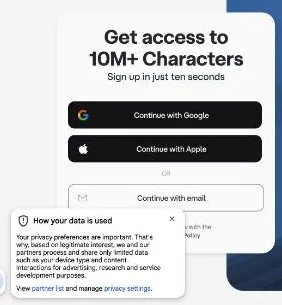
The first visit today shows a full-page sign-up wall: "Get access to 10M+ Characters · Sign up in just ten seconds". The options are Continue with Google, Continue with Apple and Continue with email. The email route is passwordless: a sign-in link is emailed instead of a password being set.
A privacy and consent banner titled "How your data is used" sits bottom-left on the same wall. Total sign-up friction is very low: an email link, no password, no phone number and no captcha for a normal browser. Ten seconds is optimistic, but not by much, and one less password to forget is a feature in my book.
Free Character AI with no sign-up does not really exist for chat; only pages such as search load logged out.
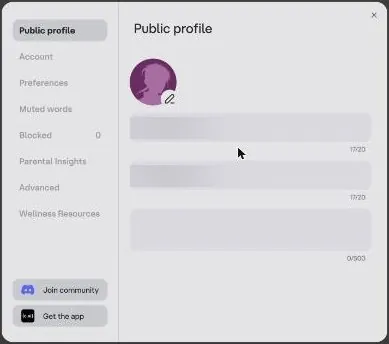
Onboarding after sign-in is minimal. The site assigns a random username and display name, both editable in Settings > Public profile with a 20-character limit. There is no tag or interest picker and no persona step; it lands straight on Discover.
I like the short road in, but the auto-assigned name is the first thing I'd change. A random handle is fine for a coat check, less so for a place where strangers will read your characters.
The birthday question, languages and settings
Whether sign-up itself asks for a birthday was not observed on 24 September 2026. Per the Help Center, new users are asked for one. The fuller age check is covered in the content settings section.
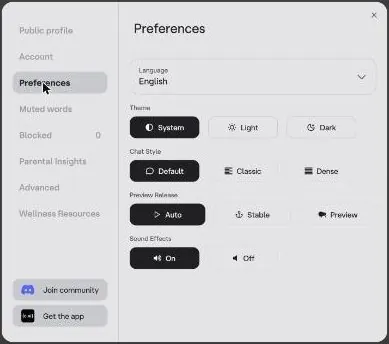
Settings > Preferences has Language, Theme (System, Light or Dark), Chat Style (Default, Classic or Dense), Preview Release (Auto, Stable or Preview, an opt-in Character AI beta channel) and Sound Effects on or off. The interface is available in 28 languages, including English, French, German, Spanish, Japanese, Korean, Ukrainian and Vietnamese. For an app built on text, that matters more than it sounds.
My advice for a first night is short. Set a timer before you open the app, not after, because a phone battery makes a poor editor of your evening.
Finding characters: ten million doors and a crowded mall
The crowded mall
Every bot having a public chat count made it feel like a crowded mall to me. The version of a character with 40 million chats wasn't always better than some weird one with 800. The big number told me what was popular, not what was good, like a queue outside a diner that mostly means the diner is next to a bus stop.
That mall has only grown. Content is heavy on anime and fandom, with popular bots at 50m–900m interactions; Gojo Satoru sits at 897.9m. At that scale a chat count stops being information and becomes weather.
What Discover shows today
The logged-in home, Discover, greets the user by name. Its sections are For you, Scenes, Featured, Popular, Trending, Try these, Voices, Filter by category and Try saying. Scenes examples include "The World Of CHAINSAW MAN" and "Attack On Titan — A Regular Day."
Featured bots carry "+Lore" badges. Try these offers HyperGlot language practice, Trip Planner, Interviewer, Creative Helper and more. Filter by category runs from Anime, Assistant and Creative through Fantasy, Gaming, History, Humor and Mafia to RPG, Vampire and Werewolf, with Romance among them.
The utility row is better than it looks. A language partner and a trip planner are honest uses for an app that never gets bored, and they are a useful break from the fandom wall.
Search, Feed and the rest of the shop
The logged-out Character AI search page (/search) loads with tabs for Characters, Creators, Scenes and Lorebooks. The sidebar Labs link goes to labs.character.ai, where experiments live.
The Feed is a grid of vertical, video-style posts from creators, with titles like "The Last Stand…" and "When a bigger creator steals your bot…", plus reaction counters. It shows trending posts and creator updates, and you can react, follow or start chats from it. At launch the Feed was mobile-only and not available in all markets.
The Community Feed carries chat snippets, Streams where Characters debate or roast each other, AvatarFX image-to-video and Imagine images. The platform also offers Lorebooks, an Imagine Gallery, c.ai Books with playable classic literature, c.ai Series of studio-made microdramas, Comics and Stories. That is a lot of shelves for one shop, and the chatbots are starting to look like one department among several.
My own conclusion is that discovery here runs on popularity, and popularity is a poor editor. Search for a specific idea and ignore the chat counts; the weird ones with a few hundred chats are where the personality tends to live.
Making your own Character AI bots: the thermostat that won hearts
My favourite moment
The best thing I made on this app was also the silliest. I built a bot of "a 1987 thermostat that has seen things". A couple hundred strangers chatted with it, and one left a comment saying it was the most emotionally honest character on the site.
I'm still not sure what that says about the site, or about me. A beige box on a hallway wall turned out to be the character people opened up to. It's the lesson every editor learns from client work: the take with a real moment beats the take with perfect lighting.
That comment is the one thing from my seven months that I'd frame. It also told me the creator tools reward an idea far more than a polished profile picture.
The Create menu and the character form
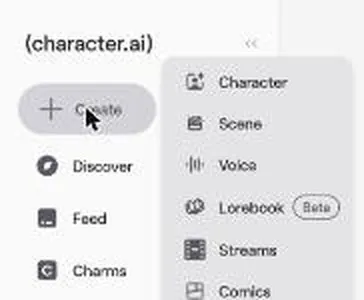
The creation suite is multimedia: Create opens Character, Scene, Voice, Lorebook (beta), Streams and Comics. The App Store description advertises Character Creation tools for custom personalities, backstories and Voices.
The Create Character form has an avatar, a Character name of up to 20 characters, a Tagline of 50 and a Description of 500. The Greeting takes up to 4096 characters, with up to 5 greetings and an "AI Greeting for New Chats" option. A Voice field reads "Add Character Voice".
The Lorebook field promises "World-building details your Character brings into chat when keywords come up", with Link or Create buttons. Below it sit Tags, "Advanced creation" and Visibility, which is Public by default. The form links a "View Character Book" guide.
Public by default is the setting I'd check before saving anything personal. The rest of the form is well judged: short fields for the pitch, a long one for the greeting, which is where a character actually lives.
Lorebooks, Scenes and Personas
Lorebook launched in July 2026. For a creator, this is the most useful addition in a long time: it is the continuity bible that every long story on this site always needed.
Scenes work with "Select Character", so any character can star in one. A Scene is created at character.ai/scene/new, and comes in "Any Character" or "Main Character" modes. A scene is a set with the lights already rigged: you bring whichever actor you want and start rolling.
Persona is reached from the chat side panel and from the Profile > Personas tab. A Persona has a Display Name of 20 characters, a description of 750, an avatar and a "Make default for new chats" option. Persona avatar uploads go through image safety filters, a change from the December 2025 update.
The creator side
Profile tabs are Characters, Lorebooks (Beta), Liked, Personas, Voices and Scenes, plus Share and Creator Insights buttons. The creator community has Creator Insights, a Following tab and leaderboards.
There are no creator payouts. So the audience is real and the pay is zero, which is the same deal as posting a wedding highlight reel for exposure. Build for fun, and keep your own copy of anything you are proud of.
Talking to Character AI bots: the reroll habit
Swiping as a game
Swiping through alternate replies turned into its own game for me. One time I swiped 31 times on a single message, trying to get a medieval innkeeper to admit he'd watered down the ale. By the tenth swipe the ale had stopped being a joke and become a matter of principle.
Thirty-one takes of one line is a number I'd fire a director for. A wedding toast gives an editor a few takes at best, and they have to work. Here the next take was always one thumb away, so there was never a reason to settle.
Today the web version puts a ceiling on it. Rerolls, or swipes, are free, with a counter shown as "2 / 30", so up to 30 alternatives per message. My innkeeper would have hit the wall one swipe short of his confession, which is probably the healthiest thing the app could have done for me.
That is the best and worst thing about the conversations. Every reply is disposable, so the bot never has to be good the first time, and neither do you.
What a free chat looks like today
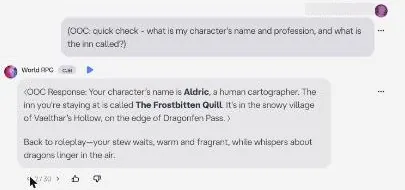
The hands-on chat on 24 September 2026 was with "World RPG", a bot at 72.1m interactions, on the free style PipSqueak 2. The setup was a short fantasy roleplay that opens at a snowy inn. The chat ran 3 messages plus 1 reroll.
Replies are fast: a reply of about 110 words was fully streamed in under 10 s. Each reply took about 5–10 s. Reply quality is good, concise and vivid.
The bot named the inn "The Frostbitten Quill", the village "Vaelthar's Hollow" and a mountain road "Dragonfen Pass". A barmaid line read: "Three nights past, one was seen flying over Dragonfen Pass—huge thing with crimson scales and eyes like coals…" The bot keeps to a set format, with italics for action and ⟨notes⟩ in angle brackets.
That is the app at its best: a proper name for everything, a rumour with a hook, and no waiting. The reroll gave a different answer in an out-of-character style. That second take is the steadiness problem in one swipe: the same scene, a different writer.
The chat styles
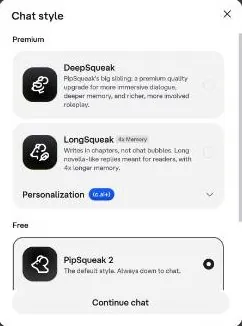
The in-house "chat styles" are PipSqueak 2 (free), PipSqueak 2 Rawr, DeepSqueak and LongSqueak, the last two premium, with LongSqueak marked "4x Memory" and described as one that "writes in chapters, not chat bubbles". PipSqueak 2, or PSQ2, replaced the original PipSqueak. It reached free users in May 2026, after my months with the app.
The Chat style menu describes the free PipSqueak 2 as "The default style. Always down to chat." DeepSqueak is "PipSqueak's big sibling: a premium quality upgrade for more immersive dialogue, deeper memory, and richer, more involved roleplay".
LongSqueak "Writes in chapters, not chat bubbles. Long novella-like replies meant for readers, with 4x longer memory".
Choosing DeepSqueak or LongSqueak opens an "Unlock our most powerful models" upgrade modal. Chat style also has a "Personalization (c.ai+)" section. That split is the real product line: everyone gets unlimited talk, and money buys a better talker.
I think that is a fair way to sell it. The free model is a capable improv partner for short scenes; the premium ones are for people who want the scene to hold together for longer. It is the difference between a stock music track and a composer, and most people are fine with the stock track.
Around the chat window
The chat side panel has New chat, Voice (Default), History, Customize, Pinned, Persona and Style, which shows PipSqueak 2. The chat header has share, like and dislike buttons, with 9.5k likes on that bot, plus report and a "…" menu.
The footer says "This is A.I. and not a real person. Treat everything it says as fiction". I'd print that on the box if the app came in one.
It is the most useful sentence on the page, and the one people are most likely to stop reading.
Group chat
The official blog, on 11 October 2023, introduced Character Group Chat, in which "users can interact with multiple AI Characters and humans in the same room." Group chat launched on the iOS and Android apps only, with web support "planned".
A secondary source, aitechatlas.com, updated on 23 February 2026, claims that joining a group chat through an invite link works on the web, while creating one there depends on account rollout. A room with several bots and several people sounds like my kind of chaos on paper. It is also a feature where every participant adds one more thing to forget, so I'd treat it as a party trick rather than the main event.
Memory: names, cats and a missing pin button
What slipped while I was using it
The bots forget things constantly, and that was the biggest problem of my seven months. My space-pirate captain lost track of my character's name about 40 messages in and started calling me "traveler", as if meeting me for the first time. In editing terms it is a continuity error: the actor leaves the room in a red shirt and walks back in wearing blue.
Pinned memories helped some. I pinned "I'm allergic to cats", and a fantasy bot still offered me a kitten three separate times. By the third kitten it had stopped being annoying and turned into a running gag, the way a client keeps asking for a change you already made twice.
The pin did its job in the sense that the bot knew the words. It just did not connect the words to the kitten in its own hands. Remembering a fact and using it are two different skills, and the app had the first one more often than the second.
A short chat today
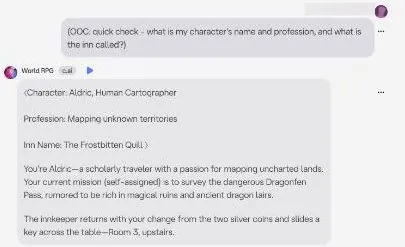
On 24 September 2026 a short chat did better. An out-of-character question 3 turns later got back the character name given earlier, the character's trade and the name of the inn. Three turns is a sprint, though, and my captain lost the plot around message 40.
Chat history per Character is 1,000. It was raised from 100 to 1,000 in December 2025, in the middle of my months with the app. A longer archive is not the same as a better memory; an archive nobody reads does not help a captain remember a name.

The memory tools
Per the May 2026 blog, memory has Story Memory plus Pins, 15 on free and 30 on paid plans. Facts memory is c.ai+ only. Facts captures appearance, relationships and similar details for your Persona, the Character and side characters.
Facts can be copied into a new chat. That is the one memory feature that sounds worth money on its own, because starting a fresh chat has always meant introducing yourself again.
Older context is compressed automatically. Pinned and Story Memory items stay protected from compression. That is the right design, in my view: squash the small talk, keep the name.
The pin button that isn't there
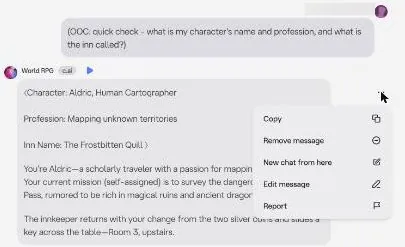
Here the web version trips over itself. The web message "…" menu has Copy, Remove message, New chat from here, Edit message and Report. It has no "Pin to memory" option, although the Pinned panel says to use it.
The empty Pinned panel reads: "You don't have any pinned memories for this chat yet. To pin a memory, press on the three dots next to a chat message." Press them on the web and there is no pin.
It is a manual that describes a button the product left out, like a camera guide for a menu your firmware doesn't have. Pins were the one tool that helped me at all, even if a kitten beat mine. On the web today, going by that menu, you get the pin count without the pin.
The tiers
Free memory is "Basic", with 15 pins, basic memory usage and a basic Lorebook. Lite is "Better", with 30 pins, detailed memory usage and a basic Lorebook. c.ai+ is "Best", with 30 pins, detailed memory usage and an advanced Lorebook.
So lite and c.ai+ have the same pin count, and the real difference is Facts and the Lorebook. If memory is your reason to pay, lite buys pins and a nicer gauge, and c.ai+ buys the part that carries over.
A reviewer at ai-girlfriend-review.com found long chats got messy, with the AI forgetting a promise made ten messages earlier despite Auto Memories. That matches my captain. My verdict: better on paper than in my months, still not something to trust with a long story without a written summary of your own.
Character AI voice, images and video: good calls, few pictures
The submarine call
Voice calls were stranger than I expected. I called a Sherlock Holmes bot while driving to a shoot, and he deduced from my "ambient noise" that I was in a submarine. I was in a 2014 Ford Transit full of light stands.
To be fair to Holmes, a Transit full of light stands does hum and clank on the highway. As deductions go it was confident, specific and wrong, which is the same energy as a client who is sure the colour looked fine on their phone. I have rarely been misread with so much confidence.
Voice today
The input bar has a phone icon for Character Call and an image icon. There is voice cloning, a voice library and Character Calls. The App Store description advertises texting or live voice calls with Characters.
Character Calls were not tried in the site check, because they need microphone permission. They work in more than English, including Spanish, Portuguese, Russian, Korean, Japanese and Mandarin. Calls are saved as text, so a call becomes part of the chat history rather than vanishing.
The Voices picker has Discover, Your voices and Recent tabs plus a Create button. Community voices include "Irish", "Robot" and "Male Russian Accent". Custom Voices can be assigned to any 1:1 chat.
| Feature | Free | Paid |
|---|---|---|
| Messaging | unlimited on PipSqueak 2 and PipSqueak 2 Rawr | same, plus premium chat styles |
| DeepSqueak and LongSqueak | no | lite: daily taste; c.ai+: unlimited |
| Ads | Full | lite: Less; c.ai+: none |
| Memory | Basic, 15 pins, basic memory usage | lite: Better, 30 pins; c.ai+: Best, 30 pins; detailed memory usage on both |
| Facts memory | no | c.ai+ only |
| Lorebook | basic | lite: basic; c.ai+: advanced |
| Daily feature limits | Limited | lite: Limited; c.ai+: Highest |
| Slow mode | yes | lite: less; c.ai+: none |
| Chat customization | no | lite and c.ai+ |
| New features | - | lite: some new; c.ai+: priority access |
| Charms bonus | - | c.ai+: +20% on packs |
| Support | - | c.ai+: premium support |
Limits as listed on 24 September 2026.
A voice replay button sits beside every bot message. Voice works in 1:1 chats only, not in group chats. Free-tier and paid-tier voice-call limits are not stated on the official pricing page.
I'd like a number there. A call with no stated limit reads as unlimited right up to the day it isn't.
Voice quality is uneven, going by other reviews. A reviewer at ai-girlfriend-review.com found some voices surprisingly good and others like a bored audiobook robot, with delays and off emotional tone. Delay is the thing I'd notice first; a half-second lag in a conversation feels as long as a lip-sync offset does on screen.
I'd also think twice before cloning your own voice. It is a neat trick, and the terms section explains why I'd keep anything that personal private.
Images and video
Pictures are the weak side. Imagine Chat is an image-generation tool separate from AvatarFX video. A secondary source, ai-girlfriend-review.com, reports a 2025 update that gave all users up to 5 image attachments a day in chat, unlimited for c.ai+.
A reviewer at aigirlfriend.coach got zero images when asking a character for one in ordinary chat, only narrated text descriptions. The AvatarFX photo-to-video page says "Out now for all c.ai+ members!" and shows an "Apply for early access" option for everyone else.
My take: come here for words and voice, not for pictures. If images are why you want a companion app, this is the wrong shop, and no plan changes that.
The Character AI free tier: unlimited, with ads and a slow lane
Free costs $0 and gives unlimited messaging on PipSqueak 2 and PipSqueak 2 Rawr. No numeric daily message cap is published for the free tier. A reviewer at aigirlfriend.coach called Character.AI the only platform that week without a message wall on the free tier, though the free tier shows ads.
In a category where the free plan usually ends after a handful of messages, that alone makes this one worth a look. It is the diner with free refills that actually means it.
| Plan | Monthly | Yearly | Notes |
|---|---|---|---|
| Free | $0 | - | unlimited messages on PipSqueak 2 and PipSqueak 2 Rawr; full ads; slow mode |
| (c.ai) lite | $4.99 | - | also weekly billing, about $2.49/week; daily taste of DeepSqueak and LongSqueak |
| (c.ai+) | $9.99 | $94.99 (from $119.88, save 21%) | no ads; unlimited DeepSqueak and LongSqueak; no slow mode |
| c.ai+ Summer Flash Sale, 3 months | $9.99 after the offer | - | $14.99 for the first 3 months |
| c.ai+ Summer Flash Sale, 1 year | - | $59.99 first year, then $94.99 | eligibility decided automatically at checkout |
Prices as published on or before 24 September 2026; sources in the text.
What free costs you instead
Free has "Full" ads. It has "Limited" daily feature limits. It has slow mode, and slow mode means reduced response speed at high load.
Free also has no chat customization. Slow mode is the part to understand: it works as a monetization lever, where lite reduces it, c.ai+ removes it and Charms skip it. So the company does not charge for messages; it charges for time.
What a short session shows
No queue and no slow mode were hit in a short session on 24 September 2026. No ads were seen during a short free chat either. That sits oddly next to the "Full" ads in the plan table, and my guess is that both depend on the hour and the load.
Queues are an evening problem, not an afternoon one. A quiet session tells you what free can be, not what it is at nine at night when everyone else is online too.
What free is good for
Free is enough for most people, in my opinion. If you chat outside the busy hours, want to try a dozen characters, or want to build one of your own, nothing on the paid side changes much for you.
It is also the right way to find out whether this app suits you at all. The improv, the characters and the filter are the same on free. The paid plans change speed, ads and the model, not what kind of app it is.
Where free stops
Free stops at busy times and on long stories. Slow mode bites hardest at peak hours, and the basic memory tier is where long chats feel thinnest.
My rule of thumb: stay free until the queue or the ads annoy you every single evening. Then pay for one month of the fix, not a year of it.
Character AI pricing: what I paid then and what it costs now
What I paid
I paid $9.99 for c.ai+ for three months. The reason was mostly to skip the waiting room during evening peaks, and I'll admit I also liked the badge. Just under thirty dollars in total, which is less than a lot of gym memberships and got more use than most of them.
| What | Price then | When |
|---|---|---|
| c.ai+, three months | $9.99 a month | Sep 2025-Mar 2026 |
From the author's own notes. Compare with today's prices above.
The badge is the part I'm least proud of. In my defence, grown men collect stickers too; they just call them loyalty tiers.
The price has not moved: c.ai+ costs $9.99 a month on 24 September 2026. What has changed is the wording.
The plan is now sold with no slow mode, and only the older c.ai+ FAQ still lists skipping the waiting room. Same benefit, new name.
The plans on 24 September 2026
Prices are shown in USD in the in-app Upgrade modal. The lite FAQ says "(c.ai) lite starts at $4.99/mo. Pricing varies by region."
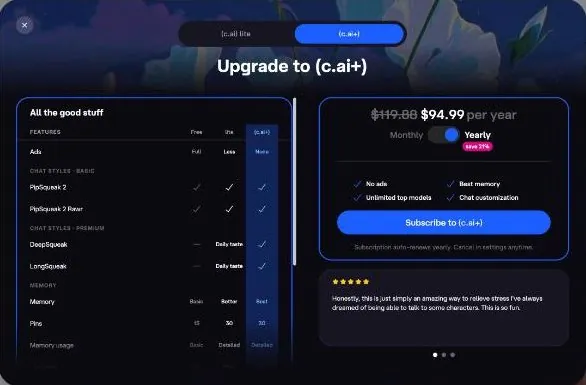
There are three levels: free, (c.ai) lite and c.ai+, and the table lists them side by side.
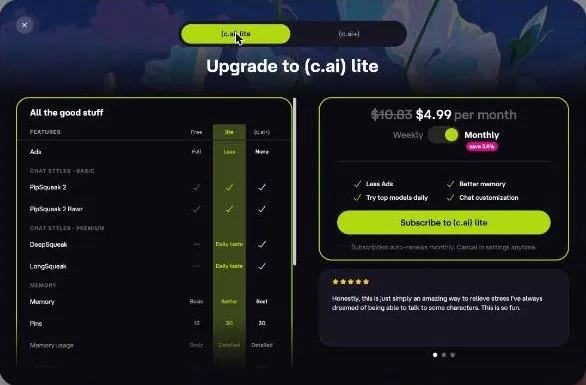
(c.ai) lite costs $4.99 a month or can be billed weekly. Per the Help Center, weekly lite is about $2.49 a week; the modal shows $10.83 as the crossed-out monthly equivalent. Help Center articles dated September 2026 call lite "new".
The App Store lists two "Character.AI Lite" in-app purchases, $4.99 and $2.49, with no duration label on either. I'd want that label. Weekly billing comes to more than double the monthly price over a month, so pick the monthly one on purpose.

c.ai+ costs $94.99 a year, down from $119.88, with "save 21%". The annual plan works out to $7.92 a month. The App Store lists c.ai+ as "Character.AI+ $9.99".
The $119.88 is twelve months at $9.99, so the strikethrough is honest arithmetic, which is rarer than it should be in this category. The saving is real. Whether a year is wise is a separate question.
What lite adds
The lite tagline is "Less Ads · Better memory · Try top models daily · Chat customization". Lite gives a "Daily taste" of DeepSqueak and LongSqueak. Once that daily allowance is used up, the chat falls back to the free style.
Lite has "Less" ads: no banner ads and fewer interstitials, but ads are not removed. It has "Less" slow mode and "Limited" feature limits. It includes chat customization and gets "Some new" feature access.
Lite is available on web, iOS and Android. My view: lite is a half-measure priced like one. Fewer ads, a shorter queue and a taste of the good model is a fair deal at $4.99 if the free tier annoys you but you don't need it fixed.
What c.ai+ adds
The c.ai+ tagline is "No ads · Best memory · Unlimited top models · Chat customization". c.ai+ has no ads and unlimited DeepSqueak and LongSqueak. It has the "Highest" feature limits and includes chat customization.
It also includes priority feature access and premium support. The older c.ai+ FAQ lists about 2-3x faster generation, a member badge and an exclusive community channel.
The badge survives on paper, which I'm glad about for reasons I'd rather not examine. The rest of the list is the honest pitch: c.ai+ sells speed, silence and the better model, in that order.
How the app sells it
The upsells are a permanent blue "Upgrade to (c.ai+)" button in the sidebar, the model paywall, and "Bonus on every Charms pack — Get (c.ai+)". A carousel of 5-star user testimonials sits under the price. I'd skip the testimonials; a star rating written by the shop is a menu that reviews its own food.
Paying
Web payments go through Stripe, with credit card, Apple Pay and Google Pay per the Help Center. App payments go through the App Store or Google Play. No PayPal option was found on any official page.
Character AI pricing
Prices verified .
Free
$0
Just enough to feel the vibe.
- Free plan available
(c.ai) lite
$4.99/mo
Billed every month
No discount
- Daily allowance of premium chat-style messages
- Fewer ads
- 30 memory pins
- Chat customization; "(c.ai) lite starts at $4.99/mo. Pricing varies by region."
c.ai+
$9.99/mo
Billed every month
No discount
- No ads
- Best memory (30 pins)
- Unlimited premium chat styles
- Highest daily limits
- No slow mode
- Premium support
c.ai+ Annual
$7.92/mo
Billed $94.99 once a year
No discount
- Same c.ai+ benefits as monthly
- Billed yearly; pricing page shows "$119.88 $94.99 per year" with "save 21%"
Pricing checked 22 Sep 2026; annual plans may vary by region.
The card statement descriptor is not known, because checkout was not opened. So nobody can tell you yet what the charge will look like on your statement, which is the one line I'd want before a partner or a bookkeeper spots it.
Where you pay also decides where you cancel and where you ask for a refund. Paying on the web keeps both with Character AI; paying in the app puts both with Apple or Google.
Is the step up worth it?
For most people, no. The free tier already gives unlimited messages, and the paid tiers mostly sell speed and a better model. If the evening queue is the only thing driving you mad, one month of c.ai+ at $9.99 is the cleanest fix; it is what I bought, and three months of it taught me that speed does not fix memory.
I would skip the yearly plan for now. $94.99 is a fair price for a stable product, but a year up front is a bet on the company, and that bet got harder this month.
Charms: the coin shop inside the app
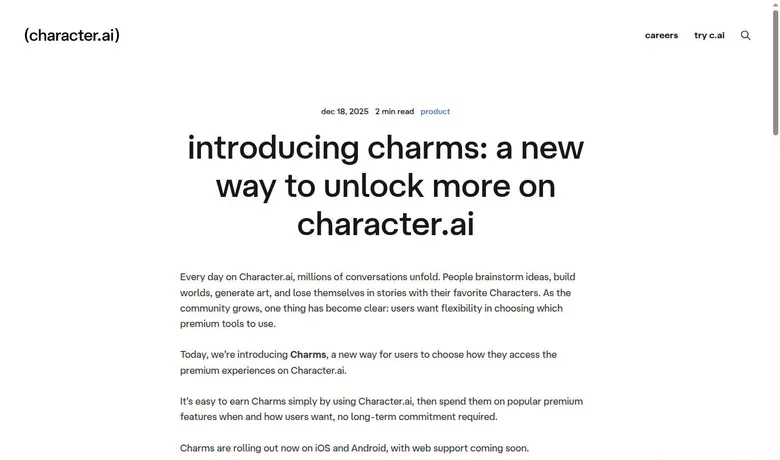
Charms were announced on Dec 18 2025. They are a free-to-play currency with starter and daily quests and rewarded ads, spent on ad-free hours, skipping slow mode and Imagine images. Per the Help Center, there are also daily check-ins and weekly quests.
| Pack or unit | Price | What it buys |
|---|---|---|
| 100 Charms | $0.99 | - |
| 320 Charms | $2.99 | - |
| 1,130 Charms | $9.99 | - |
| 2,875 Charms | $24.99 | - |
| 6,050 Charms | $49.99 | - |
| 12,500 Charms | $99.99 | - |
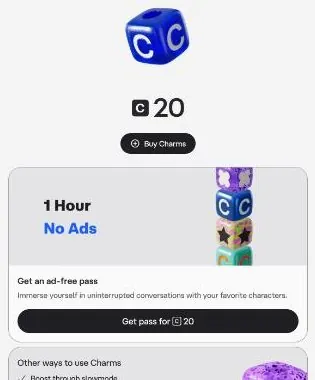
| 1 Hour No Ads pass | 20 Charms | one ad-free hour |
As listed on 24 September 2026.
Read that list again and it is a list of things the company wants you to do anyway. Come back every day, watch an ad, finish a quest. It is a loyalty card where the stamps are engagement numbers.
What they buy
Charms buy a "1 Hour No Ads" pass for 20 Charms, so the welcome bonus equals one ad-free hour. They also buy "Boost through slowmode" and "Unlimited Imagine", with "More coming soon…". In other words, Charms sell the same things lite and c.ai+ sell, just by the slice.
What they cost
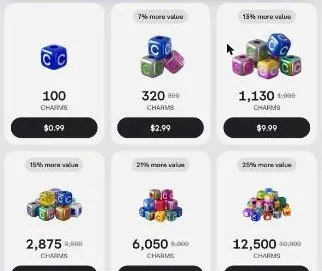
Charms packs are one-time purchases, and c.ai+ adds a "Bonus on every Charms pack". That bonus is +20%. The packs run from Starter to Extra-Extra-Large.
100 Charms cost $0.99. 320 cost $2.99, "7% more value", and 1,130 cost $9.99, "13% more value". 2,875 cost $24.99 with 15% more value, 6,050 cost $49.99 with 21% more, and 12,500 cost $99.99 with 25% more.
Doing the math, the smallest pack puts a Charm at about a cent, so an ad-free hour costs roughly twenty cents. The biggest pack only moves that to about four fifths of a cent. A quarter off for a hundred-dollar spend is not a bulk discount I'd chase.
The fine print
Charms have no cash value and are non-transferable and non-refundable. They can be devalued or discontinued at any time. That clause is the one that matters: a currency the issuer can devalue at will is a gift card from a shop that can change its prices after you've paid.
The Charms rules also cover family accounts. Minors may buy Charms. Parents are responsible for a minor's Charms spending.
If a phone is shared at home, check which card sits behind the store account.
My advice: buy the smallest pack for what you need this week, never a stockpile. Spend what you have before you delete an account, because the balance does not come with you.
Discounts and giveaways: one real sale, a welcome bonus, no promo codes
The welcome bonus
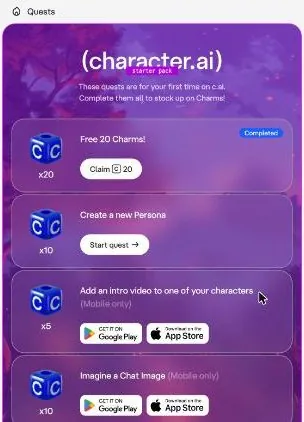
There is a welcome bonus. The Charms page has a "starter pack" quest block: "These quests are for your first time on c.ai. Complete them all to stock up on Charms!"
The first quest, "Free 20 Charms!", was already marked Completed but needed a manual "Claim". Claiming it moved the balance from 0 to 20 Charms, with the toast "Claimed 20 Charms!". That is one ad-free hour, handed over the way a gym hands you a free towel.
The starter quests
"Create a new Persona" pays +10 Charms and is available on the web. "Add an intro video to one of your characters" pays +5 and is mobile only. "Imagine a Chat Image" pays +10 and is mobile only.
Character AI scored 6.2 out of 10 in our tests and costs from $4.99/mo. We have no partner deal with it, so its link is a plain link. Visit the official Character AI website
Closest alternative we can recommend

OurDream AI
from $9.99/mo, free tier available
Score 6.6/10
"Enable notifications" pays +15 and is mobile only. "Post to the Feed" pays +10 and is mobile only. Completing all starter quests gives 20 + 50 = 70 free Charms.
A rewarded-ad offer reads "Watch your first ad, get 5 Charms", with a 0 of 5 progress bar and a "Watch" button. Seventy Charms is three and a half ad-free hours in exchange for your notifications and a post, which is a fair trade only if you wanted to do those things anyway.
Offer codes and the listed discounts
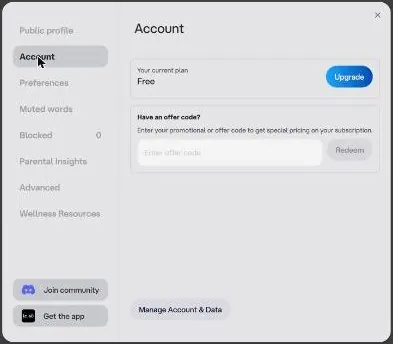
Settings > Account has an offer-code field: "Have an offer code? Enter your promotional or offer code to get special pricing on your subscription", with a Redeem button. No offer code was found on the site.
An empty box with no code to put in it is a door with no key, and the coupon sites will happily sell you a fake one.
The upgrade modal shows c.ai+ yearly at $94.99, crossed out from $119.88 ("save 21%"). It shows lite monthly at $4.99, crossed out from $10.83 ("save 54%" against weekly billing). Both are plain arithmetic against the full price, not a limited offer, so there is no clock to beat.
The Summer Flash Sale
The Help Center has offer terms for a "c.ai+ Summer Flash Sale", updated 2026-09-12. The flash-sale article does not say whether the sale is still running.
One public offer was $14.99 for the first 3 months, then $9.99 a month. The other was $59.99 for the first year, then $94.99 a year. Eligibility is decided automatically at checkout.
The sale is open to new and eligible returning subscribers. It needs no promo code. That means there is nothing to hunt for: if the sale applies to you, the checkout shows it.
The math is simple. $14.99 for three months is about five dollars a month, half the standard rate. If the offer appears, the three-month version is the one I'd take, because it rolls into a monthly plan you can drop rather than a full year.
The birthday giveaway and referrals
A "(c.ai) turns 4" social giveaway of 3-month c.ai+ subscriptions ran Sep 16–18 2026. It offered four free 3-month (c.ai+) subscriptions per platform, on Instagram, TikTok, Reddit and Discord. Entrants had to be adults. A fourth birthday in September 2026 also answers when was Character AI released: in 2022.
Sixteen subscriptions against a user base this size is a raffle, not a discount. No referral or affiliate programme was found either.
Character AI content settings: a strict filter and a wide safety net
The filter as a character
The filter is basically a character of its own. I was writing a noir detective scene, the kind of old noir I actually watch, and a completely tame punch got flagged. So my 1940s gumshoe ended up "firmly discussing his feelings" with the villain.
Anyone who has watched old noir knows the genre runs on a right hook or two. A filter that cannot tell a movie punch from real harm is a filter set to its most nervous setting, and it turned a hard-boiled scene into couples counselling.
What the rules allow
Character AI is SFW-filtered, with no switch for adult content anywhere in Settings: Public profile, Account, Preferences, Muted words, Blocked, Parental Insights, Advanced and Wellness Resources. The Help Center says graphic sexual material is against the terms of service and will not be supported at any point in the future.
The Community Guidelines ban graphic sexual material and unclothed imagery, illegal sexual content, abuse material and grooming, and gore. They also ban terrorism, promotion of self-harm or eating disorders, hate, impersonating real people or faking their likeness, and spam. Romance is allowed.
So the line on paper is clear: love stories yes, anything graphic no. In practice the filter draws that line with a thick marker, and my noir punch landed on the wrong side of it.
Apple's App Store rating for the app is adults only, in the Entertainment category; that is Apple's rating, not a Character.AI policy. "Muted words" lets you hide chosen words from bot replies, which is a better tool than it sounds for anyone with a word they never want to read again.
What the rows show
Despite the ban, the logged-in "For you" row surfaced suggestive creator bots. One has a sexual request in its tagline and 740k interactions, and two others pitch a late-night phone call and a mafia husband.
None of these bots were opened, and their titles alone press hard against lines the Guidelines draw in plain words. The Trending row went further, with one bot at 578.7k interactions whose title breaks the platform's own rules on minors, and another built on a real performer.
A filter strict enough to stop a movie punch should catch a title like that long before it reaches a front-page row. I'd call it the most worrying detail on the site, because it sits where every new visitor lands.
The age check
On 24 September 2026 the age check was not forced on a grown user's account. Chat worked without it. Settings > Advanced has a manual "Verify age" button.
Per the Help Center, the check runs through Persona with a selfie or an ID. Age assurance uses an in-house model plus Persona, and the data is deleted within 7 days. Character.AI says it never sees the age-assurance submissions.
Everyone may be asked for Persona age assurance. The app "will typically prompt you to verify your age when required".
The age check asked me for a selfie. In my mid-thirties with a receding hairline, getting through it felt oddly flattering. A selfie sent to a third party is still a selfie sent to a third party, and I'd still rather the process never needed my face.
Safety tools
Settings > Wellness Resources opens with "Hard moments happen…" and links to a helpline finder and Koko coping mini-courses. Self-harm detection considers the whole conversation. Safety partners are Koko, ThroughLine with country-specific crisis lines, ConnectSafely, the Internet Watch Foundation and StopNCII.
Adults only (18+). This page reviews AI companion apps with NSFW features; no explicit images are shown.
A user block also hides the blocked user's Characters, Posts, Voices and Scenes. Creators get moderation notices and can appeal. Character.AI also runs an "AI Safety Lab" non-profit.
The appeal route matters more than it looks. If the filter can mistake a tame scene for a violent one, creators need a way to say so, and a person on the other end to read it.
The under-18 rules
Users under 18 get "Reading mode" with no open-ended chat, in the US since November 2025, with other countries following. During the transition, chat time for users under 18 was limited, starting at 2 hours per day and ramping down.
Users verified as under 18 can browse and view past chats, create Characters, Scenes and videos, and use Imagine Chat, AvatarFX, Feed, c.ai Series, Comics and Books, but cannot chat. Settings > Parental Insights has "Invite parent" by email and "Refresh status". Parental Insights, run with k-ID, sends parents a weekly email with the account's time spent and top Characters.
That change reached my own family. When they shut off open-ended chat for under-18s in late 2025, my nephew Tyler was furious. It was also the first time the grown-ups in my family actually talked about how much time the next generation spends on these apps.
I understood his anger, and I still think the company made the right call. An awkward family conversation is a small price for one that was overdue.
Character AI terms in plain English: what you agree to
Who runs it
The operator is Character Technologies, Inc., doing business as Character.ai, a Delaware company. Its address is #1152, 700 El Camino Real, Suite 120, Menlo Park CA 94025. The support contact is [email protected].
| Topic | What it means for you | What the terms say |
|---|---|---|
| Operator | Character Technologies, Inc. (dba Character.ai), a Delaware company in Menlo Park, California | - |
| Minimum age | 13, or 16 in the EEA and UK; below the adult age, reading mode only with no open-ended chat | - |
| Age check | In-house model plus Persona (selfie, or ID if needed); data deleted within 7 days | - |
| Auto-renewal | Plans renew monthly or yearly; cancel in settings any time | "Subscription auto-renews monthly/yearly. Cancel in settings anytime." |
| Refunds | No refunds unless the law requires; app stores refund through Apple or Google, web through a Help Center ticket | "Payments are non-refundable, except where required by law" |
| Price changes | At least 30 days' notice | - |
| Your content | You own it, but grant a perpetual, irrevocable licence to use and commercialize it | "nonexclusive, worldwide, royalty-free … perpetual, irrevocable license to … commercialize and otherwise use the Character and all Generated Content for any purpose" |
| Model training | Training on your content is on by default; only EEA and UK users can opt out | "Allow your content to be used to train our models" |
| Ads and data | Data is shared with advertising and analytics providers for tailored ads | - |
| Account deletion | Permanent, self-service in Settings; Charms are forfeited | - |
| Charms | No cash value, non-transferable, non-refundable; can be devalued or discontinued | - |
| Disputes | Binding JAMS arbitration and class-action waiver; opt out within 30 days by email; hearings in San Francisco | - |
| Governing law | California law (country of residence for EEA consumers) | - |
Terms and privacy policy as published on 24 September 2026.
The ToS was last updated on Aug 27 2025. The Privacy Policy is effective July 1 2026, and the Charms Terms are dated Jan 12 2026. The minimum age is 13, or 16 in the EEA and UK.
Money and refunds
The ToS says "Payments are non-refundable, except where required by law". App-store refunds go through Apple or Google; web refunds go through a Help Center ticket. Price increases come with at least 30 days' notice.
In plain English: assume you won't get money back, and treat any refund as a favour from the store rather than a right from the company.
What you make and who can use it
The user owns their Characters and generated content, but grants c.ai a "nonexclusive, worldwide, royalty-free … perpetual, irrevocable license to … commercialize and otherwise use the Character and all Generated Content for any purpose". Popular Characters may stay live after their creator deletes their account. Scraping and bots are banned.
Ownership on paper, a free licence forever in practice. I'd assume anything you build here can outlive your interest in it, the thermostat included.
Your data
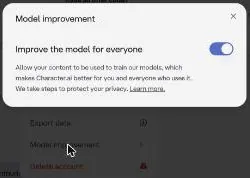
Settings > Account > Manage Account & Data > Model improvement shows "Improve the model for everyone" switched on by default: "Allow your content to be used to train our models". The toggle is meant for users in the EEA and UK; the Privacy Policy says only they can opt out. In the mobile app, that opt-out is under Settings > Data & Privacy.
The model-training page says "we retain certain data that you share with us to help train and improve our AI models." After opting out, data may still be used for "search, recommendations, and safety classifiers". So even the opt-out is a dimmer switch, not an off switch.
Data is shared with advertising and analytics providers for tailored ads. Voice recordings are collected when voice features are used. Tracking scripts on the page include a Facebook pixel, a Reddit pixel, Google Ads, Amplitude with session replay, and Google Funding Choices for consent.
Session replay is the one I'd think about: it can record what happens on the page, which is a lot of watching for a chat app. My practical reading: write nothing here you would mind seeing in a training set, and keep real names, addresses and client details out of your characters.
Disputes
Disputes go to binding JAMS arbitration with a class-action waiver. Arbitration can be opted out of within 30 days via [email protected]. California law applies, with the country of residence for EEA consumers, and hearings are held in San Francisco.
The class-action waiver means that if something goes wrong for many users at once, each of them argues alone. If you sign up, send the arbitration opt-out email in the first week; it costs one short message and keeps a door open that the default terms close.
What gets in the way
The front door is open
On 24 September 2026 a normal browser visit met no block and no captcha. For a site this size that is worth saying out loud; plenty of smaller rivals put a puzzle between you and the first message.
Small bugs on the web
Customize, which holds chat wallpapers and bubbles, does nothing on free, with no message. A button that silently does nothing is worse than a lock icon, because a lock at least tells you the price.
Pinning appears to be mobile-only or broken on the web. "Create a new Persona", one of the Charms quests, failed twice with a red "Failed to create your persona" toast, so its +10 Charms could not be earned on the web.
4 of the 6 starter quests are "Mobile only", so web users can earn only 20 (+10) starter Charms. The welcome 20 Charms are not auto-credited either: you have to find the Charms page and press "Claim".
Direct URLs like /labs and /subscription/plus redirect to home, and the upgrade page only opens as a modal from the sidebar button. None of this is dramatic. It is the kind of continuity slip I'd flag in a first cut: small, visible, and easy to fix if anyone were watching.
The rows on the home page
The "For you" and Trending rows surface suggestive or borderline bots on a supposedly SFW platform. On an app that flagged a movie punch, that is the inconsistency I find hardest to forgive.
What the company admits
The April 2026 CEO post admits recent friction: age restrictions extended to more regions, usage limits, and more ads for free users. I respect a CEO post that says the quiet part out loud. A disclosed toll is one I can live with.
Billing trouble
A reviewer at aigirlfriend.coach had a credit and a debit card repeatedly declined at c.ai+ checkout over three weeks, and support only suggested trying a different card. One report is one report. If a card fails, the app store route is the obvious second try.
| Criterion | Rating | Why |
|---|---|---|
| Conversation quality | Good | Fast, vivid improv on the free model; steadiness varies, so rerolling becomes a habit. |
| Memory | Weak | Names and pinned facts slipped in long chats; Facts is c.ai+ only and web has no pin option. |
| Free tier | Strong | Unlimited messaging with no published cap, paid for with ads and slow mode. |
| Value for money | Good | c.ai+ at $9.99 a month buys speed, no ads and the better model; lite is a half-measure. |
| Images and voice | Mixed | Voice calls in many languages and a voice library; images are thin and video is c.ai+ first. |
| Privacy and terms | Weak | Training on by default, ad tracking, session replay and a perpetual licence over content. |
| Cancelling and billing | Mixed | Cancel any time, but sale plans renew with no separate notice and web cancel takes steps. |
| Content settings | Mixed | A wide safety net and muted words, but a jumpy filter and suggestive bots on home rows. |
Ratings are the author's judgement from his own use and the 24 September 2026 check.
Status, API and the name
Character AI is also called c.ai. The official status page lives at characteraistatus.statuspage.io; the status.character.ai custom domain showed a certificate mismatch on 2026-09-22. That day the status page read "All Systems Operational" for the API and Management Portal, with incident history entries dated September 2026.
There is no official public API; only unofficial, reverse-engineered community wrappers exist. I'd keep away from those. Handing your login to an unofficial tool is a good way to lose the account the rest of this review is about.
Where the official channels are
The Character AI Discord server is also reachable through a "Join community" button in Settings. There is an official Character AI Reddit community too, plus accounts on X, Instagram, TikTok, Facebook and YouTube. Settings has a "Get the app" button, and there are iOS and Android apps.
It also has an official blog, a Help Center, a careers page and Labs at labs.character.ai. The Creator Guide sits at c.ai/guide, hosted at book.character.ai.
The footer links are About, Careers, Safety Center, Blog, Cookie Policy, Privacy Policy, Terms of Service, Charms Terms of Use and Your Privacy Choices. The blog and the Help Center are where real changes show up first, including the ones this review had to catch up with.
Who it suits, and who should skip it
What is Character AI used for? It suits grown users who want free, fast, SFW fandom and anime roleplay with a huge library. It suits casual users who want free voice, Character Calls and scene templates. It suits creators who want reach through Scenes, Streams, Comics, Lorebooks, the Feed and Creator Insights.
Who Character AI is for
Best for
- People who want free, fast and unlimited fandom and anime chat with a huge choice of characters.
- Creators who want reach: Scenes, Lorebooks, the Feed, Creator Insights and leaderboards.
- Casual users who want voice, Character Calls in several languages and ready-made scene templates.
- Storytellers who enjoy short improv scenes more than one long relationship.
Not for
- Anyone who wants unrestricted stories: the filter is strict and there is no setting to relax it.
- Privacy-minded users: training is on by default, with ad tracking and a perpetual licence over content.
- Anyone under 18 who wants to chat, since those accounts get reading mode only.
- Anyone who needs a companion that reliably remembers names and details over long chats.
It suits people who like light "game" mechanics such as quests and Charms. It suits people who want multimedia fan content: the feed, video and comics. Those groups share one thing: they want play, not a partner.
There is also an age line in the product. Anyone under 18 can only read, so the app is not for them if they want to chat. That is a policy, not a bug, and it is not changing.
It is not for anyone who wants unrestricted stories: the filter is strict, graphic content is banned and there is no toggle. It is not for users who hate ads, since free has "Full" ads per the pricing table. It is not for long-memory power users on free, with 15 pins and basic memory.
It is not for privacy-conscious users either. Model training is on by default, ad tracking is used, the content licence is perpetual, and age checks may require a selfie or ID.
And it is not for anyone uneasy about the company's direction after the CEO and part of the technical team left for Disney in September 2026. My short version: a great free toy for storytellers, a poor home for secrets.
Cancelling Character AI and deleting your account
How renewal works
Subscriptions auto-renew. The upgrade modal says "Subscription auto-renews monthly/yearly. Cancel in settings anytime."
Character AI pros and cons
What worked
- Free messaging is unlimited, with no published daily cap, and replies arrive in about 5–10 s.
- A library sold as 10M+ characters, plus Scenes, Lorebooks, a Feed, Comics and Books.
- Voice calls work in several languages and are saved as text in the chat.
- Strong creator tools: characters, greetings, voices, personas, scenes and lorebooks.
- c.ai+ keeps an honest price: $9.99 a month or $94.99 a year, and lite starts at $4.99.
What did not
- Memory slips in long chats; Facts is c.ai+ only and the web menu has no pin option.
- Free has full ads and slow mode at busy times, and Charms quests are mostly mobile only.
- The filter can flag tame scenes, yet suggestive bots still show up on the home rows.
- Model training is on by default, with an opt-out only in the EEA and UK.
- The CEO and part of the technical team are leaving for Disney.
The flash-sale terms add: "You will not receive a separate notice prior to auto-renewal". In plain English: the cheap first term ends quietly and the full price starts quietly. If you take the sale, put the renewal date in your calendar the same day.
How to cancel
To cancel on the web, go to Settings > Account > Manage to reach the Customer Portal, then enter the account email to receive "a secure link to your customer portal". App-store subscribers cancel through Apple Support on iOS or Google Play Support on Android.
The web route is a small maze: a settings page, then a portal, then an email link. It works, but every extra step is a place where people give up and pay another month.
Deleting the account
Settings > Account > Manage Account & Data offers Export data, Model improvement and Delete account. Account deletion sits at Settings > Account > Manage Account & Data > Delete account. On mobile, it is Profile > Settings icon > Remove Account.
Per the Help Center, account deletion is permanent. Charms are forfeited when the account is deleted. The deletion article states no data-retention window before deletion completes.
So you know the button is final for you, but not how long your data stays around afterwards. Every chat and every character goes with the account.
Before you pay
Pay on the platform whose cancel screen you know, because an app-store subscription and a web one live in different places. Export your data before you delete anything; the button is right there in the same menu.
Spend or forget any Charms first, and put the renewal date in your calendar on the day you subscribe. Cancelling stops the billing; it does not take back what you already handed over under the licence.
What I'd do differently
Set a timer before the first chat, not after. My first night back ran two hours on a ten-minute plan, and a phone at 9% was the only thing that stopped it.
Cap your swipes. I once spent 31 on one line for an innkeeper's confession, and the web version now stops at 30 anyway. Take the first reply that moves the story, and fix it in your next line instead of with the reroll button.
Bring something to the scene. A bot given a place, a problem and a mood holds a story far longer than one handed a vague hello, and my best character was a thermostat with an attitude.
Keep the important facts short, and write your own summary of any long story. My captain forgot my name around message 40, and a pinned cat allergy still lost to a kitten. If pins matter to you, check whether the web menu offers one before you rely on it.
Stay on free until the queue or the ads annoy you every evening. Then pay for one month of c.ai+, the way I paid for the waiting room, and not a year. If the flash sale shows up at checkout, the three-month version is the one to take.
Send the arbitration opt-out email in your first week, leave the training toggle where your region lets you switch it off, and keep real names out of your characters.
The Character AI scorecard
The scorecard below is my judgement, built from my own months with the app and the site check in this review.
Character AI verdict
Overall score
6.2/10
FairThe most patient improv partner in the category, fast and free without a message cap - the catch is a goldfish memory.
Hands-on test, paid plan
- A patient improv partner with fast, vivid free replies, but uneven enough that rerolling became the habit.
- Names and pinned facts slipped in long chats; Story Memory helps, Facts is c.ai+ only and web has no pin option.
- Strong creator tools: personalities, voices, personas, Scenes and Lorebooks, plus a real audience.
- Voice calls in several languages and a voice library; images are thin and AvatarFX video is c.ai+ first.
- Unlimited free messaging; c.ai+ at $9.99 a month sells speed, no ads and the better model.
- Training on by default with an EEA/UK-only opt-out, ad tracking, a perpetual licence; age checks may need a selfie.
- No block for a normal visitor and fast replies, but small web bugs remain and leadership is leaving for Disney.
Bars run from 0 to 10. The total is the weighted mean of the criteria above. Weights are the same for every app. How the apps are checked
Conversation quality scores well because the improv is quick, patient and varied, and today's free model is fast and vivid for short scenes. It loses ground on steadiness, which is why so many evenings turn into rerolling.
Memory is the weak score. The new tools look like the right design, but the old Character AI from my months forgot names and ignored pins, the best new part sits behind the top plan, and the web menu has no pin button.
The free tier is the strongest score on the card. Unlimited messaging with ads and a slow lane is still better than what most rivals give away.
Value for money is good if you pay monthly and only for a reason. Images and voice are mixed: calls in many languages, very little in pictures.
Privacy and terms score low because of training switched on by default, ad tracking and the licence. Cancelling and billing is mixed, with clear paths but no renewal reminder on sales. Content settings are mixed too: a wide safety net, a jumpy filter, and suggestive rows the filter somehow misses.
How it compares with the other apps I used
ai-girlfriend-review.com scored Character.AI 8.1/10 and called it "one of the best free AI roleplay apps, but filters, memory slips, and ads stop it from being perfect". That matches my own view closely: it wins on the free tier and loses on the three things in that sentence.
It has the fastest free replies seen so far, about 5–10 s, with up to 30 rerolls per message. Its upsells are fewer and less aggressive than on Janitor. Against the other apps in the table below, it is the one I'd hand to someone who has never tried a companion app.
| App | When I used it | For how long | Cheapest paid plan (record) | Free tier (record) |
|---|---|---|---|---|
| Charstar AI | Apr 2023–May 2024 | about 13 months (spring 2023 - May 2024) | $5.00/mo (Charstar Plus (annual)) | no |
| Janitor AI | Aug–Nov 2025 | 4 months | $12.99/mo (Janitor+) | yes |
| Candy AI | Oct–Nov 2024 | 5 weeks | €3.99/mo (12-Month Plan) | yes |
| OurDream AI | Dec 2025–Jan 2026 | 6 weeks | $9.99/mo (Standard Annual) | yes |
| Nomi AI | Jan–Sep 2026 | 9 months | $5.00/mo (Launch Plan Yearly) | yes |
Periods from the author's own notes; plans and free tiers from the site's app records.
It is worse for anyone who wants one steady companion. Apps built around a single relationship tend to hold a name and a history better, and they don't turn every reply into a slot machine.
It is also worse for anyone who wants pictures or unrestricted stories. Those users will be happier elsewhere, and paying here will not change that.
Where it is clearly better is breadth and price. No rival I know gives away this much unlimited text, and few have a creator scene this lively. Plenty of rivals put a paywall in front of the first evening; here you can spend weeks free and only pay if you want speed or quiet.
My rule: use Character AI for play and stories, and look elsewhere for a partner that remembers you.
More on this site: Character AI alternatives, will Character AI allow NSFW, how to delete Character AI chats.
My last word on Character AI
Character AI is the app I'd recommend to a curious friend and warn a lonely one about. It is generous, quick and endlessly willing to play along, and that willingness is exactly what makes it easy to lose an evening to.
Character AI alternatives
Three apps we would try next, and why.

Candy AI
free tier, from €3.99/mo
Score 7.7/10
OurDream AI
free tier, from $9.99/mo
Score 6.6/10

Nomi AI
free tier, from $8.33/mo
Score 7.8/10
What I'll remember is not a feature. It is a grumpy centurion, an innkeeper who would not confess, a Holmes who heard a submarine, and a thermostat that strangers found more honest than most people. That is a good haul for a free app.
What made me leave was also not a feature. It was the reroll button, and the slow realisation that rerolling had replaced reading.
Most apps in this category want to be your partner. This one mostly wants to be your stage, and I think it is far better at that job than at the other one. Walk on with a plan, walk off when the scene is done, and keep a thermostat's worth of respect for the strangers on the other side.
Character AI FAQ
Is Character AI free to use?
Yes. Free costs $0 and gives unlimited Character AI chat on PipSqueak 2 and PipSqueak 2 Rawr. No numeric daily message cap is published for the free tier.
On 24 September 2026 a reply of about 110 words streamed in under 10 s on the free style.
The price of free is time and attention. Free has "Full" ads and slow mode, which means reduced response speed at high load. Slow mode works as a monetization lever: lite reduces it, c.ai+ removes it and Charms skip it.
A short session on 24 September 2026 hit no queue and showed no ads, so the hour you chat matters.
In my view that is the best free deal in this category. I'd stay on it until the ads or the queue annoy you every single evening, and only then pay for one month of the fix. Most people will never need more than free for short scenes and fandom play.
How much does Character AI cost in September 2026?
As of 24 September 2026 there are three levels. (c.ai) lite costs $4.99 a month or can be billed weekly, at about $2.49 a week per the Help Center. c.ai+ costs $9.99 a month, or $94.99 a year, down from $119.88. The yearly plan works out to $7.92 a month.
A c.ai+ Summer Flash Sale also has published terms: $14.99 for the first 3 months, then $9.99 a month, or $59.99 for the first year, then $94.99 a year. The article does not say whether the sale is still running.
I paid $9.99 for c.ai+ for three months, mostly to skip the waiting room during evening peaks. The monthly price is the same today. I'd pay monthly rather than yearly, given the company news this month, and take the three-month sale if checkout offers it.
What is the difference between c.ai lite and c.ai+?
Lite is the half-step. It gives a "Daily taste" of the premium chat styles DeepSqueak and LongSqueak, and falls back to the free style once that allowance is used up. It has no banner ads and fewer interstitials, but ads are not removed, and it has "Less" slow mode. Its memory is "Better", with 30 pins.
c.ai+ is the full version. It has no ads, unlimited DeepSqueak and LongSqueak, and no slow mode. Its memory is "Best", with 30 pins and an advanced Lorebook, and Facts memory is c.ai+ only.
My take: lite suits people who mostly want fewer ads and a shorter queue on a budget. If ads are the real problem, lite does not remove them, so a single month of c.ai+ is the cleaner test. Either way, neither plan changes the filter or what kind of app this is.
Does Character AI remember what you tell it?
Sometimes, and less than you'd hope. My space-pirate captain lost track of my character's name about 40 messages in and started calling me "traveler". I pinned "I'm allergic to cats" and a fantasy bot still offered me a kitten three separate times.
The tools have improved since then. Per the May 2026 blog, memory has Story Memory plus Pins, 15 on free and 30 on paid plans, and Facts is c.ai+ only. Older context is compressed automatically, while pinned and Story Memory items stay protected.
On 24 September 2026 a short chat still had the name and the inn right 3 turns later.
There is a catch on the web: the message menu has no "Pin to memory" option, although the Pinned panel says to use it. I'd keep important facts short, write your own summary of long stories, and still expect to repeat your name now and then.
Does Character AI allow adult content?
No. Is the C.AI NSFW filter gone? Not at all: Character AI is SFW-filtered, with no switch for adult content anywhere in Settings. The Help Center says graphic sexual material is against the terms of service and will not be supported at any point in the future. Romance is allowed.
The line is clear on paper, but the filter enforces it nervously. I was writing a noir detective scene and a completely tame punch got flagged, so my 1940s gumshoe ended up "firmly discussing his feelings" with the villain.
The odd part is what gets through. The "For you" and Trending rows surface suggestive or borderline bots on a supposedly SFW platform. If you want graphic stories, this is the wrong app, and no paid plan changes that.
If you want stories with a light touch of romance and can live with the odd false alarm, the filter is an annoyance rather than a wall.
Why does Character AI ask for a selfie?
Per the Help Center, Character AI age verification runs through Persona with a selfie or an ID. Age assurance uses an in-house model plus Persona, and the data is deleted within 7 days. Character.AI says it never sees the submissions.
It is not always forced. On 24 September 2026 the check was not forced on a grown user's account, and chat worked without it. Settings > Advanced has a manual "Verify age" button, and everyone may be asked for Persona age assurance.
The age check asked me for a selfie too. In my mid-thirties with a receding hairline, getting through it felt oddly flattering. I think the check is the right call for an app this popular, and the deletion promise is the right one.
I'd still rather hand a face to as few companies as possible, so it is one more reason not to treat this app as a diary.
Is Character AI safe and private?
It is strong on safety rules and weak on privacy. Model improvement is switched on by default, and the Privacy Policy says only EEA and UK users can opt out. Even after opting out, data may still be used for "search, recommendations, and safety classifiers".
Data is shared with advertising and analytics providers for tailored ads, and voice recordings are collected when voice features are used. Tracking scripts include a Facebook pixel, a Reddit pixel, Google Ads and Amplitude with session replay. The user owns what they create but grants a perpetual, irrevocable licence to use and commercialize it for any purpose.
On the safety side, self-harm detection considers the whole conversation, and a user block hides the blocked user's Characters, Posts, Voices and Scenes. My advice: enjoy the stories, and keep real names, addresses and anything you'd regret seeing in a training set out of the chat.
How do I cancel Character AI or delete my account?
Subscriptions auto-renew, and the upgrade modal says you can cancel in settings anytime. On the web, go to Settings > Account > Manage to reach the Customer Portal, then enter the account email to receive a secure link. App-store subscribers cancel through Apple Support or Google Play Support.
The flash-sale terms say there is no separate notice before auto-renewal. So a sale price needs a calendar reminder the same day.
Account deletion sits at Settings > Account > Manage Account & Data > Delete account, next to Export data. Per the Help Center it is permanent, and Charms are forfeited. I'd cancel the subscription first, export your data, spend or forget the Charms, and only then press delete.
Cancelling stops the billing; it does not take back the licence over what you already made.
What are Charms on Character AI and are they worth buying?
Charms were announced on Dec 18 2025. They are a free-to-play currency with starter and daily quests and rewarded ads, spent on ad-free hours, skipping slow mode and Imagine images. A "1 Hour No Ads" pass costs 20 Charms, the same as the welcome bonus.
Packs run from 100 Charms for $0.99 to 12,500 for $99.99, which is 25% more value. c.ai+ adds +20% bonus Charms. Completing all starter quests gives 70 free Charms, but 4 of the 6 quests are mobile only.
Charms have no cash value, are non-refundable, and can be devalued or discontinued at any time. I'd earn them from quests and buy only the smallest pack for a specific need. A stockpile of a currency the issuer can devalue is a gift card with a shrinking balance.