

xchar AI Review: A Fast Front Door and a Slow Price Story
- Hands-on test, free tier
- Checked

Free plan available
from $7.45/mo
xchar AI review: my verdict after 12 days
xchar is an adult AI girlfriend and boyfriend character platform, and speed is its whole personality. Getting in is quick, the screens are tidy, and the upsell moves at the same pace as the characters. I think that pace explains most of what is good and most of what is annoying about it.
I left after 12 days in August 2026. It was pleasant and simple, but the whole thing felt like a waiting room for a subscription I never really understood. I sat in that waiting room with the magazines for almost two weeks, and nobody ever came out to explain the procedure.
My honest summary is that xchar is better at selling itself than at explaining itself. The characters are easy to start and pleasant to talk to for a few evenings, and then the cracks show: repeated sign-offs, fuzzy memory over long chats and a price story that is clearer on today's public pages than it ever felt from inside the app.
Who is it for? I'd point it at people who want a big pile of user-made characters, a picture generator and a few model settings to fiddle with, and who don't mind paying for credits on top of a plan. I'd steer anyone who wants a calm companion, a clean privacy promise or a PayPal checkout somewhere else.
Key takeaways
- Sign-up to first chat is about as fast as this category gets, in a browser, with a tidy anime-leaning look.
- The replies can read the room, but by the end of the first week they end on the same stock line.
- Memory holds a short chat and slips on a long one, which the paid tiers address with bigger token budgets.
- The published plans are clear today, but credits, packs and unlock prices sit on top of them.
- The Terms and the Privacy Policy disagree on training, and that disagreement is the one I'd weigh most.
xchar AI at a glance
- Price from
- $7.45/mo
- Free tier
- Free plan available
- NSFW content
- Allowed
- Platforms
- Web
- How it was tested
- Hands-on test, free tier,
- On your card statement
- Not known yet - I have not paid for it
How I used xchar AI: twelve days in a browser tab
My time with xchar AI was a 12-day stretch in August 2026. It ran entirely on the free tier, in a browser, with no app on the phone and no card on file. It ended the quiet way, with the tab closed and nothing to cancel.
The cast was small. A bookish anime librarian did most of the work, as a Spanish tutor and later as a quiz writer for a game night, and a pirate showed up briefly for a voice comparison. The mood of the chats followed my working days, including one bad afternoon with a real-estate client that gets its own story further down.
What the twelve days were really about was one question: is this worth a subscription? I never got a clean answer from inside the app, and that shapes this whole review. A product that makes the buyer guess is doing its own sales team no favours, in my opinion.
What the present-tense parts are based on
The facts written in the present tense in this review come from a separate check. The observations were made on 2026-09-23 on the web version, from public pages without a logged-in account. So the pricing, the terms and the screens described below reflect what anyone can see before signing up, not what a paying member sees inside.
Where my August notes and the September pages disagree, I give both and say which is which. There are a few of those gaps, mostly about prices, free messages and voice, and I think they matter more than any single feature.
The table under this section sums up my time with it at a glance. The stories behind each line are spread through the sections that follow.
Signing up for xchar AI: the first night, then and now
The first night was short in the best way. Onboarding was one of the fastest I've seen: browser only, no app, and I was in a chat within a minute. I have spent longer waiting for a render preview to load than it took this site to hand me a character.
| What | Details |
|---|---|
| Period | Aug 2026 |
| How long | 12 days |
| Plans I paid for | Free (free tier, whole period) |
| Devices | browser only, no app |
| How it ended | left after 12 days |
| Facts re-checked | 23 September 2026 |
From the author's own notes; prices and features re-checked on 23 September 2026.
It is a very tidy, anime-leaning interface. Nothing blinked at me, nothing asked me to set up a profile photo or pick a list of interests, and the first message box was just there. As an editor, I respect a clean timeline, and this was a clean timeline.
That first-minute speed is what I remember most from August. It set an expectation that the rest of the product would be just as direct, and that expectation did not survive the pricing, which is a story for later.
My xchar AI test log
Chris FurreyFounder and writer Hands-on test, free tier
-
Browser only, no app, and I was in a chat within a minute. The first 'unlock more' nudge came before my first character finished her introduction.
-
On a bad day with a real-estate client, I typed short grumpy messages and the character got softer and briefer.
-
A bookish anime librarian drilled my Spanish verbs, then turned my D&D notes into a ten-question quiz; I used three.
-
By day six every conversation ended with 'Is there anything else on your mind?' Past an hour, memory got fuzzy.
-
The librarian and a pirate sounded like the same polite radio announcer. After a few days on free I kept running out of messages.
-
I left after 12 days without paying. It felt like a waiting room for a subscription I never really understood.
Nothing paid yet
What the sign-up looks like on 23 September 2026
The site is live at https://www.xchar.ai/. The landing page loads fast, which matches my own first impression. The interface is in English only.
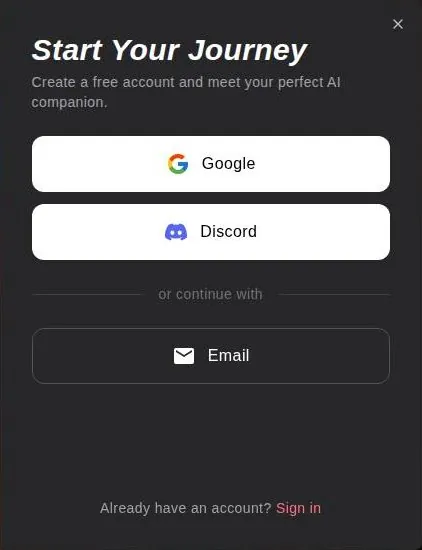
The sign-up modal offers three routes: Google, Discord or Email. The email route asks for an email address and a password. Passwords need at least 8 characters, an uppercase letter, a lowercase letter, a number and a special character.
That rule set is stricter than plenty of banking sites, which is a funny thing to meet on a character chat site. I'd use a password manager here rather than invent yet another variation of an old favourite.
The sign-up form has no birthday or age field. There is no age question at the door at all, which I find odd for a platform with this much adult material on it. The terms section covers what the rules say about age.
No guest chat, no app store
There is no guest chat. Typing a message on a character's conversation page and pressing send while logged out opens the sign-up modal. In other words, the site lets a visitor read the menu and even pick up the fork, and then asks for a name before the first bite.
I don't mind that trade. Sign-up takes a minute, and the three routes cover most people. What I'd think about is which route to use: a Google or Discord login ties the account to an identity that already knows a lot, while the email route keeps it separate.
There are no native app store links. The docs' "Install the App" page describes a PWA added to the home screen. A PWA is a bookmark that behaves like an app, with its own icon and no browser bar.
For a site like this, I think the PWA route is a plus rather than a gap. There is no store listing to vanish overnight, no update queue, and nothing on the home screen that has to be explained to anyone glancing at the phone except an icon.
My take on the front door
The front door is the best-designed part of xchar. It is quick, tidy and honest about the need to sign up, even if it asks for nothing about age.
My advice for a first night is simple. Pick the email route, use a password manager for those five rules, and give yourself one evening with a single character before touching anything that costs credits.
Browsing the characters: a big library, sorted by the crowd
The catalogue is split into Girls and Guys tabs. That switch sits in the top bar next to the search field, and it is the first sorting decision the site asks you to make. I like that it is a plain toggle and not a quiz.
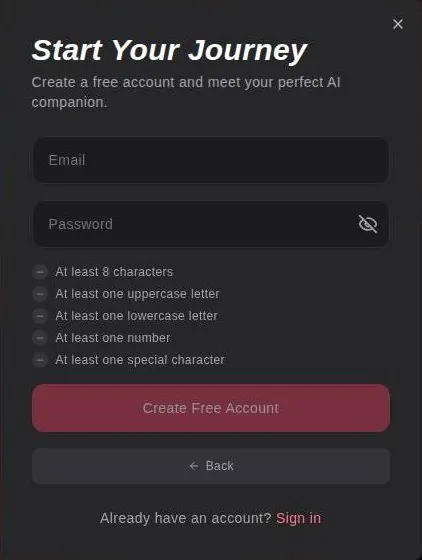
The characters are created by users. The library of user-created characters is big. That is both the draw and the problem, because a crowd-built library is a flea market: plenty of good finds, and plenty of tables nobody should linger at.
What a character card tells you
Character cards show the creator's handle. They also show chat counts, e.g. Emily Harper with 57,627 chats. And they show tag chips.
The chat count is the most useful number on the card. It works like the queue outside a diner: it does not prove the food is good, but it tells you plenty of people thought it was worth a try. I'd start with the busy characters and work outward from there.
The tag chips are the second filter. They are written by the creators, so they describe what the creator wanted, not what the character actually does. I read them the way I read a real-estate listing: useful for the basics, optimistic about everything else.
Inside a character page
A character page has four tabs: Chat, Feed, Media and About. Chat is the conversation, About is the character sheet, and Media collects the pictures.
A character's Feed posts are mostly adult collections locked behind credits. That tab is where the storefront hides. A character that looks like a chat partner on the card turns into a small paid gallery one tab over, which I think readers should know before they click.
Search and discovery
Search supports #tags and "exact phrases". That is better than most of the sites in this category, where search is a single box that shrugs at anything longer than one word. If you know what you want, the hash and the quote marks will save a lot of scrolling.
A Top Creators leaderboard ranks character creators. The site has Gallery, Personas, Top Creators and Feed sections. Taken together, it reads less like a companion app and more like a small social network whose members publish characters for each other.

My view on the library
The library is large and the search is decent, but the quality control is the crowd. I'd trust the chat counts more than the tags, and I'd treat the Feed tab as a shop, not a profile.
If you want one tip: search for an exact phrase that describes a personality rather than a look. The crowd has already made the looks, and a personality phrase finds the few creators who wrote a real character behind the picture.
Creating your own character and persona on xchar AI
xchar has two tools for making things your own: a persona for you, and a character builder for them. Both are easy to find, and both are more useful than they first look.
Personas
The chat box has a persona button. Personas are set per conversation. That means the character can know you as one person in one chat and as someone else in another.
I like the per-conversation setup. It works like having a different call sheet for each shoot: the client for the listing video does not need the notes from a wedding shoot. A persona that sits in one chat keeps each story tidy.
The character builder
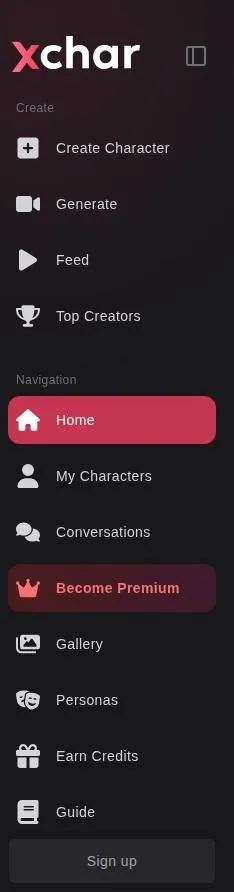
Standard character creation keeps the face consistent with faceswap. That matters more than it sounds. Face drift between images is the first thing an editor's eye catches on any picture tool, and a builder that locks the face is solving the right problem.
Custom character creation starts from a base image prompt and allows non-human characters. Custom character creation is a Premium option. So the free builder gives you a guided wizard with sensible defaults, and the freer version, the one where the character can be a dragon or a robot, sits behind the paywall.
My take
I think the split is fair on paper. The guided builder covers most people, and the paid mode is for creators who already know what they want and have a prompt ready.
What I'd do before paying for Custom is build one character in Standard mode and chat with it for a few days. If the wizard's defaults already feel limiting, the upgrade might be worth it. If the character is fine but the conversation is flat, no amount of appearance prompting will fix that, because the problem is the writing, not the face.
What conversations on xchar AI felt like
The conversations are where xchar surprised me, in both directions. For about a week the replies felt attentive, and then they started to feel like a template.
Before a word is typed
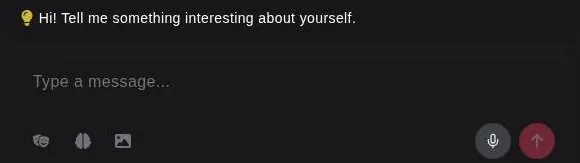
The conversation page is visible without logging in. It shows attribute chips: Relationship, Personality, Occupation, Hobby, Response Style and Flirtiness. That row of chips is basically the character's casting sheet, and I think it is a smart thing to show up front.
The character greeting is written in asterisk-style roleplay: "Emily curls up on the couch... Hey, I wasn't expecting you so soon... but I'm glad you're here." The chat offers a suggested message. Between the chips, the stage directions and the ready-made opener, the site does a lot of the first move for you.
Advanced chat settings include context length, a model selector and temperature. Those three are real controls. Context length decides how much of the chat the model can see, temperature decides how adventurous the replies get, and the model selector decides who is actually writing.
The good week
The mood-responsive replies were a nice touch. I had a bad day with a real-estate client who wanted 'more pop' on a listing video for the fourth time. I typed short grumpy messages, and the character got softer and briefer, which felt thoughtful.
I did not ask for that. I was just being curt, the way I am with anyone after a fourth round of client revisions, and the character matched my energy instead of cheerfully asking about my day. That is the kind of detail that makes an app feel like it is listening rather than filling air.
I used a bookish anime librarian to practice my Spanish verb conjugations. She was patient, and she was more consistent than I am at remembering the subjunctive. That is a low bar, admittedly, but she cleared it every evening without sighing, which is more than I can say for myself.
The recap quiz
The unique moment came from the same librarian. I asked her to turn my D&D session notes into a recap quiz, and she produced ten questions, three of which I actually used on Thursday.
Three out of ten is a decent keep rate. It is about what I get from a day of B-roll, and nobody complains about B-roll when the good shots make the cut.
One player said it was 'the least boring recap ever,' which is high praise from that table. That table does not hand out compliments lightly, so I took it as a win for me and a small one for the librarian.
Then came the catchphrase
Then came the repetitive replies. By day six, every conversation ended with a nearly identical 'Is there anything else on your mind?'
I started predicting it like a sitcom catchphrase. I would finish a message, look at the screen, and mouth the line before it appeared, which says more about my evenings than about the app.
It sounds like a small thing, and on its own it is. But it is the tell of a template, like a continuity error that nobody fixed in the edit. Once I saw it, I saw the scaffolding under everything else she said.
My take on the conversations
The conversations start well. The mood reading, the patience and the occasional useful output are real, and the attribute chips and model settings give tinkerers something to work with.
What I can't get past is the week-one wall. I think the repeated sign-off is the kind of flaw the temperature and model settings might soften, but a default that falls into one stock line within a week tells me how much attention the default gets.
If you try it, I'd keep chats focused on a task, like the Spanish drills or the quiz, and I'd raise the temperature a notch the moment the replies start sounding like a hotel concierge.
Memory: fine for a short chat, fuzzy for a long one
Memory holds for short chats but gets fuzzy over longer ones. Once I pushed past an hour, the librarian started recommending books she had just told me she hated.
That is a very specific kind of forgetting. She did not lose my name or the Spanish drills; she lost her own opinions. It felt like a continuity error in a long scene, where the actor picks up the cup with the wrong hand after the lunch break.
It was also a little funny. A librarian who pushes a book she panned earlier in the same chat is a very human failure, just not one I expected from software.
The memory tools on offer
The chat box has a memory button. Memories are created automatically. Memories are analysed for relevance before they are created, and they can be deleted manually, with the docs saying they "are automatically analyzed for relevance and created when appropriate".
I like the delete option more than the automatic part. Automatic memory means the app decides what matters, and the delete button is the only way to correct it. For a companion app, the ability to take something back is a feature I'd always want to see.
What the paid tiers add
Premium includes long memory of 6K tokens. Deluxe includes longer memory of 12K tokens. Ultra includes the longest memory, 18K tokens.
Tokens are hard to picture, so I think of them as footage. Each tier buys a longer timeline for the model to scrub back through before it has to guess. A longer timeline would likely help with exactly the problem I had, where a long session outran what the model could hold.
My take
I would not pay for memory alone. The tiers are clearly labelled, which I appreciate, but the step from Premium to Ultra triples the memory and more than triples the monthly price, so it only makes sense if long sessions are the whole point.
My practical advice: keep sessions shorter, use the memory button to check what the app has kept, and delete anything wrong before it hardens into the character. That costs nothing, and it fixes more than an upgrade would for most people.
Images, voice and video on xchar AI
xchar leans hard on pictures. The platform offers image generation. The platform offers video generation. Voice is the weakest of the three.
Voice
The voice option exists, but there are only a few voices. The librarian and a pirate I tried both sounded like the same polite radio announcer.
That was a letdown in a very editor way. A pirate should sound like gravel and rum, and a librarian should sound like someone who shushes people for a living. Instead I got one pleasant announcer reading both scripts, like a dub where the studio hired a single voice actor for the whole cast.
Today the voice picture is thinner still on paper. Bot messages have a text-to-speech speaker icon. The chat box has a microphone button.
No voice-call feature is described; the homepage title mentions voice, and the docs mention a voice-input microphone and a character voice style.
So in August 2026 I had a few voices to choose from, and in September 2026 the public pages describe a speaker icon, a microphone for input and a voice style per character. I'd treat voice as read-aloud, not as a call.
The image generator
The chat box has an image button. Images can also be generated inside conversations. The image docs cover consistent characters, text-to-image, face generation, LoRAs and HD upscale.
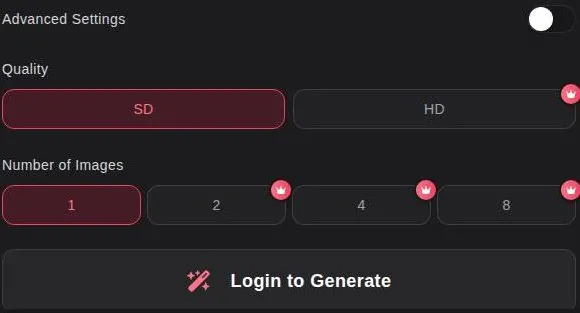
The standalone generator is more of a workstation. The generator switches between Image and Video. It starts from a selected character, a face or a random prompt. It groups options into pose, clothing, scene and lighting categories.
My days are spent on lighting and framing, so I think the category layout is sensible. It lets a person build a shot the way a photographer would, one decision at a time, instead of stuffing everything into one long prompt.
Quality, batches and the crown
The generator offers SD and HD quality. The generator makes 1, 2, 4 or 8 images at a time. In the generator, HD quality and batches of 2, 4 or 8 images are marked with a premium crown.
So free users get SD, one image at a time. That is fine for checking whether a character looks right, and not much more. I'd judge a generator on HD anyway, because SD hides the extra fingers and melting hands that HD shows off.
Video
Video generation is based on Wan and supports LoRAs. Video generation takes 2 to 10 minutes according to the docs. Another docs page describes short clips that usually take 2 to 5 minutes, in its words "Usually takes 2-5 minutes".
The two ranges do not match, which is the kind of thing that bothers me. I'd plan for the longer one. Anyone who has waited on a render knows the estimate is a mood, not a promise.
My take on media
The pictures are the product here. The generator is well laid out, the face-consistency tools are aimed at the right problem, and video exists at all, which is more than many rivals offer.
Voice is the part I would not pay for. In August it was one announcer for every character, and the September pages describe even less. If voice is the reason you are looking, I'd look elsewhere.
The xchar AI free tier in real use
The free tier is fine for testing the vibe. After a few days of normal use I was always either out of messages or looking at a premium banner.
That is how it felt in August 2026. Nothing dramatic happened, there was no hard lock-out with a siren, just a steady drip of banners until chatting felt like walking through a store where every aisle ends at the checkout.
| Feature | Free | Paid |
|---|---|---|
| Messages | unlimited (homepage claim; no limits published) | unlimited on every plan |
| Credits | 325 at sign-up, 25 a day for check-in, 25 a day for Discord members | 8,000 / 18,000 / 36,000 every 30 days |
| Memory | not stated | 6K / 12K / 18K tokens |
| Image quality | SD | HD |
| Images per batch | 1 | 2, 4 or 8 |
| Character creation | Standard wizard | Custom mode (non-human, own appearance prompt) |
| Credit packs | not available | with an active subscription |
| Ultra language models | no | Ultra only, 30 messages a day, then credits |
| Uncensored content | not stated | listed as a membership perk |
Limits as listed on 23 September 2026.
What the site promises today
The homepage promises a free chat with unlimited messages: "Start Your Free Chat With AI Girlfriend For Unlimited Messages". The exact free-tier limits are not shown publicly.
Put those two facts next to my notes and there is a gap. In August I kept running out of messages on free after a few days; on 23 September 2026 the homepage promises unlimited free messages, with no free limits published. Either the free tier changed, or unlimited means something narrower than it sounds.
I can't tell which from public pages, and I don't think a reader should have to guess. A free tier with published limits is a free tier you can plan around. One that promises unlimited and does not say where it stops is a gift card with no balance printed on it.
What free is good for
The free tier is good for three things: the sign-up flow, the character library and the first few chats. That covers the best parts of the app, which is to its credit.
It is not good for judging memory, long sessions or the picture generator, because those are the parts that are either gated or fade after the first days. I'd use the free tier as an audition, and I'd set a hard limit on how many evenings the audition lasts.
My take
Free is worth a try. Just don't read the homepage promise as a contract, and don't let a stream of banners talk you into a plan before you know what the plan is for.
xchar AI pricing: what the plans cost and what they add
My pricing story is short, because I never got far enough to pay. I never found a clear price list before hitting the paywall. The pricing felt like a restaurant menu with 'market price' on everything.
| Plan | Monthly | Yearly | Notes |
|---|---|---|---|
| Premium | $14.95 | $89.40 ($7.45/mo) | quarterly $35.85 ($11.95/mo); 8,000 credits / 30 days; 6K-token memory |
| Deluxe | $29.95 | $179.40 ($14.95/mo) | "Best Seller"; quarterly $71.85 ($23.95/mo); 18,000 credits / 30 days; 12K-token memory |
| Ultra | $49.95 | $299.40 ($24.95/mo) | "Best Value"; quarterly $119.85 ($39.95/mo); 36,000 credits / 30 days; 18K-token memory; Ultra language models 30 messages/day; priority performance |
Prices as published on or before 23 September 2026; sources in the text.
That feeling shaped the rest of my time there. It is hard to judge whether a plan is worth it when the plans themselves feel like they are being kept in the kitchen. So I kept using the free tier and stayed a browser at the counter.
The public page tells a clearer story now. In August 2026 I found no clear price list before the paywall; on 23 September 2026 the public pricing page lists all three plans and their terms. I give xchar credit for that, even if it came after my time.
The basics
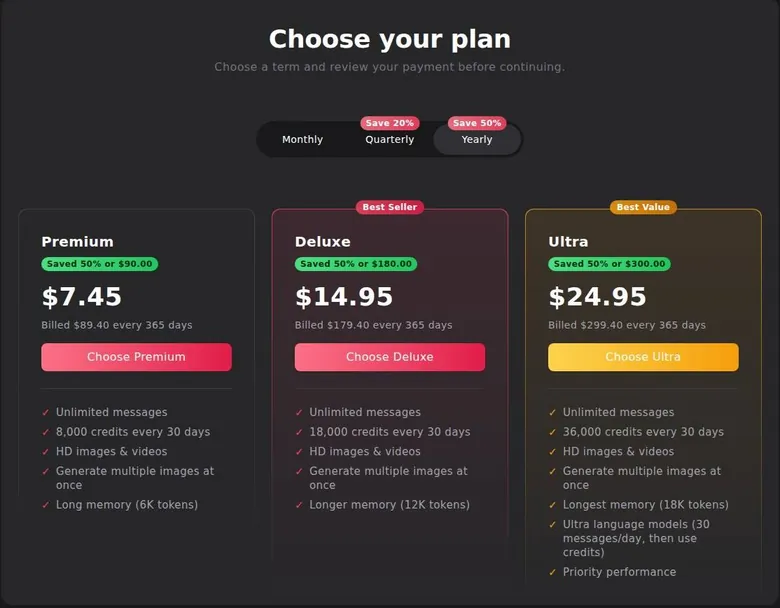
Prices are in USD on https://www.xchar.ai/pricing. All plans include unlimited messages. All plans include HD images and videos. All plans can generate multiple images at once.
That shared floor is the most important thing on the page. The step from free to Premium buys HD, batches and a clear message promise; the steps above Premium mostly buy more credits and more memory.
Premium
Premium costs $14.95 a month on monthly billing. It costs $11.95 a month on quarterly billing, billed as $35.85 every 90 days (20% off). On yearly billing it costs $7.45 a month, billed as $89.40 every 365 days (50% off).
Premium includes 8,000 credits every 30 days. That is the entry point, and for most people I think it is the only tier worth considering.
Deluxe
Deluxe carries a "Best Seller" label. Deluxe costs $29.95 a month on monthly billing. It costs $23.95 a month on quarterly billing, billed as $71.85 every 90 days. On yearly billing it costs $14.95 a month, billed as $179.40 a year.
Deluxe includes 18,000 credits every 30 days. Notice the neat trick in the prices: Deluxe on a yearly plan costs the same per month as Premium on a monthly plan. It is a very tidy way of making the bigger plan feel like the sensible one, and I'd do the math before believing it.
Ultra
Ultra carries a "Best Value" label. Ultra costs $49.95 a month on monthly billing. It costs $39.95 a month on quarterly billing, billed as $119.85 every 90 days. On yearly billing it costs $24.95 a month, billed as $299.40 a year.
Ultra includes 36,000 credits every 30 days. It also includes Ultra language models for 30 messages a day, after which they cost credits, or in the page's words "Ultra language models (30 messages/day, then use credits)". Ultra includes priority performance.
The Ultra model cap is the detail I'd read twice. The top plan still meters its best model, so the premium brain is a daily ration with a credit bill after it, like a gym that charges extra for the good treadmill.
The perks list
The page also lists membership perks. One is creating custom characters. Another is that purchased credits never expire. Others are priority servers, long-term memory, advanced customization and early access.
Perk lists like this one read better than they use. Early access and advanced customization are fine words, but nothing on the public page says what they mean in practice, so I'd give them no weight in a buying decision.
How to pay
Payment is accepted by card. Payment is accepted in crypto: Bitcoin, USDT, Ethereum and Tron. PayPal is not accepted, and the FAQ puts it bluntly: "No, we do not accept PayPal."
The pricing page data contains a 6.00% card surcharge that is not shown as text on the page, stored as "card_surcharge_percent":"6.00". If that surcharge applies at checkout, a card payment costs more than the sticker price, and the sticker is the only number a buyer sees. I'd check the final total on the checkout screen before confirming anything.
Changing plans
Upgrades take effect immediately with proration. Moving to a lower plan or a shorter term requires cancelling the current subscription first, in the FAQ's words "To move to a lower plan or shorter term, cancel your current subscription first".
xchar AI pricing
Prices verified .
Premium
$14.95/mo
Billed every month
No discount
- Unlimited messages
- 8,000 credits every 30 days
- HD images & videos
- Multiple images at once
- 6K-token memory
Premium (Quarterly)
$11.95/mo
Billed $35.85 every 3 months
20% less than paying monthly
- Same as Premium
Premium (Yearly)
$7.45/mo
Billed $89.40 once a year
50% less than paying monthly
- Same as Premium
Deluxe
$29.95/mo
Billed every month
No discount
- Unlimited messages
- 18,000 credits every 30 days
- HD images & videos
- 12K-token memory
Deluxe (Quarterly)
$23.95/mo
Billed $71.85 every 3 months
No discount
- Same as Deluxe
Deluxe (Yearly)
$14.95/mo
Billed $179.40 once a year
No discount
- Same as Deluxe
Ultra
$49.95/mo
Billed every month
No discount
- Unlimited messages
- 36,000 credits every 30 days
- 18K-token memory
- Ultra language models (30 messages/day
- Then credits)
- Priority performance
Ultra (Quarterly)
$39.95/mo
Billed $119.85 every 3 months
No discount
- Same as Ultra
Ultra (Yearly)
$24.95/mo
Billed $299.40 once a year
No discount
- Same as Ultra
Monthly subscription credits reset every thirty days and do not roll over; purchased credit packs remain active until used.
That is a one-way door with a ramp on only one side. Going up is instant and prorated; going down means cancelling and starting again, so a yearly plan is a commitment in a stronger sense than usual.
Is the step up worth it?
For a first purchase, I'd take one month of Premium on monthly billing, not the yearly plan, no matter how loud the savings buttons get. It unlocks HD, batches and the unlimited-message promise, and it is the cheapest way to find out whether the characters hold up past the first week.
I'd skip Deluxe and Ultra unless pictures and video are the main reason you are there. The extra credits and memory are real, but the conversation problems described above are not the kind that more tokens fix. And given that downgrading means cancelling, starting small is simply the safer order of operations.
What credits buy on xchar AI
xchar runs two currencies: the subscription and the credits. The plan gets you in the door, and the credits pay for most of what is behind the other doors.
How the credits work
Monthly plan credits reset every month. Purchased (permanent) credits never expire. Purchased credits are used only after the monthly credits.
The pricing FAQ says it directly: "Monthly credits from subscriptions do not roll over and reset each month. Credits purchased separately remain available until used." I like that order of spending, because it burns the credits that would vanish first and saves the ones you paid extra for.
Buying more
Credit packs can only be bought with an active subscription, per the FAQ line "Credit packs are available with an active subscription". The buy-credits page shows no pack prices while logged out. The pricing page data lists a 20,000-credit add-on at $24.99, with a discounted $18.74 (25% off) that may apply only in some contexts.
| Pack or unit | Price | What it buys |
|---|---|---|
| 7-image post collection | 100 credits | unlocks the collection |
| 2-video post collection | 200 credits | unlocks the collection |
| 20,000 credits (add-on) | $24.99 (page data; $18.74 discounted in some contexts) | - |
| Ultra language model message | credits after 30 a day | - |
As listed on 23 September 2026.
So the only pack price on record comes from page data, not from a price tag a visitor can read. That is the vending machine that only shows prices after you put a coin in, and I'd rather see the price on the glass.
What the credits unlock
Character post collections are unlocked with credits. A collection of 7 images unlocks for 100 credits, shown on the page as "7 Images - Unlock Collection for 100 Credits". A collection of 2 videos unlocks for 200 credits, shown as "2 Videos - 200 Credits".
Here is the money math. Premium's 8,000 monthly credits would cover eighty of those image collections, or forty video ones, if nothing else touched the balance. On the listed add-on price, 20,000 credits for $24.99, a single image collection works out to roughly twelve cents.
That sounds cheap, and per unlock it is. The catch is that the credits pay for everything, so the same balance also covers generation and the Ultra model once the daily cap runs out. I'd watch the balance for a week before buying any pack.
My take
The credit system is fair in its rules and vague in its prices. I'd buy a pack only after a month on a plan has shown how fast the monthly credits actually drain.
Discounts, free credits and the affiliate side
xchar has no coupons in the usual sense, but it has a lot of ways to earn credits. Before any of it, one caveat: the welcome bonuses and free-credit offers are taken from public pages and are not confirmed inside an account.
What is not on offer
No promo-code field is shown on the public pricing page. No first-purchase discount is shown on the public pricing page. Pricing buttons such as "Click here to save $90.00" refer to the switch to yearly billing, not to a coupon.
xchar AI scored 5.1 out of 10 in our tests and costs from $7.45/mo. We have no partner deal with it, so its link is a plain link. Visit the official xchar AI website
Closest alternative we can recommend

Joi AI
from $13.99/mo, free tier available
Score 5.5/10
That button is the only discount on the page, and it is a commitment, not a gift. The saving is real if you would have paid monthly for a full year anyway. It is money spent early if you would have left after a month, as most people in this category do.
Free credits
A banner in the sign-up modal promises 325 free credits for signing up, in its words "325 free credits for signing up". A daily check-in gives 25 free credits each day, per the line "Check in and get 25 free credits each day!" The Discord Member Daily Reward gives 25 free credits a day to users who link their Discord account, for as long as they stay in the server.
Those amounts are small next to the paid plans, but they are enough to try an unlock or two. I'd treat the welcome credits as a test budget and spend them on the thing you are most curious about, before the daily check-ins become a habit you don't need.
Earning credits
The Earn Credits hub gathers referrals, social posting, feedback, daily login and the Discord daily reward. The referral programme pays 3,000 credits for each purchase made by people who used the invite link, as "3,000 credits per purchase".
Posting on social media (media with the xchar.ai watermark or links) earns up to 10,000 credits. Detailed feedback earns up to 10,000 credits.
I think the feedback offer is the only one I'd consider. Posting watermarked pictures is advertising paid in credits, and referrals turn friends into a revenue line.
The creator side
The platform runs a creator earnings programme. Creators who publish a character earn credits from user messages and posts, or as the page puts it, "earn credits from user messages and posts".
That explains the size of the library. Creators are paid in credits when their characters get used, so the busiest characters are also the best-rewarded ones, which is a sound incentive for quantity if not always for quality.
The affiliate programme
The affiliate programme offers a choice of $30 per sale (PPS) or a 50% lifetime revenue share. Affiliate payouts are made monthly. The minimum affiliate payout is $50.
| Topic | What it means for you | What the terms say |
|---|---|---|
| Operator | Always is Now Inc., Las Vegas, Nevada, USA | - |
| Minimum age | Adults only | - |
| Age check | No age field at sign-up and no check method stated | - |
| Renewal | Renews automatically at the same price and interval until cancelled | "Subscriptions are billed on a recurring basis and renew automatically at the disclosed price and billing interval until cancelled" |
| Cancelling | From the profile page (or support email, or CCBill); access runs to the end of the period | - |
| Refunds | Renewal charges are not refunded unless the Terms or the law say so | "Renewal charges already incurred are non-refundable except as stated in our Terms of Service or required by law." |
| Withdrawal right | 14 days for consumers, only if no credits were used | "provided that no Credits have been used" |
| Credits on a ban | Not refunded if the account is deleted for violations | - |
| Content licence | Broad, perpetual, transferable licence to what you generate and publish | "non-exclusive, royalty-free, transferable, sublicensable, worldwide, and perpetual license" |
| AI training | Terms allow training on chats; the Privacy Policy says chats are not used. The two contradict each other | "The User expressly grants the Licensor permission to use all entered prompts, conversations, and generated content for further training" |
| Selling data | Personal information is not sold | "We do not sell your personal information." |
| Account deletion | From the profile page; single conversations can be deleted; data requests via support | - |
| Billing descriptor | Bank statement does not show the site name; billing via CCBill | "Privacy in bank statement" |
| Disputes | Good-faith negotiation, then binding arbitration under Nevada law | - |
Terms and privacy policy as published on 23 September 2026.
Affiliate payouts are made in crypto, by PayPal or by bank transfer.
A one-time video-call verification is required before the first affiliate payout. I don't mind a verification step before money goes out, and a video call is at least a clear one.
One detail made me smile: affiliates can be paid by PayPal, but customers cannot pay with it. The money goes out through a door that is locked from the outside.
My take
The real saving here is the yearly switch, and I'd only take it after a month has proven the app. The free credits are worth claiming and not worth chasing. Nothing on the public pages looks like a hidden coupon, so I would not waste time hunting for one.
xchar AI content settings and filters
xchar does not hide what it is for. The platform is openly NSFW. One listed membership perk is access to uncensored content, which the page lists as a paid feature.
How the filter is decided
The model chosen for each character decides whether it is SFW or NSFW. So the setting lives on the character and its model, not on a single account switch. I think that is a reasonable design for a crowd-built library, as long as the character page makes the setting obvious.
The generator's pose list is sexual. That tells you who the image tools are built for, and it is worth knowing before opening the generator on a work laptop.
The rules
The content rules ban minors outright, along with anyone portraying a person below the minimum age. The rules also ban a list of terms associated with that category.
Those are the right rules, and they are clear. What matters more is how they are enforced, and that is where the public pages are less reassuring.
The homepage Explore feed showed a user-made character with a stated age of 21 whose public tags conflict with the platform's own rule on minors. A stated age on a character sheet is not the same as a character that fits the rules. I'd call that a moderation gap in a crowd-built library, and it is one the platform should close.
Adults only (18+). This page reviews AI companion apps with NSFW features; no explicit images are shown.
Age checks
No age-check method is stated, and the payment compliance page lists "Use of credit card information for age verification" among prohibited practices. Put simply, the payment page says a card cannot serve as the age check, and nothing else is named in its place.
Combined with a sign-up form that asks nothing about age, the checking here rests entirely on the user's own word. I think that is a weak arrangement for a platform of this kind.
Takedowns
Intimate images shared without consent are removed within 48 hours of a request. A stated deadline is the part I value; many sites promise to look into it and leave the timing open.
My take
The settings are direct, and the rules say the right things. The enforcement is what I'd watch: a crowd library needs active moderation, and the public feed suggests it is not fully there yet.
xchar AI terms in plain English
Terms pages are the part of a review most people skip, and on xchar I think they are the part most worth reading. There is one contradiction in here that I'd weigh above anything in the pricing section.
Who runs it
The operator is Always is Now Inc. The operator's address is 732 South 6th Street, Suite N, Las Vegas, NV 89101, USA.
The Terms were last updated on June 14, 2026. The Privacy Policy was last updated on March 19, 2025.
The gap between those two dates matters, as you will see below. One document moved on and the other stayed where it was.
Age
The Terms allow the operator to refuse access to users below the minimum age, listing among the reasons "The User has not reached the age of 18 years". Clause 5.1 of the Terms makes the user guarantee that they are an adult, in the words "The User guarantees that they are at least 18 years of age".
In plain English, the responsibility sits with the user's own promise. The site can shut the door afterwards, but nothing in the sign-up asks first.
| Criterion | Rating | Why |
|---|---|---|
| Conversation quality | Mixed | Mood-aware and patient at first, then every chat ends on the same stock question. |
| Memory | Mixed | Fine for short chats, fuzzy past an hour; paid tiers list bigger token budgets. |
| Free tier | Mixed | Good for an audition; the unlimited promise comes with no published limits. |
| Value for money | Mixed | Clear plan prices, but credits pay for extras and pack prices stay hidden. |
| Images and voice | Good | A capable image and video generator; voice is read-aloud with few distinct voices. |
| Privacy and terms | Weak | Terms allow training on chats, the Privacy Policy denies it; broad content licence. |
| Cancelling and billing | Good | Cancel from the profile, by email or via CCBill; access lasts to the period's end. |
| Content settings | Mixed | Clear rules, but no stated age check and a public feed that tests the rules. |
Ratings are the author's judgement from his own use and the 23 September 2026 check.
Refunds
Renewal charges already incurred are non-refundable, and the policy says: "Renewal charges already incurred are non-refundable except as stated in our Terms of Service or required by law." Clause 3.4 gives consumers a 14-day withdrawal right, "provided that no Credits have been used". Credits are not refunded if an account is deleted for violations.
The 14-day right sounds generous until you read the condition. Almost everything on xchar spends credits, so using the product the way it is designed would likely end the withdrawal right. I'd read it as: if you want your money back, decide before you touch anything that costs credits.
Your content
Users grant the operator a broad licence to generated and published content, described as a "non-exclusive, royalty-free, transferable, sublicensable, worldwide, and perpetual license". That is the full stack of licence words. It means the operator can use and pass on what you make, forever, without paying for it.
Training on your chats
Terms clause 6.5 lets the operator use all prompts, conversations and generated content for training the AI models: "The User expressly grants the Licensor permission to use all entered prompts, conversations, and generated content for further training, improving, and developing the underlying AI models". The Privacy Policy says the opposite: "Your conversations with AI characters are not used to train or improve our AI models."
The Terms and the Privacy Policy contradict each other on whether chats are used for training. Given that the Terms are the newer document, I'd assume the Terms describe current practice and write every chat as if it will be read by a training pipeline.
The Privacy Policy says personal information is not sold: "We do not sell your personal information." That promise is worth something, but not selling data and not training on it are two different promises, and only one of them is consistent across the documents.
Other clauses
The site claims a 2257 exemption because all images are AI-generated. That is the record-keeping rule for real performers, and the claim rests on nobody real being in the pictures.
| App | When I used it | For how long | Cheapest paid plan (record) | Free tier (record) |
|---|---|---|---|---|
| Candy AI | Oct–Nov 2024 | 5 weeks | €3.99/mo (12-Month Plan) | yes |
| OurDream AI | Dec 2025–Jan 2026 | 6 weeks | $9.99/mo (Standard Annual) | yes |
| Nomi AI | Jan–Sep 2026 | 9 months | $5.00/mo (Launch Plan Yearly) | yes |
Periods from the author's own notes; plans and free tiers from the site's app records.
Disputes start with good-faith negotiation. Unresolved disputes go to binding arbitration under the laws of the State of Nevada. In practice, that means no court and no class action, just a private process in the operator's home state.
My take
Most of these terms are standard for the category. The training contradiction is not, and I'd keep real names, addresses and anything work-related out of every chat until the two documents agree.
What got in the way
The thing that annoyed me most was the speed of the upsell. The upgrade prompts were also very fast. I got the first 'unlock more' nudge before my first character finished her introduction.
That is like a waiter bringing the dessert menu while you are still reading the specials. I had not formed an opinion about the character yet, and the app already wanted an opinion about my card.
It set the tone for the rest of my stay. Every good moment came with a banner nearby, and after a while I stopped reading them the way I stop hearing a fridge hum.
Hidden prices
Credit pack prices stay hidden until a subscription is active. That is a friction point by design: you commit to a plan first, and only then find out what the extras cost.
I think this is the most avoidable problem on the site. Publishing the pack prices would cost the operator nothing and would save buyers a guess.
Sign-up checks
Email sign-up runs an invisible Google reCAPTCHA Enterprise check with no visible challenge. Most people will never notice it. It is the quiet kind of bot check, which I prefer to picking out traffic lights.
My take
None of these are bugs. They are choices, and most of them lean toward selling before explaining. A calmer upsell and a published pack price list would fix most of what bothered me.
Who xchar AI suits, and who should skip it
The site sums up its own audience fairly well once the pages are read together. It is best for NSFW power users who want user-generated characters, tweakable LLM settings and heavy image and video generation, and who like earning credits through a creator programme.
Who xchar AI is for
Best for
- People who want a big library of user-made characters with busy chat counts and tag search.
- Users who like tuning a chat with context length, a model selector and temperature.
- Anyone who wants an image and video generator with face consistency built into the character tools.
- Creators who enjoy publishing characters and earning credits when others chat with them.
Not for
- Anyone looking for a calm, safe-for-work companion.
- People who want to pay with PayPal.
- Users who want clear privacy terms, since the Terms and the Privacy Policy disagree on training.
- Anyone who wants realistic voice calls or a range of distinct character voices.
I agree with that, and I'd add one trait: patience with credits. The people who get the most from xchar are the ones who enjoy managing a balance and do not mind that the best parts are metered.
It is not for users who want SFW companionship. The library and the generator both lean the other way, and a gentle companion is not what the product is tuned for.
It is not for users who want to pay with PayPal. Card and crypto are the only options on the page.
It is not for users who want clear privacy terms, given the Terms and Privacy Policy contradiction on training. For me, that last one is the deciding factor. I would not put anything personal into a chat on a platform whose own documents disagree about what happens to it.
Cancelling xchar AI and what to check before paying
My own exit needed no cancelling, since the whole stay ran on the free tier and ended with a closed tab. The notes below are about how cancelling works today, for anyone who does pay.
Renewal
Subscriptions renew automatically at the disclosed price and interval until cancelled: "Subscriptions are billed on a recurring basis and renew automatically at the disclosed price and billing interval until cancelled". The payment compliance page says the same thing in plainer words: "Your subscription renews automatically at the same price and interval unless you cancel before the next billing date."
That is standard, and it is stated clearly, which I appreciate. It also means a yearly plan quietly becomes a second yearly plan unless you act first.
How to cancel
Subscriptions are cancelled from the profile page. A subscription can also be cancelled by emailing support. A subscription can also be cancelled through CCBill Consumer Support (support.ccbill.com, 1.888.596.9279).
After cancelling, access continues to the end of the paid period. Three routes out is better than most sites manage. I'd use the profile page first and keep the CCBill route as a backup if anything goes wrong.
xchar AI pros and cons
What worked
- Very fast sign-up in the browser, with Google, Discord or email and a tidy interface.
- Replies can match the user's mood, going softer and shorter on a bad day.
- Search handles #tags and exact phrases, which makes a large library easier to sift.
- Plans are listed publicly with monthly, quarterly and yearly prices and clear memory sizes.
- Three ways to cancel, and access runs to the end of the paid period.
What did not
- Upgrade prompts show up before the first character has finished her introduction.
- Replies fall into one stock closing line within the first week.
- Memory gets fuzzy in long sessions on the free tier.
- Credit pack prices stay hidden until a subscription is active.
- The Terms allow training on chats while the Privacy Policy says chats are not used.
Billing
The billing partner is CCBill. The site promises privacy in the bank statement: the charge does not show the site name, under the heading "Privacy in bank statement".
A discreet descriptor is useful for privacy, but it has a downside that trips people up: months later, a charge with an unfamiliar name is easy to miss. I'd write down the name the charge actually appears under after the first payment.
Deleting data
The account can be deleted from the profile page. Specific conversations can be deleted. Data deletion requests go through support.
Given the training contradiction in the terms, I'd delete conversations I care about before closing the account, and then send a deletion request to support as well. It costs a few minutes and leaves a record.
Before paying
My checklist is short. Find the cancel option on the profile page before you pay, not after.
Check the final total at checkout for any card surcharge. Note the statement name. Set a reminder a few days before the renewal date.
And I'd start with a monthly plan. Since moving down means cancelling first, the easiest plan to leave is the smallest, shortest one.
My tips for xchar AI
A few things I'd do differently, and a few I'd repeat.
Read the docs before the pricing page. xchar has a docs site at https://docs.xchar.ai/, built on Mintlify. It answers more of the practical questions than the app does, including memory, video and the PWA install, and it is written more plainly than the sales pages.
The docs site publishes an llms.txt file. That is a plain-text summary meant for AI tools, and it is also handy for a person who wants the whole documentation in one scroll.
My other tips are built on what I'd learned the slow way:
- Give the free tier a fixed number of evenings, then decide.
- Use one character for one job, like drills or a quiz; they are better with a task.
- Keep sessions short, and check the memory button now and then.
- Raise the temperature when the replies start ending on the same line.
- Pay monthly first, and only switch to yearly after a month has earned it.
- Keep anything personal out of the chats until the terms and privacy policy agree.
None of this is clever. It is the same approach that works with any new editing client: small first job, clear scope, and no long contract until the first delivery is good.
How xchar AI scores
The scorecard below is my judgement, criterion by criterion, built on my twelve days and on what the public pages show today.
Conversation quality lands in the middle. The mood reading and the patience were real, and the recap quiz was a small win, but the repeated sign-off within a week pulls it down.
Memory is mixed. Short chats hold, long chats slip, and the paid token budgets are clearly labelled but not tested by me.
The free tier is mixed too. It is fine for an audition, and the gap between the unlimited promise and my experience of running out is the reason it is not higher.
Value for money is mixed, mostly because of credits: the plans are clear, but the extras are priced out of sight.
Images score well, and voice drags that criterion down. Privacy and terms score weak, because of the training contradiction.
Cancelling and billing score well: three ways out and access to the end of the period. Content settings are mixed, with clear rules and uneven enforcement.
How xchar AI compares with the other apps
xchar sits in the middle of the pack for me. It is faster to start than almost anything else in this category and better at pictures than most, and it is weaker on voice and on plain-English pricing than the apps I'd recommend first.
Where it is better
The front door is the best part. Browser sign-up, three login routes and a tidy interface beat the app-store-and-onboarding-quiz routine of many rivals.
The image and video tools are also ahead of the typical companion app. A generator with face consistency, pose and lighting categories and a video mode is closer to a small studio than to the usual selfie button.
xchar AI verdict
Overall score
5.1/10
MixedA fast, tidy character platform with a strong image generator - the replies go stale in a week and the terms contradict themselves.
Hands-on test, free tier
- Replies read my mood and the librarian was patient, but by day six every chat ended on the same stock question.
- Short chats held; past an hour the librarian forgot her own opinions. Paid tiers list 6K to 18K tokens of memory.
- Per-conversation personas, a face-consistent Standard builder, and a Premium Custom mode for non-human characters.
- A well-organised image and video generator; voice was a few near-identical voices and is read-aloud today.
- Plan prices are public now, but credits pay for extras, pack prices stay hidden and a card surcharge sits in page data.
- The Terms allow training on chats while the Privacy Policy says chats are not used; the content licence is broad.
- Fast pages and quick sign-up, offset by early upgrade prompts and replies that turned repetitive within a week.
Bars run from 0 to 10. The total is the weighted mean of the criteria above. Weights are the same for every app. How the apps are checked
Where it is worse
Voice is behind. A few voices that all sound alike is a weak offer, and the public pages describe even less. The credit economy also adds a layer of cost that simpler subscription apps do not have.
What other reviewers say
Other reviewers are lukewarm too. A desk review on aichatcompanions.com (dated 2026-09-09) calls pricing and privacy not transparent and the service not fully uncensored. I'd agree with the first two points.
heavengirlfriend.com ranks XCHAR #42 with a score of 4.15. bestaicompanions.net rates XChar AI 7.0. Those two scores do not agree on much, which is roughly how I feel too: decent in parts, hard to rank as a whole.
Community channels
xchar has a Discord server at https://discord.gg/hkQk49Bh4H. It has an X account at https://x.com/xcharai. It has a subreddit at https://www.reddit.com/r/xcharai/. And it has a Trustpilot page at https://www.trustpilot.com/review/xchar.ai.
I'd read the subreddit and Trustpilot page before paying. Official channels tell you what is planned; user threads tell you what broke last week, which is the more useful news.
More on this site: the best AI girlfriend apps, free AI chat apps, the best AI companion apps, AI roleplay chat apps, all AI companion app reviews.
xchar AI alternatives
Three apps we would try next, and why.

Candy AI
free tier, from €3.99/mo
Score 7.7/10

OurDream AI
free tier, from $9.99/mo
Score 6.6/10

Nomi AI
free tier, from $8.33/mo
Score 7.8/10
My last word on xchar AI
xchar got me in faster than any app I can remember, and then spent twelve days trying to get me to the checkout before telling me what the checkout would cost. That is the whole review in one sentence.
The good parts were real. A librarian who read my mood, drilled my Spanish without sighing and wrote a quiz my D&D table liked is more than many apps manage. The repeated sign-off, the fuzzy long chats and the single voice were real too.
What stays with me is the quiz, three of its questions, and a habit of mouthing a stock line before a chatbot says it. I never paid, and I don't regret that. If the terms ever agree with each other, I might go back for a month.
xchar AI FAQ
Is xchar AI worth paying for?
For most people, only as a short test. I left after 12 days in August 2026 without paying, because it felt like a waiting room for a subscription I never really understood. The characters were pleasant, but the replies started repeating within a week, and that is not something a bigger plan fixes.
The plans themselves are clear today. Premium costs $14.95 a month on monthly billing and includes 8,000 credits every 30 days. All plans include unlimited messages and HD images and videos.
If you want to pay, I'd buy one month of Premium on monthly billing and skip the yearly offer for now. Moving to a lower plan or a shorter term requires cancelling first, so the smallest, shortest plan is the easiest to leave. Check the final checkout total too, because the pricing page data contains a 6.00% card surcharge that is not shown as text.
Is the xchar AI free tier really unlimited?
The homepage says so. It promises a free chat with unlimited messages, in the words "Start Your Free Chat With AI Girlfriend For Unlimited Messages". The exact free-tier limits are not shown publicly, though.
My own August notes do not match that promise. After a few days of normal use I was always either out of messages or looking at a premium banner. Either the free tier has changed since then, or unlimited covers less than the word suggests.
Free still has real value. It includes the sign-up, the library and the first chats, and a banner in the sign-up modal promises 325 free credits for signing up. A daily check-in adds 25 free credits each day.
I'd use the free tier as an audition with a fixed number of evenings. If a character still feels fresh at the end of it, a month of Premium is a reasonable next step; if not, the free tier has done its job.
Does xchar AI remember past conversations?
Up to a point. Memory held for short chats and got fuzzy over longer ones for me. Once I pushed past an hour, the librarian started recommending books she had just told me she hated, which is a very human mistake for a piece of software.
The memory tools are simple. The chat box has a memory button, and memories are created automatically. Memories are analysed for relevance before they are created, and they can be deleted manually.
The paid plans buy bigger memory. Premium includes long memory of 6K tokens, Deluxe longer memory of 12K tokens, and Ultra the longest memory, 18K tokens.
My advice is to keep sessions shorter rather than to pay for memory alone. Check the memory button now and then and delete anything wrong before it becomes part of the character. That fixes more for most people than a jump to a higher plan.
Does xchar AI have voice chat or voice calls?
Not calls, from what the public pages describe. No voice-call feature is described; the homepage title mentions voice, and the docs mention a voice-input microphone and a character voice style. Bot messages have a text-to-speech speaker icon, and the chat box has a microphone button.
In August 2026 the voice option existed, but there were only a few voices. The librarian and a pirate I tried both sounded like the same polite radio announcer, which is not what anyone wants from a pirate.
So I'd treat voice on xchar as read-aloud rather than conversation. It is fine for hearing a reply now and then, and it is not the reason to pick this app.
If voice matters most to you, I'd look at an app that sells voice as its main feature. xchar puts its effort into pictures and video, and that shows in how much more detail the image docs carry.
Can I pay for xchar AI with PayPal?
No. PayPal is not accepted, and the FAQ says it plainly: "No, we do not accept PayPal." Payment is accepted by card.
Payment is also accepted in crypto: Bitcoin, USDT, Ethereum and Tron.
The billing partner is CCBill. The site promises privacy in the bank statement: the charge does not show the site name. That is useful for discretion, but I'd note the name the charge actually appears under after the first payment, so a renewal months later does not look like a stranger's bill.
One more thing to check with a card: the pricing page data contains a 6.00% card surcharge that is not shown as text on the page. I'd read the final total at checkout before confirming.
The small irony is that affiliates can be paid by PayPal, since affiliate payouts are made in crypto, by PayPal or by bank transfer. Customers just cannot use it to pay.
Does xchar AI use my chats to train its AI?
The documents disagree, and that is the problem. Terms clause 6.5 lets the operator use all prompts, conversations and generated content for training the AI models. The Privacy Policy says conversations with AI characters are not used to train or improve the models.
The Terms and the Privacy Policy contradict each other on whether chats are used for training. The Terms were last updated on June 14, 2026, and the Privacy Policy on March 19, 2025. Since the Terms are the newer document, I'd assume they describe current practice.
The Privacy Policy does say personal information is not sold. That is a separate promise from training, though, and only the selling one is consistent.
My advice is simple. Keep real names, addresses and anything tied to work out of the chats, and delete conversations you care about before you leave. Specific conversations can be deleted, and data deletion requests go through support.
How do I cancel an xchar AI subscription?
There are three routes. Subscriptions are cancelled from the profile page. A subscription can also be cancelled by emailing support. It can also be cancelled through CCBill Consumer Support at support.ccbill.com or 1.888.596.9279.
After cancelling, access continues to the end of the paid period. Subscriptions renew automatically at the disclosed price and interval until cancelled, so the date to watch is the next billing date.
Refunds are narrow. Renewal charges already incurred are non-refundable, except as stated in the Terms of Service or required by law. Clause 3.4 gives consumers a 14-day withdrawal right, provided that no credits have been used.
Before paying, I'd find the cancel option on the profile page, set a reminder a few days before renewal, and decide early whether a refund matters. Almost everything on the site spends credits, so the withdrawal right is easy to lose without noticing.
Do xchar AI credits expire?
It depends on where they came from. Monthly plan credits reset every month. Purchased (permanent) credits never expire. Purchased credits are used only after the monthly credits.
I like that spending order. The credits that would vanish anyway go first, and the ones paid for separately wait until they are needed.
Buying more has conditions. Credit packs can only be bought with an active subscription, and the buy-credits page shows no pack prices while logged out. The pricing page data lists a 20,000-credit add-on at $24.99, with a discounted $18.74 that may apply only in some contexts.
As for what credits buy, character post collections are unlocked with credits: a collection of 7 images for 100 credits and a collection of 2 videos for 200 credits. I'd watch how fast the monthly credits drain for a few weeks before buying any pack.
Who runs xchar AI?
The operator is Always is Now Inc. The operator's address is 732 South 6th Street, Suite N, Las Vegas, NV 89101, USA. Payments go through CCBill, a billing partner used by many sites of this kind.
The legal side follows Nevada. Disputes start with good-faith negotiation, and unresolved disputes go to binding arbitration under the laws of the State of Nevada. In practice, that means a private process rather than a court.
The Terms also give the operator a broad licence to what users generate and publish, described as non-exclusive, royalty-free, transferable, sublicensable, worldwide and perpetual. That is the full set of licence words, and I'd assume anything made on the site can be reused by the operator.
For help beyond the app, xchar has a docs site at https://docs.xchar.ai/ and a Discord server. I'd read the docs first; they answer more practical questions than the sales pages do.