

Wyvern Chat AI Review: A Free Roleplay Workshop With a Queue
- Hands-on test, paid plan
- Checked

Free plan available
from $25/mo
WyvernChat review: my verdict
WyvernChat introduces itself plainly, under the title "WyvernChat: AI Roleplay, Characters & Worlds", and it lives at app.wyvern.chat. As of 23 September 2026 the whole app still carries a "Beta" label. I read that as an honest warning rather than a pose: features move fast here, and rough edges are part of the deal.
After three months I dropped back to free. It's a tinkerer's platform, and I'd tinkered enough for one summer. That sounds like a breakup line, but it felt more like wrapping a project: I got what I came for and closed the laptop.
My verdict is simple. If you like opening the hood, writing lorebooks and picking your own model, WyvernChat is one of the most generous free roleplay sites around, and the first paid step is cheap. If you want a companion that says good morning and remembers your week without any setup, this is a workshop, not a living room.
The best comparison I can offer is a rental edit suite that stays open all night for free, as long as you don't mind waiting for the render. That is a good deal for the right person. It is a confusing one for everybody else.
Key takeaways
- The free tier is real: unlimited chat on shared open models, with no ads, paid for in waiting time rather than money.
- The creator tools are the draw: card imports, lorebooks, group scenes and scripting that runs inside the chat.
- Memory is the weak spot in long scenes, and the long-term memory tools sit behind a subscription.
- Subscriptions are sold and billed by Featherless, the model provider, so the money side lives on another company's site.
- The terms name no company and no country, so trust rests on the team's reputation rather than on paper.
WyvernChat at a glance
- Price from
- $25/mo
- Free tier
- Free plan available
- NSFW content
- Allowed
- Platforms
- Web
- How it was tested
- Hands-on test, paid plan,
- On your card statement
- Not known yet - I have not paid for it
How I used WyvernChat
My time with WyvernChat ran from June to August 2025, three months in total, and it lived on one machine. It's web-only, with no mobile app, so it became a desktop evening hobby instead of something I checked in bed. That's probably healthier.
Being tied to the desk changed the tone of the whole thing. It stopped being a pocket companion and became something closer to a hobby bench, like a model railway in the spare room that you visit on purpose.
What those evenings were for
The details sit further down, each in its own section. The card imports and the scripting are in the creation section, the group scenes are under conversations, and the money is in pricing. The short version is that I treated WyvernChat as a tabletop prep room with a talking cast, not as a girlfriend app, which says more about me than it does about the app.
That framing matters for anyone reading this review with a different goal. The site is built for people who enjoy the setup as much as the scene. If the setup sounds like homework, most of what makes this site good will read like chores.
How it looks today
The present-day facts in this review come from a check on 23 September 2026 that used the web version on the free tier. I think that is the fair way to judge WyvernChat now, because the free tier is where nearly everyone starts and where the site makes its first impression.
It is still a browser tab first, a year after my summer with it. For some people that is a dealbreaker. For me it turned out to be a feature, because an app that can't follow me to bed is an app that can't eat my sleep.
| What | Details |
|---|---|
| Period | Jun–Aug 2025 |
| How long | 3 months |
| Plans I paid for | Free (free); Feather Basic ($10); Feather Premium ($25 for a month); Free (free, after three months) |
| Devices | web only, on desktop |
| How it ended | dropped back to free after three months |
| Facts re-checked | 23 September 2026 |
From the author's own notes; prices and features re-checked on 23 September 2026.
How it ended
The ending is in the verdict above, and it was undramatic: the free tier again, with a folder of cards and one dice script as the leftovers. It was a hobby that ran its course, not a relationship that went sour.
Signing up for WyvernChat and the first night
The first minutes on WyvernChat tell you who it was built for. There is no App Store or Google Play listing for WyvernChat; the product is a web app. The interface language is English.
My WyvernChat test log
Chris FurreyFounder and writer Hands-on test, paid plan own card, no press account
-
The free tier gave me unlimited messages to unlimited characters, capped at 30 private characters, with replies in about 10 seconds.
-
I dragged in eight PNG cards from my old folder and they just worked, lorebooks included.
-
I paid $10 for Feather Basic and linked a Featherless.ai account; it took two emails and a day for my subscription to sync.
-
I wrote a tiny /roll command in Lua so dice rolls happened in-script instead of being hallucinated.
-
I bumped up to Feather Premium at $25 for a month for the 70B models: better prose, but group scenes felt like chess by mail.
-
After three months I dropped back to free. It's a tinkerer's platform, and I'd tinkered enough for one summer.
– 62 days plan paid for: Featherless AI Chat plan (third-party) Total spent $35
So the first night happens in a browser, in English, with a sign-up form that looks like it was designed by people who also maintain a code repository.
How sign-up works today
Sign-up is offered with Google, GitHub, Discord or email. The GitHub button is a small tell about the audience, the way a mixing desk in a lobby tells you what kind of studio you walked into.
The email route asks for an email, a display name, a password and a password confirmation. The age gate is a single checkbox reading "I confirm that I am 18 years of age or older". Sign-up does not ask for a birthday at all.
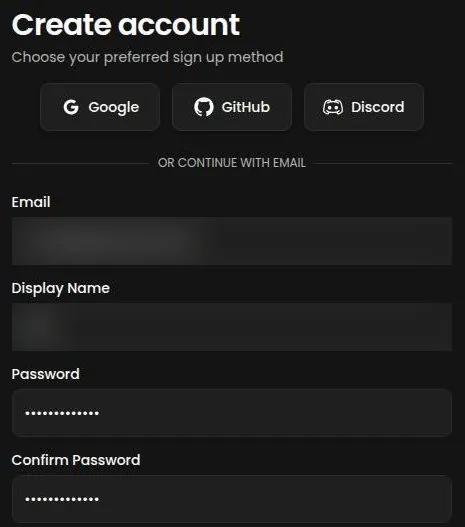
I'd call that the lightest gate possible. It relies on honesty, like the honour box at a roadside flea market stall, and the rest of the site's rules lean on the same idea.
After the form is submitted, the site redirects to the login page rather than into the app. A Firebase verification email titled "Verify your email for WyvernChat" arrives in under a minute. The verification link points to koios-academy.firebaseapp.com, a domain that shares nothing with the WyvernChat name.
That link is the one moment in the flow that would make a careful person pause. Nothing on the page explains the domain. It is probably harmless, but it is the kind of continuity error I'd flag in a client edit, because viewers notice what doesn't match even when they can't say why.
Login works after the email is verified. The login page also offers a "Featherless" sign-in, which makes sense once you learn who sells the subscriptions.
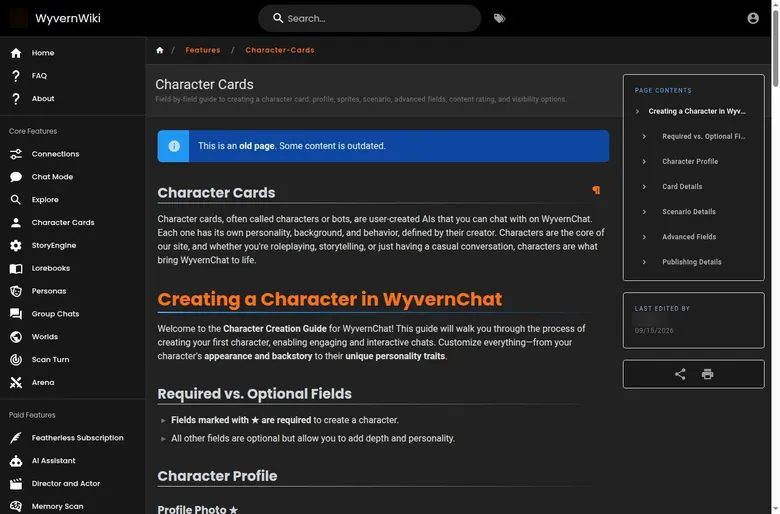
One trap is worth knowing before the first click: the wiki says each login method creates a separate account. Sign up with Google and log in later with Discord, and you get two strangers with the same face, so pick one door and use it every time.
The onboarding
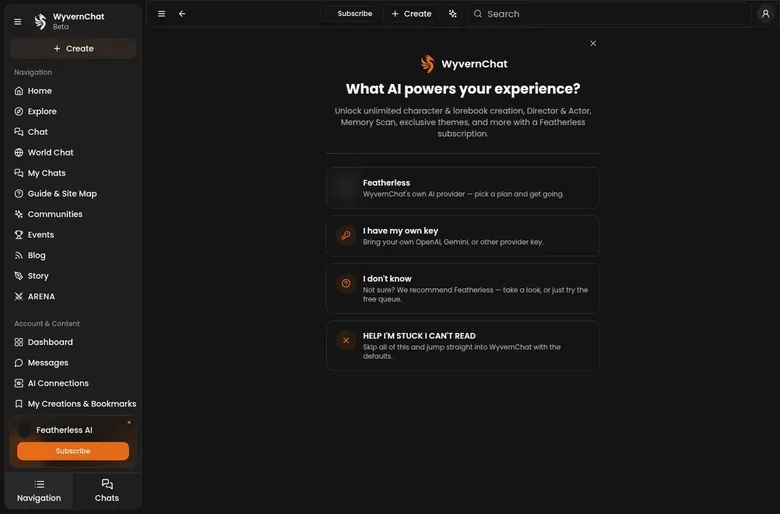
Onboarding step 1 asks "What AI powers your experience?" and offers Featherless, "I have my own key" for OpenAI, Gemini or another provider, "I don't know", or skip. Step 2 shows the Featherless plans next to a button to "Continue with the free queue". Step 3 explains the crystal economy and sets content preferences.
The whole onboarding takes about three minutes. Three minutes is not long, but the order matters. A new user meets a plan page before meeting a single character, which is like a diner handing you the dessert menu before the coffee.

To be fair, the free queue button is there and it is not buried. I'd call it a nudge rather than a trap. Someone who reads each screen can reach a free chat without paying anything.
What the first night tells you
The first question in onboarding is about which AI provider powers your experience, and that single screen says more about WyvernChat than its marketing does. A mainstream companion app hides the engine. This one asks you to pick it before you have seen a single character.
For a newcomer that is a strange first question, a bit like a camera shop asking which sensor you want before you have said what you shoot. For someone who already knows what a context window is, it is a relief. My advice for a first night is to take the free queue, skip the plans, and spend the evening on characters rather than settings.
Browsing the WyvernChat library
The logged-out home page opens with a stats strip, and the numbers are bigger than a beta label suggests. It shows 197,068 users. It shows 22,445 characters.
The same strip shows 3,482 creators. It also shows 1.4M open chats. That last figure is the one that tells me people come back, because an open chat is a story somebody has not finished.
Doing the math out loud, that is a bit over six characters per creator and roughly one creator for every fifty-odd users. That ratio is healthy. It suggests a community where a fair share of people build rather than only browse, which matches the workshop feel of the whole site.

What a card tells you
The character preview modal from Explore works, and it is the quickest way to judge a character without committing to a chat. The card used for the check, "Mora: Sloth Demon", comes in at 1,244 tokens.
I like that the token count is on the card. It works like the file size on a clip of B-roll: before you drop it into the timeline, you know how much of your budget it will eat. On a free model with a modest context window, a heavy card leaves less room for the conversation itself, so this number is worth a glance.
Moderation and the community machinery
Public character cards are reviewed by automod and volunteer moderators. That is not a guarantee of quality, but it is more than a free-for-all upload bin, and it shows in how tidy the public side looks.
Around the library runs a small economy of community activity. The site runs Bounties. It also runs contests and events. The creator program and ArenaBot run through Discord.
I think that last point matters more than it looks. A good part of the life of this platform happens off the site, so a creator who skips Discord is working with one eye closed.
Your own corner
The Dashboard has the tabs Notifications, Rewards, Reports, Friends and Limits. It reads like the back office of a small forum rather than a companion app, and that is a fair description of the whole place.
Where discovery falls short is the same place it falls short on every big community hub. Big libraries surface what is already popular, and good niche cards hide below the fold. I'd treat the library like a flea market: the gems exist, but you find them by digging, by following creators whose work you like, and by asking in the community rather than trusting the front table.

Making characters on WyvernChat
Creation is where WyvernChat won me over, and it started with a drag and drop. Importing cards is effortless. I dragged in eight PNG cards from my old folder and they just worked, lorebooks included.
That sounds small, but anyone who has moved a project between editing suites knows how rare a clean import is. Usually something breaks: a font, a proxy link, a colour profile. Here the cards arrived with their lore attached, like footage that comes with its sound already synced.
The reason it works is the format. SillyTavern character cards can be imported, with their data carried in the PNG metadata.
The platform also has lorebooks of its own. Chats support personas, so the user side of a scene can have a name and a description too.
Scripting, the part that sold me
The feature that won me over was Lua scripting. I wrote a tiny '/roll' command for a dungeon-crawl character so dice rolls happened in-script instead of being hallucinated. As a DM, that was peak nerd satisfaction.
The problem it solved is familiar to anyone who runs a table. A language model asked to roll dice will cheerfully invent a result that suits the story, which is fine for a novel and fatal for a game. With the roll done in code, the dice stopped being a plot device and became dice again.
Under the hood, StoryEngine supports Lua and Handlebars scripting. That is a real programming layer inside a chat site, and I can't think of many companion apps that offer anything close.
My take on the creator tools
This is the strongest part of WyvernChat, and it is not close. The creator tools treat a character like a small software project rather than a profile page, which is exactly right for people who enjoy building.

The catch is the same as the praise. A newcomer who wants a pretty character in five clicks will find more knobs than they asked for. I'd start by importing a card you already like and changing one thing at a time, the way you learn a new editing suite by re-cutting an old project.
Chatting on WyvernChat: what the conversations felt like
Conversations on WyvernChat depend on the model more than on the site, and the site is honest about that. Each message shows the model that wrote it, here google/gemma-4-31B-it via the Free Queue.
I wish every app did this. It is the equivalent of a credit roll on every reply, and it makes quality problems easy to trace. When a reply goes strange, you know which actor fluffed the line instead of blaming the whole production.
The chat checked in September 2026
The chat checked on 23 September 2026 was with the community character "Mora: Sloth Demon". The card opens with a safe-for-work, slice-of-life greeting. Replies are long, literate third-person prose of 400+ words.
The character keeps a strong voice through those replies. One reply includes the line "Hmm. Let's go with Rainbow Road,".
Asked what was in the fridge, the bot answered: "Pancakes ... I prepped the batter and put it in a jar, so all you have to do is pour it."
That is a good line for a free model. It is domestic, specific and in character, which is harder to pull off than a dramatic speech.
The character also addresses the user by the persona name. That is a small thing, but it matters. A scene where the other person keeps saying your name feels directed, while one where they keep saying "you" feels like a form letter.
My opinion of that prose is mixed in a good way. It is well written, and it is long. For a slow story, four hundred words per reply is a feast; for quick banter it is a monologue.
You set the pace through the settings, not by asking nicely. A shorter reply length and a tighter prompt turn the same character from a novelist into a conversation partner. I'd make that change on day one if you want chat rather than chapters.
The controls
The chat has a Simple and an Advanced mode. The panels include Generation Settings, Chat Settings, Lorebooks & Summary and Display. The whole setup gives control over the model and the samplers.

Simple mode is the sensible starting point. Advanced mode is where the samplers live, and samplers are the colour grading of text: small moves change the whole mood, and big moves ruin the picture.
The editing tools are the ones I'd want in any roleplay app. Chats have Edit Intro and New Intro options. Messages can be edited and regenerated.
Director's whisper is a hidden instruction box, a way to tell the character what to do next without saying it in the scene. The chat also supports "/" commands. Between the two, you can steer a scene without breaking it, like a director talking into an earpiece instead of walking into the shot.
In editing terms, this is a full timeline with keyframes rather than a one-button filter. That is the point of the place. It is also why a beginner can get lost in it within ten minutes.
Group scenes
WyvernChat has group chats. The wiki describes them this way: "Group Chats: Chat with multiple characters or human users at once in a shared space." The "+ Character", "+ User" and "+ Lorebook" buttons add participants for group scenes.
Group chats have real turn-order controls. I ran a swamp-camp scene with a druid, a necromancer, and a goblin accountant. For once nobody hijacked every turn, unlike my actual Thursday table.
Anyone who has run a tabletop game knows the player who narrates for everyone. Here the software politely kept that player in line, and I felt a small pang of envy on behalf of my real Thursday group. I'd pay for that feature at my own table, if only it came in a box.
That camp gave me my one only-here story. My goblin accountant used my /roll script to audit the party's loot. He rolled a natural 1 and declared the necromancer bankrupt.
The whole group chat mutinied. I laughed at my desk like a man watching his own blooper reel. It was the moment WyvernChat stopped feeling like a chat app and started feeling like a table where the dice have opinions.
What made it work was the combination, not any single feature. A group scene, a character with a job, and a script that refused to cheat produced a joke none of the pieces would have written alone. That is the best case for this platform in one scene.
Worlds and the arena
Beyond plain chat, "WyvernWorlds" or World Chat adds RPG stats, combat, items and markets, and guilds. ARENA is a battler mode.
I'd treat both as side rooms in the same building. They are good if your idea of romance involves a loot table, and easy to ignore if it doesn't. For a companion seeker they are noise; for a tabletop player they are the part of the building with the snacks.
Bring your own model
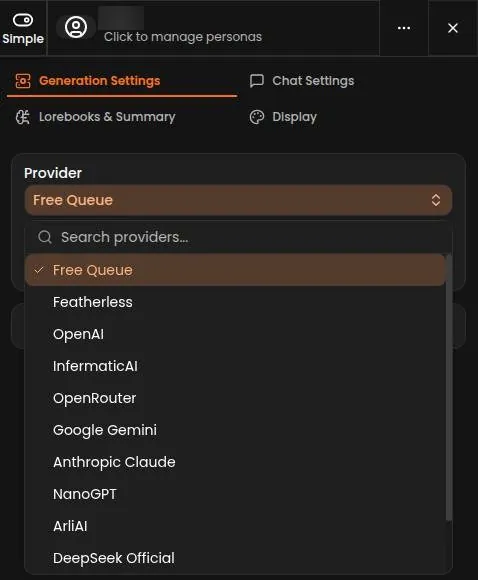
The provider question from onboarding comes back inside the chat. WyvernChat supports your own API keys for 10+ providers. The provider dropdown lists Free Queue, Featherless, OpenAI, InfermaticAI, OpenRouter, Google Gemini, NanoGPT, ArliAI, DeepSeek Official, ElevenLabs and Google Vertex AI.
Own keys also work with any OpenAI-compatible custom endpoint. This is the part that makes WyvernChat a front end rather than a closed product. You rent the stage and bring your own actors.
For a reader who already pays a provider, that changes the value question completely. The site becomes a better window onto a model you already rent, and the choice of window is about tools, not about who owns the engine.
My view of the conversations
On a good model the writing is some of the best on any free site in this category, and the controls let you fix what the model gets wrong. On the free queue it is slower, and long replies make the wait feel longer.
The conversation quality here is not a single score. It is a slider you set with your model choice and your patience. I'd rate the ceiling high and the floor ordinary, which is the usual trade on platforms that hand you the controls.

Memory: what WyvernChat remembered
Memory was the first thing to crack in my long scenes. It got shaky after about 25 messages. The druid forgot she'd sworn a vow of silence and gave a speech.
I laughed, because it was a textbook continuity error, the kind I catch in wedding footage when a bouquet changes hands between shots. But it also broke the scene, since the whole joke of the vow was the silence.
What it gets right in short scenes
Short-range memory is fine. In the chat checked on 23 September 2026, the fridge answer matches the greeting's line "tomorrow's breakfast is already in the fridge". So a detail planted at the start can come back correctly a few replies later.
The wiki describes Chat Mode as real-time chat "with memory, settings, and no message limits." Chats support summaries and lorebooks for memory. Those two tools are the manual gearbox of memory on this site: you decide what the character must never forget and write it down.
Why it forgets
Effective memory depends on the chosen model's context. The Featherless Chat plan gives 32K context, which its own page puts at about 90 messages. On smaller free models the window is shorter, and the forgetting starts sooner.
That is not a WyvernChat bug so much as the physics of language models. Still, the site's own long-term fix costs money. Memory Scan, the long-term memory feature, is subscriber-only. Scan Turn is subscriber-only too.
My take on memory
I think the memory picture is honest but demanding. The tools exist, and a careful writer can keep a campaign straight with a good lorebook and a summary. The automatic help sits behind the paywall, so free users do the bookkeeping by hand.
For a long campaign, I'd write the vows, the wounds and the debts into a lorebook entry before the scene starts. It feels like making a continuity sheet for a shoot, dull on the day and priceless in the edit.
The other habit worth building is a summary every so often in a long scene. It costs a minute, and it saves the character from turning up to the next chapter with a clean slate and a confident smile.
| Feature | Free | Paid |
|---|---|---|
| Queue | queue waits | no queue |
| Models | Free Queue models (Gemma 4, Huihui, Stellar Odyssey) | up to 32B on Supporter; any size on Premium |
| Context | 18,000 to 24,000 | most up to 32K; up to 256K on Flex |
| Private characters | 30 | unlimited |
| Private lorebooks | 30 | unlimited |
| Director & Actor | no | yes |
| Memory Scan | no | yes |
| Director's Whisper and Impersonation | yes | yes |
| Themes | 2 custom themes | exclusive themes |
| Messages | no cap seen | unlimited use (flat plans) |
Limits as listed on 23 September 2026.
Images, voice and video on WyvernChat
WyvernChat is a text platform first, and the media side reflects that. No voice call feature is documented. ElevenLabs can be connected with your own API key, but for text-to-speech only, or in the wiki's words "Text-to-speech only, not for chat".
That means voice is a bring-your-own add-on with its own bill. For someone who already pays for ElevenLabs it is a nice bonus. For everyone else it is a door to another subscription, like a bar that lets you bring your own wine and still charges for the glass.
Avatars and the desktop app
Characters can use VRM 3D models and sprites. That gives a scene a visual stand-in, closer to a game character on screen than to a generated photo. I'd call it charming for the game-minded crowd and irrelevant for people who came for pictures.
There is news on the platform side. A desktop app, "Wyldfire", for Windows, macOS and Linux was announced on Sep 1, 2026. It is an announcement, not a review subject yet, but it fits the site's personality: a desktop app for desk people, still no phone app.
Is it worth paying for media?
Not here. None of the plans turns WyvernChat into an image or voice app, and the text-to-speech route runs through another company's key. If images, voice or video are the main reason you want a companion, this is the wrong shop.
My view is that WyvernChat knows what it is. It spends its effort on the writing room and leaves the sound stage to others. As an editor I respect a production that doesn't fake a department it doesn't have.
The WyvernChat free tier
The free tier is the best argument for WyvernChat, and it surprised me. It offered unlimited messages to unlimited characters, capped at 30 private characters, with replies taking about 10 seconds. Slow, but honest.
I was used to free tiers that work like the sample tray at a supermarket: one taste, then a sales pitch. This one felt more like a public library card, with limits on what you can keep at home but none on how much you read.
How free works today
Chat itself is free through the "Free Queue".
| Plan | Monthly | Yearly | Notes |
|---|---|---|---|
| Free (Free Queue) | free | not listed | queue waits; 30 private characters and 30 private lorebooks |
| Supporter | $10/mo | not listed | flat rate, no queue, models up to 32B, most up to 32K context |
| Premium | $25/mo | not listed | "Most popular"; any model size, up to 10,000 other models |
| Flex | $50/mo | not listed | usage-based credits billed per token, up to 256K context, unused credits roll over |
| Own API key | free on the WyvernChat side | not listed | the provider bills its own usage |
Prices as published on or before 23 September 2026; sources in the text.
The wiki says new chats default to it: "New chats default to the Free Queue, a shared connection WyvernChat runs on its own account so you can try the app immediately. It has no cost and needs no API key."
It offers a free queue of open models, and the free tier runs on those models.
No message cap was seen on the Free Queue. No message limit was hit in the September 2026 check either.
No ads appeared. Messages do not come with a meter, a coin or a countdown, which in this category is almost eccentric.
The free models
Free Queue model "Gemma 4 - All-Rounder" has an 18,000 context. "Huihui - Creative & Uncensored" has an 18,096 context. "Stellar Odyssey - Storytelling & Prose" has a 24,000 context.
The wiki FAQ lists a different set: Neon-v2, Mistral Nemo Instruct, Dan's Personality Engine, LooseCannon and Stellar Odyssey, a list that may change. I'd trust the dropdown over the FAQ on any given day. The lineup rotates like the specials board at a diner, so check what is on it before you plan a long campaign around one model.
The price of free is time
The free tier has queue waits. The first reply on 23 September 2026 showed a queue notice: "Position 20 in Queue ... 35 users ahead of you, Est. wait: 30s".
That first reply took about 60 s in total. The second reply took about 40 s.
Here is the then-and-now in one line. In summer 2025 my free replies took about 10 seconds; on 23 September 2026 the first free reply took about 60 s and the second about 40 s. A secondary wiki also reports an enforced 15-second cooldown on all free models, in its words "all free models have an enforced cooldown of 15 seconds".
A minute per reply is fine for a slow letter-writing scene and painful for banter. It is the difference between editing on a fast machine and waiting for proxies to build: the work is the same, the rhythm is not.
What free lets you keep
The free tier allows 30 private characters. It allows 30 private lorebooks. Each public item published adds +5 private slots. Public content is unlimited on the free tier.
| What | Price then | When |
|---|---|---|
| Feather Basic (15B-class models, 2 concurrent connections) | $10 | Jun–Aug 2025 |
| Feather Premium (70B models) | $25 | Jun–Aug 2025, one month |
From the author's own notes. Compare with today's prices above.
The smaller limits are generous for a hobbyist. The free tier allows 5 worlds. It allows 5 backgrounds.
It also allows 10 collections. It allows 2 custom themes. For a single campaign with a couple of settings, that is more shelf space than most people will fill.
There are daily creation caps as well. The free tier allows 10 new private characters a day. It allows 5 new public characters a day. The Limits tab shows storage used, slot counters and when daily limits reset.
I like that last tab a lot. It is the rare free plan that shows its limits on a meter instead of springing them on you mid-scene, like a gym that posts its class caps on the door.
Free tools that other apps charge for
Director's Whisper is free for all users. Impersonation, sold in the interface as "Write for Me" and "Improve My Writing", is free for all users too. Both are the kind of tool I'd expect behind a paywall elsewhere.
Where free stops
Some advanced features, such as Actor mode, need a real connection rather than the Free Queue. The long-term memory tools are also paid, as the memory section explains. That is the line: free covers the writing, paid covers the automation and the speed.
My judgement is that this is one of the most honest free tiers in the category. It is slow, and the queue gets longer as the site grows, but it does not trick you. For a patient writer it can be the whole product; for anyone who needs replies at conversation speed, it is a long trial.
Who should stay on free
I'd stay on free if your scenes are slow, your characters are few, and you enjoy writing long turns while the queue does its thing. The storage limits will not bite a hobbyist, and the editing tools are the same ones paying users get.
I'd leave free if the wait breaks the mood, or if you run group scenes where every turn stacks another queue. That is the one place where time really is money, and the cheapest paid tier is priced low enough to make the maths easy.
WyvernChat pricing: what I paid and what it costs now
The first thing to know about paying for WyvernChat is that you are not paying WyvernChat. Subscriptions are sold by Featherless AI, the model provider behind the site.
The site says "There is no separate WyvernChat subscription" and "Pricing is managed by Featherless". Prices are in USD.
What I paid in 2025
My first payment was modest. I paid $10 for Feather Basic to get the 15B-class models and 2 concurrent connections. Then I had to link a Featherless.ai account, since they run the backend.
It took two emails and a day for my subscription to sync. That day felt long, like a client who has paid the invoice while the footage still sits in a transfer queue. It worked in the end, but the hand-off between two companies was the least polished part of the whole summer.
Later I bumped up to Feather Premium at $25 for a month to try the 70B models. The prose really was better. But slow responses still made group scenes feel like chess by mail.
That month taught me the real limit of the upgrade. A bigger model is like a better camera: the pictures improve, but if the crew is slow, the shoot is still slow. With three characters taking turns, every wait stacked up, and the better sentences arrived at a pace that killed the banter.
The plans on 23 September 2026
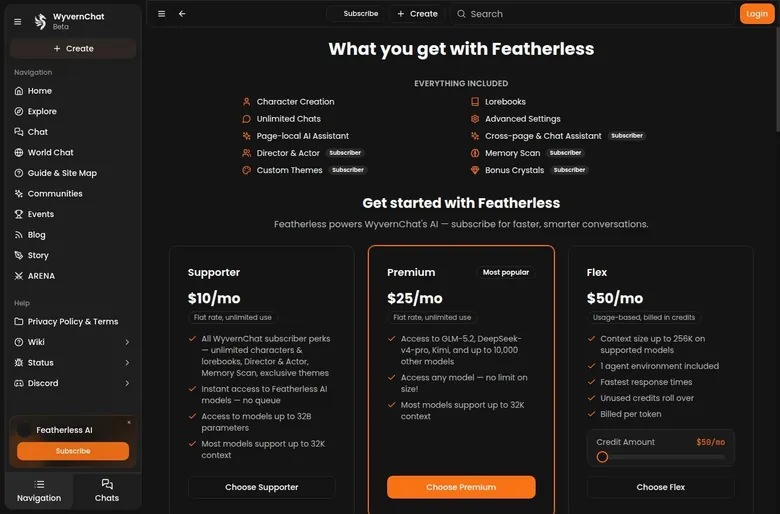
The Supporter plan costs $10/mo as a flat rate, sold with the words "Flat rate, unlimited use". It includes all WyvernChat subscriber perks: unlimited characters and lorebooks, Director & Actor, Memory Scan and exclusive themes. Supporter has "no queue".
Supporter gives access to models up to 32B. Most models on it support up to 32K context. So the same $10 I paid for Feather Basic with 15B-class models in 2025 buys a plan with models up to 32B today.
WyvernChat pricing
Prices verified .
Featherless AI Chat plan (third-party)
$25/mo
Billed every month
No discount
- Unlimited tokens
- 32K context
- 4 concurrent units
- Any model in Featherless catalogue; 'Works with SillyTavern
- RisuAI
- Wyvern'. On WyvernChat an active Featherless subscription also grants 1,000 crystals/month and exclusive themes.
Prices reflect the third-party Featherless arrangement; WyvernChat itself charges no direct subscription.
The Premium plan costs $25/mo and is labelled "Most popular". It is also a flat rate with unlimited use.
Premium gives access to GLM-5.2, DeepSeek-v4-pro, Kimi and up to 10,000 other models. It allows models of any size, with no limit on size at all. Most models on Premium support 32K context.
In 2025 I paid $25 for Feather Premium to reach the 70B models; on 23 September 2026 Premium is still $25/mo, now with no size limit at all.
The Flex plan costs $50/mo in usage-based credits, "Usage-based, billed in credits". Flex allows up to 256K context.
It includes 1 agent environment. It has the fastest responses. On Flex, unused credits roll over.
What the subscription unlocks on WyvernChat
A few features on the site are tied to having a subscription. Director & Actor is subscriber-only. The in-chat AI Assistant, "Bob", is subscriber-only as well.
None of those are essential for a first month. They are the power tools of the workshop: nice when you know what they are for, clutter when you don't.
The same plans on Featherless's own site
Featherless's own pricing page tells a slightly different story. It lists its Chat plan at $25 a month.
That plan includes unlimited tokens, 32K context, 4 concurrent units and any model in the Featherless catalogue. The current page shows Chat at $25/mo, Developer at $50/mo and Business at a custom price.
So WyvernChat's "Premium" is Featherless's "Chat" under another name, and the $10 Supporter tier doesn't appear on that Featherless page at all. An older secondary source lists tiers of $10/mo basic, $25/mo premium and $75/mo scale: "Pricing begins at ten dollars per month for the basic tier, twenty-five dollars per month for the premium tier". I'd check the plan names on both sites before paying, because two price lists for one product is how people end up on the wrong tier.
Featherless's guide says WyvernChat connects with an API key or a linked account, and it sums up the first option as "All you need is your Featherless API Key".
| Pack or unit | Price | What it buys |
|---|---|---|
| 1 chat message on the Free Queue | free | one reply, no credits used |
| Flex credits | $50/mo | tokens, billed per token; unused credits roll over |
| Crystals | earned through activity | cosmetics, tips, boosts and Bounties; never messages or models |
As listed on 23 September 2026.
The free alternative to paying
Bringing your own API key is an alternative that costs nothing on the WyvernChat side. The providers listed for an own key include OpenAI, InfermaticAI, OpenRouter, Google Gemini, NanoGPT, ArliAI, DeepSeek Official, ElevenLabs and Google Vertex AI.
Is the step up worth it?
For most readers I'd say the $10 tier is the sweet spot, because it removes the queue, which is the free tier's real cost. Premium makes sense for one month of curiosity rather than as a standing bill. I would skip Flex unless you already know what an agent environment is and why you would pay per token for it.
The maths is simple enough to do out loud. A year of the $10 tier costs about what a decent tripod costs, and a year of Premium costs a noticeably better one. I'd rather pay the smaller bill every month and treat the bigger plan as a rental for a special project, the way a videographer rents a special lens for one job instead of buying it.
Coins, credits and what money buys
WyvernChat has a currency, but it is not the kind that eats your wallet. Messages do not cost credits. Crystals are a community currency, and they are cosmetic only. The app states that crystals "never affect your AI messages or model access".
That sentence is the most reassuring line on the site. In this category, coins usually sit between you and the next reply, like a vending machine that asks for another quarter halfway through the snack. Here the currency is closer to arcade tickets: fun to collect, useless for buying the actual game.
How crystals come in
The wiki puts it this way: "Crystals are WyvernChat's community currency. You earn them through everyday activity and spend them on cosmetics, tipping other creators, and running Bounties." Per the wiki, a comment earns +25 crystals, up to 10 per day.

Crystals are also earned through bounties, per the wiki. They are earned from boosts received as well. So the people who earn the most are the ones who make things others like, which is the right incentive for a creator hub.
What crystals buy
Crystals pay for cosmetics and tips. That is the whole list, and I think it is a healthy one. A creator can get a tip for a good card, and a user can change the look of the place, without either of them paying real money to talk.
Where real money goes
Real money only enters through the subscriptions, and the only per-unit bill is on the top plan. Flex is billed per token. Everything below it is a flat monthly fee.
For a reader who hates meters, that is the cleanest money setup I can describe in this category. You either pay nothing, pay a flat fee, or knowingly choose a metered plan. There is no hidden fourth option where a scene quietly drains a coin balance.
That is also why I don't count crystals as part of the price at all. They are a loyalty scheme for creators and regulars, like stamps on a diner card, and the meal costs the same whether you collect them or not.
Discounts, promo codes and bonuses
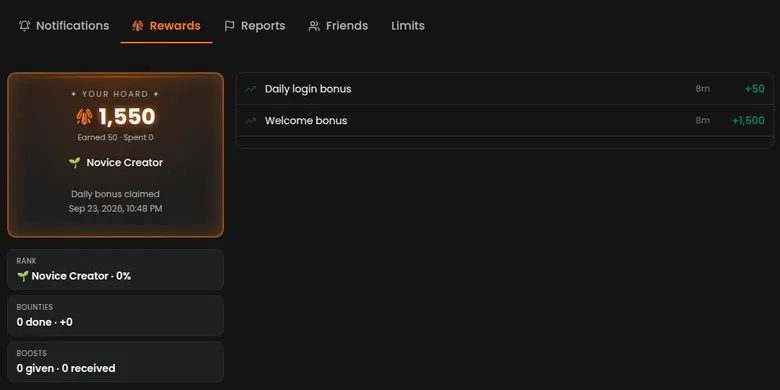
The bonus side of WyvernChat is all crystals, and crystals do not buy messages, so none of it is a discount in the usual sense. A welcome bonus adds +1,500 crystals. A daily login bonus adds +50 crystals.
The daily bonus is claimed automatically and shows up in Dashboard > Rewards. The balance after sign-up and the first daily bonus is 1,550 crystals.
I like the automatic claim. No wheel to spin, no timer, no push to come back at an exact hour, just a small deposit that appears on its own.
WyvernChat scored 6.1 out of 10 in our tests and costs from $25/mo. We have no partner deal with it, so its link is a plain link. Visit the official WyvernChat website
Closest alternative we can recommend

SpicyChat
from $5/mo, free tier available
Score 7.9/10
Subscriber bonuses
Per the wiki, Featherless subscribers get +1,000 crystals a month. The plans page lists "Bonus Crystals" for subscribers as "(coming soon)", in its words "Bonus Crystals ... (coming soon)".
That mismatch is small but worth noting before anyone counts on it. The wiki describes the bonus as live, while the plans page still calls it upcoming. Either way, it is cosmetic currency, so I would not let it tip a decision to pay.
What is missing
No coupon codes were found. No free trial was found. No referral program was found. No first-purchase discount was found.
The inbox stays quiet too. No welcome or promo email arrives; the only email is the verification email. After years of companion apps that treat an email address as a permission slip for daily discounts, that silence feels almost old-fashioned.
Where the real savings are
The absence of a trial is less of a problem than it sounds, because the free queue is a standing trial with no end date. The real savings are structural. You can stay free and accept the queue, or bring your own key and pay a provider directly.
My advice is to ignore any coupon site that claims a WyvernChat code. The site itself doesn't sell subscriptions, and the plan pages list no codes, so a promo code page for it is the online version of a flyer for a sale at a shop that has no till.
If you want a discount in practice, the free queue is it. Use it for a few weeks before paying, and you will know whether the queue or the models are the thing you want to buy your way out of.
WyvernChat content settings and filters
WyvernChat treats content settings like a big mixing desk rather than a single on-off switch. The content preferences list is long, with blockable content flags, tags, languages and tag groups. A toggle for showing adult content sits in onboarding and in settings, and it is off by default.
Off by default is the right call. A new account sees the safe side first and has to opt into the rest, which is how I'd want any open community to behave.
What the tags cover
The tag system covers mature themes such as violence and abuse, dozens of tags for sexual content, and identity, species, language and genre. The tag list also carries flags for several taboo themes around family, sleep and consent. These are flags only, and they were not explored.
Sexual content is allowed on the platform as long as it is tagged. The whole system depends on creators tagging honestly, and on the automod and volunteer moderators catching those who don't.
What you can block
Users can block single tags. Users can also block whole tag groups, for example furry and anthro characters, graphic violence, heavy fetish content and trigger warnings. Users can block communities as well.
Those three layers make the filter as strict or as loose as you want. I think the tag-group blocks are the most useful for most people, because blocking tags one by one is like colour grading a film one frame at a time.
The hard limits
The rules ban characters coded as juvenile. That line does not move with any setting, and I'd rather see it stated plainly than buried in a long policy.
On the age side, age is self-confirmed by using the site, and no age check is described: "By using WyvernChat, you confirm that you are at least 18 years of age." That is the honour system again, the same as the sign-up checkbox.
My view of the settings
The controls are strong and the defaults are sensible. The weak point is not the filter but the trust it rests on: tagging is done by creators, and the age confirmation is a promise rather than a check. For an adult who knows what they want to see and what they don't, it is one of the most precise setups in this category.
Adults only (18+). This page reviews AI companion apps with NSFW features; no explicit images are shown.
WyvernChat terms and privacy in plain English
WyvernChat's rules live on one page, and they are shorter than most. The paths /pricing, /terms, /privacy, /premium and /subscription return 404; the rules live on the single /policy page. I'd read that page once before paying anyone, because it answers the content questions well and the business questions barely.
Who runs it and where
Governing law is "the laws of the country in which our company is based", with no company name or country given. That is the weakest clause on the page. A contract that points at an unnamed company in an unnamed country is like a client contract signed by "the editor": friendly until something goes wrong.
The terms can also change without notice. In practice that means the page you read today is the rule, until it isn't, and nobody is obliged to tell you.
Who can use it
The policy says users must be at least 18 years of age, in its words "You must be at least 18 years of age to use WyvernChat." Scraping and automation are prohibited under section 3A. The wiki says there is no two-factor authentication.
That last point matters more than it looks. An account without a second factor rests on one password, so I'd use a unique one for this site and nothing else.
What is allowed and what is banned
The policy allows mature content, including sexual content, if it is marked with content-warning tags: "Mature content, including sexual content, is permitted but must be marked accordingly". It also rules out any such material involving characters depicted as juvenile, which it describes as "Characters depicted as juvenile via their appearance, personality, or other traits". The prohibited list also names realistic animals.
| Topic | What it means for you | What the terms say |
|---|---|---|
| Minimum age | Adults only, confirmed with a checkbox; no age check is described | "You must be at least 18 years of age to use WyvernChat." |
| Adult content | Allowed if it is tagged | "Mature content, including sexual content, is permitted but must be marked accordingly" |
| Banned content | Anything that breaks the age rule, real people, realistic animals, hate and NSFL content | - |
| Ownership | You keep ownership of your characters and chats; the site gets a limited license | "You retain ownership of any content you create ... including characters, chats" |
| Data sale | No profile-linked data is sold or shared | "no data linked directly to your user profiles is ever sold, shared, or disclosed to third parties" |
| Data after deletion | Not kept after the account is deleted | "WyvernChat does not retain user data after account deletion." |
| AI training | Not mentioned | - |
| Operator and governing law | No company name or country is given | "the laws of the country in which our company is based" |
| Changes | Terms can change without notice | - |
| Billing, refunds and renewal | Not on WyvernChat; Featherless handles them | - |
| Account deletion | Type DELETE in the Account tab; it cannot be undone and does not cancel a Featherless plan | "If you have an active paid subscription, deleting your account does not cancel it for you" |
Terms and privacy policy as published on 23 September 2026.
The policy bans content about identifiable real people, even if they consent. It bans hate content.
It bans "NSFL" content, the shock and gore material that most people never want to see by accident. It also bans photos of real people and AI images that cannot be told apart from real photos.
I think the real-people rule is the most important line here. As someone who handles other people's faces for a living, I like that the ban holds even with consent, because consent is hard to prove and easy to fake.
Moderation uses automod plus volunteer human moderators. Reviews usually take under 12 h. For a volunteer operation, that is a reasonable turnaround.
What you own
Users keep ownership of the content they create, in the policy's words "You retain ownership of any content you create ... including characters, chats". WyvernChat gets a limited license to operate and showcase user content. User content is not used in ads without consent.
That is a creator-friendly set of clauses. The license is the usual one any hosting site needs, and the ad clause closes a door that other apps leave open.
Your data
The privacy text says only anonymized data needed for things like error reporting is collected: "We only collect anonymized data necessary for ... Error reporting".
It also says "no data linked directly to your user profiles is ever sold, shared, or disclosed to third parties". Anonymized data may be used internally for service improvement.
The policy does not mention AI training at all. I'd read that silence as neither a promise nor a threat, just a gap, and I'd like to see it filled.
On deletion the language is firm. The policy says "WyvernChat does not retain user data after account deletion." After deletion, the account's data is permanently removed from the systems, in the words "Once an account is deleted, the data associated with it is permanently removed from our systems."
| Criterion | Rating | Why |
|---|---|---|
| Conversation quality | Good | Long, literate replies with a strong voice and full editing tools; free models are slow. |
| Memory | Mixed | Short details hold, long scenes drift; the automatic memory tools are subscriber-only. |
| Free tier | Strong | No message cap, no ads and generous storage, paid for with queue time. |
| Value for money | Good | A flat $10 plan removes the queue, and your own API key costs nothing on the site. |
| Images and voice | Weak | No voice calls or image tools; only avatars and text-to-speech with your own key. |
| Privacy and terms | Mixed | Clear data and ownership promises, but no company name, jurisdiction or two-factor login. |
| Cancelling and billing | Mixed | Billing lives with Featherless, and deleting the account does not stop a subscription. |
| Content settings | Strong | Blocks for tags, tag groups and communities, with the adult toggle off by default. |
Ratings are the author's judgement from his own use and the 23 September 2026 check.
My read of the terms
On content and data, the page is clearer than most. On the business side it is thin: no company, no country, no refund terms, and rules that can change without notice. I'd trust it with characters and stories, and I'd keep the money side with Featherless, whose own terms are the ones that cover billing.
What got in the way on WyvernChat
Most of my friction on WyvernChat came from the models rather than the site, and some of it was funny. The strangest bug came in the middle of a very English, very Victorian scene. My butler character dropped a Mandarin word, then a Persian one, then continued as if nothing had happened.
It was like a period drama where an extra walks past in trainers. Nobody in the scene reacts, the dialogue carries on, and you sit there wondering whether you imagined it.
Another night a character replied with nothing but asterisks for three messages. I joked that he'd finally reached the pure-action roleplay singularity. In editing terms it was a clip of pure black with a timecode, technically delivered and useless.
The queue and the waits
Free queue waits were about 30-60 s per reply on 2026-09-23. That is the biggest everyday friction for free users. A minute is fine for a letter and heavy for a conversation.
Onboarding also pushes a Featherless subscription. It is a gentle push, but it comes before a new user has met a character, which I think is the wrong order.
Small rules that trip people up
Email verification is required before the first login. Per the wiki, only one browser tab is allowed at a time, for security. That second rule surprises anyone who keeps a character open in one tab and the wiki in another, and I'd rather it were stated at sign-up than discovered mid-scene.
No public WyvernChat API is documented. That is a small gap for tinkerers, who are exactly the crowd this site attracts.
Thin paperwork
The legal docs are thin: no company name, jurisdiction or refund terms on the site. For a free user this barely matters. For anyone paying, it means the real contract is with Featherless, and it is worth knowing that before the card comes out.
| App | When I used it | For how long | Cheapest paid plan (record) | Free tier (record) |
|---|---|---|---|---|
| Candy AI | Oct–Nov 2024 | 5 weeks | €3.99/mo (12-Month Plan) | yes |
| OurDream AI | Dec 2025–Jan 2026 | 6 weeks | $9.99/mo (Standard Annual) | yes |
| Nomi AI | Jan–Sep 2026 | 9 months | $5.00/mo (Launch Plan Yearly) | yes |
Periods from the author's own notes; plans and free tiers from the site's app records.
Where the community lives
Social presence is small and focused. The Discord at discord.gg/wyvernchat is the main community. The site also has a blog. No X, Reddit, Instagram, TikTok or app-store links were found.
That is fine for regulars and awkward for newcomers. If Discord is not your kind of place, you will miss most of the news and most of the help.
My take on the friction
None of these problems is a dealbreaker on its own. Together they add up to a site that asks for patience, some technical comfort and a willingness to read a wiki, which is exactly the crowd it was built for.
The model glitches are the part I'd forgive most easily, because they come with the territory of open models. The thin paperwork is the part I'd forgive least, because it is a choice rather than a limitation.
Who WyvernChat is for, and who should skip it
WyvernChat is a very good fit for a specific kind of person and a poor fit for most others. It is best for experienced AI roleplayers and bot creators who want free open-model chat. It suits users who want deep customisation: lorebooks, samplers and scripting.
It also suits users who want to bring their own API keys. And it suits people who want an active creator community, including adult content with tag filtering.
If three of those four sound like you, I'd say try it tonight. It is the kind of place that rewards people who read the manual and then ignore half of it on purpose.
Who should skip it
It is not for beginners who want a simple, polished companion app. It is not for users who want images, voice or video out of the box.
Who WyvernChat is for
Best for
- Experienced roleplayers and bot creators who want free chat on open models without a message cap.
- Writers who want deep control: lorebooks, samplers, personas and Lua scripting inside the chat.
- People who already pay a model provider and want to bring their own API key at no extra cost.
- Tabletop fans who want group scenes with real turn order and dice that are not made up.
Not for
- Beginners who want a simple, polished companion app that works in minutes.
- Anyone who wants images, voice or video out of the box.
- People who dislike waiting in a queue for each free reply.
- Anyone who needs a named company, jurisdiction and refund terms on the site itself.
It is also not for people who dislike queues on a free tier. And it is not for people who need a clear company identity and billing terms on the site itself.
The queue point is the one people underestimate. A free tier that asks for patience on every reply is fine for a slow story and exhausting for chatter, and no setting on the free side changes that.
The company point matters only once money is involved. A free user risks little, while a paying user is dealing with a company that the site itself does not name.
My honest shortcut is this: if you want a partner, look elsewhere; if you want a writers' room with a dice bag, you have found it.
Cancelling WyvernChat and deleting your account
Cancelling on WyvernChat is really two separate jobs, and mixing them up is the most expensive mistake a reader can make here. Billing, refund and auto-renew terms are not on WyvernChat; Featherless handles them.
The key warning is in WyvernChat's own words: "If you have an active paid subscription, deleting your account does not cancel it for you". Featherless subscriptions are managed on Featherless. So a reader who deletes the WyvernChat account and walks away can keep paying for a subscription that no longer has an account attached to it.
Deleting the account
Account deletion is done by typing DELETE in the Danger Zone of the Account tab. Account deletion is irreversible. I like the typed confirmation, the same way I like an export dialog that asks twice before overwriting a master file.
What to do before paying
My order of operations is simple. Cancel the subscription on Featherless first, confirm the renewal is off, and only then delete the WyvernChat account if you want it gone. Export anything you care about before the delete, because there is no undo.
WyvernChat pros and cons
What worked
- The free tier has no message cap and no ads, and crystals never affect messages or model access.
- SillyTavern cards import cleanly from PNG, lorebooks included.
- Lua and Handlebars scripting, group chats with turn order and Director's Whisper give real scene control.
- Every message shows which model wrote it, and own API keys work for many providers.
- Detailed tag blocking, with the adult content toggle off by default.
What did not
- Free queue waits of about a minute per reply make banter slow.
- Memory drifts in long scenes, and Memory Scan is subscriber-only.
- Subscriptions, billing and refunds run through Featherless, a separate company.
- The terms name no company or country, and they can change without notice.
- No mobile app, no voice calls and no image tools.
Before paying at all, I'd open the Featherless billing page and read the renewal and refund terms there, since WyvernChat itself has none to show. It takes a few minutes and saves the classic surprise on the next bank statement.
I think this split is the single most confusing thing about WyvernChat for a paying user. Two companies, two accounts, one bill, and the button on the site you use every day is not the one that stops the charge. Write down where you subscribed on the day you do it, the way you label a hard drive before it goes on the shelf.
My tips for WyvernChat
Most of my tips come from the same place: the community. The Discord is small, a few thousand people, and friendly. The devs actually respond, and someone helped me debug my Lua script within an hour.
That hour mattered more than any feature. A stuck script at night is like a corrupted project file before a delivery, and a stranger fixing it quickly is the difference between a hobby and a headache. My first tip is to join the Discord before you need it.
Bookmark the right pages
The wiki is at wiki.wyvern.chat, and it answers most setup questions faster than any forum thread. The status page is at status.wyvern.chat. When the free queue feels slower than usual, I'd check the status page before blaming your settings.
Save your work
Chats can be exported. Per the wiki, the chat export zip is capped at 100 logs and 1000 messages per chat. If a long campaign matters to you, export it in pieces rather than trusting one big archive at the end.
Spend your time, not your money, first
My practical advice is to start on the free queue and learn the tools there. Import a card you already like, write one lorebook entry, and try one small script before deciding whether anything needs paying for.
If the queue is the only thing bothering you, the cheapest paid plan fixes that. If memory is the problem, a good lorebook and summary fix more than a bigger plan does. And if you already pay for a model provider, bring the key and skip the subscription entirely.
One more tip for the free queue: aim for shorter replies when you just want to chat. A shorter reply arrives sooner, and the wait feels less like a render bar and more like a pause in conversation.
My last tip is personal. Set yourself a stop time for evenings on this site, because a platform built for tinkering never tells you when the project is finished.
How WyvernChat scores
The scorecard below rewards what WyvernChat does best and marks down where it asks for patience or trust. Conversation quality rates well, because the writing on a good model is strong and the editing tools let you fix what the model gets wrong. The free models are slower and plainer, so the score depends on your setup.
Memory is mixed. Short scenes hold together, but long ones drift, and the automatic memory tools are paid. The free tier is strong: no message caps, no ads and generous storage, paid for with queue time.
Value for money is good, because the cheapest paid plan removes the queue for a modest fee and bringing your own key costs nothing on the site. Images and voice are weak, since this is a text platform with only a bring-your-own voice option.
Privacy and terms are mixed: clear promises on data and ownership, but no company name or jurisdiction. Cancelling and billing are mixed too, because the money lives with Featherless and deleting the account does not stop a subscription. Content settings are strong, with precise tag blocking and sensible defaults.
WyvernChat verdict
Overall score
6.1/10
FairA generous free roleplay workshop with deep creator tools and scripting - slow free queues and billing run by a third party.
Hands-on test, paid plan
- Long, literate replies with a strong voice and real group turn order; free models are slow and sometimes glitch.
- Short details hold, but long scenes drifted after about 25 messages; Memory Scan is subscriber-only.
- Card imports, lorebooks, personas, samplers and Lua scripting: a full workshop for character builders.
- No voice calls or image tools; only VRM models, sprites and text-to-speech with your own ElevenLabs key.
- Unlimited free chat with no ads, and a flat $10 plan removes the queue; own API keys cost nothing on the site.
- Clear promises on data sales and deletion, but no company name, no jurisdiction and no two-factor login.
- Beta label, free queue waits of about 30-60 s per reply, and odd model glitches like language switches.
Bars run from 0 to 10. The total is the weighted mean of the criteria above. Weights are the same for every app. How the apps are checked
How WyvernChat compares with the other apps I used
WyvernChat sits closer to the builders' end of the market than any finished companion app. It is a power-user roleplay platform in the SillyTavern and Chub tradition. If you know those names, you already know the shape of the place: cards, lorebooks, models you pick yourself.
The link to that tradition runs both ways. A home banner says: "With the influx of users from Chub, the team is reminding you all to please check our guidelines."
Featherless markets its Chat plan with the line "Works with SillyTavern, RisuAI, Wyvern". In other words, the same subscription powers several front ends, and WyvernChat is one of them.
Where WyvernChat is better
It is better than most apps in the table on price honesty and on tools. The free tier has no message meter, the currency never touches messages, and the creator tools go deeper than any mainstream companion app. The group scenes and scripting are the best reason to pick it over the finished apps.
Where WyvernChat is worse
It is worse on polish, speed on the free tier, phones and media. The finished companion apps usually give a decent reply in seconds, remember more without manual work, and come with pictures and voice. They also tend to name the company behind them, which matters when money is involved.
My summary is the one I'd give a friend at the bar. If you want a companion, pick one of the polished apps. If you want a workshop where the characters are your own and the dice are real, WyvernChat is the better deal, and often the cheaper one.
The polished apps are showrooms; this is the shop floor, sawdust included.
More on this site: the best AI girlfriend apps, free AI chat apps, the best AI companion apps, AI roleplay chat apps, all AI companion app reviews.
WyvernChat alternatives
Three apps we would try next, and why.

Candy AI
free tier, from €3.99/mo
Score 7.7/10

OurDream AI
free tier, from $9.99/mo
Score 6.6/10

Nomi AI
free tier, from $8.33/mo
Score 7.8/10
My last word on WyvernChat
WyvernChat gave me a summer of the nerdiest fun in this hobby. It never tried to be a girlfriend, and I respect it for that. It tried to be a table, and on good nights it was. Some evenings it was a slow one, but the company was good.
What stays with me is not a single character. It is the goblin accountant and the moment a dice script turned a chat into a game with rules. That kind of joy comes from tools, not from marketing, and this site is all tools.
The weaknesses are real. The queue is slow, the memory needs babysitting, and the paperwork is thinner than I'd like for anyone paying money.
So I keep it where it belongs: a bookmark for evenings when I want to build something rather than be entertained. If you like building, go in patient and bring your own ideas. If you don't, admire the craft from a distance and pick something easier.
WyvernChat FAQ
Is WyvernChat free?
Yes, and more honestly free than most apps in this category. Chat itself is free through the "Free Queue", a shared connection WyvernChat runs on its own account, with no cost and no API key needed. No message cap was seen on the Free Queue, and no ads appeared in the September 2026 check.
The free tier still has limits on what you keep. It allows 30 private characters and 30 private lorebooks, and each public item published adds +5 private slots. Some advanced features, such as Actor mode, need a real connection rather than the Free Queue.
The real price of free is time. The free tier has queue waits, and on 23 September 2026 the first reply took about 60 s and the second about 40 s. In summer 2025 my free replies took about 10 seconds, which I called slow, but honest.
I'd still call it honest today, just slower.
How much does WyvernChat cost in 2026?
WyvernChat itself sells nothing. The site says "There is no separate WyvernChat subscription" and "Pricing is managed by Featherless". Subscriptions are sold by Featherless AI, the model provider behind the site, in USD.
On 23 September 2026 the Supporter plan costs $10/mo as a flat rate with unlimited use, no queue and models up to 32B. Premium costs $25/mo, is labelled "Most popular" and allows models of any size. Flex costs $50/mo in usage-based credits, with up to 256K context and the fastest responses.
In 2025 I paid $10 for Feather Basic with 15B-class models, and later $25 for a month of Feather Premium to try the 70B models. The prices have held, while the model limits grew. For most people I'd start with the $10 tier, since it removes the queue, and treat Premium as a one-month experiment.
Who runs WyvernChat, and who bills me?
The billing answer is clear, the ownership answer is not. Subscriptions are sold by Featherless AI, the model provider behind WyvernChat, and billing, refund and auto-renew terms are handled by Featherless rather than by WyvernChat. Featherless's own guide says WyvernChat connects to it with an API key or a linked account.
Who runs WyvernChat itself is harder to say. Governing law is the law of the country where the company is based, with no company name or country given. The legal docs are thin: no company name, jurisdiction or refund terms on the site.
When I paid in 2025, I had to link a Featherless.ai account, since they run the backend, and it took two emails and a day for my subscription to sync. My advice is to read the Featherless billing page before paying, because that is where the contract that covers your money actually lives.
Does WyvernChat have good memory?
It has decent short-term memory and weak long-range memory unless you do the bookkeeping. In the chat checked on 23 September 2026, the fridge answer matched a detail from the greeting, the line "tomorrow's breakfast is already in the fridge". So details planted early can come back a few replies later.
Long scenes are another story. My memory got shaky after about 25 messages in long scenes, and a druid who had sworn a vow of silence forgot it and gave a speech. Effective memory depends on the chosen model's context; the Featherless Chat plan gives 32K context, about 90 messages per its own page.
The tools exist, but the automatic ones cost money. Chats support summaries and lorebooks for memory. Memory Scan, the long-term memory feature, is subscriber-only, and so is Scan Turn.
On the free tier, I'd write important facts into a lorebook entry before a long campaign starts.
Is WyvernChat safe and private?
On data, the promises are good. The privacy text says only anonymized data needed for things like error reporting is collected, and that no data linked to user profiles is sold, shared or disclosed to third parties. The policy says user data is not retained after account deletion.
Anonymized data may still be used internally for service improvement.
There are gaps worth knowing. The policy does not mention AI training at all. The wiki says there is no two-factor authentication. The terms can change without notice.
No company name or country is given.
My view is that the privacy wording is better than the business paperwork. I'd trust the site with characters and stories, use a unique password because there is no second factor, and keep an eye on the policy page, since changes come without an announcement.
How do I cancel a WyvernChat subscription?
Cancel on Featherless, not on WyvernChat. Billing, refund and auto-renew terms are not on WyvernChat; Featherless handles them. The site's own warning reads: "If you have an active paid subscription, deleting your account does not cancel it for you". Featherless subscriptions are managed on Featherless.
Deleting the WyvernChat account is a separate step. It is done by typing DELETE in the Danger Zone of the Account tab, and it is irreversible. After deletion, the account's data is permanently removed from the systems.
My order of operations is simple: stop the subscription on Featherless, check that renewal is off, export anything you want to keep, and only then delete the account. Chats can be exported, though per the wiki the export zip is capped at 100 logs and 1000 messages per chat. Doing it in the wrong order is how people end up paying for an account that no longer exists.
What content does WyvernChat allow, and can I filter it?
The platform allows mature content, including sexual content, if it is marked with content-warning tags. A toggle for showing adult content sits in onboarding and settings and is off by default. Users can block single tags, whole tag groups and communities.
Some lines do not move with any setting. The rules ban characters coded as juvenile. The policy also bans content about identifiable real people, even with consent, as well as hate content and photos of real people.
Public character cards are reviewed by automod and volunteer moderators.
On the age side, the sign-up has a checkbox reading "I confirm that I am 18 years of age or older", and it does not ask for a birthday. I think the filter itself is one of the most precise in this category. Its weak point is trust: tags are set by creators, and the age confirmation is a promise rather than a check.
Does WyvernChat have a mobile app?
No. No App Store or Google Play listing for WyvernChat was found; the product is a web app. It works in a phone browser like any site, but there is no app to install.
The platform news points toward the desktop instead. A desktop app, "Wyldfire", for Windows, macOS and Linux was announced on Sep 1, 2026. That fits the personality of the site, which is built for people who sit at a keyboard and tinker.
In 2025 it was web-only with no mobile app, so it became a desktop evening hobby for me instead of something I checked in bed. That's probably healthier. If you want a companion in your pocket, the lack of an app is a real drawback.
If you want a hobby that stays at the desk, it is a quiet advantage, and I'd count it as one.
How does WyvernChat compare with SillyTavern and Chub?
WyvernChat is a power-user roleplay platform in the SillyTavern and Chub tradition. It speaks the same language: SillyTavern character cards can be imported through their PNG metadata, and the site has lorebooks, personas and scripting.
The overlap is visible on the site itself. A home banner says: "With the influx of users from Chub, the team is reminding you all to please check our guidelines." Featherless markets its Chat plan as working with SillyTavern, RisuAI and Wyvern.
In other words, one subscription can power several front ends.
The difference is that WyvernChat is a hosted site with a free queue, so there is nothing to install. When I used it, importing cards was effortless: eight PNG cards from my old folder just worked, lorebooks included. I'd pick WyvernChat over a self-hosted setup if you want the same card ecosystem without running anything on your own machine.