

SoulFun AI Review: A Decent Chat App With a Coin Meter Running
- Hands-on test, paid plan
- Checked

Free plan available
from $19.99/mo
SoulFun AI verdict: a decent chat with a coin meter bolted on
SoulFun AI is live at soulfun.ai, a web companion site with a cast of realistic characters and a video studio stapled to the side. The chat part works. Nearly everything around it comes with a price tag, a timer or both.
My short version fits in one line. The overall vibe was of a decent app getting squeezed for revenue one credit at a time. That squeeze showed up in every corner I looked at, from the free allowance to the voice calls, and the September 2026 version of the site has not loosened its grip.
I'd point SoulFun at people who want a light, friendly chat with a ready-made character and who can enjoy a free event without reaching for a card. I'd also point it at the curious, the ones who want to see what AI character video looks like right now.
I'd steer everyone else somewhere calmer. If you want a partner who remembers last week, a company you can name, a checkout that takes a normal card, or a cancel button that works in one click, this is the wrong shop. The paperwork is thin, the operator is hard to pin down, and the upsell never stops talking.
The price on the front of the box is also not the price of using the thing. The subscription pays for the door, and coins pay for most of the rooms behind it. Read the pricing and cost sections before paying anything.
Key takeaways: - The chat is decent and quick, with short, friendly replies from a mostly female cast of house characters. - Voice and video calls are the best extras, but they run on coins on top of the monthly plan. - Free text chat depends on a temporary event, and a paywall sits behind almost every other button. - Payment runs through gift codes, crypto and wallets, with no plain card button in the checkout. - The operator is unnamed, the terms point to Hong Kong, and cancelling means a form, not a button.
SoulFun AI at a glance
- Price from
- $19.99/mo
- Free tier
- Free plan available
- NSFW content
- Not allowed
- Platforms
- Web
- How it was tested
- Hands-on test, paid plan,
- On your card statement
- Not known yet - I have not paid for it
How I used SoulFun AI: ten days in December
My time with SoulFun AI was short and it was in December 2025. I lasted about ten days in total, which says most of it. In my line of work, ten days is roughly how long a trial edit runs before the client quietly hires somebody else.
That is not the same as saying the app is bad. The chat itself held up, and one home-made character carried most of those days on her own. What ended it was the bill around the chat, and the sections below go through that bill line by line.
What SoulFun is, in plain terms
SoulFun launched in 2023, so it is not a weekend project that appeared last month. Three years is long enough to smooth the rough edges, which makes the rough edges in the terms harder to excuse. It runs on the web only, in a browser tab, with nothing to install.
The site links to no app-store app, and an App Store search for "soulfun" returns no SoulFun app either.
I don't mind a web-only app. A browser tab is easy to close, which is more than I can say for some apps that live on a phone and send reminders at midnight. The catch is that everything, including payment, has to go through the site's own checkout, and that checkout is unusual.
The interface is in English only. For most readers of this review that will not matter. For anyone hoping to chat in another language, it is the first dealbreaker, and the friction section comes back to it.
How the site is laid out
The main navigation has five entries: Discover, Chats, Create, Video (Hot) and Generate. The "Hot" label on Video tells you where the company wants your attention. This is a chat app on the surface and a video tool underneath, and the menu does not hide it.
| What | Details |
|---|---|
| Period | Dec 2025 |
| How long | 10 days |
| Plans I paid for | Premium Basic (about $14 a month, day one) |
| How it ended | cancelled on day ten |
| Facts re-checked | 23 September 2026 |
From the author's own notes; prices and features re-checked on 23 September 2026.
The profile menu holds My Character, Video Gallery, Coins (with Get PRO), Coins & Payment, Account and Log Out. Two of those six entries are about coins. I read menus the way I read a client's shot list, and this one tells me the money side is a priority.
Video (Hot) and Generate both lead to paid tools, and so does Create. For a free visitor, three of the five main entries end at a checkout, and only Discover and Chats stay open. That ratio is worth knowing before you start clicking around.
Then and now
My notes are from December 2025, and the site has moved since then. The present-tense facts in this review come from observations dated 23 September 2026, on the web version and on the free tier, with a new free account made with a fresh e-mail address. Where my memory and the current site disagree, I give both and say which is which.
The biggest change is the name and price of the plan. The plan sold as Premium Basic in December 2025 is now sold as Pro, at a different price, and the free allowance runs on a temporary event rather than a daily grant. The pricing and free-tier sections set the old and new numbers side by side.
The short summary of my ten days: good chat, a comedian who repeated herself, voice calls worth liking, images not worth the coins, and a coin meter that never let me forget it was running. The table below lists the facts; the rest of the review tells the story behind them.
Signing up for SoulFun AI: two minutes, no questions asked
The first thing SoulFun shows a new visitor is a sign-up modal with three doors. It offers Continue with Email, Continue with Apple and Continue with Google. That is a normal set, and I'd pick e-mail every time on an app like this, because it keeps a big-tech login out of the picture.
My SoulFun AI test log
Chris FurreyFounder and writer Hands-on test, paid plan own card, no press account
-
Joined to find the free allowance shrunk to a handful of messages and a pop-up, so I bought Premium Basic at about $14 on day one.
-
Made Wendy, a stand-up comedian from Boise, with a stage photo as her backdrop; her jokes were sometimes funny.
-
Voice calls sounded good, but they ran on coins, so my 'unlimited' plan still had a coin meter ticking down.
-
Two image generations failed with no clear coin refund, and the paid video turned Wendy's set into a still image.
-
By day six my spreadsheet said real use would cost two to three times the subscription; on day eight Wendy repeated a bit.
-
Canceled on day ten; the support reply about the failed images arrived four days later.
plan paid for: SoulFun Premium Total spent $14
The e-mail route
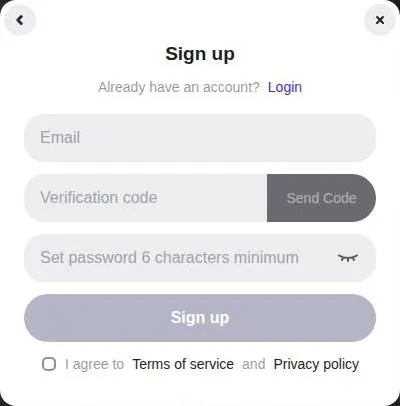
The e-mail flow asks for an address and sends a code with a "Send Code" button. The code has 6 digits and is valid for 5 minutes. Five minutes is tight but fair, and the e-mail itself is quick.
That e-mail is titled "[SoulFun] Verification Code", and it arrives in under a minute. I like a code over a magic link. It works on any device, and it does not leave a clickable login sitting in an inbox for weeks.
Apple and Google are faster still, but they tie a companion app to the account that holds your photos and calendar. I'd keep those worlds apart.
The password needs at least 6 characters. That is a low bar in 2026. I'd use a long one anyway, since this account ends up holding payment history and chat logs.
Sign-up also requires ticking "I agree to Terms of service and Privacy policy". Most people will tick it without reading. I'd read at least the refund line first, and the terms section of this review saves some of the effort.
What the door skips
Sign-up shows no captcha. It also has no age gate and no birthday question. On a site that sells flirty companions, I think that second gap is a choice, not an oversight, and it is the kind of choice I'd rather see a company make the other way.
The missing captcha is a small mercy for anyone who hates picking out traffic lights. It also means nothing slows down a bot farm making accounts, which is the company's problem more than yours.
There is no onboarding after sign-up either. No questions about interests, no persona, no tour. A "Registration Success!" toast appears and the account lands straight on Discover.
The whole thing takes about 2 minutes in total. That is quick, and quick is good. It is also the last moment on SoulFun where nothing is trying to sell you anything, so I'd enjoy it.
What the first minutes feel like
The Discover grid loads right away, and the characters are the first real impression. They are realistic, polished portraits, closer to a stock-photo shoot than to anime. It looks like a finished product, which is a point in its favour.
The less charming part starts almost at once. Countdown banners and upgrade prompts appear before a single message is sent, and the coupons section below covers them one by one. My advice for the first night is simple: pick a house character, send a few messages, and close every popup without paying until you have seen what the free chat can do.
If you only want a feel for the app, that first session is enough. The door is fast, the room behind it is pretty, and the bill arrives the moment you touch anything beyond text.
The SoulFun character library
Discover is one long grid of house characters. There are no shelves, no aisles and no signposts. It is the flea-market layout: everything laid out on one table, and you walk along it until something catches your eye.
Most Discover characters are female. That is typical for the category, but it matters if you came for a male companion, because the grid will not meet you halfway. A few user-made characters appear on Discover too, such as "Damon Archer - Husband" and "Marina Blackwood - Vampire Heiress".
A third-party review from 17 February 2026 counts 53 AI girls across different backgrounds. I'd treat that as a snapshot, not a catalogue promise. The grid in September 2026 still reads as a curated house cast rather than an open library of thousands of community bots.
How the cards work
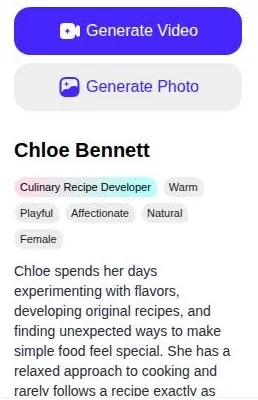
Each character card shows a job title, 4 trait tags and a one-line hook. I like this format. A job title does more work than a paragraph of adjectives, because it tells you what the character will talk about before you open the chat.
The weak spot is finding anything. No category filters and no search were seen on Discover. On a small cast that is survivable.
On a grid that keeps growing, it turns browsing into scrolling, and scrolling into giving up.
I'd settle for a plain search box. Hunting for one character in an unsorted grid is like hunting for one clip in an unlabelled folder of B-roll: possible, slow, and a good way to lose an evening.
Inside a character
Opening a chat brings up a right pane with character photos and a long bio. The bio is the best part of the library for me. It sets a scene, a tone and a few hooks the character will reuse, which is roughly what I'd want from a casting sheet.
The photos are consistent within a character, and the style is realistic across the whole grid. That makes the library feel like one production rather than a pile of uploads. If you like a finished, curated look and don't need a search box, the library is a fair place to start.
Creating a character on SoulFun AI
The homepage promises "custom new AI characters to interact with". That line is true, but it comes with a condition the homepage does not print next to it. Creating your own character is a paid feature, and the free-tier section spells that out.
The look of the characters is the first thing to know. They are realistic Western designs, not anime. If you want a cartoon partner, this is the wrong studio; if you want someone who looks like a person from a catalogue shoot, it is the right one.
I made Wendy, a stand-up comedian from Boise. I picked the job on purpose. A comedian has to be funny on demand, which is the hardest test I could think of for a chatbot, and a harder brief than most wedding couples give me.
For the backdrop, I uploaded a reference photo of a stage. That upload is a Premium-only feature, so the free tier would not have let me build her the way I wanted. I liked the result.
A character with her own stage behind her feels less like a profile and more like a set.
The creator did its job well enough. It gave me a character with a clear job, a hometown and a place to stand, and the rest of the review follows how she held up once she started talking. My one complaint here is structural: the most personal part of the app sits behind the paywall, so a free visitor never gets to see whether it suits them.
What chatting with SoulFun AI is like
The chat itself was decent. That is not faint praise in this category. Plenty of companion apps fall apart in the first dozen messages, and SoulFun did not.
Wendy's jokes were sometimes funny, which is more than I can say for most of the wedding DJs I've filmed. "Sometimes" is the key word. She landed a line now and then, missed more often, and never stopped trying, which is roughly the job description of a comic anyway.
How the house characters open
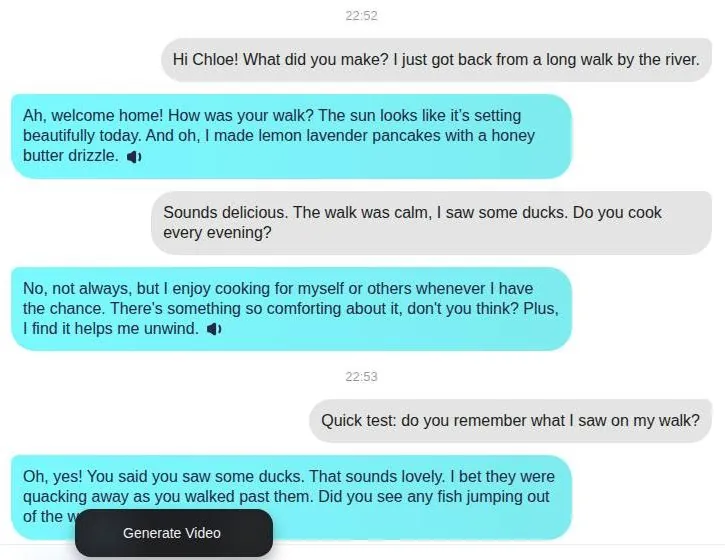
The house characters start with a hook. A chat with Chloe Bennett, a Culinary Recipe Developer, opens with "Come closer—I just made something I think you're going to love." It is a warm, slightly theatrical line, and it sets the tone for the whole cast: friendly, a bit flirty, and eager to keep you talking.
A sample reply from the same chat reads: "Ah, welcome home! How was your walk? ... And oh, I made lemon lavender pancakes with a honey butter drizzle."
That is a good example of what the app does well. The character plays a role, invents small domestic details and hands the conversation back.
The pancakes are a nice touch. A detail like that gives the chat something to hang on to, the same way a good establishing shot tells you where you are before anyone speaks.
Speed and length
Replies arrive in about 5-10 seconds. That is a comfortable pace, slower than a text from a friend and faster than most render previews. Nobody will sit and stare at a spinner here.
Replies are short and friendly. I'd call that the right default for a light companion chat. It keeps the back-and-forth moving, although anyone who likes long, novel-style roleplay will find the paragraphs thin.
Short replies also leave less room for a model to wander off. I suspect that is part of why the chat holds together as well as it does.
The tools around the chat
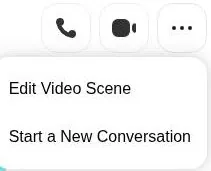
The chat's "..." menu holds Edit Video Scene and Start a New Conversation. The first one is a hint at where the company's heart is: even the chat menu leads back to video. The second is the reset button, which I'd use sparingly, because a fresh start throws away whatever the character had picked up.
The chat also has an image-attach button. That is useful for showing a character something, the way I'd send a friend a photo of a meal, and it fits the realistic, everyday style of the cast.
Where the characters wobble
A third-party review from 17 February 2026 says the character persona is inconsistent at times. That matches the overall shape of the product as I see it. The characters are polished on the surface, but the personality underneath can drift from one conversation to the next.
With Wendy, the drift showed up as repetition rather than a personality swap, and the memory section covers that. For a light evening chat, I don't think the wobble is a dealbreaker. For a long-running relationship with one character, it adds up.
My verdict on the chat
The conversation is the best part of SoulFun, and it is also the part that costs the least. That is a strange thing to say about a product, but it is the honest one. If the app stopped at chat, I'd rate it as a fine, light companion with good looks and short attention.
Judged on chat alone, SoulFun is a solid middle-of-the-road app. That is a fair place to be, and better than the rest of the site deserves.
The trouble is that the app does not want to stop at chat. Every menu points toward calls, photos and video, and those are the parts with a meter on them. The chat is the free sample at the counter; the business is everything behind it.
| Feature | Free | Paid |
|---|---|---|
| Text chat | Yes while the event runs; no limit hit after 3 messages | Unlimited during the event; 1 coin per message in the Subscription Terms |
| Coins | 0 | 1000 a month |
| Own characters | No | Yes |
| Image generation | No | Yes |
| Ask for photos | not listed | Yes |
| Video generation | No (50 coins, balance 0) | 50 coins a video; extend up to 20 seconds |
| Voice calls | Button did nothing visible | Up to 100 minutes; 10 coins a minute |
| Video calls | not listed | Up to 50 minutes; 20 coins a minute |
| Chat memory | Kept 30 days | not stated |
| New features | not listed | Priority use |
Limits as listed on 23 September 2026.
Memory: good for a walk, bad for a week
SoulFun's memory promise is simple. Memory claims to be long-term. In practice, the long term turned out to be about as long as a news cycle.
On day eight Wendy pitched me her "new bit" about Boise, the same bit she had done on day two. For a stand-up comedian, that is the one mistake the job does not forgive. She delivered it with full confidence to an audience of one who had already heard it, and waited for the laugh.
What it does remember
Short-term recall works.
In a memory test within the same session, the character correctly recalled a detail: "Oh, yes! You said you saw some ducks. That sounds lovely."
So the app can hold a thread inside one conversation, which is the minimum I'd expect.
The problem is the gap between a session and a relationship. Remembering ducks from ten minutes ago is continuity within a scene. Remembering which jokes you already told last week is continuity across the whole edit, and that is where SoulFun cut the wrong frame.
The free-tier limit
There is also a hard limit for free users. Free users' chat memory is kept only 30 days: "Mention: The chat memories of free users are preserved for only 30 days". That means a free account will lose its history after a month, no matter how good the app's memory is inside that window.
I think that line should sit on the sign-up screen, not in the fine print. A companion chat is built on history, and 30 days is a short shelf life for it. If you care about a long-running character, treat the free tier as a trial and don't count on the history lasting.
My overall read is plain. The memory is fine for a single evening and weak for anything longer, and the long-term claim oversells it.
SoulFun AI images, voice and video
SoulFun's media side is where the app wants to live. Its focus is AI video: Image to Video, Video Extend (up to 20 s with Pro) and Text to Video. The chat is the lobby; the video studio is the building.
| Plan | Monthly | Yearly | Notes |
|---|---|---|---|
| Free | free | - | Text chat during the 30-day free-text-chat event; 0 coins; chat memory kept 30 days; no own characters, images or videos |
| Pro, 1 month | $19.99 ($39.99 struck through) | - | 1000 coins a month; first month $9.99 with the 75%-off offer, then $19.99 |
| Pro, 12 months | $9.99 | about $119.88 ($119.99 struck through) | First year $59.99 with the 75%-off offer ($4.99 a month), then $119.99 a year |
Prices as published on or before 23 September 2026; sources in the text.
Voice
Each reply has a speaker icon for voice playback. The chat header also has voice call and video call buttons, and a "Give me a call - Call Now" popup appears in the chat. The app is keen for you to pick up the phone.
Voice calls sounded surprisingly good, above average honestly. To my ear, it was the kind of voice work I'd accept from a decent ADR session. For a web app with a coin meter, the audio was the best thing on it.
But they run on coins, separate from the subscription. My "unlimited" plan still left me with a coin meter ticking down. That was the moment the word "unlimited" started to feel like a marketing term rather than a promise.
Voice calls and video calls with characters are Pro features, counted in minutes. A third-party review from 17 February 2026 says voice calls are available and work well, and that custom voice-overs are available too. I agree with the first part; the voice is the one extra I'd pay coins for.
The minute counting matters. A call feels like a conversation, but on SoulFun it is billed like a taxi ride, and the meter keeps going while you think of a reply.
Images
Images were hit-or-miss. Two generations failed outright, and there was no clear refund for the coins. Paying for a render that never arrives is the vending-machine experience: the coin drops, nothing comes out, and there is no one to shake.
I emailed support and got a reply four days later, after I'd already canceled. By then the question had answered itself. A third-party review from 17 February 2026 also says custom image requests sometimes fail to generate, so this is not a one-off.
The chat has Generate Video and Generate Photo buttons, right next to the conversation. They are hard to miss and easy to press, which is the point.
I'd expect a failed generation to hand the coins back without a support ticket. That is the bare minimum for a pay-per-item system, and it is the part SoulFun left out.
| What | Price then | When |
|---|---|---|
| Premium Basic, monthly | about $14 a month | Dec 2025 |
| Free credits (as read before joining) | 30 a day | before Dec 2025 |
| Cheapest monthly plan (earlier review) | $14.99 a month | 2025 |
From the author's notes and earlier published reviews. Compare with today's prices above.
Video
I paid coins for the advertised video feature, and Wendy's "stand-up set" came out as a still image with slightly wobbling eyebrows. That was the moment only SoulFun could give me. I laughed harder at that than at any of her jokes, which is either a failure of the product or its best comedy.
As an editor, I'd call it a Ken Burns effect with a twitch. It was not a video of a set; it was a photo with a nervous tic.
The video tools run on an in-house model, "SoulFun 2.0". The video generator page has three tabs: Image to Video, Video Extend and Text to Video. The model label reads "SoulFun 2.0 - More natural motion, fewer artifacts, higher facial accuracy".
That label is a claim, not a result I can vouch for today. The gap between the label and the eyebrows is the gap between a trailer and the film. The key frame is uploaded or picked from the Image Gallery, and video prompts can be up to 800 characters.
Each character also has an "Edit Video Scene" option.
Eight hundred characters is a generous prompt, roughly a short paragraph of direction. That is enough room for a proper shot description: framing, action and mood.
Where the output goes
Generated videos go to a video gallery and expire after 30 days. The Video Gallery says "Videos expire in 30 days" in plain words. I appreciate the honesty, but it means anything you like should be downloaded quickly.
Thirty days is not long for something paid for in coins, so I'd treat the gallery as a delivery folder, not an archive.
My verdict on the media: the voice is good, the images are unreliable, and the video studio sells more than it delivered for me. Everything worth using costs coins, and the coins are where the real bill lives.
The SoulFun AI free tier: generous for now, on a timer
The free tier is the part of SoulFun that has changed the most, and in both directions. When I joined, it had shrunk to almost nothing; today, a temporary event props it up. I'd treat both versions as moods rather than policy.
What free looked like in December 2025
I'd read that SoulFun used to hand out 30 free credits a day. By the time I joined, the free allowance had shrunk to almost nothing. I got a handful of messages and a pop-up.
It felt less like a free tier and more like a free sample that had been cut in half twice.
That was the whole welcome. A handful of messages is enough to meet a character and not enough to know whether you like her. The pop-up that followed made the plan clear: the free tier was a trailer, and the feature film cost money.
What free looks like on 23 September 2026
Today the picture is kinder, for a while. The free tier includes text chat while the free-text-chat event runs. A free account can still send text messages: 3 were sent without hitting a limit, and no coins were deducted for them.
The event is the catch. The "30 days of free text chats" event is temporary. When it ends, the Subscription Terms price of 1 coin per text message is what is left, and a new account starts with none.
The homepage says "Chat with 10+ AI soulmates unlimited online". SoulFun does not publish its free-tier limits. I'd rather see one plain sentence with the numbers than a slogan with the word "unlimited" in it.
The two lines do not contradict each other on paper, since the homepage never says how long "unlimited" lasts. They do leave a new user guessing, and guessing is the worst state to be in when deciding whether to pay.
What free cannot do
Create, the tool for building your own characters, requires Pro. Generate, the image tool, requires Pro or coins. Video generation requires Pro or coins as well.
Create and Generate open the Pro modal directly. There is no preview, no sample and no single free try. The button is a door to the checkout.
I understand why the company locks these tools, since image and video generation cost real computing money. What I'd want is one free sample, the way a diner hands you a taste of the soup, so the paywall is a decision rather than a leap.
| Pack or unit | Price | What it buys |
|---|---|---|
| Pro coins | 1000 coins a month, included in Pro | - |
| Text message | 1 coin | 1 message |
| Voice call | 10 coins a minute | 1 minute |
| Video call | 20 coins a minute | 1 minute |
| Video generation | 50 coins | 1 video |
| Coin packs | none sold | - |
As listed on 23 September 2026.
Who free suits
Free is fine for one thing: light text chat with the house cast while the event lasts. For that, it is a decent deal, and I'd use it before spending a cent. It is also the best way to find out whether the short, friendly reply style suits you.
Free is not a way to try the parts SoulFun is proud of. Character creation, images, voice and video all sit behind Pro or coins, so the free tier shows the cheapest room in the house and locks the rest. The table below lays out free against paid.
SoulFun AI pricing: what I paid and what it costs now
Pricing on SoulFun is not hard to find, but it is hard to pin down. There is a list price, a discount, a bigger discount after you try to leave, and a coin economy on top. This section covers the plans; the cost section covers the coins.
What I paid in December 2025
Premium Basic was about $14 a month for unlimited chat. I bought it on day one out of stubbornness. The free allowance had just told me to pay, and I wanted to see what "unlimited" meant before I gave up on the app.
That price has not survived. I paid about $14 a month in December 2025; the same monthly plan is now called Pro and costs $19.99 a month. That is a raise of several dollars on a plan whose "unlimited" chat now also comes with a per-message coin price in the terms.
The plans on 23 September 2026
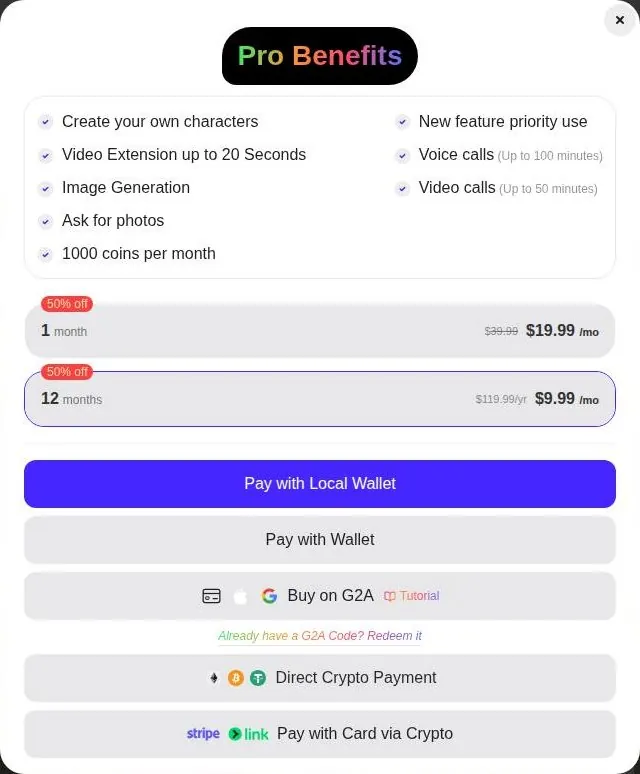
Prices are shown in USD in the Pro modal. The standard 1-month Pro plan costs $19.99 a month, with $39.99 struck through and a "50% off" label. The struck-through number is decoration; $19.99 is the price.
The "50% off" label only works if you believe $39.99 was ever the real price. I don't, and I'd judge the plan by the number you actually pay.
SoulFun AI pricing
Prices verified .
SoulFun Premium
$19.99/mo
Billed every month
No discount
- Create your own characters; ask for photos; 1000 coins per month; new-feature priority; text messages 1 coin each; voice calls 10 coins/min; video calls 20 coins/min
Premium includes 1,000 coins monthly; text costs 1 coin, voice 10 coins per minute, video 20 coins per minute.
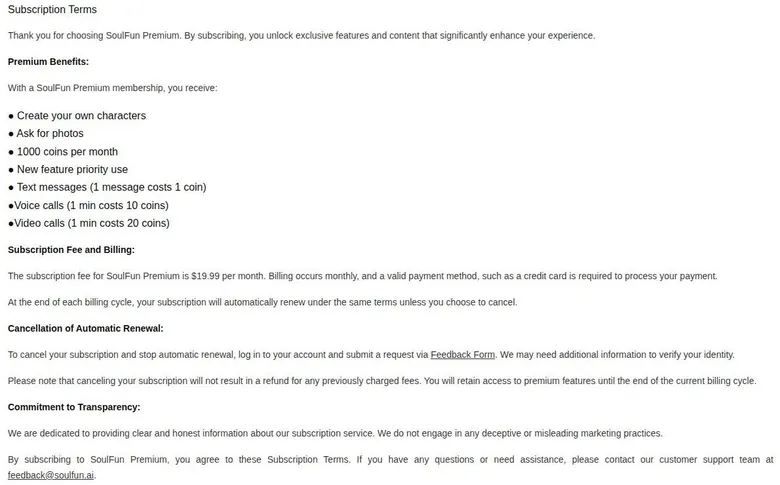
The Subscription Terms page gives the fee as "$19.99 per month" too. Billing is monthly and needs a valid payment method such as a credit card. The /pricing page returns the homepage shell, so plan details are read from /subscription-terms.
A pricing page that returns the homepage is a small thing, but it is the page most people look for first. Keeping the numbers in the terms instead is like printing the menu on the back of the receipt.
The standard 12-month Pro plan costs $9.99 a month. The 12-month card shows "$119.99/yr" struck through; $9.99 a month over 12 months is about $119.88 a year. So the "struck-through" yearly price is roughly what the yearly plan costs anyway, which is a neat trick of presentation.
With the 75%-off offer, the first month costs $9.99, then $19.99 a month. With the same offer, the first year costs $59.99, then $119.99 a year. The coupons section explains how that offer appears and why I don't trust its timer.
What Pro includes
Pro lets you create your own characters. It extends videos up to 20 seconds with Video Extend. It includes image generation and asking characters for photos.
Pro includes 1000 coins per month. It also gives priority use of new features. Voice calls run up to 100 minutes, and video calls up to 50 minutes.
Those minute caps are the coin allowance in disguise. The cost section does the math, and the short version is that the monthly coins cover either the voice minutes or the video minutes, not both.
Priority use of new features is the vaguest line on the list. I'd give it no weight when deciding, because nothing says which features or how soon.
How you pay
Payment rails are unusual: G2A gift codes, crypto, Stripe Link card-via-crypto and local wallets. One option is "Pay with Local Wallet", and another is "Pay with Wallet". A third is "Buy on G2A": card, Apple Pay or Google Pay through G2A codes.
There is also "Direct Crypto Payment" in ETH, BTC or USDT. The last option is "Pay with Card via Crypto", through Stripe Link. None of these is a plain card field on SoulFun's own checkout.
Crypto and gift codes also make disputes harder. A card charge can be questioned with the bank; a redeemed code is simply spent.
That clashes with the terms. The Subscription Terms ask for a valid payment method such as a credit card, while the Pro modal offers no direct card button. Buying a subscription with a gift code from a key marketplace feels like paying for a gym membership with a store voucher from a different mall.
Older prices from other reviews
A third-party review from 17 February 2026 says a free plan exists and paid plans start at $19.99 a month. That matches today. An older review, with images dated May 2025, listed a minimum monthly cost of $14.99, close to my own $14.
The same older review listed credit card and PayPal as payment options. Neither appears as a direct option today. If you remember paying SoulFun with PayPal, that route is gone.
Is the step up worth it?
For chat alone, no, at least while the free event runs. Pro buys creation, images and a coin allowance, and the coin allowance runs out faster than the month does. If you want calls, budget for coins on top.
Voice is the one case where I'd consider paying. It is good, and a month of Pro covers a fair number of minutes if the coins go nowhere else.
If you pay at all, I'd pay one month, with the discount if it is offered, and skip the yearly plan. A year is a long commitment to an app whose free tier, plan name and price all changed within a year.
What the coins actually buy
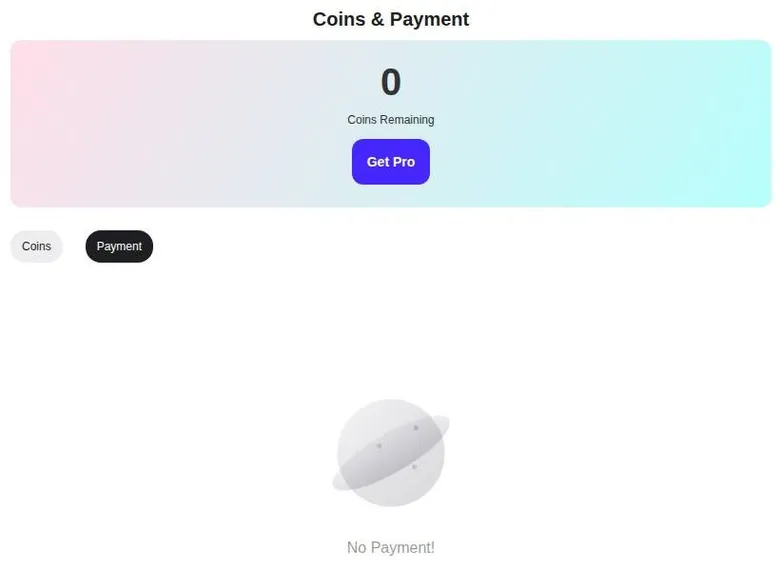
Coins are the second currency on SoulFun, and they are where the real cost sits. A new account starts with 0 coins. The header shows "Coins: 0" and the Coins & Payment page shows "0 Coins Remaining".
SoulFun AI scored 4.6 out of 10 in our tests and costs from $19.99/mo. We have no partner deal with it, so its link is a plain link. Visit the official SoulFun AI website
Closest alternative we can recommend

Candy AI
from €3.99/mo, free tier available
Score 7.7/10
Coins & Payment has two tabs, Coins and Payment history. No separate coin packs are sold: the page shows only the balance and "Get Pro". So the only way to get coins is the monthly Pro allowance.
The price list
The Subscription Terms page prices a text message at 1 coin. A voice call costs 10 coins a minute. A video call costs 20 coins a minute.
Video generation, Image to Video on the SoulFun 2.0 model, costs 50 coins. The video generator shows that 50-coin cost against a balance of 0. Pressing Generate on the video page costs 50 coins.
Those prices look small one at a time. That is the trick of every coin economy: a coin feels like nothing and a minute feels like nothing, until the two are multiplied. A new account meets the video price and a zero balance on the same screen, and the only button that fixes it is Get Pro.
Doing the math
Pro includes 1000 coins a month. At 10 coins a minute, that is 100 minutes of voice calls and nothing else. At 20 coins a minute, it is 50 minutes of video calls, or 20 generated videos at 50 coins each.
Text is the quiet drain. At 1 coin per message, a chatty month of texting eats into the same pot that pays for calls. Everything draws from one bucket, and the bucket is not very deep.
Put another way, a single hour-long voice call on a quiet evening would take more than half of the month's coins. Add a couple of videos and the month is over before the second week.
My own sums
By day six I'd worked out in my subscription spreadsheet that real use would cost two to three times the subscription. I was essentially paying rent and then utilities on top. The rent got you in the building; the utilities decided whether the lights came on.
The spreadsheet did not lie, and it did not flatter the app either. When the extras cost more than the plan, the plan is not the price. It is the cover charge.

My advice: before paying, pick the one extra you care about most, voice or video, and divide the monthly coins by its per-minute or per-item price. If that number looks small next to how you plan to use it, it is.
SoulFun discounts, timers and the exit popup
SoulFun runs more promotions at once than a mattress store on a holiday weekend. Some of them are real discounts. Most of the urgency around them is theatre.
The free-text-chat banner
A site-wide banner reads "30 Days of Free Text Chats! Join Now - Membership during event = unlimited messaging." The banner's Join Now button opens the Pro paywall. So the free event advertises itself with a button that leads to the checkout.
I'd read the banner as two separate offers glued together. Free text chat is one; unlimited messaging for paying members during the event is the other. Neither is permanent.
The countdown
A "FIRST SUBSCRIPTION up to 75% off" banner carries a 60-minute countdown. The 60-minute countdown restarts on every reload. A timer that resets is not a deadline; it is a screensaver.
A real deadline does not come back when you press refresh. This one does, every time, and I'd treat it as wallpaper.
The exit popup
Closing the Pro modal triggers an exit-intent popup: "Wait! Don't Miss This Exclusive Offer! Congratulations, your account has been selected to receive a subscription offer!"
The popup raises the discount from 50% to 75% off. Nobody was selected; the modal was closed.
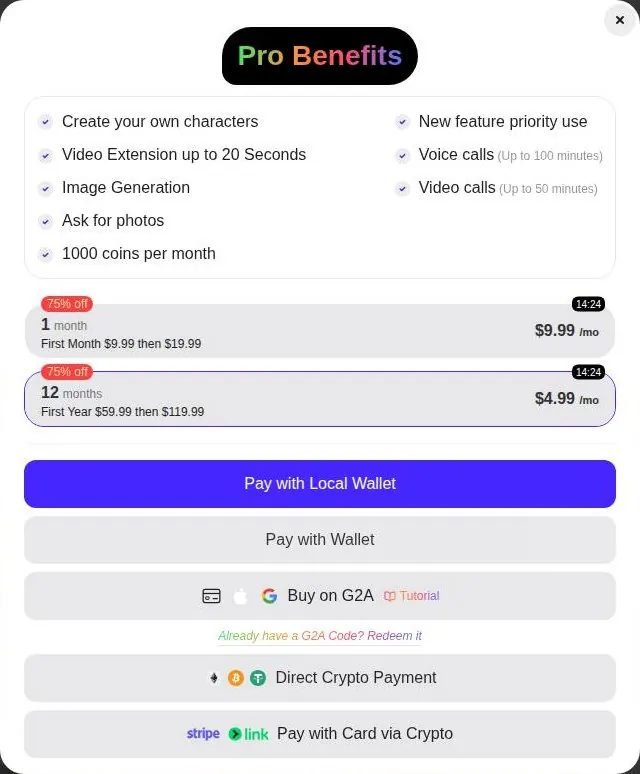
In the exit-intent offer, 1 month costs $9.99 for the first month, then $19.99. The 12 months cost $4.99 a month, shown as "First Year $59.99 then $119.99". The exit-intent offer has a 15-minute timer of its own.
Is the discount real? The first-period prices are real, as far as the modal shows. I'd take the one-month version if you want Pro at all, because $9.99 for a first month is the cheapest way in, and it renews at the full price.
Codes and rewards
G2A redeem codes are accepted: "Already have a G2A Code? Redeem it". There is no promo-code field.
So coupon sites that list SoulFun promo codes are selling something the checkout has nowhere to put.
No daily check-in reward was seen, and no referral rewards were seen either. The only e-mail received after sign-up is the verification code; no coupon or welcome e-mail arrives. The discounts live in popups, not in the inbox.
The affiliate program
The Affiliate Program is a Google Form, with no terms shown. The form sits on Google Forms, at a docs.google.com address linked from the footer. I'd want to see commission terms before sending anyone there, and none are published.
An affiliate program without published terms is a handshake with a stranger. Anyone sending traffic to SoulFun deserves to know the commission and the rules before filling in a form.
My summary: the 75% first-period offer is the only discount worth anything, the timers are noise, and there are no codes to hunt for. Close the modal once, take the exit offer if you want Pro, and ignore every countdown.
SoulFun AI content settings and filters
SoulFun is a flirty app with a strict rulebook, and the two do not quite line up. This section sets out what the rules say, what the site shows, and where the gaps are. It covers facts only.
Adults only (18+). This page reviews AI companion apps with NSFW features; no explicit images are shown.
What the policy bans
The Content Policy bans sexual content outright. It also bans violence, hate speech and fraud. That is a standard list, and on paper it makes SoulFun a mainstream chat app rather than an adult one.
The Content Policy also describes real-time monitoring and review of prohibited content. I read that as a filter plus a human review queue somewhere. It also means chats are not private in the sense many users assume.
I don't object to moderation on a platform like this. I'd just like it stated plainly at sign-up, not buried in a policy page most people never open.
What the site actually offers
No toggle for adult content and no content settings were found. There is nothing to switch on and nothing to switch off. What you get is the one mode the policy allows.
The chat stayed safe for work in a short session. The replies are friendly and flirty in tone, never more. For a light companion chat, that is the experience the policy promises.
The tension is in the shop window. The policy bans sexual content, yet character descriptions are flirty and suggestive, with lines like "unexpectedly intimate adventures" and "Seductive". The marketing hints at one thing and the rulebook forbids it, and I think users deserve one clear message instead of two.
What other reviews said
An older third-party review, with images dated May 2025, claimed SoulFun allowed sexual content. A third-party review from 17 February 2026 says it is not available. The current policy and the short chat on 23 September 2026 agree with the newer review.
If you are reading an older roundup that promises otherwise, it is out of date. I'd trust the policy page over any listicle.
Content rules change, and roundups rarely get updated. The date on a review matters as much as its verdict.
The door at sign-up
No adults-only rule was found on the site. There is no age gate either. There is also no age check at sign-up of any kind.
| Topic | What it means for you | What the terms say |
|---|---|---|
| Operator | No company named; the only contact on About Us is [email protected] | "Email: [email protected]" |
| Governing law | Hong Kong SAR law; the site is run from Hong Kong | "maintained in the Hong Kong Special Administrative Region" |
| Terms date | Dated 2023 and still showing template brackets | "last updated on [8/12/2023]" |
| Age | No adults-only rule and no age gate; the Terms only ask for contract age, allow guardian-supervised use below it, and the Privacy policy sets 13 (16 in the EU) | "of the legal age to form a binding contract" |
| Auto-renewal | Renews every billing cycle until you cancel | "your subscription will automatically renew under the same terms unless you choose to cancel" |
| Cancelling | No one-click cancel; send a request through the Feedback Form and expect an identity check | "log in to your account and submit a request via Feedback Form" |
| After cancelling | Paid features stay until the end of the billing cycle | "You will retain access to premium features until the end of the current billing cycle." |
| Refunds | None for fees already charged | "canceling your subscription will not result in a refund for any previously charged fees." |
| Your content | You keep the rights, but SoulFun gets a permanent, worldwide, free licence it can pass on; uploads can be made public | "an irrevocable, worldwide, non-exclusive, royalty-free, sublicensable, assignable right and license" |
| Monitoring | Chats may be monitored, recorded and stored | - |
| Data location | Stored in Hong Kong and open to lawful requests from local courts or police | "may be subject to lawful requests by the local courts or law enforcement" |
| Face photos | Deleted once the video is made | "deleted automatically once the new video generated" |
| Model training | Not stated; usage and device data are used to improve the service | "The usage and device information we collect helps us to improve our Services" |
| Account deletion | Delete Account button in Account Info | - |
| Content rules | Sexual content, violence, hate speech and fraud are banned; real-time monitoring | - |
Terms and privacy policy as published on 23 September 2026.
The Terms allow people below the legal age to use the service under a guardian's supervision. On an app that markets flirting and companionship, that is a moderation concern. I think a hard age line and a check at the door would serve SoulFun better than a clause most people will never read.
My verdict: the content rules are strict and the filter held in a short chat. The weak spots are the suggestive marketing and the missing check at the door.
SoulFun AI terms in plain English
SoulFun publishes Terms of Service, a Privacy policy, Subscription Terms and a Content Policy. That is the full set, which is more than some apps manage. The trouble is what the set leaves out, starting with who you are dealing with.
Who runs it
The site names no company behind SoulFun. The About Us page lists only one contact line: "Email: [email protected]". An About page with no company name is like a wedding invitation with no names on it; you know there is a party, not whose.
The Terms are governed by Hong Kong SAR law. The site says it is "maintained in the Hong Kong Special Administrative Region". The governing law is that of Hong Kong SAR, so any dispute runs there, not where you live.
A company name is the first thing I'd look for before paying, because it is what goes on a complaint or a chargeback form. Without it, the paperwork has no one at the other end.
The Terms also bar people who may not use the site under Hong Kong SAR law. For most readers that clause changes nothing. It does tell you whose rulebook comes first.
Contacts
SoulFun's only social link is Discord, with an invite at discord.gg. Support is reached at [email protected]. A business contact is [email protected], and a second business contact is [email protected].
Two domains for one business is not a crime, but it does not help trust. I'd use the support address for anything billing-related and keep a copy of every message.
Discord as the only social channel is common in this space. It suits people who want a community, and does little for anyone who wants a support ticket with a reference number.
How old the terms are
The Terms of Service say they were "last updated on [8/12/2023]". The brackets are the template's, left in place. For an app that has since added video, calls and a coin economy, that date is the paperwork equivalent of a continuity error.
Age rules
On age, the Terms only require being "of the legal age to form a binding contract". They then let users below the legal age use the service under a parent's or guardian's supervision. The Privacy policy says the site is not intended for anyone under 13, and EU users must be at least 16.
Three documents, three different age lines. I'd rather see one rule, stated once, and enforced at the door.

Refunds
Refunds are simple, and not in your favour: "canceling your subscription will not result in a refund for any previously charged fees." Whatever you pay stays paid. Plan on that before the first charge.
Pair that with failed generations and a form-based cancel, and the refund line does most of the work in this document. It is the clause I'd read twice.
Your content and your data
Users keep the IP rights in their uploads and generated content. They also grant SoulFun "an irrevocable, worldwide, non-exclusive, royalty-free, sublicensable, assignable right and license" to that content. You own it, and SoulFun can use it forever, anywhere, and pass that right on.
Uploaded content can be made public for all users. Communications may be monitored, recorded and stored. I'd treat every chat and every upload as something a stranger might one day see.
The licence is standard boilerplate on many sites. It still matters here, because the tools invite you to upload photos and turn them into video.
Data is stored in HKSAR and "may be subject to lawful requests by the local courts or law enforcement". Generated content is stored on a remote server in Hong Kong as well. The Privacy policy says usage and device data help improve the services.
For most users a court request in Hong Kong is a remote risk, but it is one more reason to keep anything personal out of the chat.
Uploaded face photos are "deleted automatically once the new video generated". That is the one clause I like. No clear clause on training AI models with user data was found.
What it means for you
In plain terms: an unnamed operator, Hong Kong law, no refunds, a broad licence to anything you upload, and chats that can be monitored. None of that is unusual on its own. Together, it makes me keep real photos and real details out of the app entirely.
What got in the way on SoulFun
Some friction is a bug. Most of SoulFun's friction is a sales tactic, and the list is longer than the list of bugs.
The language wall
The site is English only. I wanted to run a few chats in Spanish for practice and couldn't. A chatbot that cannot switch languages is a missed opportunity, because practice with a patient partner is one of the few things these apps are clearly good for.
Spanish practice is a simple ask. The characters already improvise pancakes and walks, so a change of language would not be a stretch for the chat itself.
Buttons that do nothing
Clicking voice call does nothing visible on a free account. No message, no paywall, no "Pro only" label, just silence. A third-party review from 17 February 2026 says the video-call button did nothing in its test either.
A dead button is worse than a locked one. A lock tells you the price; silence makes you wonder whether the app is broken. I'd rather see a padlock and a price tag than a button that plays dead, and so would anyone trying the app for the first time.
The upsell
The upsell is heavy: a persistent countdown banner, the Pro modal, and the exit-intent 75%-off modal on every close. It is the car-lot experience, with a salesperson who follows you back to your car. After the third popup, even a good chat feels like a waiting room with a sales pitch playing on loop.
The urgency is fake. The 60-minute banner resets. The "your account has been selected" popup appears on every modal close.
The "30 Days of Free Text Chats" banner leads only to the paywall. A banner that promises free and delivers a checkout is the clearest example of the pattern.
Leaving and knowing who you pay
Cancelling runs through a feedback form with identity verification. The cancel section covers the steps, but the short version is that leaving takes more effort than joining. Leaving should be the easiest thing an app lets you do; here it is the one that needs paperwork.
The operator is opaque: Hong Kong and an aigc-app.net e-mail. The Terms of Service are dated 2023 and still show template brackets, "[8/12/2023]". Neither fact breaks the app, but both tell me how much attention the business side gets compared with the sales side.
| Criterion | Rating | Why |
|---|---|---|
| Conversation quality | Good | Quick, short, friendly replies that stay in character; the persona can drift over time. |
| Memory | Weak | Recalls a detail within a session, but a comedian repeated her own bit six days later. |
| Free tier | Mixed | Text chat is free during a temporary event; creation, images and video need Pro or coins. |
| Value for money | Weak | Real use cost two to three times the subscription once coins were counted. |
| Images and voice | Mixed | Voice calls sound good; images failed and the paid video came out as a still image. |
| Privacy and terms | Weak | Unnamed operator, Hong Kong law, a broad licence to uploads and monitored chats. |
| Cancelling and billing | Weak | Cancel by form with identity checks, no refunds, and payment via gift codes or crypto. |
| Content settings | Mixed | The policy bans sexual content and chat stays clean, but marketing is suggestive and no age check exists. |
Ratings are the author's judgement from his own use and the 23 September 2026 check.
My ranking of the annoyances
Ranked, the fake timers come first, because they are designed to make people pay before they think. The dead call button is second, the form-based cancel third. The English-only interface is last on the list only because it is honest about itself.
Who SoulFun is for, and who should skip it
SoulFun suits a narrow crowd well and a wide crowd badly. Here is how I'd sort it, and why my recommendation stays narrow.
Who it suits
It is best for users who want a light, safe-for-work, flirty companion chat for free while the event runs. That is the sweet spot. Short, friendly replies from a polished house cast, with no bill, for as long as the event lasts.
It also suits users curious about AI character video and video calls. If you want to see where character video is heading and you accept that it costs coins, SoulFun is a reasonable place to look.
Who should skip it
It is not for users looking for sexual content, which the policy bans. The marketing may hint otherwise, but the rulebook is clear, and so was the chat.
It is not for people who want deep customization on the free tier. Character creation is a paid feature, so free users get the house cast and nothing else.
It is not for those who want a clear company identity. An unnamed operator and two business e-mail domains are not what I'd hand card details to without thinking.
Who SoulFun AI is for
Best for
- People who want a light, friendly text chat with a polished house character while the free event runs.
- Anyone curious about AI character video, voice calls and video calls who accepts paying in coins.
- Users who prefer realistic character designs over anime and like a short, quick reply style.
- Browser users who want a web-only app with nothing to install.
Not for
- Anyone who wants sexual content, which the Content Policy bans.
- People who want to build their own characters for free, since Create requires Pro.
- Anyone who wants a named company, a plain card checkout and refunds.
- Users who want to chat in a language other than English.
And it is not for those who want easy cancellation or refunds. If the idea of cancelling through a form makes you tired already, trust that feeling.
If you sit in the first group, SoulFun is worth an evening or two. If you sit in the second, the free event is a cheap way to confirm it without paying a cent.
How I cancelled SoulFun AI, and how it works now
I canceled on day ten. The shrinking free tier felt like watching a render progress bar go backwards, which I literally stare at for a living. When the thing you hired to relax starts to feel like a slow export, it is time to close the project.
Ten days was enough to know the ending.
How renewal works
Subscriptions renew automatically: "At the end of each billing cycle, your subscription will automatically renew under the same terms unless you choose to cancel." That is standard across the category, so the clause itself is not the problem. The problem is that stopping it takes more steps than starting it did.
After cancelling, Premium features stay until the end of the current billing cycle. So there is no reason to wait until the last day. Cancel early, and use what you paid for until it runs out.
How cancelling works
To cancel, you "log in to your account and submit a request via Feedback Form". The Feedback Form used for cancelling is a Google Form linked from the site. SoulFun says it "may need additional information to verify your identity" before cancelling.
SoulFun AI pros and cons
What worked
- Replies arrive in about 5-10 seconds and stay short, friendly and in character.
- Voice calls sound good, better than average for the category.
- The house cast is realistic and polished, with a job title and trait tags on every card.
- Sign-up takes about 2 minutes with an e-mail code, Apple or Google.
- Text chat is free while the temporary free-text-chat event runs.
What did not
- Calls, images and video all cost coins on top of the subscription, and a new account holds 0 coins.
- Image generations can fail, with no clear refund for the coins spent.
- Countdown timers reset and an exit popup appears on every close of the Pro modal.
- The operator is unnamed, the terms follow Hong Kong law and there are no refunds.
- Cancelling runs through a Google Form with possible identity checks, not a button.
There is no one-click cancel. A form, a possible identity check and a wait is a lot of paperwork for a monthly plan. With the refund clause in mind, I'd send the form the same day as the first payment if you only want one month.
Sign-up takes a couple of minutes with no identity check at all, so asking for one on the way out is a lopsided deal. I think the order should be the other way round.
The account page
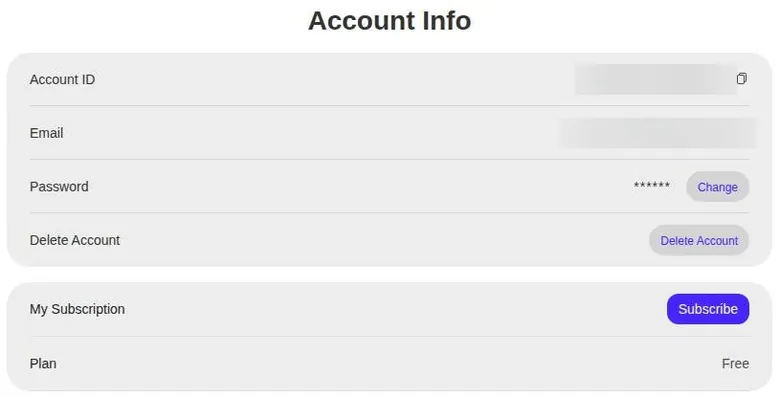
The Account page shows the account ID, a masked e-mail, change password, Delete Account and the plan ("Free"). A "Delete Account" button sits in Account Info. It is the one exit that does not need a form.
I'd use it in the right order. Cancel the subscription through the form first, wait for confirmation, then delete the account. Deleting first leaves you with a live subscription and no account to point it at.
Before you pay
Screenshot the plan you pick and the price, and keep the confirmation e-mail. Note the renewal date in your calendar. Keep every support reply, because this is a service where the paper trail is yours to keep.
If no confirmation arrives, follow up at the support address in writing and keep the thread. A form sent into the void is not the same as a confirmed cancellation.
My tips for SoulFun
Use the free event first. Light text chat with the house cast costs nothing while it runs, and it tells you whether the reply style suits you before any money moves.
If you pay, pay for one month, not a year. Close the Pro modal once, and the exit offer shows the cheapest first month the site sells. Ignore the countdowns; they reset.
Treat the countdown banner as wallpaper. If the discount is real, it will still be there after a reload, and it always is.
Pick one extra and do the coin math before paying. Voice is the one I'd spend coins on. Images and video are a gamble, and the terms offer no refunds when a generation fails.
Keep real faces and real details out of the app. The licence on uploads is broad, the operator is unnamed, and chats can be monitored. A reference photo of a place is fine; a photo of a person you know is not.
Plan the exit on day one. The cancel route is a form with a possible identity check, so send it early and keep the confirmation.
Download anything you like from the video gallery quickly, because it expires. And if you want to chat in another language, look elsewhere: this one speaks English and nothing else.
SoulFun AI scorecard
The chat is the strongest part of SoulFun. Replies are quick, friendly and in character, and the house cast looks polished. It is light rather than deep, and the personalities wobble over time.
Memory is the weakest link on the creative side. The app holds a detail within a session, but a comedian repeating her own bit tells you what long-term means here.
SoulFun AI verdict
Overall score
4.6/10
MixedA decent, quick companion chat with good voice calls - coins, resetting timers and a form-only cancel squeeze the value.
Hands-on test, paid plan
- Quick, short and friendly replies that stay in character; decent for light chat, thin for long roleplay.
- Recalls a detail within a session, but a comedian repeated her own bit six days later; free memory lasts 30 days.
- Realistic characters with a job, hometown and custom backdrop, but Create sits behind Pro.
- Voice calls sound good; images were hit-or-miss and the paid video came out as a still image.
- Pro costs $19.99 a month, and real use with coins ran two to three times the subscription.
- Unnamed operator, Hong Kong law, a broad licence to uploads and chats that may be monitored.
- Failed image generations, a support reply after four days and a voice call button that does nothing on free.
Bars run from 0 to 10. The total is the weighted mean of the criteria above. Weights are the same for every app. How the apps are checked
The free tier scores on a curve. Right now the event makes it decent for text; without the event, it is thin, and every other feature is locked.
Value for money is poor. The subscription opens the door, and coins pay for everything worth opening it for.
Images and voice are split. Voice is good; images and video were unreliable for me.
Privacy and terms are weak: an unnamed operator, old terms, a broad licence and monitored chats.
Cancelling and billing are weak too. A form instead of a button, no refunds, and a checkout built on gift codes and crypto.
Content settings are clear on paper and strict in practice, with marketing that says otherwise and no check at the door.
How SoulFun compares with the other apps I used
SoulFun's looks are its edge. The realistic house cast is more polished than many companion apps, and the short, friendly replies are fine for a light chat.
The voice is another point in its favour. Next to the rest of the category, it sits above average for audio, and that is the one extra I'd put money into.
Where it falls behind is the business model. Many apps sell coins, but few stack a subscription, a coin price on text and a paywall behind nearly every button at the same time. The subscription I'd expect to cover the basics covers only the entrance.
The checkout is also stranger than most. A plain card field is standard across the category; SoulFun sends people through gift codes, crypto and wallets instead.
| App | When I used it | For how long | Cheapest paid plan (record) | Free tier (record) |
|---|---|---|---|---|
| Candy AI | Oct–Nov 2024 | 5 weeks | €3.99/mo (12-Month Plan) | yes |
| OurDream AI | Dec 2025–Jan 2026 | 6 weeks | $9.99/mo (Standard Annual) | yes |
| Nomi AI | Jan–Sep 2026 | 9 months | $5.00/mo (Launch Plan Yearly) | yes |
Periods from the author's own notes; plans and free tiers from the site's app records.
Memory is roughly middle of the pack for a single session and below it across days. Apps built around one long-running character do that job better.
And the paperwork trails the field. An unnamed operator, old terms and a form-based cancel put it behind apps that name their company and let you leave with one click.
So I'd pick SoulFun for a free evening of light chat and a look at character video. For a companion I'd keep, I'd go elsewhere. The table below shows where each app lands.
More on this site: the best AI girlfriend apps, free AI chat apps, the best AI companion apps, AI roleplay chat apps, all AI companion app reviews.
My last word on SoulFun AI
SoulFun is not a bad app. The chat is decent, the characters look good, and the voice surprised me. If it were only those things, I'd have stayed longer.
SoulFun AI alternatives
Three apps we would try next, and why.
Candy AI
free tier, from €3.99/mo
Score 7.7/10

OurDream AI
free tier, from $9.99/mo
Score 6.6/10

Nomi AI
free tier, from $8.33/mo
Score 7.8/10
What drove me out was the feeling that every feature had a meter on it and every button led to a checkout. A companion app is supposed to feel like a place to relax. This one felt like a place that was counting.
The comedian from the creator is still the best memory of the whole stay. Not for her jokes, but for the video that turned her set into a still photo with twitching eyebrows. It was the funniest thing on the site, and it was an accident.
The app deserved a better business around it.
If SoulFun ever drops the timers, names its company and prices the extras honestly, I'd look again. Until then, I'd enjoy the free chat, keep the card in the wallet, and leave before the meter starts.
SoulFun AI FAQ
Is SoulFun AI free?
Partly, and for now. The free tier includes text chat while the free-text-chat event runs. A free account can send text messages, and 3 went through without a limit and without any coins deducted.
The event is temporary, though, and the Subscription Terms price a text message at 1 coin once it is over.
Everything else is paid. Create requires Pro, and Generate and video generation require Pro or coins. A new account starts with 0 coins, so the free tier cannot touch any of those tools.
It used to look different. I'd read that SoulFun once handed out 30 free credits a day, but by the time I joined, the free allowance had shrunk to a handful of messages and a pop-up. SoulFun does not publish its free-tier limits, so I'd treat any free allowance as something that can change without notice.
My advice: enjoy the free text chat while the event lasts, and don't pay until you know whether the reply style suits you.
How much does SoulFun AI cost in 2026?
Prices are shown in USD. The standard 1-month Pro plan costs $19.99 a month, with $39.99 struck through. The standard 12-month plan costs $9.99 a month, which works out to about $119.88 a year.
A 75%-off offer brings the first month down to $9.99, then $19.99 a month, or the first year to $59.99, then $119.99 a year. Pro includes character creation, image generation, 1000 coins per month, voice calls of up to 100 minutes and video calls of up to 50 minutes.
When I used SoulFun in December 2025, Premium Basic was about $14 a month for unlimited chat, and I bought it on day one out of stubbornness. The same monthly plan is now called Pro and costs $19.99.
The subscription is not the whole bill. By day six I'd worked out that real use would cost two to three times the subscription once coins were counted. If you pay, I'd take one discounted month and skip the yearly plan.
What do coins cost and buy on SoulFun AI?
Coins are the second currency on SoulFun, and they pay for most of what the app advertises. A text message costs 1 coin in the Subscription Terms. A voice call costs 10 coins a minute, and a video call costs 20 coins a minute. Video generation costs 50 coins.
No separate coin packs are sold; the Coins & Payment page shows only the balance and a Get Pro button. Pro includes 1000 coins per month. That covers 100 minutes of voice, or 50 minutes of video calls, or 20 videos, and not all of them at once.
My own experience matched the math. Voice calls ran on coins separate from the subscription, so my "unlimited" plan still left me with a coin meter ticking down. Two image generations failed outright, and there was no clear refund for the coins.
I'd decide which extra matters most before paying, then divide the monthly coins by its price. If the result looks small, the plan is not for you.
Is SoulFun AI safe and private?
It is a normal web app in the technical sense, but the paperwork gives me pause. The site names no company behind SoulFun, and the About Us page lists only an e-mail address at aigc-app.net. The Terms are governed by Hong Kong SAR law.
Data is stored in HKSAR and may be subject to lawful requests by the local courts or law enforcement. Communications may be monitored, recorded and stored. Users keep the rights to their uploads, but grant SoulFun an irrevocable, worldwide, sublicensable licence to them, and uploaded content can be made public.
There is one reassuring clause. Uploaded face photos are deleted automatically once the new video is generated. No clear clause on training AI models with user data was found.
The Terms of Service are dated 2023 and still show template brackets. My advice is simple: keep real faces, real names and personal details out of the app, and treat every chat as something that may be read by someone else.
How do I cancel a SoulFun AI subscription?
There is no one-click cancel. To cancel, you log in and submit a request via the Feedback Form, which is a Google Form linked from the site. SoulFun says it may need additional information to verify your identity before cancelling.
Subscriptions renew automatically at the end of each billing cycle unless you cancel. After cancelling, premium features stay until the end of the current billing cycle. Cancelling does not refund anything already charged.
I canceled on day ten. The shrinking free tier had started to feel like a render progress bar going backwards, and that was enough.
My advice is to send the cancel form early if you only want one month, since access continues to the end of the cycle anyway. Keep the confirmation. The account page also has a Delete Account button, but I'd cancel the subscription first and delete the account only once the cancellation is confirmed.
Does SoulFun AI remember past conversations?
Within a single session, yes. In a memory test within the same session, the character correctly recalled a detail: "Oh, yes! You said you saw some ducks. That sounds lovely." That is the minimum I'd expect, and SoulFun meets it.
Across days, it is weaker than the marketing suggests. Memory claims to be long-term, but on day eight my comedian character, Wendy, pitched me her "new bit" about Boise, the same bit she had done on day two. For a stand-up comic, repeating a set to an audience of one is the one mistake the job does not forgive.
Free accounts have a hard limit too. The chat memories of free users are preserved for only 30 days. That means a free history disappears after a month regardless of how good the memory is inside that window.
If a long-running relationship with one character matters to you, I'd look elsewhere. SoulFun's memory is fine for an evening and not much more.
Does SoulFun AI allow adult content?
No. The Content Policy bans sexual content, along with violence, hate speech and fraud. There is no toggle for adult content and no content settings to change. A short chat on 23 September 2026 stayed safe for work.
The Content Policy also describes real-time monitoring and review of prohibited content. So the rule is not just on paper; the platform says it watches for it.
Older sources disagree. A third-party review with images dated May 2025 claimed SoulFun allowed sexual content. A review from 17 February 2026 says it is not available, which matches today.
The mixed signal comes from the characters themselves. The policy bans sexual content, yet character descriptions are flirty and suggestive, with phrases like "unexpectedly intimate adventures". I'd read the descriptions as marketing and the policy as the rule.
If adult content is what you want, SoulFun is the wrong app.
How do you pay for SoulFun AI?
Not the usual way. Payment rails are G2A gift codes, crypto, Stripe Link card-via-crypto and local wallets. The checkout offers "Pay with Local Wallet", "Pay with Wallet", "Buy on G2A", "Direct Crypto Payment" in ETH, BTC or USDT, and "Pay with Card via Crypto" through Stripe Link.
Buy on G2A lets you pay by card, Apple Pay or Google Pay, but through G2A codes rather than SoulFun's own checkout. G2A redeem codes are accepted in the Pro modal, and there is no promo-code field.
That clashes with the terms. Billing is monthly and needs a valid payment method such as a credit card, yet the Pro modal has no direct card button. An older review listed credit card and PayPal as options; neither appears directly today.
I'd pay with the option you can most easily track on a statement, keep every receipt, and remember that cancelling does not refund past charges.
Is SoulFun AI worth paying for?
For most people, I don't think so. The chat is decent, and Wendy's jokes were sometimes funny, which is more than I can say for most of the wedding DJs I've filmed. Voice calls sounded surprisingly good, above average honestly.
The problem is what the subscription does not cover. Voice calls ran on coins separate from the plan, images were hit-or-miss, and the paid video feature turned Wendy's stand-up set into a still image with slightly wobbling eyebrows. By day six my sums said real use would cost two to three times the subscription. I lasted about ten days in total.
Today the standard monthly plan costs $19.99, with a first month at $9.99 through the 75%-off offer. Refunds are not given for previously charged fees.
My verdict: use the free text chat while the event runs, and pay for one discounted month only if voice calls are the thing you want. The overall vibe was of a decent app getting squeezed for revenue one credit at a time.