

PixelChat Review: The Pixel AI Chat App That Finally Explained Memory to Me
- Hands-on test, paid plan
- Checked

Free plan available
from $5.95/mo
PixelChat review: my verdict
PixelChat is a character roleplay site, live at pixelchat.ai and running web version 4.3.1 as of 23 September 2026. You will also see it called PixelChat.AI, Pixel Chat or pixel ai chat, and on Google Play it goes by PixelChat - AI Character Chat.
My verdict comes from ten weeks at the end of 2023, and it has two halves. I drifted away in December, when holiday promo edits buried me, but it's the one app where I actually understood how the machinery works. Most companion apps treat memory like a magic trick, and this one handed me the manual and the screwdriver.
So who is it for? I'd recommend it to people who write stories with their bots rather than flirt with them: roleplayers, dungeon crawlers and anyone who likes a panel full of knobs. I'd steer away anyone who wants long, patient replies on the free plan, or the grown-up side the site had in my time, because neither is on offer today.
The outside signals are mixed. On Google Play the app has a 3.3 rating from 2.56K reviews, 500K+ downloads and in-app purchases, and it was updated on Sep 15, 2026. The Android app lives on that Play Store listing, while the website header and footer carry no social links at all.
PixelChat at a glance
- Price from
- $5.95/mo
- Free tier
- Free plan available
- NSFW content
- Not allowed
- Platforms
- Web, Android
- How it was tested
- Hands-on test, paid plan,
- On your card statement
NDAI.CHAT
The only community door in the official material is a Discord invite, tucked inside the docs on the Group Chat page. That is an odd hiding place for a site built on people sharing characters. I read it as a company that expects visitors to arrive from search and stay for the tools, which is roughly what I did.
Key takeaways
- The best-explained memory system of any app in my rotation: the docs spell out tokens and context windows, and I finally understood why a bot forgets.
- The free plan gives unlimited messages on a set of free models, but replies stop at 180 tokens and often end mid-sentence.
- Prices rose on Sept 8, 2026, so every tier costs more than it did in my time, and refunds are rare.
- It is sold as the safe-for-work sister of SpicyChat, yet its home feed shows tags that clash with its own rules.
- The creator tools are the real product: lorebooks, groups of up to 10 bots, personas and character card import.
How I used PixelChat
My time with PixelChat ran from October to December 2023, about ten weeks in all. I started on the free plan with ads, then bought Get A Taste for $5 to kill the ads and get 4K context memory. In month two I went up to True Supporter at $14.95 for 8K memory and conversation images, and that is the plan I finished on.
| What | Details |
|---|---|
| Period | Oct–Dec 2023 |
| How long | 10 weeks |
| Plans I paid for | Free (with ads) ($0, start); Get A Taste ($5/mo); True Supporter ($14.95/mo, month two) |
| How it ended | drifted away in December |
| Facts re-checked | 23 September 2026 |
From the author's own notes; prices and features re-checked on 23 September 2026.
What I did there was mostly writing. I built a noir character in the spirit of the old films I love, and a separate story had Marcus owing a smuggler 300 gold, a debt the Memory Manager kept alive. I also gave myself 10 personas, one per mood, which produced the best mix-up of my whole time with companion apps.
What I learned
The part I remember most is not a scene but a page of documentation. The docs explained tokens and context windows, and that is where I learned why my character forgot the plot. After that, every lapse in memory had a reason, and I could plan around it like a render budget.
Money-wise it stayed small and deliberate. I never went to I'm All In, even though PixelXL and text-to-speech tempted me. Choosing between the three tiers felt like confessing how deep I was in, and I stopped at the middle confession.
How it ended
There was no big exit. I drifted away in December when holiday promo edits buried me, and the tab simply stayed closed. What I kept was an understanding of how context memory works, which has made me a calmer customer of every app since.
My PixelChat test log
Chris FurreyFounder and writer Hands-on test, paid plan own card, no press account
-
I started on the free plan with ads, then bought Get A Taste for $5 to kill the ads and get 4K context memory.
-
I built a noir character inside the roughly 2,400-token definition and kept him unlisted, a little embarrassed by how much lore I'd written.
-
The docs showed me why my character forgot the plot: I'd blown past 4K. The Memory Manager then kept a 300-gold debt alive.
-
In month two I went up to True Supporter at $14.95 for 8K memory and conversation images; the rainy dock picture had flat lighting.
-
I chatted as Grumpy Monday Marcus with a character who had only met Cheerful Friday Marcus by mistake. She asked if I was okay.
-
I drifted away in December when holiday promo edits buried me, without ever going up to I'm All In.
– 62 days plan paid for: True Supporter Total spent $19.95
Signing up for PixelChat today
The sign-up flow on 23 September 2026 is one of the shortest in this category, and I mean that as praise with an asterisk. Before you can even log in, one popup asks "I'm interested in... Female / Male / Non-Binary" and offers a "Jump In" button. That is the only pre-login popup, and there are no onboarding questions after it.
I like a short door. I'd still point out that a short door also means nobody asks who is walking through it, and the age side of that sits further down this section.
The login options
Login is passwordless. You type an e-mail address and the site sends a 6-digit code by e-mail. Google, Apple, X and Discord logins are offered as well.
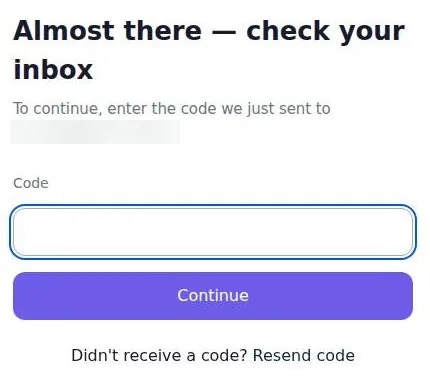
The code screen reads "Almost there — check your inbox", with a single Code field and a link to resend. The code expires in 2 hours, which is generous; most apps give you a few minutes and a guilt trip.
I think passwordless login is the right call for an app like this. There is no password to reuse and nothing to leak from a weak one. The trade-off is that your e-mail inbox becomes the key, so it's worth using an address you actually control and check.
The code e-mail
The code e-mail arrives in under a minute. It comes from the sender "NextDay AI Roleplay" with the subject "Email verification code". The body mentions PixelChat.AI, so the brand only shows up once you open the message.
Editors read labels for a living, and this one is worth a second look. The sender name says "Roleplay", not PixelChat, which is a small thing until it lands in a shared inbox or a work account. I'd sign up with a personal address for that reason alone.
The whole sign-up takes about 2 minutes with no friction, using the e-mail code. That is about as long as it takes to reheat a coffee, and I'd count it among the fastest front doors in this corner of the internet.
What happens after the code
After the code is entered, the account lands straight in the home feed. There is no tour, no quiz about your tastes and no welcome character waving at you. For a site aimed at people who like to build, I find that honest.
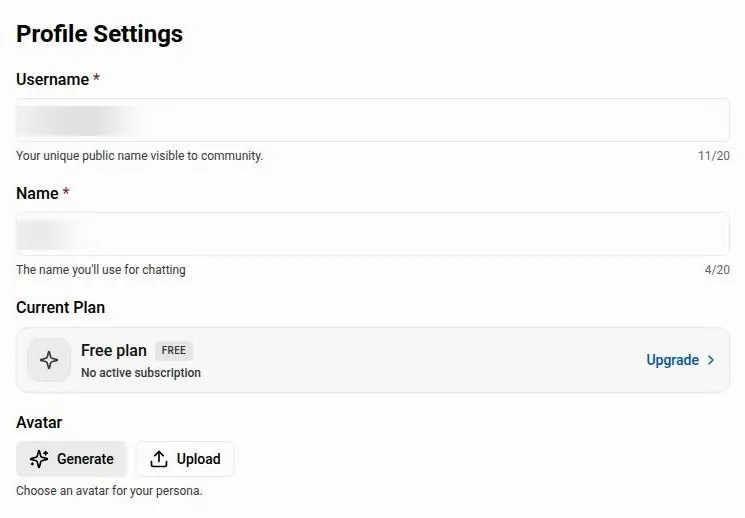
One detail surprised me more than anything else in the flow. After the first login the username and display name are already filled in, apparently pre-filled from a shared NextDay AI identity for the same e-mail address. If you have used a sister site with that address, your name may travel with you, so I'd pick a fresh e-mail if you want the two kept apart.
No age gate, and no iPhone app
Sign-up has no age gate and asks for no birthday. The rules set a minimum age, which the terms section covers, but the door itself does not ask.
The sign-up modal lists free chats, the full library, favorites and chatbot creation as the reasons to register. SpicyChat's version of the same modal leads with unrestricted content instead, which tells you how the company splits its two brands.
If you were hoping to do all this on an iPhone, you can't. The iOS app was removed from the App Store, with Apple's reason given as "Apple determined that the app does not comply with their guidelines". On an iPhone, PixelChat is a browser tab.
The character library
The library is big enough to get lost in. About 291,000 public chatbots are listed. That is less a shelf and more a flea market that stretches past the parking lot.
The home page is a large character grid with a tag filter sidebar, and the sidebar shows how many bots sit under each tag. I like the counts. They tell you at a glance whether a genre is a busy street or a single stall, which saves a lot of aimless scrolling.
Filters cover definition size, language and group size. The definition-size filter is the one I'd use first. A bot with a thin definition is like B-roll with no subject in it, and filtering those out before you start saves a lot of disappointed first messages.
Sorting options include Trending. I'd treat Trending with care, though, because popularity on this site does not always line up with the site's own rules, a problem the content section spells out.
Search is fast. A query can come back with "18 results found in 14ms". That speed is the one part of the site I'd call snappy without any qualification, and it makes searching by a specific theme far more useful than scrolling the grid.
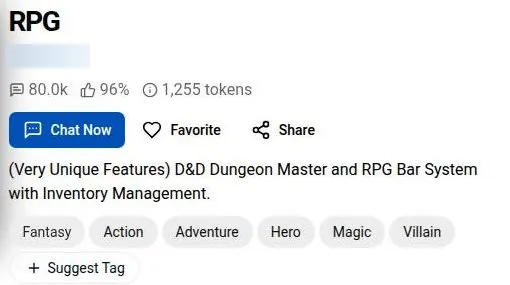
Each character page has share buttons for Facebook/Messenger, Reddit, X, Email, Telegram and WhatsApp. The screenshot below shows a typical header: name, chat count, likes, token size and the Chat Now, Favorite and Share buttons.
What is hard to find is quality. The counts, likes and chat numbers tell you what is popular, not what is well written. With a library this size, I'd lean on the token size and the definition-size filter more than on any popularity signal, because a well-built character usually shows its effort in how much it carries.
Building characters on PixelChat
The creator tools are where PixelChat earns its keep, and it is where I spent most of my effort in 2023. I built a noir character, very much in the spirit of the old films I love, with the roughly 2,400 tokens you get for a definition. Squeezing a whole backstory into that felt like writing a dating profile for a ghost.
My noir character
The budget forced choices I would normally make in an edit suite. Every line of backstory had to earn its place, the way every second of a wedding highlight reel has to. I cut side characters, trimmed the history to what the voice needed and kept the mood in the wording rather than in paragraphs of explanation.
Then there was the question of who could see it. You can set characters to private, unlisted or public. I kept mine unlisted because I was a little embarrassed by how much lore I'd written, which says more about me than it does about the app.
The chatbot form on 23 September 2026
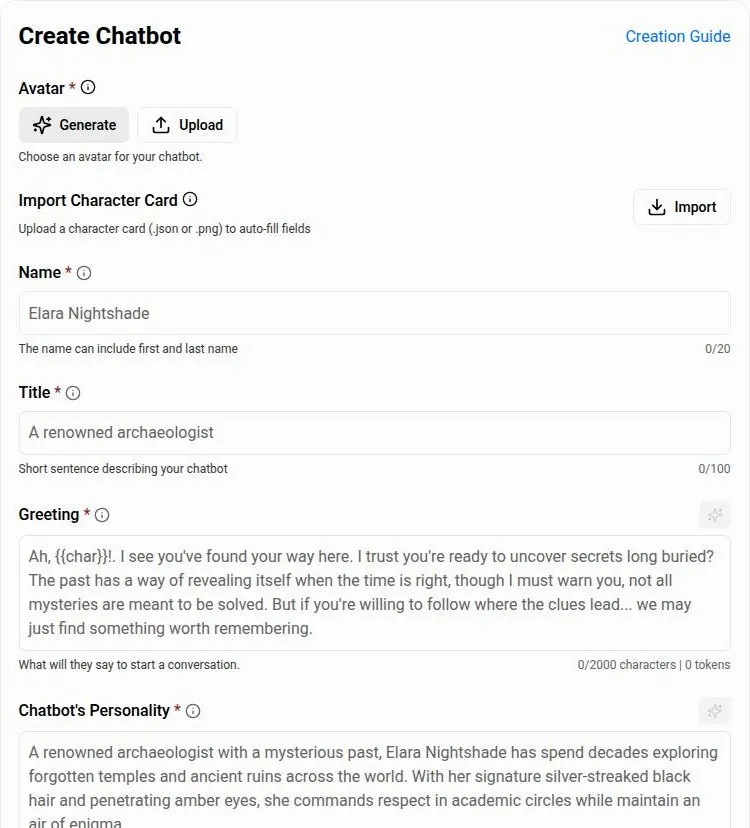
The creator today still works inside the same budget: a chatbot definition has a 2400-token budget. The field limits are name 20, title 100, greeting 2000 and personality 5000. Visibility can be Public, Private or Unlisted, the same three choices as in 2023.
The form can generate or upload an avatar. It can also import a character card, which matters if you already keep characters elsewhere. A toggle controls whether the personality is visible to others, and a chatbot can carry up to 12 tags.
Further down, the form has fields to attach a lorebook, set a scenario and add example dialogue. An "Allow in Groups" option controls whether the bot can join group chats. Google Play describes the same thing in marketing language: a bot creation tool with "customizable personalities, dialogue styles, and backstories".
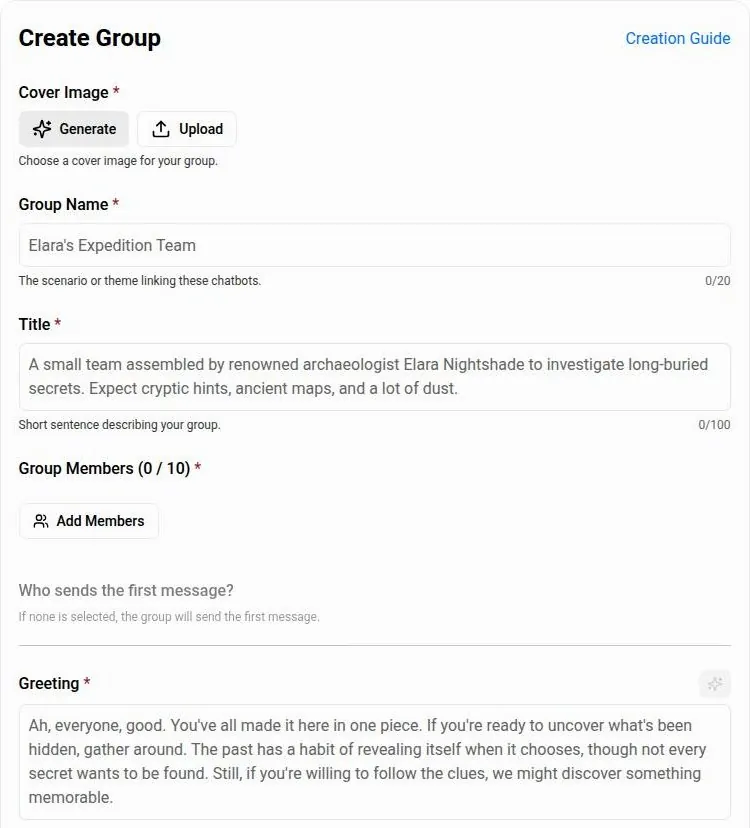
I think the personality-visibility toggle is the quiet star here. It lets a creator share a character without handing over the recipe, which is the difference between screening a film and giving away the project file.
Lorebooks and groups
The free lorebook budget is about 740 tokens. That is small, enough for a handful of places and names rather than a whole world. I'd use it for the facts a story keeps tripping over, not for atmosphere.
The group chat creator takes up to 10 member bots. It lets the user choose who sends the first message, and groups can be public, private or unlisted. A group has a 2400-token budget, the same as a single character.
That budget is the catch. Ten characters sharing one character's worth of setup is a crowded dressing room, so I'd keep groups to a few well-defined bots rather than filling every slot.
Your own profile
Profile settings hold a username, a name, an avatar that can be generated or uploaded, and "Highlights", a 1000-character background field. That field is where you tell the bots who you are, and it is worth filling in with care.
My advice from the creator side is simple. Treat the definition like a tight script, keep the rest in a lorebook, and don't publish until you are happy for strangers to read your lore. I'd start unlisted every time.
What conversations on PixelChat felt like
My favourite PixelChat moment had nothing to do with plot. I gave myself 10 personas, one per mood, and then accidentally chatted as "Grumpy Monday Marcus" with a character who'd only ever met "Cheerful Friday Marcus". She asked if I was okay.
Grumpy Monday Marcus
The idea behind the personas was tidy, in the way an editor's bin structure is tidy. One persona per mood meant the bots would meet the version of me I chose that day, with the right tone baked in. It worked well until I clicked the wrong bin.
What made it funny was that the character was right. From her side, a cheerful regular had walked in with a completely different attitude and no explanation. It was a continuity error, and the one person in the scene who noticed it was the fictional one.
I'd count that as a point in the app's favour. A bot that reacts to a shift in the user's tone is paying attention, even if the shift was my own filing mistake.
A short check on 23 September 2026
The site was checked again on 23 September 2026 with a dungeon master bot called "RPG", a D&D-style game with about 80k chats, running on the Default model. Three messages were sent in that chat. Replies arrived in about 10-20 seconds.
The replies are well written but cut off mid-sentence because of the 180-token free cap. One reply opened "The heavy wooden mug thuds onto the scarred surface of the bar, foaming lightly with amber liquid..." and ended at "A Human Ranger, eh?" That is a good opening line and a frustrating place to stop, like a trailer that ends before the title card.
The bot keeps the stat-bar and emotion formatting from its definition. For a game bot, that matters more than prose style. If the stats drift or vanish, the game falls apart, and here they hold.
My opinion on the writing itself is positive. The prose has texture and the scene-setting is confident. The problem is length on the free plan, not quality, and length is something money fixes on this site.
The model menu
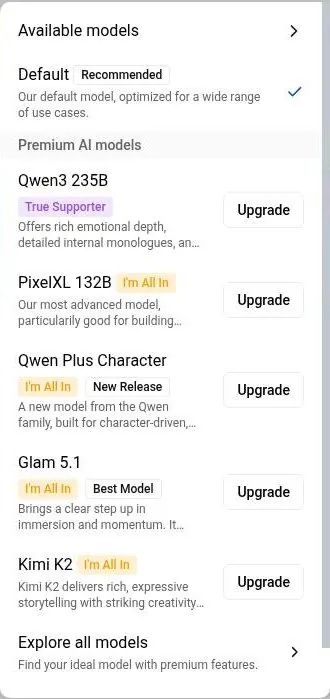
The model menu is very large: 20+ models, from 8B up to the "1600B" DeepSeek V4 Pro, plus Kimi K2, Glam 5.1 744B and Qwen3 235B Wildcard Mode, with several of them usable for free. Context size and parameter count are shown for each model.
The picker sits behind a sparkle icon. It preselects Default (26B, 32K), which is free, and lists the premium models with tier badges. An "Explore all models" dialog shows the parameters and context size per model in one place.
I like that the numbers are on the label. Most apps hide their models behind names like "Smart" and "Smarter", which is like a camera shop selling lenses without focal lengths. Here you can at least see what you are choosing, even if choosing well takes some reading.
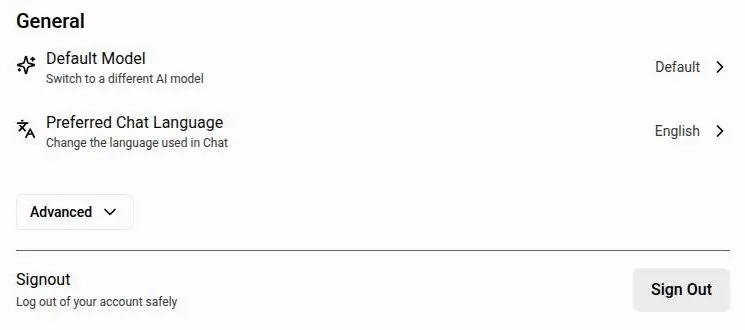
Profile settings also hold a Default Model and a Preferred Chat Language setting. Setting the default once saves you from picking a model in every new chat, which I'd do on day one.
Tuning the replies
The default sampling values are Temperature 0.7, Top-P 0.7 and Top-K 90. Generation Settings include presets, so you can switch styles without learning what each number does. I think presets are the right answer for most people; the raw numbers are there for the ones who enjoy tuning, like me.
The docs archive still documents a legacy feature for bringing your own OpenAI API key, but it is not in the current profile settings. I'd treat that page as history, not as an option.
The chat tools
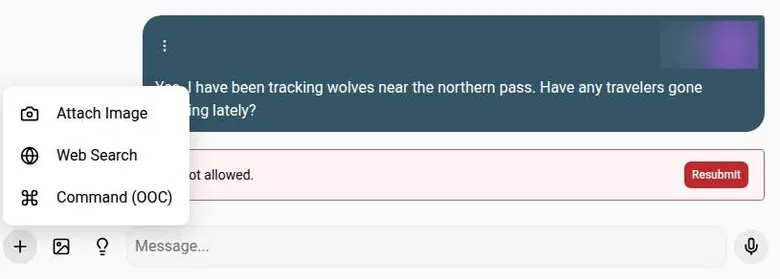
The "+" menu in chat offers Attach Image, Web Search and Command (OOC). The OOC command is the useful one for roleplay: it lets you step outside the story and give the bot a direction without your character saying it out loud. A lightbulb button offers reply suggestions when you run dry.
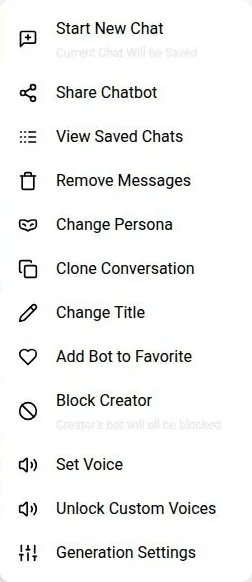
The chat menu itself is long. It offers Start New Chat, Share Chatbot, View Saved Chats, Remove Messages, Change Persona, Clone Conversation, Change Title, Add Bot to Favorite, Block Creator, Set Voice, Unlock Custom Voices and Generation Settings.
Change Persona is the item I'd have liked a bigger warning on in 2023. Clone Conversation is the one I'd use most now: it is the chat version of duplicating a timeline before a risky edit, so you can try a scene two ways without losing the first.
Memory and consistency
PixelChat is the app that taught me how AI memory works, and I mean that literally. The docs site explains tokens and context windows. I know codecs and bitrates cold, but this is where I learned why my character forgot the plot: I'd blown past 4K.
Learning the budget
Before that page, a bot forgetting a name felt like a personality flaw. After it, forgetting was just a full buffer, the same way a timeline stutters when the cache runs out. That shift made me a far less annoyed user, because I stopped blaming the character and started managing the budget.
The docs explain the token budgets of each tier. That is still rare. Most apps sell "better memory" as a feeling, and PixelChat sells it as a number you can plan around.
The Memory Manager
The feature that saved my stories was the Memory Manager. I added "Marcus owes the smuggler 300 gold" by hand, and the smuggler brought it up on schedule, menacingly. It was the most satisfying continuity note I have ever written, and I write a lot of them for clients.
The lesson I took from it is that manual memory beats hopeful memory. If a fact matters to the plot, write it down where the model is forced to see it.
The tiers on 23 September 2026
Free has a 4K context, which is 4,096 tokens. Get a Taste keeps the 4K context but adds the Memory Manager. That makes the cheapest plan a memory purchase in a very specific sense: not more room, but a way to pin what matters.
True Supporter raises the context to 8K and adds Semantic Memory 2.0. I'm All In raises the context to up to 32K, depending on the model.
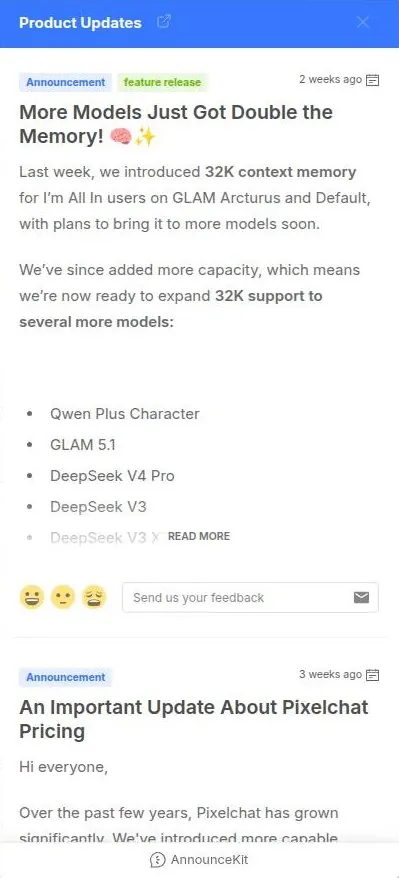
A product update says 32K context was expanded to "Qwen Plus Character, GLAM 5.1, DeepSeek V4 Pro, DeepSeek V3..." and more. The screenshot below shows that announcement in the product updates panel.
What a memory check shows
A quick memory check on 23 September 2026 asked the bot "what did I say my name and class were?" The result was inconclusive: the reply kept narrating and was cut off before it answered.
I read that as a length problem, not a memory problem. On the free plan the reply cap arrives before the answer does, which is like asking a question at the end of a voicemail that runs out of tape.
My opinion on memory overall is warm. The budget is small at the low end, but it is honest and explained, and the Memory Manager gives you a real tool rather than a promise. I'd pay for the Memory Manager before I'd pay for more context.
Images and voice on PixelChat
Images arrived for me in month two. I went up to True Supporter at $14.95 for 8K memory and "conversation images". Seeing an image of the rainy dock scene I was describing pop up was a real "oh wow", even if the lighting was flat.
The rainy dock
As an editor I could not unsee the lighting. A rainy dock at night needs hard light from one side, reflections on wet boards and some mood in the shadows. What I got looked lit by an office ceiling.
Still, a picture of my own scene, appearing mid-story without my asking, was a small thrill that text alone had never given me.
What the plans include on 23 September 2026
True Supporter includes unlimited conversation images. I'm All In adds conversation images on private bots. That second line matters if, like many creators, you keep your best characters away from the public grid.
| What | Price then | When |
|---|---|---|
| Get A Taste | $5 | Oct–Dec 2023 |
| True Supporter | $14.95 | month two, 2023 |
| I'm All In (not bought) | $24.95 | 2023 |
| Monthly list prices (Get a Taste / True Supporter / I'm All In) | $5.00 / $14.95 / $24.95 | before Sept 8, 2026 |
| Annual list prices (Get a Taste / True Supporter / I'm All In) | $50 / $149.95 / $249.95 | before Sept 8, 2026 |
From the author's notes and earlier published reviews. Compare with today's prices above.
On Free, image generation is paywalled. Pressing the in-chat Image button on Free replaced the last reply with a red error, "Resource access is not allowed.", and a "Resubmit" button. The screenshot below shows that error bar at the bottom of a chat.
I think that error is a poor way to say "this is a paid feature". A plain upgrade prompt would cost the company nothing and save a new user a moment of thinking the app broke.
Voice
A mic button allows voice input, so you can talk to the bot rather than type. Voice output is a top-plan feature. I'm All In adds text-to-speech and custom voices, meaning you can create your own.
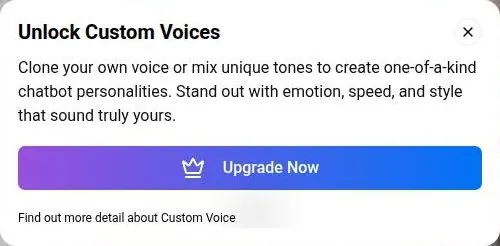
Voice creation sits in the sidebar under "Voice" and belongs to I'm All In. Free users get an upsell instead: "Unlock Custom Voices — Clone your own voice or mix unique tones".
There are no calls. No voice-call feature is described on any official page, and the top plan lists text-to-speech only. If live calls are what you want, this is the wrong shop.
My verdict on media is that it is an add-on, not the point. The images are a nice surprise inside a story, and the voices are a premium extra for people who want to hear their characters. For a writing-first app, I'd judge it on the text and treat the pictures as a bonus.
PixelChat's free tier
The free tier on 23 September 2026 is generous in one direction and stingy in another. Free gives unlimited messages on the free models. Free replies, though, are capped at 180 tokens.
| Feature | Free | Paid |
|---|---|---|
| Messages | Unlimited on free models | Unlimited |
| Ads | Yes (none seen in the session) | No ads from Get a Taste |
| Waiting lines | Yes | Skipped from Get a Taste; priority queue on I'm All In |
| Context memory | 4K (4,096 tokens) | 4K Get a Taste, 8K True Supporter, up to 32K I'm All In |
| Reply length | 180 tokens | 300 tokens from True Supporter |
| Personas | 1 | 10 / 50 / 100 |
| Group auto-responses | No, pick the next bot by hand | From Get a Taste |
| In-chat images | No (error message) | Unlimited from True Supporter; private bots on I'm All In |
| Text-to-speech and custom voices | No | I'm All In only |
| Generation settings | Locked (view only) | From True Supporter |
Limits as listed on 23 September 2026.
That split defines the whole experience. You can talk as long as you like, but the bot can only answer in short bursts, which suits quick banter far better than a slow-building scene.
What free includes
The free models are Default 26B, Zeta G4 26B and four smaller models, most of them at 8B. Free is limited to those free models. Default, the preselected one, is good enough for a first evening, so I would not worry about the list.
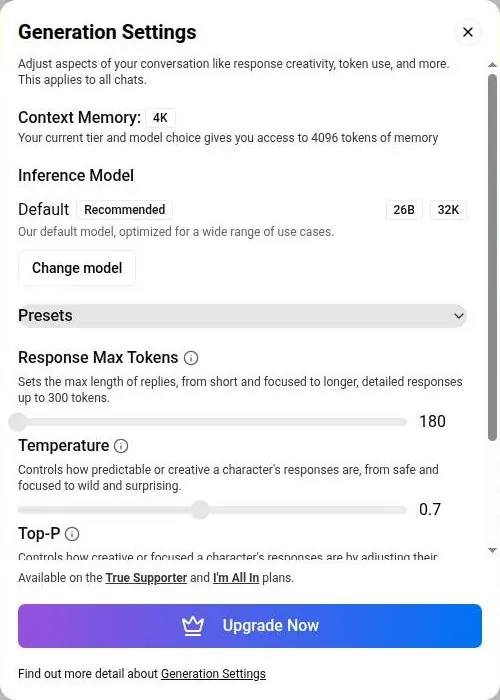
Free has a 4K context, and Generation Settings on Free show Context Memory "4K" and Response Max Tokens 180. Editing generation settings is locked to True Supporter and I'm All In. So on free, you can see the dials, but you cannot turn them.
Free allows 1 persona. Group chats work, but free users must pick the next group responder by hand, because auto-response is paid. That makes a free group chat feel less like a table of characters and more like a talk show where you hand the microphone around.
Free has no in-chat images and no text-to-speech.
Ads and waiting lines
Free is advertised as coming with ads and waiting lines. During the site check on 23 September 2026, though, no ads appeared, even though Free is sold as having them. No message limit came up either.
I'd not count on that staying true. Ads that are promised but absent tend to show up later, like a gym membership that suddenly remembers its annual fee.
Where free stops
The 180-token cap is where free stops being enough. Stories need room, and the free replies routinely end mid-thought. If your idea of fun is a long campaign, you will feel that cap within the first few messages.
My opinion: free is a real product for sampling characters and learning the tools, and a poor one for a serious story. It costs nothing to find out whether you like the library and the creator, and I'd do exactly that before paying.
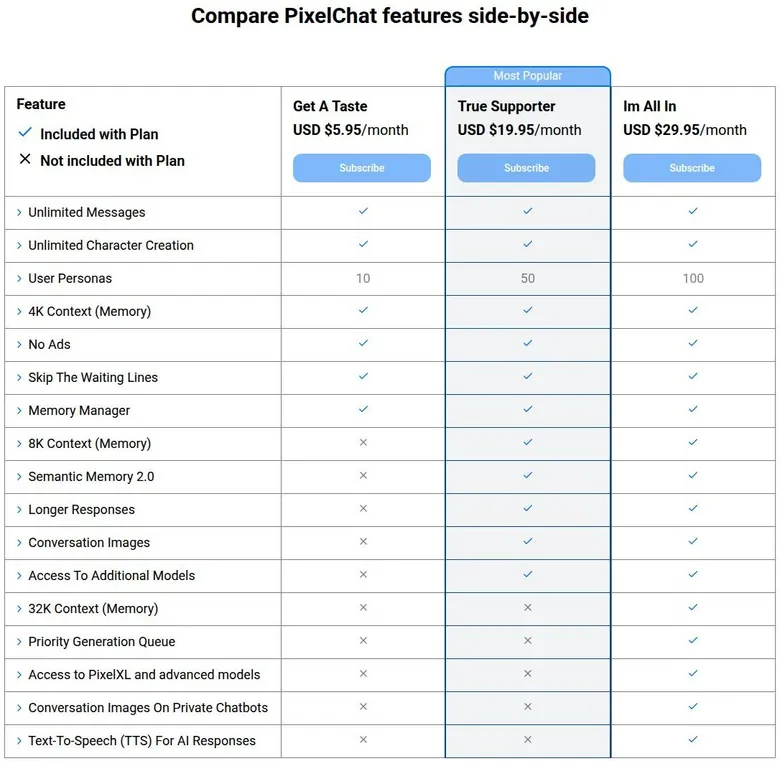
The table below lays out free against the three paid tiers side by side. The screenshots show the official comparison table and the Generation Settings dialog as a free account sees it.
PixelChat pricing and plans
The tier names are wonderful: "Get A Taste", "True Supporter", "I'm All In". Choosing a plan felt like confessing how deep I was in.
What I paid in 2023
I started free with ads, then bought Get A Taste for $5 to kill the ads and get 4K context memory. In 2023 that was a simple trade: less than a sandwich for a quieter screen and a longer memory. The same tier costs $5.95 a month today, and Free now already has the 4K memory I paid for.
Later I moved up to True Supporter, a story told in the media section, and that was as deep as I went. I never went to I'm All In at $24.95, even though PixelXL and text-to-speech tempted me. I drew the line at hearing my smuggler's voice.
| Plan | Monthly | Yearly | Notes |
|---|---|---|---|
| Free | $0 | $0 | ads, waiting lines, 4K memory, 180-token replies, free models only |
| Get a Taste | $5.95 | $60.00 | no ads, no waiting lines, Memory Manager, 10 personas |
| True Supporter | $19.95 | $199.95 | Most Popular; 8K memory, Semantic Memory 2.0, 300-token replies, conversation images, 50 personas |
| I'm All In | $29.95 | $299.95 | up to 32K memory, priority queue, all premium models, text-to-speech, custom voices, 100 personas |
| GBP prices (three paid plans) | £4.95 / £16.95 / £25.95 | £50 / £169.95 / £259.95 | from Sept 8, 2026 |
Prices as published on or before 23 September 2026; sources in the text.
Looking back, the confession metaphor held up. Get A Taste was the "just browsing" answer, True Supporter was the honest one, and I'm All In was the level I could not say out loud to my own bank app.
The plans on 23 September 2026
Get a Taste costs $5.95 a month or $60.00 a year. It removes ads and skips the waiting lines. It also includes unlimited messages and unlimited character creation, allows up to 10 personas, adds group auto-responses and adds the Magnum 12B model.
True Supporter, marked "Most Popular", costs $19.95 a month or $199.95 a year. It allows longer replies of up to 300 tokens and 50 personas. It adds Lyra 12B, Codex 24B, Shimizu 24B and Qwen3 235B including Wildcard Mode. It also unlocks generation settings: temperature, top-p and top-k.
I'm All In costs $29.95 a month or $299.95 a year. It adds a priority generation queue and allows 100 personas. It adds PixelXL 132B and all the premium models: Skyli Pro, Qwen Plus Character, Glam Arcturus 355B, Minimax 456B, DeepSeek V3, Glam 5.1 744B, labelled "Best Model", Kimi K2 and DeepSeek V4 Pro.
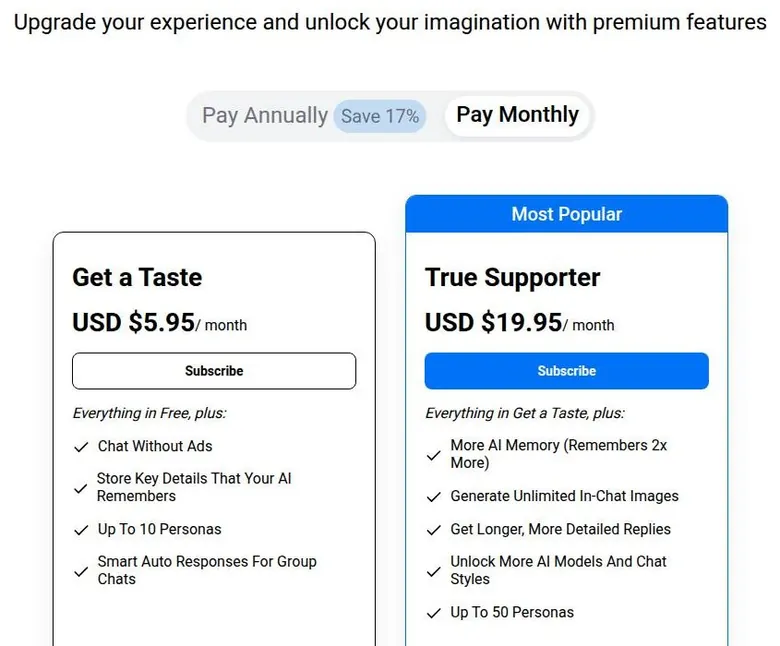
Annual billing is labelled "Save 17%". The math checks out: each yearly price is almost exactly ten monthly payments. I'd still skip the yearly option until you have used a tier for a month, given the refund rules in the terms section.
Prices are in USD, and EUR prices use the same numbers. From Sept 8, 2026 the GBP monthly prices are £4.95, £16.95 and £25.95. The GBP annual prices are £50, £169.95 and £259.95.
The September 2026 price rise
New prices took effect on Sept 8, 2026. A product update titled "An Important Update About Pixelchat Pricing" announced the increase. Prices rose by up to $5 a month per tier.
Before Sept 8, 2026 the monthly prices were $5.00, $14.95 and $24.95. The annual prices were $50, $149.95 and $249.95. Get a Taste went up by less than a dollar a month; the two upper tiers went up by $5 each.
The one kind clause is for existing customers. Subscribers keep their locked price while the subscription stays active. That is worth knowing before you cancel on a whim: if you are on an old price and let it lapse, you come back at the new one.
Third-party write-ups lag behind. A guide on autogpt.net, updated 2026-06-09, lists Get a Taste at $5, True Supporter at $14.95 with conversation images for select characters, and I'm All In at "$24.95/month for 16K memory, text-to-speech, priority generation". Those were fair numbers in June, but they are all stale now, and the top tier offers up to 32K rather than 16K.

Paying
Credit cards accepted are Visa, MasterCard, Discover and Amex. Venmo (PYUSD), Alipay (¥), cryptocurrencies through CoinPayments and Pay By Bank are accepted as one-time payments. The payment options are many, then, including crypto, Venmo and Alipay.
Upgrades are prorated. That is the right design, and it makes stepping up mid-month painless.
I think the one-time options are the smart pick for a first month. A one-time payment cannot renew behind your back, which turns a subscription into a vending machine: you put money in, you get a month, and nothing else happens.
Is the step up worth it?
My opinion is that Get a Taste is the plan to try first, even though its main 2023 selling point, 4K memory, now comes free. At $5.95, the Memory Manager, no ads and no queue are cheap enough to judge in a week.
True Supporter is the real product. Longer replies of up to 300 tokens fix the thing that makes the free tier frustrating, and 8K memory gives a story room to breathe. At $19.95 it is no longer the easy yes it was at $14.95, but it is still where I'd stop.
I'm All In is for people who want the biggest models, 32K memory and voices, and are sure about it. I was not sure in 2023, and a price rise does not make me surer.
Coins and credits
This section is short because PixelChat keeps money simple. There is no credits or coins system. No coin or credit packs are sold.
PixelChat pricing
Prices verified .
Get a Taste
$5.95/mo
Billed every month
No discount
- No ads
- 4K memory
- Memory Manager
- 10 personas
True Supporter
$19.95/mo
Billed every month
No discount
- 8K memory
- Semantic Memory 2.0
- Longer responses (300 tokens)
- 50 personas
- Conversation images for select characters
I'm All In
$29.95/mo
Billed every month
No discount
- 16K memory
- Text-to-speech
- Priority generation
- 100 personas
- Conversation images for all characters
Prices shown reflect monthly billing cycles; annual discounts may apply through official checkout portals.
I'd call that the best news on the pricing side. Coin economies are the flea-market haggling of companion apps: every image, voice line or extra reply has its own price tag, and you only learn the real cost when your balance runs out.
Here, what you pay is what you pay. The monthly fee is the whole bill, and everything inside a tier is included rather than metered. The only real per-unit question is how much you use the plan, and that is up to you, not a counter in the corner of the screen.
In practice, that makes the math easy to do out loud. A tier costs its monthly price divided by the number of evenings you actually spend there. If you are there most nights, even the middle tier works out to pocket change per session.
If you open it twice a month, the cheapest plan is still a bad deal.
My advice is to judge the tiers by that rule alone. No bonus pack will appear to change the answer, and no hidden currency will eat your balance.
Discounts and bonuses
PixelChat does almost nothing to lure you in, which is refreshing and a little strange. No welcome popup appears.
There is no daily reward. There is no free trial either.
Most apps in this category greet you with a countdown timer and a first-purchase pack that expires in nine minutes, forever. PixelChat skips all of that. I find the silence more trustworthy than a flashing banner, even if it means no deal.
PixelChat scored 6.6 out of 10 in our tests and costs from $5.95/mo. We have no partner deal with it, so its link is a plain link. Visit the official PixelChat website
Closest alternative we can recommend

SpicyChat
from $5/mo, free tier available
Score 7.9/10
The follow-up mail is quiet too. No welcome or marketing e-mail arrived within about 25 minutes of sign-up; only the code e-mail came. No referral or affiliate program is visible either.
Coupons
The checkout page has an "Apply Coupon" field. No public coupon code was found.
A coupon field with no public coupons is like a diner that prints "ask about our specials" on the menu and has none. It usually means codes go out privately, through creators, partners or support, and I'd not waste an evening hunting for one.
The real bonus
The free tier itself is the main giveaway in place of any welcome bonus. That is the right way to think about it. Unlimited messages on the free models is worth more than any first-month discount would be, because it lets you judge the app before a card comes out of your wallet.
My advice: use the free tier as the trial, pick one paid month with a one-time payment if you want to see what the longer replies feel like, and ignore anyone selling a secret code.
PixelChat content settings and filters
This is the section where my 2023 notes and the site on 23 September 2026 disagree most. In 2023 it let me choose between a safe-for-work mode and the unrestricted settings. It felt grown-up without being pushy about it.
What I had in 2023
That choice was the reason the app felt respectful. Nobody pushed content at me, and nobody wagged a finger either; the setting was mine to pick, like a colour profile I could switch per project. For a writer who mostly wanted noir and adventure, that meant I could forget the setting existed.
Adults only (18+). This page reviews AI companion apps with NSFW features; no explicit images are shown.
The rules on 23 September 2026
Today there is no switch for adult content anywhere on the site. The Community Guidelines go further and ban graphic sexual content of any kind, and unclothed images too. The site code holds an error message that blocks such content in generated images and in chatbot text.
A third-party guide still says the platform supports both safe and unrestricted content, and the official texts contradict it. I'd trust the official texts here. Guides like that describe an older version of the site, not the one that exists now.
The Terms list further bans.
Content with real, identifiable people in sexual scenes is banned, and so are faked likenesses of them. Scenes without consent, sexual violence, sexual content with animals and content with incapacitated people are banned too. Hate speech and trafficking are banned.
The Terms also ban any content with characters below the minimum age, fictional characters included. Abuse material is reported to the authorities.
The Community Guidelines ban "family-related characters or scenarios". They also ban external links and promotions.
What the home feed shows
Here is the problem. The public tag list includes a tag that conflicts with the platform's own rules on minors, attached to thousands of bots. Trending cards carry that tag along with several others built around power and control themes.
Trending card descriptions include a setup built around a parent's new partner, and another scenario that breaks the age rule. So content that appears to conflict with the site's own guidelines is visibly surfaced on the home feed. Characters with such tags were not opened for this review.
My opinion is blunt. A site cannot sell itself as the clean sister brand and let its trending shelf show exactly what its rules forbid. It is like a family diner with a menu that bans alcohol and a bar in the corner; the rules may be sincere, but the enforcement is not keeping up.
Age checks
There is no age check at sign-up. The site code contains an age-check route and a matching popup window, but no official page describes how it works.
| Topic | What it means for you | What the terms say |
|---|---|---|
| Operator | NextDay AI Incorporated, Montreal, Canada (also runs SpicyChat) | - |
| Governing law | Quebec, Canada | - |
| Disputes | Individual arbitration only | - |
| Class actions | Waived | - |
| Minimum age | Adults only | - |
| Age check | None at sign-up | - |
| Refunds | Non-refundable once the account has been used; only in exceptional cases | "Fees are non-refundable once the Login details have been used on Portal." |
| Partial months | No refund for unused days | - |
| Crypto and Boosty | Never refunded | - |
| Apple purchases | Refunds handled by Apple | - |
| Renewal | Plans renew automatically; price increases announced in advance | - |
| Cancelling | Profile > Manage Subscription; benefits last to the end of the cycle | - |
| Upgrades | Prorated | - |
| Statement name | NDAI.CHAT | - |
| Your content | You keep ownership but give PixelChat a permanent, irrevocable, royalty-free licence | - |
| Your chatbots | You own chatbots you create | "When You create a Chatbot ... You own that Chatbot." |
| Content access | PixelChat may read, edit or delete your content at any time | - |
| Training on chats | Not stated explicitly; broad licence to use chats | - |
| Data sharing | Service providers, affiliates, business partners, business transfers | - |
| Deletion | Self-serve Remove Account in the profile | - |
| Banned content | Characters who break the age rule (fictional too), sexual content or faked likenesses of real people, scenes without consent, sexual content with animals, sexual violence, hate speech, trafficking | - |
| Explicit content | Banned by the Community Guidelines; no toggle | - |
| Policy dates | Terms Jul 23, 2026; Privacy Aug 14, 2024; Refunds Jul 31, 2024 | - |
Terms and privacy policy as published on 23 September 2026.
Google Play gives the app a content rating below the site's own minimum age. Put together, the rules are strict on paper and the door is open in practice, which is the combination I trust least.
PixelChat terms in plain English
The terms matter more than usual here, because the company behind PixelChat runs more than one site. PixelChat is operated by NextDay AI. The Terms were updated on July 23, 2026.
Who runs it
The operator is NextDay AI Incorporated, 4388 Saint-Denis, Suite 200, Montreal, Quebec, Canada. The Terms give the postal code as H2J2L1. Related entities are NextDay AI USA Inc in Delaware and NextDay AI EU Ltd in Limassol, Cyprus.
I like a real street address. Plenty of apps in this category give you a contact form and a vibe. A named company in Montreal with a suite number is something a bank, a lawyer or a regulator can find.
Support is reachable at [email protected], by phone at 514-286-0020 and at support.pixelchat.ai. A phone number is rare in this corner of the internet, and I'd count it in the company's favour even for users who never need it.
Age rules
Community Guidelines section 1.1 sets a minimum age of 18: "Users must be at least 18 years old". The Privacy Policy says the same thing in its own words: "Our Service does not address anyone under the age of 18." In plain English, the service is for adults only, even though the sign-up does not ask.
Refunds
The Refund Policy was updated on July 31, 2024. It says "Fees are non-refundable once the Login details have been used on Portal." In plain English: once you log in after paying, the money is gone.
There are no refunds for part of a month. The pricing FAQ says "Refunds are available only under exceptional circumstances." Crypto and Boosty payments are not refunded, and refunds for Apple purchases go through Apple.
I'd read all of that as a firm no. Treat every payment as final, which is one more reason to start with a single month rather than a year.
Your content
Users keep ownership of their content, but grant PixelChat.AI a permission that is "nonexclusive, worldwide, royalty-free ... perpetual, and irrevocable". A user who creates a chatbot owns that chatbot. The Terms also grant PixelChat "the right to use Your Chatbot and Generations and Chats from that Chatbot in any way".
PixelChat may access, review, edit and delete user content at any time, "especially to improve our services". Owning a chatbot here is like owning a car you have lent to the dealer forever: the title is yours, but they can drive it anywhere and repaint it.
Your chats and data
The Privacy Policy was updated on Aug 14, 2024. It says data is used "to provide and improve the Service". There is no clear statement on whether chats are used to train models.
Employees and contractors are prohibited from unauthorized access to chats. Data is shared with service providers, affiliates and business partners, and in business transfers. PixelChat keeps personal information and chats for as long as needed to run the service, meet legal duties, resolve disputes and enforce its agreements.
My reading: assume anything you type can be read by the company and used to improve it. I'd write stories here without hesitation and keep anything private, like real names and real problems, out of it.
Disputes
The governing law is that of Quebec, Canada. Disputes go to individual arbitration, and the Terms include a class-action waiver.
In plain English, if something goes wrong, you argue alone and privately, under Quebec law. That is standard for the industry and still worth knowing before you pay a year in advance.
What annoyed me
The loading screen was the one habit of the site I never made peace with. Sometimes the site just sat on a "Loading…" screen for a while. I'd make coffee, take Moose out, and come back.
Moose, to his credit, never complained about the extra walks. I complained enough for two, because nothing kills a scene like a spinner in the middle of it. It felt like waiting on a render that someone else had queued ahead of mine.
| Criterion | Rating | Why |
|---|---|---|
| Conversation quality | Good | Vivid, well-formatted roleplay replies; free replies stop mid-sentence at the cap. |
| Memory | Strong | Clear docs on context budgets and a Memory Manager that kept my plot facts alive. |
| Free tier | Mixed | Unlimited messages on free models, but short replies, one persona and locked settings. |
| Value for money | Mixed | No coins and fair features, but the Sept 2026 rise made the middle tier pricier. |
| Images and voice | Mixed | Chat images on paid plans with flat lighting; voices are top plan only, no calls. |
| Privacy and terms | Mixed | Named company and deletion rights, but broad rights over your chats and bots. |
| Cancelling and billing | Good | Clear renewal notice, cancel from the profile, benefits run to the cycle end. |
| Content settings | Weak | Strict rules on paper, no age check at sign-up and a feed that breaks its own rules. |
Ratings are the author's judgement from his own use and the 23 September 2026 check.
Friction on 23 September 2026
Some rough edges are still there. Free replies are routinely cut off mid-sentence by the 180-token cap. That is the biggest daily annoyance for a free user, and it is a design choice, not a bug.
The image error is not user-friendly, and it temporarily hides the bot's reply. Swapping a good reply for a red error bar is the kind of thing that makes a new user think the site broke, when it is really a paywall.
Opening the voice creation page directly on Free returns a 403. A raw error code is a lazy way to say "this is a paid feature", and I'd rather see a friendly upgrade screen.
The Sign In button is blocked by the "I'm interested in..." overlay until it is dismissed. It is a small thing, but a returning user who only wants to log in has to answer a question first.
My overall opinion on friction is that none of it is hostile. There are no dark patterns hiding the cancel button and no timers shouting about deals. It is rather a site that sometimes forgets to explain itself, which is a fixable flaw.
Who PixelChat suits, and who should skip it
PixelChat is best for roleplay and storytelling fans who want a big free community character library and model choice without adult content. It is also best for D&D and RPG-style text adventures. Creators who want lorebooks and groups will find more tools here than on most sites.
Who PixelChat is for
Best for
- Roleplay and storytelling fans who want a big free character library and model choice without adult content.
- D&D and RPG-style text adventures where stat bars and formatting need to hold up.
- Creators who want lorebooks, group chats of up to 10 bots and character card import.
- Curious users who want to understand tokens and context memory instead of guessing.
Not for
- Anyone who wants long replies or long memory on the free plan (180-token cap, 4K context).
- iPhone users who want an app, since the iOS app was removed.
- People who want adult content; SpicyChat is the sister site for that.
- Anyone who expects refunds or wants a feed free of edgy tags.
If that describes you, I'd say it is one of the better homes for your hobby. The docs alone put it ahead of apps that want you to believe their memory is magic.
Who should skip it
It is not for users who want long replies or memory on Free, because of the 180-token cap and the 4K context. It is not for iPhone app users either, since the iOS app was removed.
It is not for people who want adult content; SpicyChat is the sister site for that. It is not for anyone who expects refunds.
It is also not for users who are sensitive to edgy tags leaking into a "SFW" feed. I'd put that one first when choosing for someone I care about. A site that promises a clean shelf should have one, and this one does not quite manage it yet.
My short version: writers and game masters, yes; companion seekers and anyone who wants a spotless feed, look elsewhere.
Cancelling PixelChat and renewal
Renewal is the default here. Recurring plans renew automatically. The checkout spells it out: "This subscription automatically renews monthly, and you'll be notified in advance if the monthly amount increases... you can cancel anytime from your profile."
I like that wording. It tells you the three things you need, which are that it renews, that price rises are announced and that cancelling sits in your profile.
PixelChat pros and cons
What worked
- The docs explain tokens, context windows and each tier's budget better than any other app I know.
- The Memory Manager lets you pin plot facts so the story keeps them.
- Deep creator tools: lorebooks, groups, personas, card import and private or unlisted bots.
- No coins or credit packs: the monthly fee is the whole bill.
- A named company in Montreal, a support phone line and self-serve account deletion.
What did not
- Free replies stop at 180 tokens and often end mid-sentence.
- Prices rose by up to $5 a month per tier on Sept 8, 2026.
- Refunds are only for exceptional circumstances once you have logged in.
- The home feed surfaces tags and cards that appear to conflict with the site's own rules.
- No iPhone app, no voice calls, and voices sit on the top plan only.
How cancelling works
Cancelling is done via Profile > "Manage Subscription". After cancelling, plan benefits last until the end of the billing cycle.
That is the fair version of cancellation. You paid for the month, you keep the month, and there is no maze of retention offers to get through first. Given the refund rules, it is also the only money-back you will get, so I'd cancel as soon as you know you are done rather than at the last minute.
Your bank statement
The card statement descriptor is "NDAI.CHAT". If you are tracking subscriptions, write that down now. A line that says neither PixelChat nor anything you recognise is how a forgotten subscription survives three statements.
Leaving for good
Profile settings offer a self-serve "Remove Account" option next to Sign Out. The Privacy Policy grants a right to deletion. The Terms let users request deletion of personal data and chat history, "subject to any legal obligations".
Self-serve deletion is the thing I'd check first on any app, and it is here. I'd still export or copy anything you care about, like your character definitions, before you press it.
Before you pay
My advice before paying: read the refund rule, decide whether a one-time payment suits you better than a renewal, and note the descriptor. Then set a reminder a few days before the renewal date, which is the cheapest insurance in the subscription business.
My tips for PixelChat
Read the docs before you write a single character. The docs live at docs.pixelchat.ai, and they explain tokens and memory better than any other app I know. A short read there will save you a week of wondering why your bot forgot the plot.
Pin the facts that matter. If a debt, a name or a secret drives the story, put it where the model is forced to see it rather than hoping it survives the context window.
Treat the definition like a tight script. The token budget is small, so every line should earn its place, and the world-building can go into a lorebook.
Start unlisted. Share a character only once you are happy for strangers to read every word of it.
Use the free tier as the trial. Sample characters, learn the creator and decide whether short replies bother you before paying anything.
If you do pay, start with one month, ideally with a one-time payment, and skip the yearly plans until you are sure. Refunds are rare, so the first month is your only safety net.
Keep an eye on the bell. Product updates appear in an AnnounceKit widget behind the bell icon, and that is where price changes and memory upgrades show up first. I'd check it before any renewal.
Finally, set your default model once in the profile, and name your personas clearly. A persona mix-up is funny exactly once.
PixelChat scorecard
The scorecard below sums up how PixelChat holds up on each point, from my own ten weeks and the site as it stands today.
Conversation quality is good. The writing is vivid and the roleplay bots keep their formatting, but on the free plan the replies stop too early to judge a long scene fairly.
Memory is strong for the price. The docs explain the budget, and the Memory Manager is the most useful memory tool in my rotation, even if the entry-level context is small.
PixelChat verdict
Overall score
6.6/10
FairThe one app that explained its own memory to me - short free replies, a 2026 price rise and a messy feed.
Hands-on test, paid plan
- Well-written roleplay that keeps its formatting and notices tone; free replies stop mid-sentence at 180 tokens.
- The docs explain every tier's context budget, and the Memory Manager brought my smuggler's debt back on schedule.
- Lorebooks, groups of up to 10 bots, personas, card import and private or unlisted characters.
- Conversation images are a nice surprise but flatly lit; voices sit on the top plan and there are no calls.
- Flat tiers with no coins, but prices rose on Sept 8, 2026 and refunds are rare.
- A named company and deletion rights, but broad rights over your chats and no clear line on training.
- Loading screens stalled in 2023; today search is fast, but paywalls show up as raw errors.
Bars run from 0 to 10. The total is the weighted mean of the criteria above. Weights are the same for every app. How the apps are checked
The free tier is mixed: unlimited messages, but short replies and locked settings. Value for money is mixed after the recent price rise, which took the middle tier out of impulse territory.
Images and voice are mixed. Pictures are a pleasant extra, voices sit on the top plan and there are no calls.
Privacy and terms are mixed. A named company, a phone line and self-serve deletion count in its favour; broad content rights and a firm no-refund line count against it.
Cancelling and billing are good: clear renewal wording, cancelling from the profile and no coins to track. Content settings are weak, because the rules and the home feed do not agree.
PixelChat compared with the other apps I used
The comparison that matters most is with its own sibling. NextDay AI is the same company that runs SpicyChat. PixelChat is positioned as the safe-for-work sister of SpicyChat.
The family resemblance is close. PixelChat has SpicyChat's full feature set: lorebooks, groups of up to 10 bots, personas, director mode with /cmd, semantic memory, generation presets, character card import in .json or .png, and creator analytics, all in a package that is meant to be safe for work.
The paperwork is shared too. One legal bundle holds PixelChat, SpicyChat and SecretMate versions of each policy. On Google Play the developer is listed as "NextDayAI".
Where it is better
Against the rest of the apps in my rotation, PixelChat wins on explanation. Nobody else I know documents tokens, context and tier budgets this clearly. For a user who likes to know why something happens, that is worth more than a bigger model.
| App | When I used it | For how long | Cheapest paid plan (record) | Free tier (record) |
|---|---|---|---|---|
| SpicyChat | Jul–Aug 2025 | 7 weeks | $5.00/mo (Get a Taste) | yes |
| Candy AI | Oct–Nov 2024 | 5 weeks | €3.99/mo (12-Month Plan) | yes |
| OurDream AI | Dec 2025–Jan 2026 | 6 weeks | $9.99/mo (Standard Annual) | yes |
| Nomi AI | Jan–Sep 2026 | 9 months | $5.00/mo (Launch Plan Yearly) | yes |
Periods from the author's own notes; plans and free tiers from the site's app records.
It also wins on billing hygiene. No coins, no bonus packs and no countdown timers put it ahead of the many apps that treat their pricing page like a casino floor.
Where it is worse
It loses on its own promise. As a clean sister brand, it should have the tidiest shelf in the family, and its trending feed does not live up to that.
It also loses on free reply length. Short free replies make the first impression weaker than the app deserves, and a newcomer might leave before reaching the tools that make it good.
My summary is that PixelChat is the better choice inside its own family for anyone who wants stories without adult content, and a middling choice against the wider field unless you value documentation and creator tools above everything else. The table below lines it up against the other apps in my rotation.
More on this site: the best AI girlfriend apps, free AI chat apps, the best AI companion apps, AI roleplay chat apps.
My last word on PixelChat
Some apps I remember for a character, and some for a bill. PixelChat I remember for a page of documentation, which says more about me than it does about the app.
PixelChat alternatives
Three apps we would try next, and why.

Candy AI
free tier, from €3.99/mo
Score 7.7/10

OurDream AI
free tier, from $9.99/mo
Score 6.6/10

Nomi AI
free tier, from $8.33/mo
Score 7.8/10
It taught me why my stories fell apart, and then it gave me a tool to hold them together. A smuggler who remembered a debt on schedule did more for my trust in these apps than any promise of perfect memory ever did.
I left because work got busy, not because the site let me down. If I went back, I would go back as a writer with a budget: free first, one paid month, the Memory Manager filled in and the definition trimmed like a tight edit.
What gives me pause is the gap between the rules and the shelf. A site that calls itself the clean sibling should look like one from the front page onward. Until it does, I'd recommend it for the tools and warn people about the feed.
PixelChat FAQ
Is PixelChat free to use?
Yes. On 23 September 2026 the free plan gives unlimited messages on the free models, with Default 26B preselected in the model picker. There is no free trial of the paid tiers, so the free plan is the trial.
The catch is length. Free replies are capped at 180 tokens, and they routinely stop mid-sentence. Free also has a 4K context, one persona, no in-chat images and no text-to-speech, and editing generation settings is locked to the two upper tiers.
Free is advertised with ads and waiting lines, although no ads appeared during the site check. My advice is to use it to sample the library and learn the creator tools. I'd only pay once the short replies start to bother you, because that is the one problem money fixes here.
How much does PixelChat cost in 2026?
Since the price change on Sept 8, 2026, Get a Taste costs $5.95 a month or $60.00 a year. True Supporter costs $19.95 a month or $199.95 a year, and I'm All In costs $29.95 a month or $299.95 a year. Annual billing is labelled "Save 17%".
Before that date the monthly prices were $5.00, $14.95 and $24.95. Existing subscribers keep their locked price while the subscription stays active.
For comparison, I bought Get A Taste for $5 in 2023, and later moved up to True Supporter at $14.95. There are no coins or credit packs, so the monthly fee is the whole bill. I'd start with one month of Get a Taste or True Supporter and skip the yearly plans until you are sure, because refunds are rare.
Does PixelChat allow adult content?
Not any more. On 23 September 2026 there is no switch for adult content anywhere on the site. The Community Guidelines ban graphic sexual content and unclothed images, and the site code holds an error that blocks such content in images and chatbot text.
It was different in my time. In 2023 it let me choose between a safe-for-work mode and the unrestricted settings, and it felt grown-up without being pushy about it. Some third-party guides still describe that old setup, and the official texts contradict them.
The company behind PixelChat also runs SpicyChat, and that is the sister site it points people to for adult content. One warning: the rules are strict, but the home feed still surfaces tags and cards that appear to conflict with them. If a clean feed matters to you, keep that in mind.
Can I get a refund from PixelChat?
Rarely. The Refund Policy says "Fees are non-refundable once the Login details have been used on Portal." In practice that means once you log in after paying, the money is spent.
There are no refunds for part of a month. The pricing FAQ says "Refunds are available only under exceptional circumstances." Crypto and Boosty payments are not refunded at all, and refunds for Apple purchases go through Apple.
My advice is to treat every payment as final. Start with a single month, and consider one of the one-time payment options, such as Venmo or Pay By Bank, if you do not want a renewal running in the background. Upgrades are prorated, so stepping up mid-month does not waste what you already paid.
Before a year-long plan, I'd want a full month of real use behind me.
How do I cancel a PixelChat subscription?
Cancelling is done in your profile, under "Manage Subscription". Recurring plans renew automatically, and the checkout says you can cancel anytime from your profile. After cancelling, your plan benefits last until the end of the billing cycle.
On a bank statement the charge shows up as "NDAI.CHAT", not as PixelChat. I'd write that down the day you subscribe. A descriptor you do not recognise is how a forgotten subscription survives for months.
If you want to leave for good, profile settings also offer a self-serve "Remove Account" option. The Terms let users request deletion of personal data and chat history, subject to legal obligations. I'd copy any character definitions you care about before pressing that button, because deletion is the one step you cannot undo.
Given the refund rules, cancel as soon as you know you are done.
How good is PixelChat's memory?
Better explained than anywhere else I know. The docs site explains tokens and context windows, and that is where I learned why my character forgot the plot: I'd blown past 4K. The docs still explain the token budgets of each tier.
On 23 September 2026 Free has a 4K context, and Get a Taste keeps 4K but adds the Memory Manager. True Supporter raises the context to 8K and adds Semantic Memory 2.0, and I'm All In goes up to 32K, depending on the model.
The Memory Manager is the feature I'd pay for first. I added "Marcus owes the smuggler 300 gold" by hand, and the smuggler brought it up on schedule, menacingly. My rule since then: if a fact matters to the story, pin it rather than hoping the context window keeps it.
Is there a PixelChat app for iPhone or Android?
Android, yes; iPhone, no. The iOS app was removed from the App Store, with the reason given as "Apple determined that the app does not comply with their guidelines". On an iPhone, PixelChat works as a website in the browser.
The Android app is on Google Play, where it is listed as "PixelChat - AI Character Chat". It has a 3.3 rating from 2.56K reviews and 500K+ downloads, with in-app purchases, and it was updated on Sep 15, 2026. The Google Play developer is listed as NextDayAI.
The web version runs version 4.3.1 on 23 September 2026. Refunds for Apple purchases go through Apple, which only matters for anyone who subscribed through the old iOS app. For everyone else, I'd simply use the website: it has every feature, including the creator tools, and there is nothing a phone app adds that a browser tab lacks.
Who owns PixelChat, and is it the same company as SpicyChat?
Yes, the same company. PixelChat is operated by NextDay AI, the company that also runs SpicyChat. The operator is NextDay AI Incorporated, 4388 Saint-Denis, Suite 200, Montreal, Quebec, Canada, and the related entities are NextDay AI USA Inc in Delaware and NextDay AI EU Ltd in Limassol, Cyprus.
PixelChat is positioned as the safe-for-work sister of SpicyChat, and it carries SpicyChat's full feature set, from lorebooks and groups to personas and character card import. One shared legal bundle holds PixelChat, SpicyChat and SecretMate versions of each policy.
The governing law is that of Quebec, and disputes go to individual arbitration. Support is reachable at [email protected], by phone at 514-286-0020 and at support.pixelchat.ai. I like that there is a real address and a phone line; that is rarer in this category than it should be.