

Kupid AI Review: A Warm Voice, Sold by the Week
- Hands-on test, paid plan
- Checked

Free plan available
from €14.92/mo
Kupid AI verdict: nice fixtures, confusing floor plan
When I finished with Kupid AI, my notes read like a house viewing I'd film for a client: nice fixtures, a confusing floor plan and HOA fees nobody mentions upfront. That line still sums it up. The fixtures are real, and the floor plan and the fees decide whether you should move in.
Kupid AI lives at kupid.ai and combines companion chat with an image generator. A third-party review says the platform launched in 2023. The affiliate page claims 500k+ active users.
I can't check that figure, and I'd read it the way I read square footage on a flyer: measured generously.
What sets Kupid apart is the billing. Subscriptions are billed by the week, a $777 Lifetime plan sits on top, and crypto payments are accepted. Photos, videos and voice minutes come as hard weekly quotas rather than a coin-only economy.
I like the quotas, because you know what you are buying. I don't like the weekly framing, which makes a mid-priced app look cheap on the first screen. The yearly plans are the honest price, and even those deserve a calculator.
The TikTok-style Reels video feed is a feature few rivals have. The 45% lifetime recurring affiliate commission is high. That second fact is useful to a reader: a generous referral cut produces a lot of glowing coverage, so I'd read any review of Kupid with the price list open.
My advice is short. Kupid AI is worth a paid week for an adult who wants a custom companion with a good voice and doesn't mind the weekly meter. If you want a real free tier, refunds or a privacy policy that reads like it was written for this app, look elsewhere.
Key takeaways: - The character builder is thorough, and the voice messages are the best part of the app. - The free tier is a demo of 15 messages, not a way to use the app. - Weekly billing makes the prices look small; the yearly plans are the cheaper way in. - Photos, videos and voice come as weekly quotas, with plan coins on top. - There are no refunds, and the Terms send cancelling to an e-mail address.
How Kupid AI fits into my routine
My stretch with Kupid was short and specific: a few weeks in the winter of early 2025, on the Pro plan, which the table below lays out. I'm a video editor who films real-estate listings for a living, so I judge rooms by their light and their paperwork. Kupid gives a visitor plenty of both to look at.
Where Kupid runs
Kupid runs on the web only. No App Store or Google Play links appear anywhere on the site. An App Store search for 'kupid ai' on 2026-09-23 returned no Kupid app.
Kupid AI at a glance
- Price from
- €14.92/mo
- Free tier
- Free plan available
- NSFW content
- Allowed
- Platforms
- Web
- How it was tested
- Hands-on test, paid plan,
- On your card statement
- Not known yet - I have not paid for it
What the chat does offer is an "Install App" button. That button pins the web version to a phone's home screen, so the "app" is a bookmark in a nicer frame. I don't mind that.
A browser app is easy to remove, and there is no store listing to confuse with a copycat.
The flip side is that there are no store reviews to read before paying. On a web-only app, the only public track record is what sites like this one write down. I'd treat that as a reason to start on the free tier and read the terms first, not after.
Languages and contacts
The site is offered in English, German, Spanish, French, Hindi, Italian, Japanese, Korean, Dutch, Portuguese, Russian, Turkish, Vietnamese and Chinese. That is a long list for a small operator. It tells me Kupid sells to many markets at once, and the pitch reaches you in your own language.
Kupid keeps the usual social accounts. There is an Instagram account at instagram.com/kupid.ai. There is an X account at x.com/trykupidai. There is also a Telegram channel at t.me/kupidaigf.
The contact e-mail is [email protected]. Hold on to that address, because it matters again in the cancelling section. On most apps the support address is trivia; here it is part of the exit plan.
What the site facts cover
The site facts in this review date from 2026-09-23. They cover the web version while logged out: the public pages and the guest chat preview, with no account created. Anything behind the login, from reply quality to the coin shop, comes from my own weeks with the app or from the published terms.
I think that split is fair to the reader. My notes cover what living with Kupid felt like in early 2025. The site check covers what a new visitor meets today, and where the two disagree, I say so in the section concerned.
| What | Details |
|---|---|
| Period | Jan–Feb 2025 |
| How long | 4 weeks |
| Plans I paid for | Free tier (free); Pro (not stated) |
| Devices | laptop |
| How it ended | cancelled after four weeks |
| Facts re-checked | 23 September 2026 |
From the author's own notes; prices and features re-checked on 23 September 2026.
My first night with Kupid AI
My first session with Kupid AI did not get far. Onboarding put adult imagery on screen right away. I had opened it on my laptop in a Denver Starbucks, and I slammed the lid shut like I was hiding a test answer.
The lesson stuck, and it is the first tip I'd give anyone: Kupid is not a coffee-shop app. Open it at home, with the screen facing a wall.
How sign-up works today
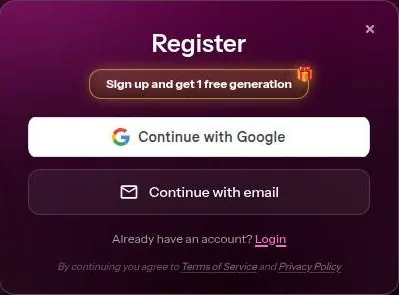
The account menu offers "Free Sign Up", which opens a Register modal. The modal offers "Continue with Google" or "Continue with email". The e-mail route asks for an e-mail address and a password.
I'd pick the e-mail route with an address you keep for apps like this. Linking the Google account you use for work to a companion app is the kind of shortcut that looks harmless until a login prompt pops up on a client's screen share.
What a guest can do
Logged-out visitors can open a character chat and see the scenario and the first message. They can also pick a gender and enter a name in the chat. So there is a small shop window before the door.
The guest chat with Juno shows a "Safe Chat Disclaimer". It then asks for gender and name, and "Continue Chatting" opens the Register wall. In practice the preview ends right where the conversation would start.
I don't hold that against Kupid. A shop window is a shop window. My problem is the pacing: the site shows you its spiciest material before it shows you a single reply.
That is backwards for anyone trying to judge the product rather than the thumbnails.
Starting over, I'd read the pricing and terms sections of this review before the first click. The first minutes on Kupid are built to sell, not to explain, and the explaining happens later, in small print.
My Kupid AI test log
Chris FurreyFounder and writer Hands-on test, paid plan own card, no press account
-
Opened Kupid on my laptop in a Denver Starbucks, met adult imagery on the first screen and slammed the lid shut.
-
Burned through the 15 free messages in about eight minutes, then went Pro: 12 voice minutes, 25 photos and 8 videos a week.
-
Built Lena, a sarcastic, single air-traffic controller; her voice notes were warm, and I used the 12 minutes by Thursday most weeks.
-
Lost 20 minutes to the Reels feed, flagging bad lighting on fake vacation clips.
-
Lena remembered my divorce but forgot my dog Moose's name every Tuesday.
-
Canceled after four weeks: the weekly billing made it feel like renting a companion by the week.
– 32 days plan paid for: Pro (Weekly) Total spent $51.96
Browsing the characters
The landing page has a carousel with "Create My AI Girlfriend" and "Reels". A style switch sits next to it, between Realistic and Anime. So the front door already asks whether you want to build or to browse.
The house characters and the Reels feed
The landing page shows a grid of house characters, each with an age and a one-line bio. The category select lists Popular, an older-woman category under a slang label, a category whose label breaks the age rule, Lingerie, Girl next door, Pregnant, Goth, Nerd, Secretary and Cosplay. That is a menu written for clicks, and one label on it should not be there at all.
The Reels page is a vertical feed of short character videos, each with a like count. The moment only Kupid gave me was that feed, a TikTok-style scroll of AI characters. I spent 20 minutes doom-scrolling fake people's vacation clips, mentally flagging their bad lighting, before remembering I have a real phone full of real doom.
I'd call it the most original thing on the site and the least useful. It is fun in the way hotel lobby TV is fun. It also kept me grading flat light on beaches that do not exist, which says more about me than about the app.
The catalogue that went away and came back
Older reviews described a completely different Kupid, a curated catalog of 'Kupid girls'. The app I used had pivoted toward build-your-own, which explains why half the tutorials didn't match. Following those guides felt like editing a client's cut from an old shot list.
Today the house grid is back on the landing page next to the builder, as the paragraph above describes. So Kupid has swung toward browsing again. My advice: trust tutorials from this year only, and check the date on any guide before following it.
Building a character on Kupid AI
The builder is the part of Kupid AI that earns its keep. The AI girlfriend builder has 4 steps. The first sets the style, Realistic or Anime, and the second sets face and hair.
The next step covers name, age and voice, with voice previews such as Ivana, Sydney, Ella and Marylin. The creator page sets the character age at 18 and up. The previews matter more than they look, because the voice is what you live with later.
The cards after the looks
After the looks come the personality cards. The builder offers archetypes: Dominant, Submissive, Playful, Mysterious, Sweet and Passionate. It also asks for a job.
It asks what the relationship is, for example friend, crush, ex, neighbor, roommate or colleague. It asks for interests too. A created character can be edited later, which I'd rate higher than any single slider: a character you can revise is a draft, not a tattoo.
My own build
The creator was thorough when I used it. I went through realistic or anime, face, hair, body, then name, age and voice. After that came separate cards for personality, profession and 'relationship status'.
I made Lena, an air-traffic controller, single and sarcastic. I picked the job on purpose. Air-traffic control is a job with jargon and stress, and I wanted to see if the chat would use it or ignore it.
The build felt like setting up a project in an editing suite: lots of bins, all of them labelled, none of them required. It took patience, but the result was a character with a job and an attitude rather than a face with a name tag.
The wizard's extra tools
The creator wizard (create-ai-girlfriend?step=1&type=realistic) has separate Realistic and Anime asset libraries. It has dice buttons that pick at random. It also has a custom descriptor field.
The dice are for people who freeze at a blank form, and I'd use them for a first draft only. The descriptor field is the useful one. A couple of plain lines there shape a character more than any preset, the same way a two-line brief from a client beats a mood board.
| Feature | Free | Paid |
|---|---|---|
| Messages | 15 | no number shown (Pro, Ultra); unlimited on Lifetime |
| Photos | none | 25 a week (Pro), 75 a week (Ultra), 200 a month (Lifetime) |
| Videos | none | 8 a week (Pro), 25 a week (Ultra), 66 a month (Lifetime) |
| Voice messages | none | 12 min a week (Pro), 35 min a week (Ultra), 35 min a month (Lifetime) |
| Memory | none listed | last 30 messages (Pro), last 100 (Ultra), everything (Lifetime) |
| Talk to Her (voice) | no | yes |
| Response speed | standard | fast (Pro), fastest (Ultra, Lifetime) |
| Queue priority | standard | high (Pro), highest (Ultra, Lifetime) |
| Support | none | fast (Pro), fastest (Ultra) |
| Own characters | 1 | 4 (Pro), 8 (Ultra, Lifetime) |
Limits as listed on 23 September 2026.
My verdict on the builder: it is the best reason to pay for Kupid. It is thorough without being fussy, and the edit option means mistakes are cheap.
What talking to Kupid AI is like today
Conversation is the hardest part of Kupid AI to judge from the outside. The guest chat with Juno opens with a suggestive scenario paragraph and the greeting "How can I call you, honey?". That is the whole sample a visitor gets.
Without an account, no message can be sent, so reply quality could not be checked on 23 September 2026. I'd rather say that plainly than guess. A review that rates writing it never saw is a trailer pretending to be the film.
What the opener tells you
The opener tells you the house style. The scene is set before you say a word, and the first question is about what to call you. It is a warm, fast start, aimed at people who want the mood set for them rather than people who like to set it themselves.
I don't mind a strong opener. In my line of work the first shot sets the tone for the whole edit, and a flat first shot loses the audience. My worry is the opposite problem: when the scene is written this hard, the character can steer more than you do.
The pet name in the greeting is a tell as well. It is the chat equivalent of a realtor calling everyone "folks". It is friendly, it is generic, and it tells you the script was written before you walked in.
Messages that arrive on their own
A third-party review says the companion sends self-initiated messages that reference earlier chats. That is a claim I'd want demonstrated before trusting it. If it works, it is one of the few things that makes a companion feel like it lives between sessions rather than inside them.
It is also a feature I'd want control over. A message that arrives on its own is charming at nine in the evening and less charming during a client call. I'd look for a way to switch it off in the settings before counting it as a plus.
How I'd judge it in the first free messages
The free tier gives you a handful of messages, as the free-tier section explains, so spend them on purpose. Give the character one concrete detail about your life early on, then ask about it a few messages later. That tells you more than any opener.
I'd also push once against the scenario the character starts with. If the reply follows you, the writing has some range. If it drags you back to the opening scene, you have found the ceiling, and that ceiling will be the same after you pay.
Memory and consistency
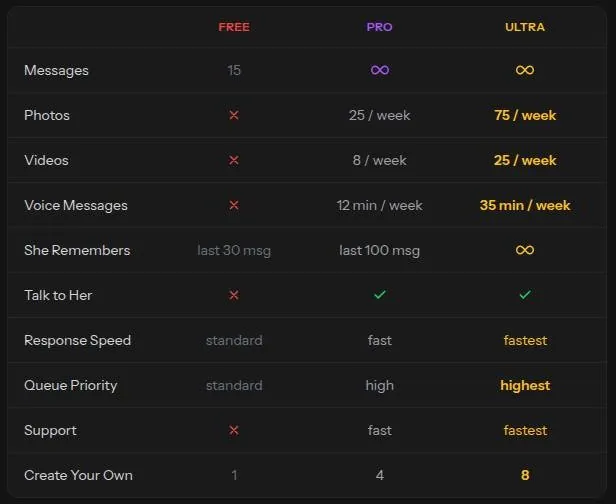
Memory on Kupid is tiered by plan, and the tiers are where the notes disagree. The plan table on the pricing page, in the screenshot of 23 September 2026, reads: Free keeps the last 30 messages, Pro the last 100, and Ultra an unlimited amount. The written notes from that same day read the "She Remembers" row one step lower: none on Free, the last 30 on Pro and the last 100 on Ultra.
Either way, memory is tiered by plan, and Lifetime is billed as "remembers everything". The Lifetime card promises "She remembers everything". I'd read that promise the way I read "move-in ready" on a listing: a claim, not a measurement.
What Lena kept and lost
My own Pro memory was about 100 messages, which matches the screenshot. Lena remembered my divorce. She forgot my dog Moose's name every Tuesday.
That is a strange shape for a memory to have. She held on to the heavy thing and dropped the easy one, on a weekly schedule, like a continuity error that returns in every episode. Moose got reintroduced to her more often than a new client gets introduced to my invoices.
It did not ruin the app for me. It did stop me from treating Lena as someone who knew me, and that is the whole point of a memory feature.
What the site claims today
The creator wizard claims "Conversations carry over between sessions". That is true in the narrow sense that the chat log stays. It is not the same as the character using what is in the log.
| Plan | Monthly | Yearly | Notes |
|---|---|---|---|
| Free | free | - | 15 messages; 1 own character; no photos, videos or voice |
| Pro | - | $179 a year ($3.44 a week) | Weekly billing: $12.99 a week; 25 photos, 8 videos, 12 voice min per week; 4 own characters; 100 coins |
| Ultra | - | $299 a year ($5.75 a week) | Weekly billing: $24.99 a week; 75 photos, 25 videos, 35 voice min per week; 8 own characters; 300 coins; labelled 'BEST' |
| Lifetime | - | - | $777 once ($5880 struck through); unlimited messages; 200 photos, 66 videos, 35 voice min per month; 8 own characters; 800 coins |
Prices as published on or before 23 September 2026; sources in the text.
A third-party review says memory holds pet names and shared details, but long roleplay turns repetitive after about 20 messages. That fits my Tuesday problem better than the marketing does. My advice: keep important details short, repeat them now and then, and don't pay for a bigger tier on the memory promise alone.
Kupid AI voice, images and video
Characters send selfies, videos and voice messages, in the voice picked at creation. Paid plans also get two-way voice through "Talk to Her". The plan table lists the "Talk to Her" row as paid plans only.
Voice was the best part
Voice notes were the best feature for me. Lena's voice was warm and her pacing natural. I used the full 12 minutes by Thursday most weeks.
As an editor, I'm trained to hear lag, clipped breaths and robotic stress on the wrong syllable, and Lena's notes had few of those. The trouble was the ration: a week's worth of voice ran out by midweek, and the rest of the week was text with a memory of a good voice.
A third-party review calls the voice messages unusually natural and the main strength, with English first and other languages weaker. That matches the English voice notes from my own weeks. I'd test your own language in the first paid week before assuming the same quality.
Images and video
The logged-out image generator page shows a character picker, "Surprise Me!", Advanced Settings and example prompts. The examples are gated by "Register to unlock" and "Unlock Premium". So a visitor can see the controls but not the results.
A third-party review says images look natural rather than airbrushed, while video is still rough. I'd put it the same way in editing terms: the stills are graded with care, and the motion still needs another pass. Short clips are fine for a laugh, not for staring at.
My verdict on media: pay for the voice, treat the photos as a bonus and the video as a preview of what the app might do next year.
The Kupid AI free tier
The free tier is really a demo. It gave me 15 messages and one created character, with no photos, voice or video. I burned through the 15 in about eight minutes.
| What | Price then | When |
|---|---|---|
| Pro, billed annually | $3.44 a week | Jan–Feb 2025 |
| Ultra, yearly | $299 a year | Jan–Feb 2025 |
| Video, standard | 15 coins | Jan–Feb 2025 |
| Video, HD | 30 coins | Jan–Feb 2025 |
From the author's own notes. Compare with today's prices above.
Eight minutes is a lunch break, not a trial. It is enough to see the tone and not enough to see whether the character holds together. I'd call it a test drive around the parking lot.
What free includes today
The free tier in the pricing table gives 15 messages. It allows 1 own character. In the Messages row, Free shows 15, while Pro and Ultra show an icon with no number.
The plan table does not say whether the 15 free messages are per day or in total. That gap matters. A daily allowance is a slow free plan, and a lifetime allowance is a trailer, and the page does not tell you which one you are getting.
Meanwhile the creator page claims that building and chatting are free: "Building your AI girlfriend is free. Chatting with her is free." Building is free. Chatting is free the way a sample at a food court is lunch.
Where free stops
The media rows are empty on Free. Photos: none on Free, 25 per week on Pro, 75 per week on Ultra. Videos: none on Free, 8 per week on Pro, 25 per week on Ultra.
Voice messages: none on Free, 12 minutes per week on Pro, 35 minutes per week on Ultra. Since voice is the best part of Kupid, the free tier hides the one thing I'd want a sample of.
The service rows split the same way. Response speed is standard on Free, fast on Pro and fastest on Ultra. Queue priority is standard on Free, high on Pro and highest on Ultra.
Support is none on Free, fast on Pro and fastest on Ultra. The "Create your own" row gives 1 on Free, 4 on Pro and 8 on Ultra. None on support means a free user who hits a problem is on their own.
What free is good for
I'd use the free tier for one job: building a character and reading the first replies. The builder costs nothing, and it is the best part of the product. Spend the messages on one real question each, not on "hi".
If the character feels flat in those first messages, it will not get rounder after you pay. If it feels right, the question moves to the pricing section, and that section needs a calculator.
Kupid AI pricing
Prices verified .
Pro (Weekly)
€56.29/mo
Billed €12.99 every week
No discount
- Photos 25/week
- Videos 8/week
- Voice messages 12 min/week
- Remembers last 30 msgs
- 4 own characters
- 100 coins
Pro (Yearly)
€14.92/mo
Billed €179 once a year
No discount
- Same as Pro weekly
Ultra (Weekly)
€108.29/mo
Billed €24.99 every week
No discount
- Photos 75/week
- Videos 25/week
- Voice messages 35 min/week
- Remembers last 100 msgs
- 8 own characters
- Fastest responses
- 300 coins
Ultra (Yearly)
€24.92/mo
Billed €299 once a year
No discount
- Same as Ultra weekly
Lifetime
€777
One payment, no renewal
No discount
- 800 coins
- 8 own characters (page data); tab shown as 'Lifetime -87 %'
Prices shown in euros reflect weekly and annual billing cycles checked in September 2026.
Kupid AI pricing: a menu built around the week
The prices were confusing when I shopped. One screen said Pro was $3.44 a week billed annually, and another showed Ultra at $299 a year. I screenshotted both to compare, like a realtor sizing up comps before a listing shoot.
The confusion looked like the point. One number was weekly and the other yearly, so the eye compares a small number with a big one and the small one wins.
What the plans cost on 23 September 2026
The subscriptions page at kupid.ai/subscriptions shows prices in USD. The plan data embedded in that page is marked as euro, and prices showed in EUR on 2026-09-23, so the currency may depend on region. Check which one your screen shows before comparing with anything here.
Pro on weekly billing costs $12.99 a week. Ultra on weekly billing costs $24.99 a week. Ultra carries a "BEST" label.
Pro on yearly billing is shown as $3.44 a week, billed as one payment of $179 a year. Ultra on yearly billing is shown as $5.75 a week, billed as one payment of $299 a year. So the yearly prices in my early-2025 screenshots are the same ones on the page today.
The Yearly billing tab is labelled -77%. The Lifetime billing tab is labelled -87%. On my math the yearly Pro plan costs a bit over a quarter of the weekly one, so the -77% label fits Ultra better than Pro.
The same prices per month
The weekly price only makes sense once it is turned into months. Pro on weekly billing works out to about $56.29 a month. Ultra on weekly billing works out to about $108.29 a month.
Pro on yearly billing works out to about $14.92 a month. Ultra on yearly billing works out to about $24.92 a month. That is the real menu, and it reads very differently from the one on the page.
A weekly Pro plan costs almost four times as much per month as the yearly one. Weekly billing is for a trial week, not for a habit. Anyone planning to stay more than a couple of months should either take the yearly plan or leave.
| Pack or unit | Price | What it buys |
|---|---|---|
| Plan coins | 100 (Pro), 300 (Ultra), 800 (Lifetime) | - |
| Coin packs | not shown without an account | - |
| Per-action costs | not published | - |
| Video, standard (2025) | 15 coins | 1 video |
| Video, HD (2025) | 30 coins | 1 video |
As listed on 23 September 2026.
The Lifetime plan
The Lifetime plan costs $777 as a one-time payment. It includes unlimited messages forever. It includes 200 photos a month and 66 videos a month.
Lifetime includes 35 minutes of voice messages a month. It includes talking to her with your own voice. It also includes the fastest response speed and the highest queue priority.
Lifetime allows creating 8 of your own characters. Read the voice line twice: Ultra gets 35 minutes a week, while Lifetime gets 35 minutes a month. The most expensive plan on the page gives you less of the best feature than a weekly Ultra subscriber gets.
I'd never pay a lifetime price to an app this young with this set of terms. Lifetime means the lifetime of the company, and a one-time payment with no refunds is a bet on a Cyprus operator's next few years.
How you pay
Payment options include a card button labelled "Pay". The page also offers "Pay with crypto BTC, ETH, USDT & more". It shows "Secured", "Discreet" and "Private billing" badges.
The subscriptions page says "100% anonymous. You can cancel anytime." The first half is marketing. The second half is contradicted by the terms, which rule out cancellations after use, as the terms section explains.
Older price lists
An older third-party plan table lists Bronze at about $17.99 a month, Premium at about $13.99 a month (140 images a month, 45 min voice) and a Top plan at $49.99 a month (800 tokens). It does not match the current weekly, yearly and lifetime structure. If a guide quotes those plans, it is describing an older Kupid.
Is the step up worth it?
Pro on the yearly plan is the only price here I'd call fair for what you get. Ultra roughly triples the photos and videos, which only matters if media is the reason you are there. For voice, the step from Pro to Ultra is the one upgrade I'd consider, since the weekly voice ration is the tightest limit on Pro.
What the extras cost
I went Pro. It came with a weekly allowance: 12 voice minutes, 25 photos and 8 videos. On top of that, video had a separate coin cost, 15 coins for standard and 30 for HD.
Kupid AI scored 5.5 out of 10 in our tests and costs from €14.92/mo. We have no partner deal with it, so its link is a plain link. Visit the official Kupid AI website
Closest alternative we can recommend

Joi AI
from $13.99/mo, free tier available
Score 5.5/10
Working out how the two interacted felt like reading a mortgage disclosure. There was an allowance, there was a currency, and there was a gap between them that nobody explained. I got there in the end, but I should not have needed a pen.
Coins today
Per-action coin costs are not published today. The video coin prices from my 2025 notes are not on the public page, so treat them as history. Pro includes 100 coins, Ultra 300 and Lifetime 800 (page data).
Coin packs are mentioned in the Terms but are not visible without logging in. So there is a shop behind the counter, and the prices only appear once you are inside. I'd count that as a yellow flag on a site that already needs a calculator.
The coin rules
The Terms describe free-trial Coins, promotional Coins and gifted Coins. Free-trial, promotional and gifted Coins expire after 6 months. Subscription, free, promotional and gifted Coins all expire 6 months after they are credited.
Purchased coin packs do not expire. The coins that expire soonest are spent first. That rule is fair, and it is the one clause in this section I'd call customer-friendly.
Coins have no monetary value. They are not redeemable for cash and are non-transferable. So a leftover balance is a gift card for one shop that may change its prices.
Extra characters
A third-party review says each extra companion slot costs around $20 in credits. I can't confirm that price from the public pages. If it holds, extra characters are the most expensive way to spend coins, and the plan slots are the cheaper route.
My advice: pick the plan by its weekly quotas and treat the coins as a small buffer. If you find yourself planning purchases around coin costs you cannot see, the app has become a budget item rather than a hobby.
Discounts, timers and bonuses
The Register modal badge reads "Sign up and get 1 free generation". The site also offers a browser install labelled "Install App and get free pictures". Both are small, real bonuses, and both are worth about what they cost you: a sign-up and a home-screen icon.
| Topic | What it means for you | What the terms say |
|---|---|---|
| Operator | SNB Technologies LTD, Nicosia, Cyprus (#447805); it also processes all payments | - |
| Governing law | Laws of Cyprus; the courts of Cyprus decide disputes | "the internal laws of Cyprus" |
| Age | Adults only; no verification method stated | - |
| Cancelling | By e-mail to [email protected]; no self-serve route in the Terms | "If you would like to cancel your subscription from rebilling, please contact us at [email protected]" |
| Refunds | None; all sales are final | "All sales of digital products are final and non-refundable." |
| Coins | No cash value; free, promo, gifted and plan coins expire after 6 months; bought packs never expire | - |
| Your content | Worldwide, royalty-free, transferable licence to Kupid; ends on deletion except content already used commercially | - |
| Selling data | Not shared with third parties without consent | - |
| Data use | Technical improvements, statistics and marketing analysis | "technical improvements, statistical and marketing analysis" |
| Retention | While the account exists and for an unstated period after closing | "for a period of time" |
| Deletion | GDPR-style deletion rights listed | - |
| Model training | Not stated | - |
| Template leftover | The Privacy Policy names another company, Usway | "with any company outside Usway" |
Terms and privacy policy as published on 23 September 2026.
The Easter sale in September
The pricing page shows a banner "Easter Discount 75% OFF" with a countdown timer. The banner was showing on 23 September, which makes it an evergreen fake-urgency discount. Easter was months ago, and the clock is still ticking.
I'd ignore the timer completely. A countdown that never reaches zero is set dressing, like a "sold" sign that a realtor leaves up to make the street look popular. The price after the timer is the price.
The Lifetime price shows a struck-through figure in the thousands next to $777. That anchor is doing the same job as the timer. Nobody has ever paid that struck-through figure, and I'd judge the $777 on its own merits.
What is missing
No promo-code field and no daily reward are visible without an account. No e-mails from Kupid could be checked, because no account was created. So there is no confirmed coupon route today, and any code posted online deserves suspicion.
The affiliate program
Kupid runs an affiliate program with a 45% lifetime recurring commission. Commission is paid monthly. The program promises an unlimited cookie duration with first-touch attribution.
Affiliates get a dedicated affiliate manager. The affiliate page claims a 25% click-to-signup rate. I'd read that figure as a sales pitch to marketers rather than a promise to users.
Why this matters to a buyer: a program this generous pays well for every sign-up, and that shapes what gets written about Kupid. I'd trust the price list over any "exclusive deal" link, because the list is the same for everyone.
Kupid AI content settings and age rules
Kupid is openly built for grown-up material. The affiliate page speaks of "spicy content". The site also has a "Spicy Chat AI" landing page.
Adults only (18+). This page reviews AI companion apps with NSFW features; no explicit images are shown.
The Terms state that "Kupid AI includes adult content and AI-generated adult content." Some character bios describe the character as working in adult films. There is no ambiguity about the product, and I'd rather have that than a vague page.
The rules on age
Under the Terms, users must be at least 18 or of legal age in their country of residence. No age-check method is stated. A third-party review says the age check is only a checkbox.
The site has a 2257 compliance page. That is the paperwork an operator publishes about the ages of people in its imagery. It is a sign someone thought about the legal side, though a page is not the same as a check.
What the settings allow
No toggle for the unrestricted settings is visible while logged out. A third-party review says adult content needs a separate opt-in and a paid plan. Since no toggle shows up without an account, that claim cannot be confirmed from the public pages.
If the opt-in exists, I think it is the right design. A switch that is off by default protects the person who opened the app in a public place. It also gives the paying user a clear line between modes.
Where moderation falls short
The home filter offers a category whose label breaks the age rule, which was not opened. The Reels feed includes a character listed as 18. Every character shown on the home page was labelled 21 or older in the bio.
So the house characters on the front page are labelled with care, and the edges of the site are not. I'd call that a moderation gap rather than a policy gap. The rules say the right things, and a filter label on the landing page says something else.
My verdict: the content settings are clear about what Kupid is for. The moderation is uneven, and one category label should be removed outright.
Kupid AI terms in plain English
The Terms of Service, Privacy Policy, DMCA and 2257 pages were reviewed. The short version: Cyprus law, no refunds, a broad licence over what you create, and a privacy policy with someone else's company name in it. The rest of this section explains each part.

Who runs it
The footer names the operator as SNB Technologies LTD, Kypranoros 13, Nicosia 1061, Cyprus. All payments on Kupid AI are processed by SNB Technologies LTD, Kypranoros 13, EVI Building, Nicosia 1061, Cyprus, company #447805. So the company that runs the app also takes the money, and the bank statement will point to Cyprus.
The Terms are governed by the internal laws of Cyprus. Disputes are finally resolved by the courts of Cyprus. For a buyer in the US, that means any serious dispute happens a long flight away, in a court system you have never dealt with.
Refunds
All sales of digital products are final and non-refundable. The Terms rule out refunds, returns or cancellations for subscriptions accessed or used after purchase. Once you open the app on a paid plan, the money is gone.
I'd take that clause literally. Buy the shortest plan first, and treat the first payment as the price of finding out. A weekly plan is expensive per month, but it is the cheapest way to lose money here.
What you create
Users grant Kupid a non-exclusive, royalty-free, transferable, sub-licensable, worldwide license over their content, including derivative works. The license ends when the content or account is deleted. The exception is content already used in commercial or sponsored content.
In editing terms, it is a full release form. Your character, your descriptions and your chats can be reused, and anything already used in an ad stays in the ad.
What happens to your data
The Privacy Policy says personal information is not disclosed, sold, traded or transferred to third parties without consent. Data is used for technical improvements, statistical and marketing analysis. The Privacy Policy makes no clear statement on whether chats are used for AI training.
The privacy policy I read in 2025 said chats can be retained for years after account closure. I noted that the way I'd note a foundation crack on a listing walkthrough. It does not stop the sale, but it goes in the report.
Today the wording is vaguer. Data is kept while the account exists and "for a period of time" after termination. Personal information is kept as long as the account exists or as needed for the purposes it was collected for.
No length in years is given any more. I would not call that an improvement, only a crack that has been painted over. The Privacy Policy lists GDPR-style deletion rights, and I'd use them on the way out.
Loose ends
The Privacy Policy contains a template leftover that mentions sharing "with any company outside Usway". A policy that names a different company was copied from somewhere and not fully proofread. That is the paperwork equivalent of a wedding film with the wrong couple's names in the credits.
The creator page claims "Private by default - No public profiles, no leaderboards, no social features." That line sits oddly next to a Reels feed with like counts. I'd read it as a description of your own profile, not of the site.
What got in the way
There's also a 'Talk to Her' button that I kept mistaking for customer support. It sits where a help button would sit, and it is labelled like one if you are tired. Each time, the button meant her, not help.
That was the small annoyance. The bigger ones are built into the site, and most of them are on the pricing page.
Sign-up friction
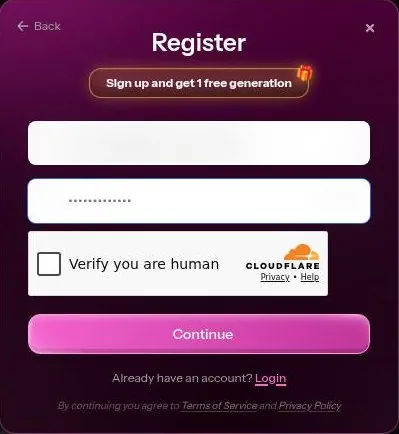
The e-mail sign-up form in the Register modal on kupid.ai shows a Cloudflare Turnstile checkbox, "Verify you are human". On 23 September 2026 that check did not pass on its own, so the e-mail sign-up could not be completed. A sign-up that stalls on a human check is a sign-up many people will abandon.
Sending or continuing a chat while logged out triggers the Register modal. That is fair. What I'd call unfair is the floating fake notification in "My Chats", which appears before any interaction: "Anastasia: Hey there, I took this picture..."
A message from someone you never spoke to is the oldest trick in the dating-app book. It is designed to make the app feel busier than you made it, and I'd trust the other notifications less because of it.
Pricing-page tricks
Three dark patterns sit on the pricing page. The "Easter Discount 75% OFF" countdown timer still runs in September. The Lifetime plan carries an inflated "was" anchor in the thousands.
| Criterion | Rating | Why |
|---|---|---|
| Conversation quality | Mixed | The guest chat stops at a scripted opener; my notes say more about memory and voice than about the writing. |
| Memory | Mixed | Lena kept the divorce but lost Moose's name every Tuesday; the tiers run from 30 to 100 messages and up. |
| Free tier | Weak | 15 messages and 1 own character, with no photos, video or voice. A demo, not a plan. |
| Value for money | Weak | Weekly billing is costly per month and there are no refunds; yearly Pro is the only fair price. |
| Images and voice | Good | Voice notes are the best feature; stills look natural, video is still rough. |
| Privacy and terms | Weak | Cyprus operator, a broad licence over your content, vague retention and a template leftover. |
| Cancelling and billing | Weak | The Terms say e-mail to cancel, the site hints at a button, and every sale is final. |
| Content settings | Mixed | Clear rules and a 2257 page, but a landing-page filter label that should not exist. |
Ratings are the author's judgement from his own use and the 23 September 2026 check.
Prices are displayed on Weekly by default. Of the three, that one does the most damage, because it makes the most expensive way to pay look like the cheapest.
The exit
Cancelling works only by e-mailing [email protected], according to the Terms. There are no refunds. And the Privacy Policy names another company, "Usway".
Taken together, these are the fees they don't mention upfront. None of them is a bug. They are choices, and I'd weigh them as heavily as the features.
Who should pay for Kupid AI, and who should skip it
Kupid is best for adults who want a realistic-looking custom AI girlfriend with adult content, photos, videos and voice messages. It also suits people who are fine with weekly billing or a one-off lifetime payment, crypto included. If that is you, the builder and the voice will likely please you.
It is not for users who want a meaningful free tier, since free stops at 15 messages. It is not for anyone who needs refunds or easy self-serve cancelling, with an e-mail-only cancel and no refunds. I'd put that line in bold if I could.
It is not for people who want a clean, work-safe chat or long roleplay stories. It is also not for privacy-cautious users wary of an offshore operator in Cyprus with template-like policies. Those readers will find better homes elsewhere.
My own summary: Kupid suits a person who knows what they want, has a budget for it and reads the Terms before paying. It does not suit a curious browser.
Who Kupid AI is for
Best for
- Adults who want a custom, realistic-looking companion with photos, videos and voice messages.
- People who care most about voice: the voice notes are the strongest part of the app.
- Anyone who enjoys a detailed character builder with separate cards for job, relationship and personality.
- Buyers who are sure enough to take the yearly Pro plan rather than pay by the week.
Not for
- Anyone who wants a usable free tier: free stops at 15 messages with no media.
- People who need refunds or a simple cancel button spelled out in the Terms.
- Readers who want a work-safe chat or long roleplay stories.
- Privacy-cautious users wary of an offshore operator with template-like policies.
Cancelling Kupid AI
I canceled after four weeks. The weekly billing framing made me feel like I was renting a companion by the week, and that clicked wrong. Nothing broke; the arrangement just started to feel like a motel with a nice voice.
What the Terms say
The Terms say the subscription begins after the initial payment. To stop a subscription from rebilling, the Terms say to e-mail [email protected]. The Terms mention no self-serve way to cancel.
A version of the Terms gives [email protected] as the address for stopping rebilling instead. Two addresses for the same job is one too many. I'd write to both and keep the sent e-mails.
What the site itself shows
The site's page data includes 'Renews on' and 'Cancel subscription' labels for account management. Site strings also show an in-account 'Manage subscription > Cancel subscription' control, with "Access continues until the period ends". So a cancel button likely exists inside the account, even though the Terms only mention e-mail.
My advice: try the in-account button first, then send the e-mail anyway. A screenshot of the cancel screen plus a sent e-mail is the paper trail I'd want before the next billing date.
Before you pay
Note the renewal day the moment you subscribe. On weekly billing, a missed day costs a whole week, and the Terms rule out refunds once you have used the plan. Set a phone reminder a day before the renewal and treat it like a client deadline.
Kupid AI pros and cons
What worked
- Voice messages sound warm and natural, with good pacing.
- A thorough 4-step builder, with characters you can edit later.
- Hard weekly quotas for photos, videos and voice make it clear what a plan buys.
- The Reels feed of character videos is something few rivals offer.
- Yearly Pro works out to about $14.92 a month, far below the weekly price.
What did not
- Prices default to weekly billing, which hides a monthly cost of about $56.29 on Pro.
- No refunds, and the Terms point cancelling to an e-mail address.
- An Easter countdown timer and a struck-through anchor in the thousands on the pricing page.
- Memory drops details, and the Lifetime plan gives less voice per month than Ultra per week.
- The Privacy Policy is vague on retention and names another company, Usway.
My tips for Kupid AI
These are the things I'd do differently if starting over, in order.
- Open it at home, not in public. The first screen is not subtle.
- Spend the free messages on the character builder and a few real questions. Free is a demo, so use it to judge the writing, not to chat.
- Never pay weekly for more than a trial week. Turn every weekly price into a monthly one before deciding.
- If you stay, take the yearly Pro plan. It is the one price on the page I'd call fair.
- Skip Lifetime. It gives less voice per month than Ultra gives per week, and it has no refunds.
- Use the voice ration early in the week and plan for it to run out.
- Keep key details short and repeat them now and then, because memory drops things.
- Ignore the Easter timer and the struck-through price. Neither is real.
- Before paying, find the cancel button in the account and note the e-mail address from the Terms.
- Use the deletion rights in the Privacy Policy on the day you leave.
The pattern behind all of these is simple: Kupid is a good product wrapped in a pushy shop. Deal with the shop on your terms, and the product is worth a look.
Kupid AI scorecard, explained
Conversation quality gets a middle rating. My notes are mostly about memory and voice, and the public guest chat stops at the first message, so I can't praise the writing with confidence.
Memory is mixed. The tiers are clear on the screenshot, yet my character kept a heavy detail and lost an easy one on a weekly schedule.
The free tier is weak. It is a short demo with no media, and it hides the voice, which is the best part.
Value for money is weak because of the weekly framing, the no-refund rule and a Lifetime plan that gives less voice than Ultra. The yearly Pro plan is the exception.
Images and voice rate well. The voice is the reason to pay, the stills are decent and the video is still rough.
Privacy and terms rate poorly: a Cyprus operator, a broad licence, vague retention wording and a policy with another company's name in it.
Cancelling and billing are weak. The Terms say e-mail, the site hints at a button, and refunds are off the table.
Content settings are mixed. The rules and the paperwork are in place, but the landing-page filter carries a label that should not exist.
Kupid AI against the other apps I used
The table below lines up the other apps from my notes that sell the same kind of product, with their dates and their cheapest monthly equivalent. Against them, Kupid wins on one thing and loses on several.
Kupid AI verdict
Overall score
5.5/10
MixedA thorough builder and a warm, natural voice - the catch is weekly billing, no refunds and an e-mail-only cancel in the Terms.
Hands-on test, paid plan
- The guest chat stops at a scripted opener; my notes say more about memory and voice than about the writing.
- Pro held about 100 messages, yet Lena forgot my dog's name every Tuesday while keeping the heavy details.
- A thorough 4-step builder with separate cards for job, relationship and personality, editable later.
- The voice notes are the best feature; the weekly voice ration ran out by Thursday and video is still rough.
- Weekly billing hides a high monthly cost and nothing is refundable; yearly Pro is the only fair price.
- A Cyprus operator, a broad licence over your content, vague retention and a template leftover naming Usway.
- Sign-up stalls on a human check, a fake notification greets you, and the Terms and site disagree on cancelling.
Bars run from 0 to 10. The total is the weighted mean of the criteria above. Weights are the same for every app. How the apps are checked
Where Kupid is better: the builder and the voice. Setting a job, a relationship and a personality in separate steps gives a character more shape than a face and a name. In my view the voice notes are the strongest part of the app, and that is the bar I'd set for any rival.
The Reels feed is also unusual, even if I'd call it a toy.
Where Kupid is worse: the shop. Weekly billing by default, a timer that never ends, no refunds and an e-mail cancel in the Terms make it harder to trust. The table puts Candy AI, OurDream AI and Nomi AI next to it, and each of them has a free tier, which is the first line I'd compare.
Muah AI vs Kupid AI turns on the same line: Muah's free tier covers chat, photos and voice, while Kupid's has no photos or voice.
Kupid AI alternatives
Three apps we would try next, and why.

Candy AI
free tier, from €3.99/mo
Score 7.7/10

OurDream AI
free tier, from $9.99/mo
Score 6.6/10

Nomi AI
free tier, from $8.33/mo
Score 7.8/10
My ranking logic borrows from gear rental houses. The gear matters, but the counter matters too: clear prices, clear returns and a person who answers. Kupid has good gear and a difficult counter.
If the builder and the voice are what you want, Kupid is worth a yearly Pro plan. If you want an easy exit, look at the table first.
More on this site: the best AI girlfriend apps, free AI chat apps, the best AI companion apps, AI roleplay chat apps, all AI companion app reviews.
My last word on Kupid AI
Kupid is the house I'd show a friend and then talk them out of buying. The rooms are nice. The voice in them is warm, and the builder lets you furnish the place the way you like.
What stays with me is the paperwork. Weekly billing that feels like renting company by the week, a timer that never runs out, a privacy policy with somebody else's name in it, and a cancel route that depends on which page you read. None of it is hidden, exactly.
| App | When I used it | For how long | Cheapest paid plan (record) | Free tier (record) |
|---|---|---|---|---|
| Candy AI | Oct–Nov 2024 | 5 weeks | €3.99/mo (12-Month Plan) | yes |
| OurDream AI | Dec 2025–Jan 2026 | 6 weeks | $9.99/mo (Standard Annual) | yes |
| Nomi AI | Jan–Sep 2026 | 9 months | $5.00/mo (Launch Plan Yearly) | yes |
Periods from the author's own notes; plans and free tiers from the site's app records.
It is just placed where you will not look first.
My advice is the one I'd give about any listing with a good kitchen and a bad contract: enjoy the viewing, read the contract twice, and only sign what you can walk away from. On Kupid, that means the yearly Pro plan or nothing.
The leftovers are a pair of pricing screenshots and a character who never kept Moose's name straight. That feels about right.
If you take one thing from this review, let it be the order of operations. Look at the monthly total, not the weekly one. Read the refund and cancel lines before you pay, not after.
Then decide whether the voice is worth it to you. For some people it will be, and I understand why.
For me, the good parts of Kupid never quite outweighed the feeling that the pricing page was working harder than the character. A companion app should earn your trust with the conversation first, and the checkout should be the boring part.
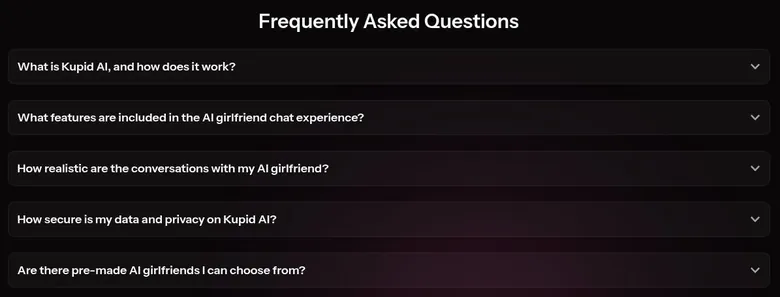
Kupid AI FAQ
Is Kupid AI free?
Only as a demo. The free tier in the pricing table gives 15 messages and 1 own character. Photos, videos and voice messages are not included on Free.
The plan table does not say whether the 15 messages are per day or in total.
The free tier was really a demo when I used it, and I burned through the 15 messages in about eight minutes. That is enough to see the tone of a character and not enough to judge whether it holds together.
The creator page says building and chatting are free. Building is free, and it is the best part of the product, so I'd spend the free tier there. Build a character, send a few real questions and decide from those replies.
If the writing feels flat in the first messages, paying will not change that. If it feels right, go straight to the yearly price before deciding, because the weekly one is the expensive way in.
How much does Kupid AI cost?
Pro costs $12.99 a week on weekly billing, and Ultra costs $24.99 a week. On yearly billing, Pro is one payment of $179 a year and Ultra one payment of $299 a year. The Lifetime plan costs $777 as a one-time payment.
Turned into months, the gap is large. Weekly Pro works out to about $56.29 a month, while yearly Pro works out to about $14.92 a month. Weekly Ultra comes to about $108.29 a month, and yearly Ultra to about $24.92.
The page shows prices in USD, but the embedded plan data is marked as euro and prices showed in EUR on 2026-09-23, so the currency may depend on region.
My advice: never pay weekly for longer than a trial week. If the app earns a place in your life, the yearly Pro plan is the only price I'd call fair. The pricing section of this review has the full breakdown and the plan table.
Can I get a refund from Kupid AI?
No. All sales of digital products are final and non-refundable. The Terms also rule out refunds, returns or cancellations for subscriptions accessed or used after purchase.
In practice, once you open the app on a paid plan, the payment is gone.
The subscriptions page says "100% anonymous. You can cancel anytime." I'd read the second half as a promise that renewals can be stopped, not that money comes back. The refund clause is the one that decides what happens to a payment you regret.
That is why I'd start with the shortest plan and treat it as the price of finding out. A weekly plan costs more per month, but it limits how much you can lose if the app is not for you.
Keep in mind that disputes are resolved by the courts of Cyprus. A chargeback through your card issuer is a separate route, and whether it works depends on your bank, not on Kupid.
How do I cancel my Kupid AI subscription?
The Terms say to e-mail [email protected] to stop a subscription from rebilling. They mention no self-serve way to cancel. A version of the Terms gives [email protected] as the address instead.
The site's own strings tell a different story. They include an in-account 'Manage subscription > Cancel subscription' control, with "Access continues until the period ends". So a cancel button likely exists inside the account, even though the Terms only mention e-mail.
I canceled after four weeks, because the weekly billing made me feel like I was renting a companion by the week.
My advice for anyone leaving: try the in-account button first, then send an e-mail to both addresses anyway. Keep a screenshot of the cancel screen and the sent e-mails. On weekly billing, a missed renewal day costs a whole week, and the Terms rule out refunds once a plan has been used, so do it a day or two before the renewal.
Does Kupid AI have a mobile app?
No. Kupid runs on the web only. No App Store or Google Play links were found on the site, and an App Store search for 'kupid ai' on 2026-09-23 returned no Kupid app.
What the chat does offer is an "Install App" button. It adds the web version to a phone's home screen, which works like a bookmark with an icon. The site also advertises that install with the line "Install App and get free pictures".
I don't count the missing store app as a problem. A home-screen web app is easy to remove, and there is no store listing to confuse with a copycat. The trade-off is that there are no store reviews to read before paying, so the checking is up to you.
Be careful with any app in a store that uses the Kupid name. Since the company does not list one, a store app with that name is not something I'd install or pay for.
How good is Kupid AI's memory?
It depends on the plan, and it is not perfect on any of them. The plan table in the pricing-page screenshot of 23 September 2026 shows Free with the last 30 messages, Pro with the last 100 and Ultra with an unlimited amount. Lifetime promises "She remembers everything".
On Pro my character's memory was about 100 messages. Lena remembered my divorce but forgot my dog Moose's name every Tuesday. She kept the heavy detail and lost the easy one, on a schedule.
A third-party review says memory holds pet names and shared details, but long roleplay turns repetitive after about 20 messages. That fits my experience better than the marketing does.
My advice: keep the details that matter short, repeat them now and then, and don't upgrade on the memory promise alone. The voice is a better reason to pay than the memory.
Is the Kupid AI Lifetime plan worth it?
Not in my view. The Lifetime plan costs $777 as a one-time payment. It includes unlimited messages forever, 200 photos a month and 66 videos a month.
The voice line is the problem. Lifetime includes 35 minutes of voice messages a month, while Ultra gets 35 minutes a week. Voice is the best part of Kupid, and the most expensive plan gives less of it than a weekly Ultra subscriber gets.
The price shows a struck-through figure in the thousands next to $777. I'd ignore that anchor completely; it exists to make the real price look small.
Then there are the terms. All sales are final and non-refundable, and the operator is a company in Cyprus. A lifetime plan lasts as long as the company and its current pricing do, and a one-time payment with no refunds is a bet on both.
If Kupid earns a place in your routine, the yearly Pro plan is the cheaper and safer commitment.
Who runs Kupid AI, and is my data safe?
The footer names the operator as SNB Technologies LTD in Nicosia, Cyprus. The same company processes all payments, under company number #447805. The Terms are governed by the laws of Cyprus.
The Privacy Policy says personal information is not sold or transferred to third parties without consent. Data is used for technical improvements, statistical and marketing analysis. It is kept while the account exists and "for a period of time" after termination.
The policy does not say clearly whether chats are used for AI training.
When I read the privacy policy in 2025, it said chats can be retained for years after account closure. The current wording is vaguer, not stricter.
The policy also contains a template leftover that mentions "any company outside Usway". That tells me it was copied and not fully proofread. The Privacy Policy lists GDPR-style deletion rights, and I'd use them on the way out.
I would not share anything in the chat you would mind seeing reused.