

DreamGen AI Review: The AI Co-Writer That Got My Novel Out of the Drawer
- Hands-on test, paid plan
- Checked

Free plan available
from $7.83/mo
20% off for 1 month (Starter and Advanced); 30% off for 1 month (Pro) verified
DreamGen review: my verdict
DreamGen is not a companion app, and it doesn't pretend to be one. It is a story-writing and role-play engine. The record on this site files it as a role-play and story generator with an image generator on the side.
If you came for a girlfriend who texts good morning, you are in the wrong building. If you came to write, pull up a chair. That is the whole verdict in two sentences, and the rest of this review is the evidence.
My own run ended in a way I didn't expect from a chatbot. I paused the subscription at 10 weeks, when wedding season started booking up my weekends. The noir-ish novel I've been threatening to write since college is out of the drawer and on my desk, and I credit this app for that, not for any single sentence it wrote.
Somewhere in those weeks I learned that DreamGen trains its own 'Opus' storytelling models and puts some of them on Hugging Face. The tinkerer in me respected a company that shows its homework. As of September 2026 it runs its own fine-tuned, self-hosted first-party models.
The older 'Opus' open-weights models are still published on Hugging Face.
The company behind it is Swiss, and training on user data is opt-in only. That matters more here than in most apps, because the thing you type into DreamGen is often a manuscript, not small talk.
A third-party review sums it up as no voice, no face, a learning curve and a free tier that runs dry fast. I agree with all four points. I'd still recommend it to anyone who writes, because none of those four things is what it is for.
Key takeaways
- It is a writing tool with role-play attached, not a companion, so judge it as a co-author and not as a partner.
- Steering is the best part: plain instructions change the tone of the prose, and the scenario tools keep a world consistent.
- The learning curve is real, and the free tier's small context is too tight to judge the product fairly.
- Credits are a second currency on top of the subscription, and pictures spend them faster than words do.
- Privacy is a strength: a Swiss company, opt-in training, and clear labels on outside models that may train on your text.
How I used DreamGen
My time with DreamGen ran from March to May 2024, ten weeks in all. It looked less like dating and more like a writing retreat with a very patient, occasionally overdramatic intern.
DreamGen at a glance
- Price from
- $7.83/mo
- Free tier
- Free plan available
- NSFW content
- Allowed
- Platforms
- Web
- How it was tested
- Hands-on test, paid plan,
- On your card statement
- Not known yet - I have not paid for it
The app has two modes: Story Mode for third-person prose and Roleplay Mode for dialogue with characters. I used Story Mode 90% of the time, like a fussy author. Roleplay Mode is where most of this hobby lives, trading lines with a character.
I wanted a narrator I could argue with, and Story Mode gave me one.
That choice says more about me than it does about the app. I spend my working days deciding what stays in a cut and what goes. Handing the pen to a character and reacting to it felt like being a guest in my own edit.
What came out of it
By week 8 the model and I had 11 pages of usable draft. Maybe 30% of that survived my editing, which is roughly my survival rate for raw footage too.
That number sounds like a complaint, and it isn't. On a shoot most of what the camera records never reaches the client, and nobody calls the camera a failure. The job is choosing.
What the app gave me was volume with a point of view. Every evening there was new material to cut, and cutting is the part of writing I know how to do. A blank page has always scared me more than a bad page, and DreamGen made sure I never had a blank one.
| What | Details |
|---|---|
| Period | Mar–May 2024 |
| How long | 10 weeks |
| Plans I paid for | Free (start); Starter (about $7.83/mo, week 1); Advanced (around $19/mo, week 4) |
| How it ended | paused the subscription at 10 weeks when wedding season started |
| Facts re-checked | 23 September 2026 |
From the author's own notes; prices and features re-checked on 23 September 2026.
The shape of those ten weeks
The early weeks were setup and learning, which the first-night section covers. The middle weeks were the productive stretch, when the scenario held together and the drafts piled up. The paid plans, their prices then and now, and the reasons for each move are in the pricing section.
The ending is in the verdict above: wedding season won. There was no fight with the app and no billing drama in how it ended. The table under this section lists the plain facts, and the rest of the review explains how each one felt.
Signing up for DreamGen and my first night
The learning curve is real. Scenario setup, the codex, steering controls: my first evening was all configuration and no writing, like building IKEA furniture before you can sit down.
My DreamGen test log
Chris FurreyFounder and writer Hands-on test, paid plan own card, no press account
-
My first evening was all configuration and no writing, like building IKEA furniture before you can sit down.
-
The free context was too small to judge anything, so I upgraded to Starter at about $7.83 a month in week 1.
-
In week 4 I moved to Advanced at around $19 a month for the 8K context, and my lighthouse story finally had room.
-
By week 8 I had 11 pages of usable draft; maybe 30% survived my editing, about my survival rate for raw footage.
-
I paused the subscription at 10 weeks when wedding season started, with my noir novel out of the drawer and on my desk.
– 62 days plan paid for: Advanced Total spent $26.83
My first evening
I sat down expecting to write a paragraph and read a reply. Instead I spent the evening filling in fields, reading what each one did and wondering which of them mattered. Every field seemed to have a reason to exist, and I wanted to know all of them before typing a word.
By the time the scenario looked finished, it was too late to write anything worth keeping.
Part of me enjoyed it, the same part that reads camera manuals for fun. The other part had come to write, and it sulked until bedtime.
It reminded me of the first day on new editing software, when every panel is open and none of them is yours yet. Nothing was broken. It was just built for someone who already knew where everything lived.
Looking back, that evening was an investment, not a waste. The scenario I built that night carried the story for weeks. I'd still warn anyone who wants a quick chat after dinner: DreamGen asks for homework before it gives anything back.
How sign-up looks today
The sign-up notes below come from a check on 23 September 2026, which used the web version on a free account. The site is live. DreamGen runs on the web only, with an English interface.
There are two addresses to know. dreamgen.com is the marketing site and blog. The app itself runs at v2.dreamgen.com, and the sign-in links redirect there.
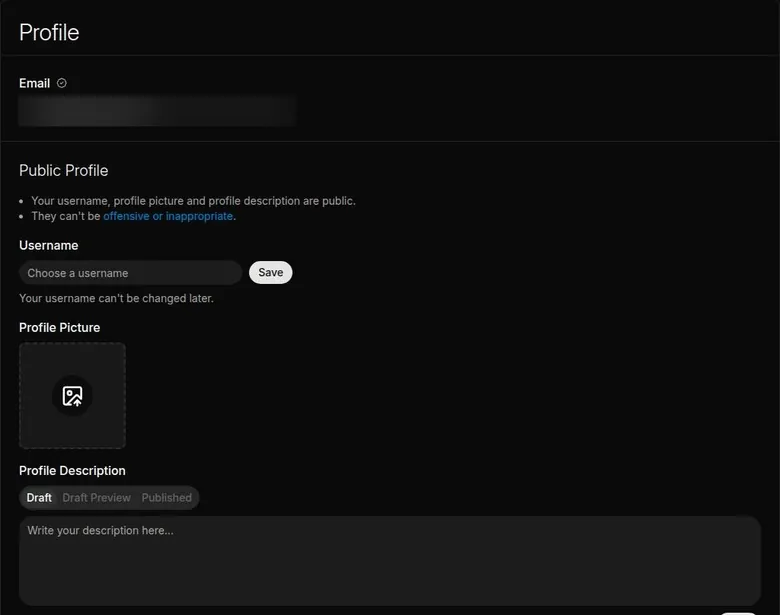
Sign-up offers Google OAuth or e-mail and password. E-mail sign-up needs no username. A username can be set later in Profile, and the page warns that it "can't be changed later".
I'd leave it empty until you know what you want to be called, because this is one decision the app won't let you revise.
Sign-up asks for no phone number. It shows no CAPTCHA either. Both are small mercies, and I rate them higher than most feature lists.
Google sign-in is the quicker door. E-mail is the better one if you'd rather keep a writing app apart from the account that holds your calendar and photos, and the verification step below is quick enough not to matter.
Verification and the tick boxes
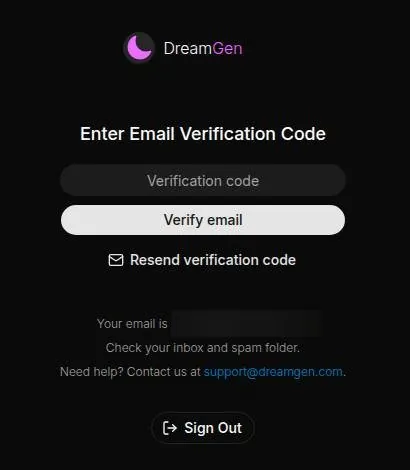
E-mail verification is required. A code-and-link e-mail titled "DreamGen: Verify Your Email Address" comes from [email protected]. It arrived in under 1 minute. The code and the link are valid for 12 hours.
Clicking the link pre-fills the code, but the "Verify email" button still has to be pressed. It is a small thing, like a render that finishes but still wants you to click Save.
After verification a "Before You Continue" box asks for 2 tick boxes. One accepts the Terms of Service, and the other confirms "I am 18 or older and a legal adult in my jurisdiction". There is no date-of-birth entry.
I'd call that an honest gate rather than a strict one. It asks for a promise and records it, and the content-settings section covers what that promise unlocks.
The first role-play adds one more disclaimer: all content is fictional, and the user accepts sole responsibility. From sign-up to the first chat took about 3 minutes.
The disclaimer is worth reading once. It tells you the platform sees itself as a fiction tool, and that what you steer it toward is yours to answer for, which is how a writer should think about it anyway.
That is fast for the paperwork. The real first night starts after it, in the scenario tools, and that part still takes an evening.
The public scenario library
DreamGen does not open on a wall of faces. The home feed is a news carousel with contests and new models. It reads like a trade newsletter, which suits the audience.
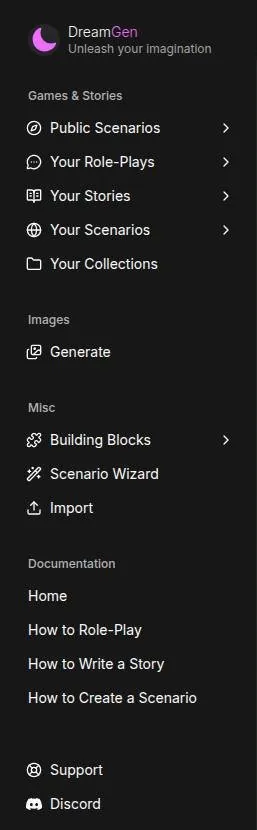
The sidebar is the real front door. It lists Public Scenarios (Role-Play/Story), Your Role-Plays, Your Stories, Your Scenarios, Collections, Image Generate, Building Blocks, Scenario Wizard, Import and Docs. That is a lot of doors for a first visit, and I think it tells you who the app was built for.
What is on the shelves
Public Scenarios is a grid of user-published scenarios with a search box and filters. Token-heavy scenarios carry a "Long" badge. I like that badge more than it deserves, because on DreamGen a long scenario eats more of your context and your credits, and the badge warns you before the meter starts.
The public content leans heavily on fan-fiction choose-your-own-adventure settings from big anime and comic franchises, from X-Men to Overlord and Demon Slayer. Isekai and RPG sandboxes are common too. If you grew up on those, the shelf will feel familiar.
If you didn't, it can feel like walking into a convention without a badge.
Romance and adult-leaning cards also appear, among them a roommate story and one titled "Your Girlfriend Amy". They are a minority next to the adventure settings, which again says the crowd here is mostly writing plots, not partners.
What is hard to find
What I'd want from the library is a shelf for original, grown-up fiction: a mystery, a slow literary drama, a lighthouse story. The search box helps if you know what to type. Browsing, though, is dominated by the franchise crowd.
My advice is to treat the library as a set of examples rather than a menu. Open a few scenarios to see how other people structure a plot, then build your own. That is where DreamGen is strongest anyway.
Building a scenario in DreamGen
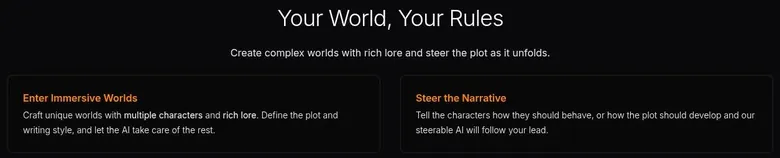
The creator is where DreamGen earns its keep. The homepage advertises building worlds with several characters and rich lore: "Craft unique worlds with multiple characters and rich lore". For once the marketing undersells it.
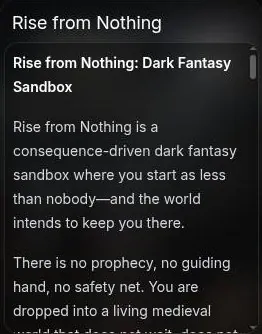
My lighthouse
The Scenario Codex is excellent once it clicks. I put in a lighthouse keeper named Ada, a missing ferry, and a town that lies about the weather, and the model kept the fog, the lies and the ferry schedule straight.
That last part is what sold me. In editing, continuity is the thing nobody praises and everybody notices when it breaks. The codex was my continuity supervisor, and for most of the story it did the job better than some humans I have worked with.
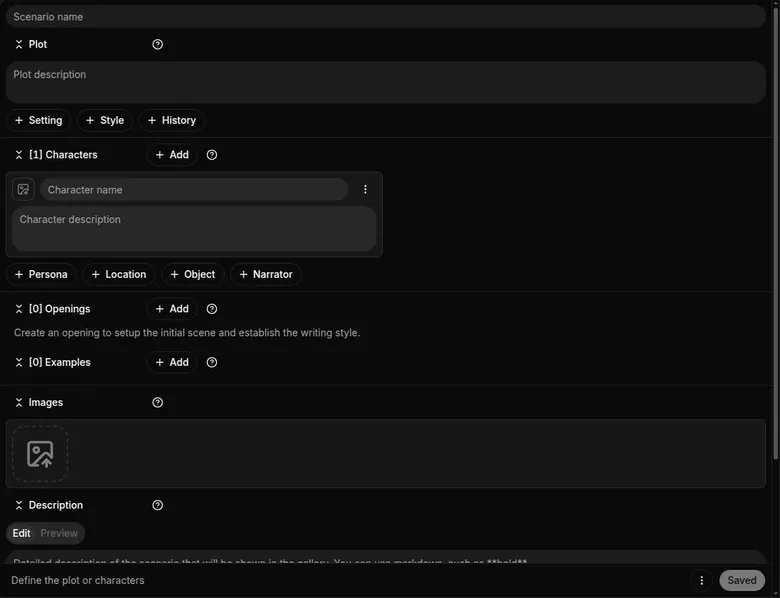
What was called the Scenario Codex in 2024 is the scenario editor in the current V2 app. It covers Plot, Setting, Style, History, entities (Character, Persona, Location, Object, Narrator), Openings, Examples, Images and Private Notes.
Three ways to start
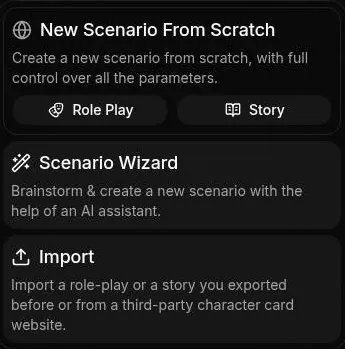
Scenario creation offers three routes: New from scratch (Role Play or Story), the Scenario Wizard (chat-based brainstorming with example prompts) and Import (exports or third-party character cards). The "Scenario Wizard" is an AI assistant that helps build scenarios. Import takes exported sessions or third-party character cards.

Building Blocks are reusable scenario pieces. For a writer that is the useful bit: a narrator voice or a location you like can move from one story to the next without retyping it.
A reviewer rates the scenario structure and the Scenario Wizard as the main strengths, with a learning curve for new users. I agree on both counts, and I'd start with the Wizard if the blank editor looks like a tax form.
Personas
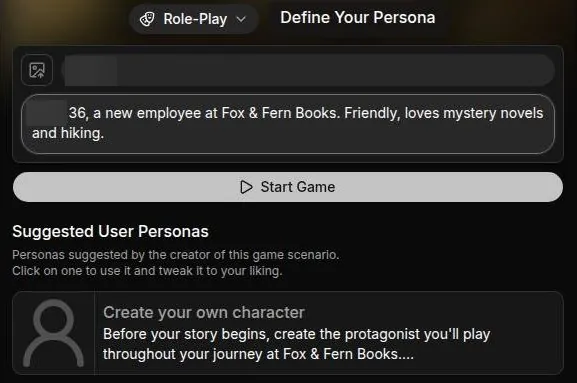
A new session asks for a persona: a name and a description. The session also shows the creator's suggested persona template, which asks for an age field marked adults only.
I think the persona matters less in Story Mode, where you are the author rather than a character. In role-play it is the difference between a stranger wandering into the scene and a character the story can react to, so it deserves two honest sentences.
For the notes in this section, a blank private role-play scenario draft was opened, and nothing was published. The editor is still dense, patient and ready to reward whoever fills it in properly.
What writing with DreamGen felt like
DreamGen has a separate Story mode, a co-written novel, as well as role-play. Most of my ten weeks happened in the first one, and that is where the best moments were.
Steering like a director
Steering the plot with instructions felt like being a director whispering to an actor. When I wrote 'make it colder' the prose really did turn colder, like pulling the white balance toward blue, and I found that thrilling.
That is the feature I'd put on the box if I ran the company. Most chat apps let you write the next line. DreamGen let me give a note, the way I give notes to a colourist, and the next page came back graded the way I asked.
It changed how I worked. Instead of rewriting a flat paragraph, I asked for the mood I wanted and cut from what came back. It felt less like typing and more like directing a very fast second unit.
The purple patches
The prose sometimes gets purple. I got 'the sea sighed its ancient sigh' three times in one chapter, and I left margin comments like client revision notes out of habit.
In fairness, a sighing sea suits a lighthouse story once. By the third time it was a continuity error with a thesaurus, and my notes started to sound like the ones I send about a logo that keeps changing colour.
A session today
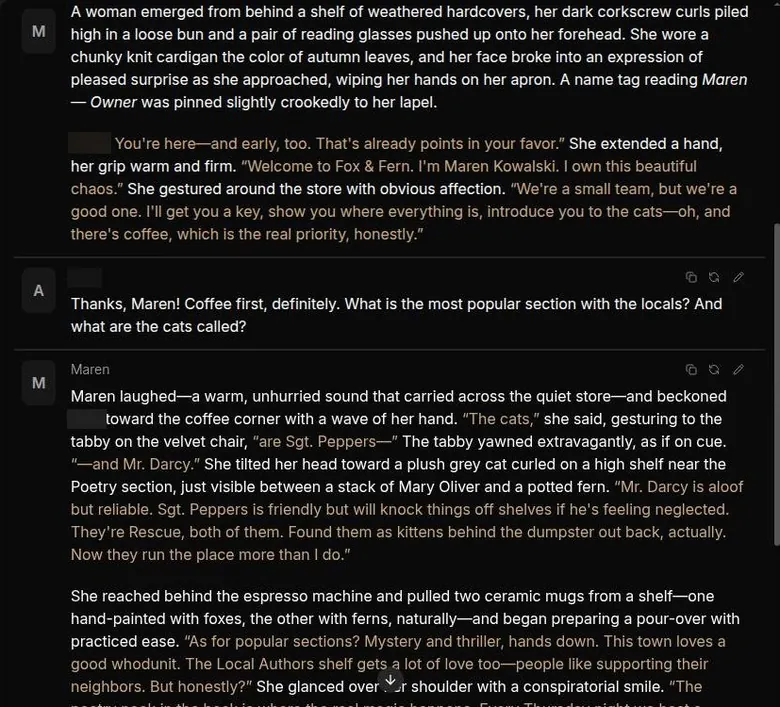
The picture from the 23 September 2026 check is more recent and a little different in tone. "Fox and fern books", a cozy bookstore role-play, was found by searching and started. The scenario has no opening message, so the user writes first.
The default model is GLM 5.2. Each reply took about 15-20 s. That wait is fine for prose and slow for banter, like a satellite delay on a live interview.
Replies were long and literary: a separate "(narrative)" block plus a message from the NPC "Maren", the owner.
The bot quotes are the best evidence of the tone.
One reply named the shop cats: "Mr. Darcy is aloof but reliable. Sgt. Peppers is friendly but will knock things off shelves if he's feeling neglected."
Another described a neighbour: "The woman who runs the bakery two doors down? Writes the most devastating sonnets about bread." That is a character with a life outside the scene, which is exactly what a bookstore story needs.
The prose quality is good, with few clichés. I'd rate that line about sonnets above half the dialogue in the romantic comedies my job has made me sit through.
A session can hold narrative blocks and multiple NPCs. The homepage advertises the same thing: "Talk with multiple characters at once or explore fantasy realms."
The controls around the chat
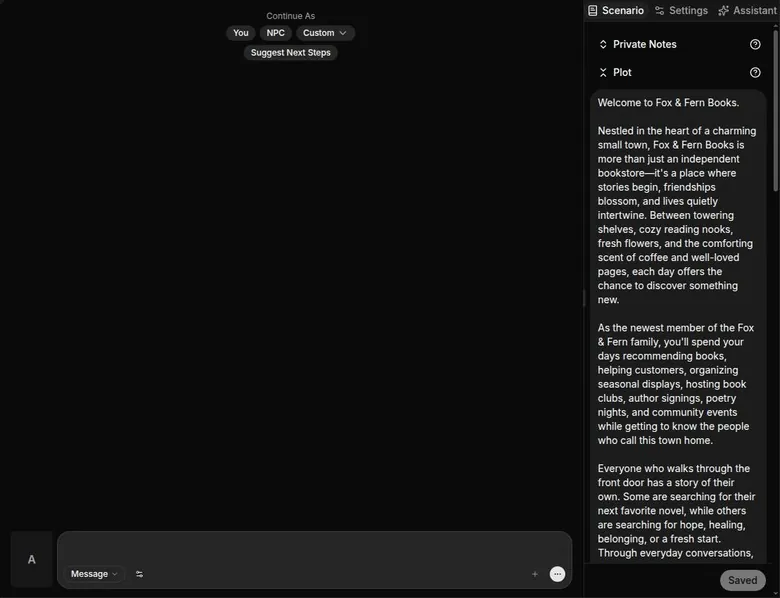
Under the chat, "Continue As" offers You, NPC or Custom: "Continue As: You / NPC / Custom". "Suggest Next Steps" offers choose-your-own-adventure options. A CYOA "Choose the Next Step" mechanic turns those into clickable options.
A message-type selector switches between Message and narrative.
The Continue As buttons are the underrated part. Letting the NPC take the next turn, or writing a custom one, keeps a scene moving when the ideas run out late at night.
The right panel has Scenario (Private Notes, Plot, Style, Setting, History, Personas, Entities, Examples, Images), Settings and Assistant tabs. Session settings cover the model, max input tokens, max output tokens, max output interactions, Thinking Effort, Take Turns, Narrative Enabled and Next Steps (CYOA) options.
There is also plenty of UI theming: avatar shape and size, font, text, italics, bold and quote colours, and background. Settings include Debug and "Set as Default" too. It is the cockpit of an app that assumes you will fly it every night.
The model menu
The first-party models in the picker are GLM 5.3 (experimental), GLM 5.2 ("Best first-party model"), GLM 4.7 ("Balanced choice"), Gemma 4 31B, Gemma 4 26B A4B and Qwen 3.5 27B. Those are not the 'Opus' models of 2024, which is the normal fate of anything in this field that is two years old.
A large menu of third-party models sits beside them: DeepSeek V4, GLM 5.x, Kimi K2.6, MiniMax M3, MiMo, Muse Spark and Glimmer, and Inkling. In full, the third-party options include DeepSeek V4 Pro ("One of the best models"), DeepSeek V4/V4.1 Flash, GLM 5/5.1/5.3/5.3 Flash, Kimi K2.6, MiniMax M3, MiMo V2.5 Pro, Muse Spark 1.2/1.3 (plus Contributor), Muse Glimmer, Inkling and Inkling Small.
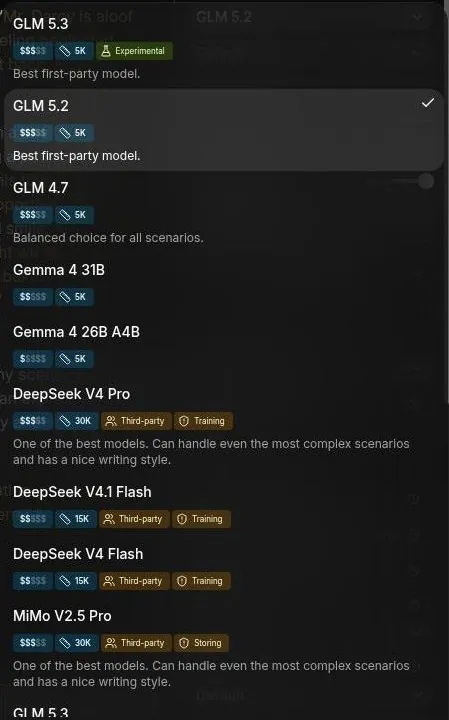
The menu moves fast. Kimi K2.5 was replaced by K2.6, and MiniMax M2.7 by M3. Every model shows a per-model price, context size and privacy label.
I value that label more than the model names, because it tells you who else might read your chapter.
For a writer the practical advice is short. Start on the default, draft on a cheaper model, and switch back when a scene matters, the way you would render proxies for the rough cut and full quality for the export.
My view after all this: the conversations are good, the controls are better, and the best way to use them is as a director, not as a pen pal.
Memory and continuity
Memory on DreamGen is mostly a question of context size, and the app is honest about that. The pricing FAQ ties the two together: "Larger context windows mean: The AI remembers more of your story".
Where Ada lost the plot
Context drift arrives around message 20–30 even on paid plans. Ada forgot her brother had drowned and invited him to dinner. It was eerie for about a second, then just wrong.
For a second I read it as a ghost story beat, and I liked it. Then I remembered I hadn't written a ghost story, and it became what it was: a continuity error. In a film edit that is the actor wearing a different jacket after the cut, and in a novel it is worse, because the reader stops trusting the narrator.
My fix was the one every editor knows: keep the important facts where the model can't miss them. The scenario tools are built for exactly that, and they helped far more than hoping the model would remember.
What the plans promise
Desk research of the official pricing page listed context windows of 4,000 tokens on Free, 5,000 on Starter, 15,000 on Advanced and 30,000 on Pro. The pricing section explains how those figures look inside the app today, model by model.
A reviewer found strong long-context coherence, but after about 50 turns a secondary character's name was forgotten. That matches the pattern: the main line holds longer than the side characters, so the supporting cast deserves a line each in the notes.
| Feature | Free | Paid |
|---|---|---|
| Monthly credits | 200 | Starter 375; Advanced and Pro 2,250 |
| Daily credits (after the monthly pot) | 25 | Starter 45; Advanced and Pro 75 |
| Context on first-party models | 5,000 tokens | Starter 5,000; Advanced 8,000-15,000; Pro 30,000-60,000 |
| Models at 0 credits | none | Advanced: small first-party models; Pro: all first-party text models |
| Credit packs | not available | subscribers only; Pro 20% off |
| Third-party model discount | none | Pro: up to 60% on select models |
| Images | cost credits | still cost credits, Pro included |
| Ads | none seen | - |
Limits as listed on 23 September 2026.
The short check on 23 September 2026 went well on this front. The bot remembered details and answered both questions in a message.
I'd score memory as fair rather than strong. It is good inside a scene and needs help across a book, and that help costs either a bigger plan or your own discipline in the scenario notes.
Images, voice and video on DreamGen
DreamGen is a text product first, and its media side shows it. There is no voice feature. Video is not mentioned on any official page.
The image generator
What does exist is an image generator, and a third-party review notes that it runs separately from the chat: "There's also a separate image generator that runs independently of the chat". In practice it is a side room: you make pictures there and carry them into your story yourself.
The first visit to it is a small obstacle course. It shows three consecutive modals: a disclaimer, "Save Your Images" and a guide tip. The disclaimer has an "I agree - Let's go" button.
The "Save Your Images" modal is not decoration. DreamGen does not store generated images, so they have to be downloaded: "We do not store any images. Make sure to download any images you like." Image prompts are stored locally on the user's device: "Prompts are stored locally on your device."
I'd treat that like footage on a card with no backup. If you like a picture, download it before you close the tab, because nobody else is keeping a copy.
What it costs and what it allows
In the 23 September 2026 check, one safe-for-work image was generated with Z-Image Turbo for 1.69 credits in about 20 s. Desk research noted that the image credit cost is shown before generating but not published anywhere else. The cost section lists the price of every image model.
The image models are SFW-only. News of Sep 10, 2026 announced the new image models GPT Image 2.5 Flare and Sunburst.
My cover-art Saturday lives in the cost section, because in the end it was a story about credits more than pictures. The short version is that moody book-cover work is still allowed under the current rules.
My take
As an editor I judge pictures harshly, and I think DreamGen's image tool is best treated as a mood board, not a product. It is useful for a cover sketch or a character reference. It is not a reason to subscribe.
If voice, calls or video matter to you, this is not your app. If you want words with the odd picture to set the mood, the generator does that job and asks you to keep your own files.
The DreamGen free tier
The homepage promises a "generous free tier, no strings attached". Desk research found no published credit numbers for the free tier. The numbers only show up once you are inside the app.
What free actually includes
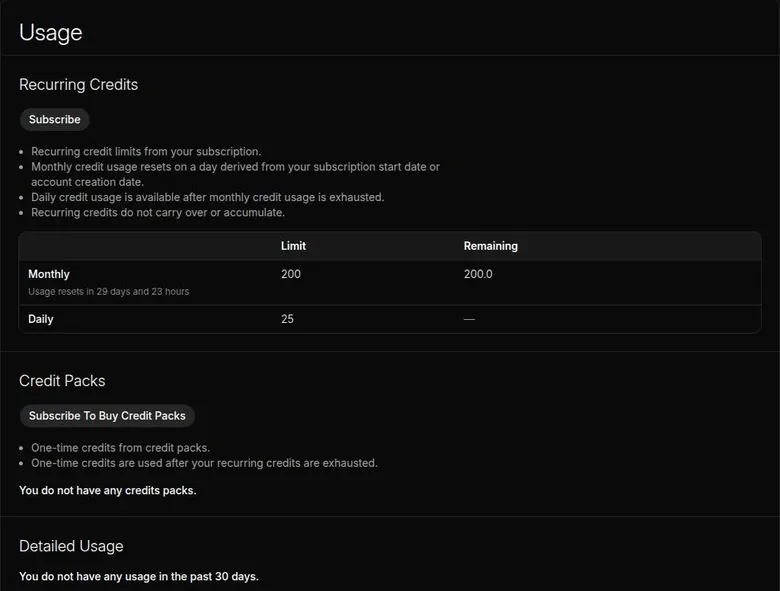
The free tier's recurring allowance, under Account > Usage, is 200 monthly credits plus 25 daily credits. The daily credits only kick in after the monthly credits run out. The pricing FAQ describes them the same way: "a small daily usage allowance that only activates after you've used your monthly usage limit."
Recurring credits don't roll over. The monthly reset is tied to the account creation date, not to the calendar. I'd note that date somewhere, because it is the day your meter refills, and nothing else in the app will remind you.
Free gives access to all current models, paid with credits. Free has no credit packs. So the free plan is a sampler: every dish is on the table, and the plate is small.
Where free stops
The bigger limit is not credits but context. Free has a 5,000-token context on first-party models. Third-party models allow more: DeepSeek V4 Pro showed "Max input tokens: 30,000" and DeepSeek Flash 15,000.
There is a catch attached. Those larger-context third-party models carry a "may use your data for training" label. I'd rather write a short story with a small memory than hand a manuscript to a provider that may train on it.
For long fiction, I think the free context is too small to judge the product. A scenario with a proper codex eats a good part of the window before the story even starts.
| Plan | Monthly | Yearly | Notes |
|---|---|---|---|
| Free | $0 | - | 200 monthly + 25 daily credits; 5,000-token context; no credit packs |
| Starter | $7.83 | - | first month $6.26 (20% off); 375 monthly + 45 daily credits; 5,000-token context |
| Advanced | $19.35 | - | first month $15.48 (20% off); 2,250 monthly + 75 daily credits; 8,000-15,000 context; small first-party models free to use |
| Pro | $48.30 | - | first month $33.81 (30% off); 2,250 monthly + 75 daily credits; 30,000-60,000 context; all first-party text models free to use; 20% off credit packs |
Prices as published on or before 23 September 2026; sources in the text.
Ads, walls and how fast it runs out
No ads were seen. No hard paywall was hit either. The whole 23 September 2026 check used 3.32 of the 200 free credits.
A reviewer found that the free tier runs out quickly, in an afternoon of use. Both can be true. A short check barely dents the pot, and a writer with long prompts on the premium models can empty it in one sitting.
My view: the free tier is honest and useful for learning the tools, and nothing here nags you to pay. It is a test drive around the parking lot, though, not a road trip. If the scenario editor makes sense to you on free, that is the signal to pay for context, not for more credits.
Who free is for
Free is enough to learn the scenario editor, read a few public scenarios and find out whether steering suits you. It is not enough to judge memory, because the story never gets long enough to forget anything.
If you stay on free, treat the daily top-up as a safety net rather than a plan. By the FAQ's own description it is a small allowance, and it only starts once the monthly pot is empty.
DreamGen plans and prices
DreamGen sells three monthly plans on top of a free one, and the differences hide in context sizes and in which models stop costing credits. Prices are in USD, and the account billing page shows monthly billing. The Free plan costs $0.
| What | Price then | When |
|---|---|---|
| Starter | about $7.83 a month | week 1 (Mar–May 2024) |
| Advanced | around $19 a month | week 4 (Mar–May 2024) |
From the author's own notes. Compare with today's prices above.
What I paid in 2024
The free tier's context is too small to judge anything. I upgraded to Starter at about $7.83 a month in week 1, and then to Advanced at around $19 a month in week 4 for the 8K context.
The first upgrade was curiosity. The second was a practical decision, the kind I make when a client's footage won't fit on the drive I brought. Ada's town needed more room than the smaller plans gave it, and paying for the bigger window was the only way to keep the fog and the ferry in the same frame.
The prices have barely moved. I paid about $7.83 for Starter in 2024, and Starter costs $7.83 a month today. I paid around $19 for Advanced; the same plan costs $19.35 today.
Free and Starter on 23 September 2026
Free includes 200 monthly and 25 daily credits. Starter costs $7.83 a month, and its first month costs $6.26 (-20%). It has a 5,000-token context.
Starter includes 375 monthly credits plus 45 extra daily credits. It gets 0% discount on credit packs and on third-party models. In 2024 Starter was my escape from the free context; today Free and Starter share the same 5,000-token window, so the move I made in week 1 would buy credits and not memory.
Advanced
Advanced costs $19.35 a month, and its first month costs $15.48 (-20%). It has a 15,000-token context on Gemma 4 26B A4B and Qwen 3.5 27B. On GLM 5.2, GLM 4.7 and Gemma 4 31B it has an 8,000-token context.
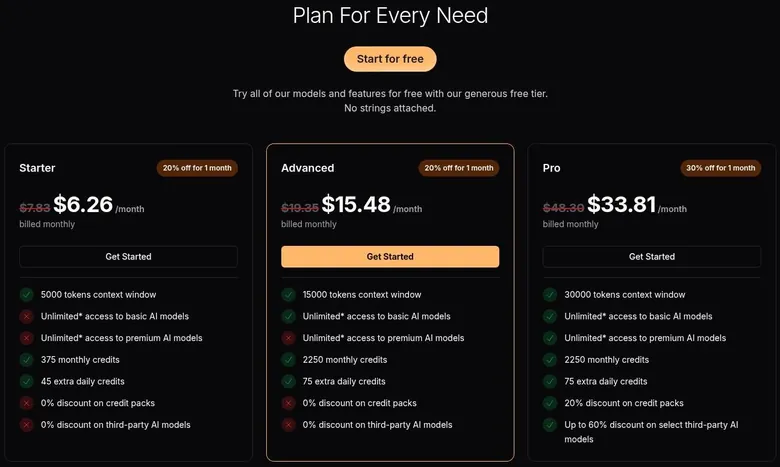
So the 8K I paid for in 2024 is still what Advanced gives on the better models. Advanced includes 2,250 monthly plus 75 daily credits. It also gives unlimited (0-credit) use of the small first-party models, Gemma 4 26B A4B and Qwen 3.5 27B.
Pro
Pro costs $48.30 a month, and its first month costs $33.81 (-30%). It has a 30,000-token context on GLM 5.2 / 4.7 and Qwen, and a 60,000-token context on Gemma 4 31B and Gemma 4 26B.
Pro includes 2,250 monthly plus 75 daily credits. It gives unlimited use of all first-party text models. It adds a 20% discount on credit packs. It also advertises "Up to 60% discount on select third-party AI models".
What "unlimited" means
"Unlimited" means 0 credits per use, under a fair-use policy. The pricing FAQ puts it plainly: "Unlimited means you can use specific models without worrying about credits - the credit cost for those models becomes zero." The fair-use policy rules out account sharing, bots or scripts, and excessive load.
The wording around it is less tidy. Desk research of the pricing page listed "unlimited basic and premium AI models" for Starter, Advanced and Pro. The notes from the 23 September check record the Starter card as offering "Unlimited access to basic/premium AI models", while the FAQ says "Free & Starter: Pay credits for all model usage".
I'd trust the FAQ and the crossed-out rows over any headline, and read every asterisk as a cost.
DreamGen pricing
Prices verified .
Starter
$7.83/mo
Billed every month
−20%, verified
- 5,000-token context; unlimited* basic and premium AI models; 375 monthly credits; 45 extra daily credits
Advanced
$19.35/mo
Billed every month
No discount
- 15,000-token context; unlimited* basic and premium models; 2,250 monthly credits; 75 extra daily credits
Pro
$48.30/mo
Billed every month
No discount
- 30,000-token context; unlimited* basic and premium models; 2,250 monthly credits; 75 extra daily credits; 20% discount on credit packs; up to 60% discount on select third-party models
Monthly and daily credits do not roll over; credit packs are exempt and used only after recurring limits.
Is the step up worth it?
A third-party review from June 2026 put paid plans at about $8 to $25 a month: "somewhere in the area of $8 to $25 per month depending on which plan". That leaves Pro out of the picture, and Pro is where the credit meter stops for the good models.
Here is the money math the way I'd do it. Advanced at $19.35 buys free use of the small models, with a 15,000-token window on them. Pro at $48.30 buys free use of every first-party text model and a window of up to 60,000 tokens.
That is well over twice the price, and it only pays off if the better models are the ones you write with every night.
My advice: skip Starter unless you only want more credits, because it adds no memory over free. Advanced is the sensible writer's plan if you are happy on the small models, where both the meter and the wider window work in your favour. Pro is for people who will write most nights, and at that point the price is closer to a gym membership than a snack.
Credits, tokens and what they buy
Credits are the other currency. Images cost extra, and I spent a Saturday making moody lighthouse cover art until I ran out of monthly credits by the 12th. I also graded every one of them in my head.
My cover-art Saturday
It started as a break from writing and turned into a whole grading session. Each cover was a little moodier than the last, and each one cost credits I wasn't counting. By the time I looked at the balance, the month's allowance was gone and the month wasn't.
| Pack or unit | Price | What it buys |
|---|---|---|
| 2 role-play replies on GLM 5.2 | 1.63 credits | 2184 input + 906 output tokens |
| 10k input + 100 output tokens | 3.43 credits | GLM 5.3, GLM 5.2, GLM 4.7, DeepSeek V4 Pro |
| 10k input + 100 output tokens | 1.72 credits | Gemma 4 31B, DeepSeek V4(.1) Flash |
| 10k input + 100 output tokens | 0.34 credits | Gemma 4 26B A4B |
| 1 image, Z-Image Turbo | 1.69 credits | - |
| 1 image, GPT Image 2.5 Flare | 3.54 credits | - |
| 1 image, GPT Image 2.5 Sunburst | 3.54 credits | - |
| 1 image, GPT Image 1.5 (deprecated) | 6.75 credits | - |
| 1 image, Nano Banana 2 | 23.63 credits | - |
As listed on 23 September 2026.
The grading in my head was the funny part. Flat skies, a lamp with no falloff, fog that looked like a filter: I kept correcting pictures I could not actually correct. It was a busman's holiday with a meter running.
The lesson was not that pictures are expensive. It was that the words and the pictures drink from the same pot, so every cover I made was a few pages I couldn't write that month.
What a credit buys today
In the 23 September 2026 check, 2 role-play replies on GLM 5.2 cost 1.63 credits (2184 input and 906 output tokens). One Z-Image Turbo image cost 1.69 credits. By that rate, 200 credits is very roughly 200+ premium-model replies at small context, or about 100 cheap images.
That math is the whole trap in one line. A reply and a picture cost about the same, and a picture feels like nothing while a reply feels like work.
The model picker gives estimates too. For 10k input and 100 output tokens it estimates 3.43 credits on GLM 5.3, GLM 5.2, GLM 4.7 and DeepSeek V4 Pro. The same estimate is 1.72 credits on Gemma 4 31B and DeepSeek V4(.1) Flash.
On Gemma 4 26B A4B it is 0.34 credits.
Image prices
At default settings a Z-Image Turbo image costs 1.69 credits. A GPT Image 2.5 Flare image costs 3.54 credits.
A GPT Image 2.5 Sunburst image costs 3.54 credits too. A GPT Image 1.5 image, now deprecated, costs 6.75 credits. A Nano Banana 2 image costs 23.63 credits.
DreamGen scored 6.8 out of 10 in our tests and costs from $7.83/mo. We have no partner deal with it, so its link is a plain link. Visit the official DreamGen website
Closest alternative we can recommend

Joi AI
from $13.99/mo, free tier available
Score 5.5/10
That last one is more than a dozen Z-Image pictures for the price of one. On Pro, images still cost credits. No plan makes pictures free.
Packs and the meter
Credit packs are for subscribers only. Pack prices are not visible to free users; the page shows "Subscribe To Buy Credit Packs".
Pack credits are used after the recurring credits run out. They don't expire with the monthly reset.
The meter itself is transparent. The Usage page breaks usage down per day by model and token count. It also has a credit calculator. An adjustable input-token cap helps save credits.
My view: DreamGen's credit system is fair and well documented, and it still needs watching. I'd check the Usage page once a week, the way most people check a bank app, and keep pictures for the moments that need one.
Discounts, contests and freebies
DreamGen is refreshingly quiet about deals. No welcome popup appears after sign-up. No coupon is offered.
There is no daily check-in reward. No referral or invite programme was seen in the app.
After sign-up only the verification e-mail arrived; no welcome or coupon e-mail came within about 30 min. I count that as a point in its favour. Apps that shout discounts at you in the first hour usually want you to stop reading the price.
The one real discount
Every paid plan has a first-month discount, shown on the landing page and the billing page. Starter and Advanced show "20% off for 1 month". Pro shows "30% off for 1 month".
No promo-code field was seen before checkout; the checkout itself was not opened. So the first-month price is the deal, and I'd skip hunting for codes.
I think the discount is fair and a little misleading at the same time. It is a real saving, but it is one month. The second month is the price you are actually signing up for, so judge the plan by that figure.
| Topic | What it means for you | What the terms say |
|---|---|---|
| Who runs it | Rozum AG in Zug, Switzerland; the name appears only as an image in the Terms | - |
| Age rule | Adults only; two tick boxes, no birth date and no ID check described | "must be at least 18 years old and of the age of majority in your jurisdiction." |
| Content rules | only illegal content and content that breaks the age rule are banned; otherwise permissive | - |
| Your content | no ownership claimed, but users grant a broad licence to run and improve the service | "The Service does not claim ownership or copyright over any User Content" |
| AI training | opt-in only and off by default; some third-party models may train on your data | "We do not use your data ... to train or improve AI models unless you explicitly opt in" |
| Human review | private chats are not read by people except when published, appealed, opted in or required by law | - |
| Refunds | the Terms say final and non-refundable with exceptions; the billing FAQ offers prorated refunds via [email protected] | "We offer prorated refunds" |
| Renewal | auto-renews, billed in advance | "billed in advance on a recurring basis" |
| Cancelling | access runs to the end of the billing period; a downgrade gives account balance, not a refund | - |
| Disputes | Swiss law; 30 days of informal talks, then arbitration in Zurich; class-action waiver | - |
| Account deletion | Request Account Deletion button in Profile; active systems cleared within a reasonable period, backups kept longer | "within a reasonable period" |
| Images | generated images are not stored; download them | "We do not store any images. Make sure to download any images you like." |
| Contact | [email protected]; [email protected] for disputes; [email protected] | - |
Terms and privacy policy as published on 23 September 2026.
Contests for writers
The more interesting freebie is earned, not given. Regular creator contests award Pro or credit prizes. The "#oc2026 Scenario Contest", announced Sep 16, 2026, offers 1 month of DreamGen Pro or 9,000 credits for publishing a scenario with original content: "Win 1 month of DreamGen Pro or 9,000 credits by publishing a scenario featuring original content".
Earlier contests (#tldr2026, CYOA) had the same prizes. The contests say "every eligible creator gets a reward". For a writer that is the best deal on the site: build something original, publish it, and the app pays you in its own currency.
The catch is the word original. Fan-fiction fills most of the public shelf, so the contest nudges creators toward their own worlds, and I think that is a good nudge for a writing tool.
Promos in the news feed
The news feed occasionally announces free-model promos, for example GLM 5.3 Flash, "free through the end of August". Those are worth a glance if you already check the feed.
My advice: take the first-month discount if you were going to pay anyway, and enter a contest if you write original scenarios. Otherwise, pay the list price and spend the effort on the story.
DreamGen content settings and filters
DreamGen is one of the more permissive writing tools I know, and it is also one of the clearer ones about where the lines sit. The About page stresses creative freedom for private content.
What is allowed by default
Adult content in text is allowed by default for adult users. Only illegal content and sexual content that breaks the age rule are banned. That is a short list, and a third-party review reads it correctly: the rules mean "freedom for adult creative writing between consenting fictional characters, not a free pass for anything."
Adults only (18+). This page reviews AI companion apps with NSFW features; no explicit images are shown.
I agree with that reading. For a noir writer, permissive matters for violence, grief and bad people doing bad things, not only for bedroom scenes.
The filters you can switch
Account > Beta Settings > Text Content Moderation has a "Required moderation" filter. It blocks content that breaks the age rule and is "already enforced by system defaults". You can't switch that one off, and that is how it should be.
An optional toggle, "Sexual content moderation", labelled "Filter sexual content", works as an opt-in filter for anyone who wants a cleaner session. Beta Settings also has a "Moderation Sandbox".
Behind the switches, automated moderation scans content. The terms-and-privacy FAQ says the same: "DreamGen uses automated systems to enforce its Terms of Service and safety rules".
Images are stricter
All 5 image models are labelled "This model is only suitable for SFW content". Image generation is effectively SFW-only now. I'm fine with that split: words get the freedom, pictures get the brakes.
The age check
The age rule is a self-declaration, and no ID check is described: "By using the Service, you represent and warrant that you meet this age requirement". The Profile page states that an age check is not required in the viewer's location, so the check depends on the region.
The persona template seen in the check asked for an age field marked adults only. I'd call the whole gate honest but light: it records a promise rather than checking one. For a writing tool used at a desk that is the norm, and I'd rather see it stated plainly than dressed up.
The public shelf
The public scenario list surfaces many anime and fan-fiction self-insert settings from franchises whose main casts are written below the age of majority. Those cards were not opened.
The same shelf also carries a separate set of cards with grown-up themes, so the mix is wide. I'd like the franchise settings and the grown-up cards kept further apart in browsing, and I think the platform's own rules argue for the same thing.
DreamGen terms in plain English
The Terms and the Privacy Policy were both updated 2026/03/23.
Who runs it and where
The operator is Rozum AG, company number CHE-334.543.961, with a care-of address at a trust company in Zug, Switzerland. Oddly, the company name appears only as an image footnote "[1]" in the Terms and the Privacy Policy, not as text. I'd rather see a legal name in plain text.
Swiss law governs the Terms, with the CISG excluded. Disputes start with a 30-day informal resolution via [email protected].
After that comes binding arbitration under the Swiss Rules: seat Zurich, a single arbitrator, in English. The Terms also include a class-action waiver.
In plain terms: if something goes wrong, you e-mail first and argue in Zurich later, alone. For a subscription this size, that means the e-mail is your real remedy.
Who may use it and what is banned
Users must be "at least 18 years old and of the age of majority in your jurisdiction." The Terms ban anything illegal in the US, the EFTA countries or the user's own jurisdiction.
They also ban sexual content that breaks the age rule, and they spell out that fictional characters count. Beyond that short list the rules are very permissive. The About page stresses creative freedom for private content.
Your content
The Terms say the service claims no ownership or copyright over user content: "The Service does not claim ownership or copyright over any User Content". For a writer that is the clause that matters most, and it is the right one.
The other half is a broad licence. Users grant DreamGen an "unrestricted, worldwide, transferable, sublicensable, royalty-free license ... for the purposes of operating, providing and improving the Service." It is standard language, but it reads large, so I'd keep the finished manuscript in my own files.
Refunds
The Terms say all purchases are final and non-refundable, except where the law requires or at the service's sole discretion. The billing FAQ is more generous: "We offer prorated refunds". Refunds are requested by e-mail to [email protected].
| Criterion | Rating | Why |
|---|---|---|
| Conversation quality | Good | Literary prose that responds to steering notes; purple patches and slow replies hold it back. |
| Memory | Mixed | Holds a scene well, but drifts across a long story unless the context is large or the notes are tight. |
| Free tier | Mixed | No ads and every model on credits, but the context is too small for long fiction. |
| Value for money | Mixed | Fair prices, but credits, asterisks and per-model context sizes make the plans hard to compare. |
| Images and voice | Weak | No voice or video; images are a separate, safe-for-work tool that costs credits. |
| Privacy and terms | Good | Opt-in training, labelled third-party models and no ownership claim; the company name is only an image. |
| Cancelling and billing | Good | Two-click cancel with access to the period end; downgrades become store credit, refunds by e-mail. |
| Content settings | Good | Permissive for text, strict for pictures, with an opt-in filter and a light self-declared age gate. |
Ratings are the author's judgement from his own use and the 23 September 2026 check.
A refund depends on the days left, the credits used and the user's refund history. Refunds are processed within 2 business days, per the billing FAQ. I'd quote the FAQ in the e-mail, because it is the friendlier of the two documents.
Training and who reads your chats
DreamGen does not train AI models on user data unless the user opts in, and the opt-in is off by default. Data from users who did opt in is not removed from existing training sets. So opting in is a one-way door for anything already used.
First-party models run on DreamGen's own infrastructure. Requests may go to third-party providers under high demand or for certain features.
Some third-party models in the picker carry the label "Privacy notice: This model provider may use your data for training", for example DeepSeek V4 Pro and V4 Flash. The "Muse Spark ... Contributor" variants state that "data sent to the model may be used by Meta for training".
Private chats are not read by people unless they are published or submitted for publication, the user consents (for example in a moderation appeal), the user opts into model improvement, or the law requires it. That list is clear, and I think it is one of the better privacy stances in this category.
What gets in the way
DreamGen's friction is not upsells or guilt-tripping characters. It is paperwork, jargon and a few loose threads.
A cockpit, not a car
The UI is fairly dense and power-user oriented: tokens, credits, many knobs. I like knobs, and I still think a newcomer will stare at the session settings like a client at a grading panel.
Several stacked modals appear on first use: the Terms and age gate, the fiction disclaimer, and 3 image-generator modals. Each one is reasonable. Together they feel like signing for a parcel five times.
"Fox and fern books" had no opening, so the user must write first. A first-time visitor may stare at an empty box wondering what they broke.
Images are not stored server-side; they must be downloaded.
| App | When I used it | For how long | Cheapest paid plan (record) | Free tier (record) |
|---|---|---|---|---|
| Candy AI | Oct–Nov 2024 | 5 weeks | €3.99/mo (12-Month Plan) | yes |
| OurDream AI | Dec 2025–Jan 2026 | 6 weeks | $9.99/mo (Standard Annual) | yes |
| Nomi AI | Jan–Sep 2026 | 9 months | $5.00/mo (Launch Plan Yearly) | yes |
Periods from the author's own notes; plans and free tiers from the site's app records.
Copy that disagrees with itself
The FAQ text says "Basic context window (4,000 tokens)" for Free, but the plan table and the model picker show 5K. So the free context is stated as both 4,000 and 5,000 tokens.
The pricing copy is flagged as inconsistent as well: per the check notes, the plan cards say "Unlimited* access to premium AI models" for Starter and Advanced, but the FAQ says Starter pays credits for everything and Advanced gets only the small models unlimited.
The Terms say purchases are non-refundable, while the billing FAQ promises prorated refunds. The company identity is shown only as an image, not as text. None of these is a scandal, but together they read like an edit nobody watched through before export.
Loose links
The Community Guidelines link in the FAQ (/app/community-guidelines) returns HTTP 404. There is no public API doc page in the V2 docs either: dreamgen.com/docs/api redirects to the docs home.
API keys can still be created in Profile. Under Profile, "API Keys" lets any account create keys. So the door is open and the manual is missing.
Finding the company
DreamGen goes by several names: "dreamgen ai", "DreamGen V2" and "v2.dreamgen.com". The blog lives at dreamgen.com/blog, with an RSS feed. Support is by e-mail at [email protected].
Discord is the community hub, with an invite reached via dreamgen.com/discord. It is the only social link in the site and app menus.
The landing page footer has no social links. No X, Reddit, Instagram, TikTok or YouTube links were found.
The Hugging Face page at huggingface.co/dreamgen hosts open-weights 'Opus' story and role-play models, such as opus-v1.4-70b-llama3, opus-v1-34b and opus-v1.2-7b. It was found by web search; the app does not link to it. For a company proud of its models, that is a strange thing to hide.
No phone app
No official mobile app was found. No mobile app-store links were found either. An iTunes search for "dreamgen" returns no DreamGen app, and the Play id com.dreamgen.app returns 404.
For a desk-bound writing tool that is a small gap, but I'd be wary of any store app that claims the DreamGen name.
Who DreamGen is for
Best for
- Writers who want a co-author for long, steerable stories and are happy to direct the prose rather than chat.
- Tinkerers who enjoy choosing models, tuning context and token settings, and building detailed scenarios.
- Role-players who like narrative blocks, several characters in one scene and choose-your-own-adventure options.
- Adults who want permissive text fiction backed by opt-in training and clear privacy labels on each model.
Not for
- Anyone looking for a companion or partner with voice calls, selfies or a phone app.
- People who want to start chatting in minutes without learning tokens, credits and scenario settings.
- Anyone who expects free unlimited chat: the free tier is a small monthly credit pot with a 5,000-token context.
- Users who want pictures as a main feature: image models are safe-for-work only and every image costs credits.
Who DreamGen is for
DreamGen is best for writers and role-players who want long-form, steerable interactive fiction or co-written stories. It is also best for tinkerers who like choosing models, tuning context and token settings, and building elaborate scenarios. I am both, which is why ten weeks felt short.
It suits users who want API access or open-weights models. It also suits adults who want permissive text content with clear privacy terms.
Who should skip it
It is not for people who want a simple "AI girlfriend/boyfriend" companion with voice calls, selfies or a mobile app. Nobody here will ask about your day.
It is not for users put off by credits and tokens jargon. If "max input tokens" makes your eyes glaze, the first evening will feel longer than a wedding reception.
It is not for anyone who wants free unlimited chat either: the free tier is 200 credits a month with a 5K context. That is a test drive, not a home.
The honest summary is that DreamGen rewards effort. The people who get the most from it are the ones who would happily read its docs, and the ones who bounce are usually right to.
My rule of thumb: if you have a story you want to finish, try it. If you want company, look elsewhere.
Cancelling DreamGen and what to check first
The pause that ended my ten weeks is covered in the verdict. This section is about how leaving works today, and it is one of the calmer exits in this category.
DreamGen pros and cons
What worked
- Steering works: a short instruction really changes the tone of the next page, like giving a note to a colourist.
- The scenario editor keeps a world consistent, with plot, setting, style, history, entities and reusable building blocks.
- Every model shows its price, context size and privacy label, and you can switch models mid-story.
- Training on your data is opt-in and off by default, and the Terms claim no ownership of what you write.
- No ads, no pushy upsells, and cancelling takes two clicks with access kept to the end of the period.
What did not
- The first evening is homework: the interface is dense and full of tokens, credits and settings.
- The free and Starter context is too small to judge a long story fairly.
- Credits sit on top of the subscription, and images spend them fast, even on Pro.
- No voice, no video, no phone app, and generated images are not stored for you.
- The pricing copy, the FAQ and the Terms disagree on context size, unlimited models and refunds.
How cancelling works
The pricing FAQ says you can cancel anytime, and the plan stays active to the end of the billing period: "You can cancel anytime - no questions asked. Your subscription remains active until the end of your current billing period". Cancelling keeps access to the end of the billing period.
Cancelling runs through Account > Billing, then "Cancel Subscription" at the top of Manage Subscription: "Click "Cancel Subscription" at the top". It is two clicks, not a maze, and I give the app credit for that.
Subscriptions auto-renew and are billed "in advance on a recurring basis". So the charge lands before the month you are paying for, which is normal and still worth a calendar note.
Changing plans
Plan changes take effect immediately. Upgrades are prorated. A downgrade gives an account balance, not a refund.
The FAQ is clear on that last point: "The prorated difference is credited to your account balance ... No refund is issued to your payment method". I'd think twice before an upgrade you might regret, because money that goes up comes back down only as store credit.
Deleting your account
Profile has a "Request Account Deletion" button. After deletion, data is removed from active systems "within a reasonable period". Backups keep the data for a while longer after deletion.
The terms-and-privacy FAQ gives a number for that period: deleted data leaves active systems typically within 35 days ("typically ≤35 days"). I'd export or copy anything you wrote before pressing the button, because the button does what it says.
Before you pay
My checklist is short. Learn the scenario editor on free before you pay for context. Note the date your plan renews.
Remember that downgrades become store credit, and that refunds go through e-mail, not a button.
If you only want a month of writing, pay for one month, write hard, and cancel in the last week. The access runs to the end either way.
One more habit I'd keep: copy your best pages out of the app every week, not only at the end. A paused plan or a deleted account should never be the moment you discover which chapter you forgot to save.
My tips for getting more out of DreamGen
Most of my advice is about spending credits on words rather than on waiting.
Tune the meter
Lowering max input tokens saves credits. I'd set it as low as the story allows and raise it only for scenes that need the long memory. It works like shooting at a lower bitrate for B-roll: nobody notices, and the drive lasts longer.
Keep the scenario notes tight for the same reason. Every line of lore rides along with every request, so a bloated codex is a tax on every reply.
Read the manual first
The docs cover Role-Play, Story, Scenario Editor, Wizard, CYOA, Publishing, Image generation, V1-to-V2 migration and community guides (Google Docs, rentry). I'd read the Story and Scenario Editor pages before the first evening, not after it. Half an hour with the docs saves the IKEA experience.
Spend like a writer
Pick the plan for context, not for credits. If the small models write well enough for your story, the plan that makes them free is the smart one; if you need the best models every night, pay for the plan that makes those free instead.
Keep pictures for covers and references, download every one you like, and don't let a mood board eat the month. Save your best pages outside the app as you go. Finally, write the steering notes like a director: short, specific and about feeling, not plot.
A note like "colder" does more than a paragraph of instructions, the same way one clear note to a colourist beats a page of adjectives.
How DreamGen scores
The scores below judge DreamGen as what it is, a writing tool, and not as a companion it never claimed to be.
DreamGen verdict
Overall score
6.8/10
FairThe best co-writer I have used for long, steerable fiction - but no voice, a real learning curve and credits on top.
Hands-on test, paid plan
- Literary prose that responds to plain steering notes; it turns purple at times and replies take a while.
- The codex kept a whole town straight, but drift arrived around message 20-30 even on a paid plan.
- Scenario editor, wizard, building blocks, import, many models and deep session settings: a writer's workbench.
- No voice or video; the image tool is separate, safe-for-work only, not stored and paid in credits.
- Plans are fairly priced, but credits, asterisks and per-model context sizes make the value hard to read.
- Swiss company, opt-in training, labelled third-party models and no ownership claim over your writing.
- The service is live and steady; a dead guidelines link, no phone app and self-contradicting copy cost points.
Bars run from 0 to 10. The total is the weighted mean of the criteria above. Weights are the same for every app. How the apps are checked
Conversation quality rates well. The prose is literary, the steering works, and the controls let you direct a scene. Purple patches and slow replies keep it from the top mark.
Memory is mixed. Inside a scene it holds, and across a long story it drifts unless you keep the key facts in the scenario notes or pay for a wider window.
The free tier is mixed: honest, no ads, all models, but a context too small for long fiction. Value for money is mixed too, because the useful plans hide behind credits, asterisks and per-model windows.
Images and voice rate weak: no voice, no video, and pictures that are an extra rather than a feature. Privacy and terms rate well, thanks to opt-in training and clear model labels, even with the company name hidden in an image.
Cancelling and billing rate well, with an easy exit and a refund policy that is friendlier in the FAQ than in the Terms. Content settings rate well: permissive for text, strict for pictures, with a light age gate.
How DreamGen compares with the other apps I used
Comparing DreamGen with the other apps in the table below is a little like comparing an editing suite with a video call. They share a screen and not much else.
The apps in that table are companions first: a character, a relationship, a chat that asks how your day went. DreamGen is a story-writing and role-play engine rather than a companion app, and it says so. That one difference decides most of the comparison.
DreamGen alternatives
Three apps we would try next, and why.

Candy AI
free tier, from €3.99/mo
Score 7.7/10

OurDream AI
free tier, from $9.99/mo
Score 6.6/10

Nomi AI
free tier, from $8.33/mo
Score 7.8/10
Where DreamGen is better
It wins on writing. I can't name a companion app with a scenario tool that keeps a whole town's lies straight, or one that turns the prose colder on request. It also wins on honesty about models: you choose the model, see its price, context and privacy label, and change it mid-story.
It wins on privacy posture as well. Opt-in training and labelled third-party models are rarer in this category than they should be.
Where DreamGen is worse
It loses on everything a companion is supposed to be. There is no voice, no calls, no phone app, and nobody remembers your birthday. The first evening is homework, where most companion apps have you chatting in minutes.
If you want someone to talk to, pick one of the others in the table. If you want something to write with, DreamGen is the only one of these I'd open.
More on this site: the best AI girlfriend apps, free AI chat apps, the best AI companion apps, AI roleplay chat apps, all AI companion app reviews.
My last word on DreamGen
DreamGen is the only app in this hobby that left me with something I could put on a shelf. Not a relationship, not a screenshot, but a stack of pages and a habit of writing in the evening.
It is not a polished product. The copy contradicts itself, the menus assume you already speak its language, and the prose sometimes sighs like a bad poet. None of that mattered much, because the core of it worked: a story took direction the way an edit does, and the story answered.
I also respect how it treats the writer. Your words stay yours, training is your choice, and the rules are permissive where fiction needs room and strict where it should be.
So my last word is simple. If you have a book in a drawer, DreamGen is a good way to get it onto the desk. Just don't expect it to write the book for you.
That part, annoyingly, is still the writer's job.
DreamGen FAQ
Is DreamGen a companion app?
No, and it says so itself. DreamGen is a story-writing and role-play engine rather than a companion app. It is a role-play and story generator with an image generator on the side. There is no voice feature.
No official mobile app was found.
That changes how to judge it. I used Story Mode 90% of the time, like a fussy author, and the app shone as a co-writer rather than a partner. The best moment was steering: when I wrote 'make it colder' the prose really did turn colder, like pulling the white balance toward blue.
If you want someone who asks about your day, sends selfies or calls you, look elsewhere. It is not for people who want a simple companion with voice calls, selfies or a mobile app. If you want to finish a story, DreamGen is one of the few apps in this space built for exactly that, and I'd judge it the way I judge editing software: by what it helps you make.
Is DreamGen free?
There is a real free plan. The Free plan costs $0. Its recurring allowance under Account > Usage is 200 monthly credits plus 25 daily credits.
The daily credits only kick in after the monthly credits run out. Free gives access to all current models, paid with credits. No ads were seen.
The limit that matters is context. Free has a 5,000-token context on first-party models. Some third-party models allow more, but those carry a "may use your data for training" label.
In 2024 the free tier's context was too small to judge anything, so I upgraded to Starter in week 1. How long the credits last depends on use. The whole 23 September 2026 check used 3.32 of the 200 free credits.
A reviewer, on the other hand, found that the free tier runs out in an afternoon of use. I'd use the free plan to learn the scenario editor, and pay only when a story needs more memory.
How much does DreamGen cost in 2026?
On 23 September 2026 there are three monthly plans, priced in USD. Starter costs $7.83 a month, with a first month at $6.26. Advanced costs $19.35 a month, with a first month at $15.48. Pro costs $48.30 a month, with a first month at $33.81.
The plans differ in credits, context and which models become free to use. Starter includes 375 monthly credits plus 45 extra daily credits. Advanced includes 2,250 monthly plus 75 daily credits. Advanced gives unlimited (0-credit) use of the small first-party models.
Pro gives unlimited use of all first-party text models.
My own bill in 2024 was close to today's. I upgraded to Starter at about $7.83 a month in week 1, and then to Advanced at around $19 a month in week 4 for the 8K context. If I went back, I'd skip Starter, because it adds credits but no extra memory over free, and pick Advanced or Pro depending on which models I wanted free.
How good is DreamGen's memory?
Good inside a scene, shaky across a long story. Context drift arrives around message 20–30 even on paid plans. My lighthouse keeper Ada forgot her brother had drowned and invited him to dinner. It was eerie for about a second, then just wrong.
The pricing FAQ ties context size to memory: "Larger context windows mean: The AI remembers more of your story". Free has a 5,000-token context on first-party models. Advanced has an 8,000-token context on GLM 5.2, GLM 4.7 and Gemma 4 31B.
Pro goes to 60,000 tokens on the Gemma models.
A reviewer found strong long-context coherence, but after about 50 turns a secondary character's name was forgotten. The scenario tools help most. Once the codex clicked, the model kept the fog, the lies and the ferry schedule of my story straight.
My advice is to keep the key facts in the scenario notes and pay for context only when the story outgrows them.
Can DreamGen make images or talk with a voice?
Images yes, voice no. There is no voice feature. Video is not mentioned on any official page. The image generator runs separately from the chat.
The image models are SFW-only. Every image costs credits. At default settings a Z-Image Turbo image costs 1.69 credits. A GPT Image 2.5 Flare image costs 3.54 credits.
A Nano Banana 2 image costs 23.63 credits. On Pro, images still cost credits.
DreamGen does not store generated images, so they have to be downloaded. Keep that in mind before closing the tab.
My own image story is a warning about the meter. I spent a Saturday making moody lighthouse cover art until I ran out of monthly credits by the 12th, and I graded every one of them in my head. I'd treat the generator as a mood board for covers and references, not as a reason to subscribe.
Does DreamGen allow adult content?
In text, yes, within a short list of rules. Adult text content is allowed by default for adult users. Only illegal content and sexual content that breaks the age rule are banned.
The Terms ban anything illegal in the US, the EFTA countries or the user's own jurisdiction.
There are switches too. A "Required moderation" filter is "already enforced by system defaults" and can't be turned off. An optional toggle, "Filter sexual content", works as an opt-in filter for a cleaner session. Automated moderation scans content.
Pictures are stricter than words. All 5 image models are labelled "This model is only suitable for SFW content".
The age gate is a self-declaration. After sign-up, a box asks the user to confirm "I am 18 or older and a legal adult in my jurisdiction", and there is no date-of-birth entry. No ID check is described.
I think the balance suits fiction writers: room for dark themes in prose, and firm lines where they belong.
Does DreamGen train AI on my stories?
Not unless you opt in. DreamGen does not train AI models on user data unless the user opts in, and the opt-in is off by default. Data from users who opted in is not removed from existing training sets.
So treat that switch as a one-way door.
The outside models are a separate matter. Some third-party models in the picker carry the label "Privacy notice: This model provider may use your data for training", for example DeepSeek V4 Pro and V4 Flash. The Muse Spark Contributor variants state that data sent to them may be used by Meta for training. First-party models run on DreamGen's own infrastructure.
The Terms say the service claims no ownership or copyright over user content. Users still grant a broad licence for operating, providing and improving the service. Private chats are not read by people unless they are published, the user consents or opts in, or the law requires it.
For a manuscript, I'd stay on the first-party models, leave the opt-in off, and keep a copy of every chapter outside the app.
How do I cancel DreamGen, and can I get a refund?
Cancelling runs through Account > Billing, then "Cancel Subscription" at the top of Manage Subscription. Cancelling keeps access to the end of the billing period. Subscriptions auto-renew and are billed in advance.
Refunds are where the documents disagree. The Terms say all purchases are final and non-refundable, except where the law requires or at the service's sole discretion. The billing FAQ is more generous and offers prorated refunds.
Refunds are requested by e-mail to [email protected]. A refund depends on the days left, the credits used and the user's refund history.
Plan changes follow their own rules. Upgrades are prorated. A downgrade gives an account balance, not a refund.
My own exit was simple: I paused the subscription at 10 weeks, when wedding season started booking up my weekends. My advice is to note the renewal date, cancel a few days before it if you're done, and quote the FAQ if you ask for money back.