

Backyard AI Review: A Roleplay Workshop That Lost Its Offline Side
- Hands-on test, paid plan
- Checked

Free plan: 300 messages a week on 1 included model with a 16k-token context; lorebooks, samplers and group chats; no card needed.
from $12/mo
Backyard AI review: my verdict
Backyard AI is a character hub for roleplay and companion chat. It is the tinkerer's version of the idea: fewer faces, more dials, and a quiet assumption that you know what a sampler is.
I stayed on the Standard cloud plan at $7 for two months, then went back to local-only. Five months in, it was still installed, and the starship mechanic still owes me a coolant pump. That is my verdict in two sentences: I liked the workshop more than the subscription.
The catch is that the app of 2024 is not the app on sale today. The offline desktop side that won me over has been retired, and what remains is a cloud service that looks lightly maintained. I'd still call it a good flat-price tool for experienced roleplay writers, but I would pay month by month and keep my own copies of anything I care about.
For anyone who wants a companion with a face, a voice note in the morning and a polished app, this is the wrong shop. For someone who likes tuning a story the way I like tuning a grade, it still has the best set of controls I know of in this category.
Key takeaways
- It is a roleplay workshop rather than a girlfriend app: lorebooks, author's notes and sampler controls come first, and visuals barely exist.
- The price is a flat subscription with no coins or credits, so a long story costs the same as a short one.
- The offline desktop app and phone tethering, the two parts that mattered most to me, are deprecated and no longer supported.
- Sign-up is social login only, the Terms have no refund clause, and the privacy policy says nothing about chats.
- A dead changelog, an expired Discord invite and a blog silent since 2024 make me wary of paying a year ahead.
Backyard AI at a glance
- Price from
- $12/mo
- Free tier
- Free plan available
- NSFW content
- Allowed
- Platforms
- Web, iOS, Android
- How it was tested
- Hands-on test, paid plan,
- On your card statement
- Not known yet - I have not paid for it
How I used Backyard AI
My time with Backyard AI ran from June to October 2024, and for most of it the app lived on my own computer rather than in anyone's cloud. The desktop app ran fully offline with no account. As someone who handles clients' unreleased footage and is paranoid about anything that phones home, I appreciated that.
In my line of work a leaked rough cut is a lost client, so I read privacy settings the way other people read horoscopes: often and with suspicion. An app that asked for no login and had nothing to phone home about passed my own studio rules on day one. It felt like editing on an air-gapped machine, which is the most romantic thing I can say about a piece of chat software.
| What | Details |
|---|---|
| Period | Jun–Oct 2024 |
| How long | 5 months |
| Plans I paid for | Free cloud plan (summer promo, unlimited Fimbulvetr 10.7B) ($0, summer promo); Standard (cloud) ($7, two months) |
| Devices | home PC with a 12GB GPU (desktop app, local models), iPhone (tethered to the home PC, later the mobile beta app) |
| How it ended | two months on Standard, then back to local-only; still installed five months in |
| Facts re-checked | 23 September 2026 |
From the author's own notes; prices and features re-checked on 23 September 2026.
Where the app came from
Backyard AI has a history of local, offline running. It began life as Faraday.dev, a desktop app built on llama.cpp. Faraday.dev rebranded to Backyard AI on May 13, 2024, per the company blog.
That puts my June start a few weeks after the name change, so for me it was always Backyard. I think the old name still explains the app's personality. It was built by people who liked running models at home, and it shows in every settings menu.
Tethering, the feature that sold me
'Mobile tethering' connected a phone to the model on a home PC. It launched on Feb 28, 2024, and let phones use local PC models for free. On paper it sounds like a footnote; in practice it was the whole appeal.
Tethering was the killer feature for me. My PC at home did the inference, and my iPhone at a bar showed the replies. My buddy asked how my phone was running a 13B model and I said "it isn't, my PC is sweating at home."
I liked it for the same reason I like proxy files in an edit. The heavy lifting happens on the big machine, and the small screen only has to show the result. There was no cloud model in the loop, just my own graphics card doing the work from home, and a small nerd pride in watching it answer a message at a bar.
The joke to my buddy landed because it was true, and because it made the phone look smarter than it was. It also meant the whole setup depended on one computer staying switched on at home. That detail comes back in the friction section, with weather involved.
What Backyard AI is in September 2026
The picture has changed. As of 2026-09-23, backyard.ai is live as a web app, an iOS app and an Android app. The service has pivoted to cloud-only.
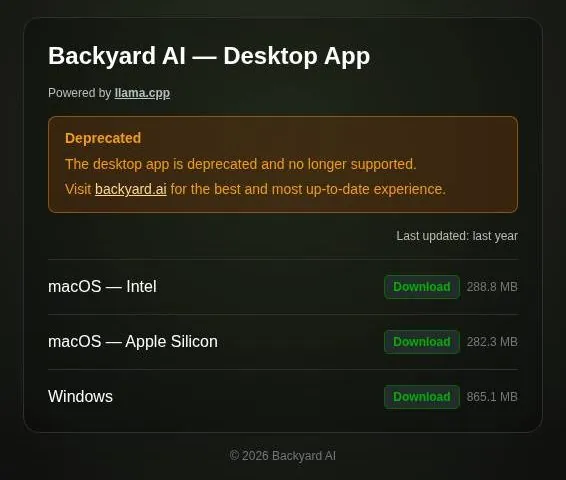
The original local desktop app, formerly Faraday.dev and built on llama.cpp, is officially deprecated. The old address, backyard.ai/desktop, now redirects to desktop.backyard.ai.
That page carries a short notice: "Deprecated - The desktop app is deprecated and no longer supported. Visit backyard.ai for the best and most up-to-date experience."
The last desktop build can still be downloaded: macOS Intel at 288.8 MB, Apple Silicon at 282.3 MB and Windows at 865.1 MB. The download page itself says "Last updated: last year."
A download button next to a deprecation notice is an odd pairing. It is like a car dealer keeping last year's model on the lot with a sign saying the factory no longer makes parts for it.
A changelog summary says the desktop apps were deprecated on June 25th, 2025, with development continuing only for the web, iOS and Android apps. That date comes from a search result rather than a fetched page, so I'd treat it as close but not certified. The same summary says existing desktop chats still open.

I think it's fine to keep an old install running for old chats. I would not build a new habit on software its makers have stopped supporting, though. It is my rule for editing plugins too: once the developer writes "no longer supported," the next system update decides when the project ends.
The two features that are gone
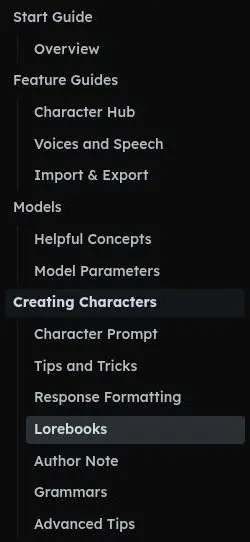
The Docs overview now lists only the Web App, iOS and Android, with no desktop and no local models. Elsewhere the docs present the same three apps and nothing else.
The desktop app that local running and tethering relied on is now deprecated. Tethering depended on the desktop app, so it is effectively legacy. That is the part that stings, because the two things that made Backyard special for me are the two things with no supported future.
Phones and store listings today
The iOS listing shows 3.4 stars from 37 ratings, a 16+ rating and Ahoy Labs as the developer. The iOS app is version 1.0.4, dated 2025-08-26. On Android, Google Play shows 3.2 stars from 99 reviews, 10K+ downloads and a last update on Aug 25, 2025.
Those numbers read like a quiet shop on a side street. Ratings in the low threes are not a disaster. A year without an update on either store tells me more than the stars do.
I'd add one practical point for phone users. An app that has not moved in a year will meet a new phone operating system sooner or later, and nobody can promise it will survive the meeting. If the phone is your main screen, I'd lean on the web app and treat the store apps as a convenience.
Are the lights still on?
The status page at backyard.ai/status shows 100% API uptime and 99.99% website uptime over 60 days. It also shows a live model list. No shutdown notice was found for the cloud service.
My Backyard AI test log
Chris FurreyFounder and writer Hands-on test, paid plan own card, no press account
-
The desktop app ran fully offline with no account, which suited someone who handles clients' unreleased footage.
-
I spent my first night just reading Character Hub descriptions, the way I read Steam reviews for games I'll never buy.
-
Tethering was the killer feature: my PC at home did the inference, and my iPhone at a bar showed the replies.
-
During the summer promo the free cloud plan gave unlimited messages on Fimbulvetr 10.7B, and I used it while exports rendered.
-
I stayed on the Standard cloud plan at $7 for two months, then went back to local-only; five months in, it was still installed.
– 123 days plan paid for: Standard Total spent $14
The 'More' menu holds Status, Docs, Blog, YouTube and X. So the servers run and the doors are open. I'd describe it as a diner where the grill is hot but nobody has touched the menu board in a while.
That distinction matters for a reader deciding whether to pay. Uptime says the kitchen works tonight. It says nothing about whether anyone will fix the leaking roof, and the rest of this review keeps finding small leaks.
How my time ended
My own ending was quiet, and the verdict above has the details: two months on Standard, then back to local models on my own graphics card. Looking back, the order of events is almost funny. I moved from the cloud to the desktop app, and later the company moved from the desktop app to the cloud.
Signing up for Backyard AI today
In 2024 the desktop app needed no account, so there was no front door worth describing. My first night belongs to the Hub, and the library section tells that story. The front door on 23 September 2026 is a different thing.
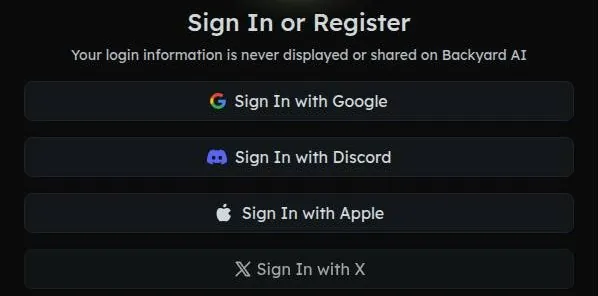
The 'Sign In or Register' dialog offers four buttons and nothing else: Sign In with Google, Discord, Apple or X. There is no e-mail or password sign-up. For an app whose old version needed no account at all, that is a sharp turn.
The dialog says that continuing certifies the user is over 18 years old: "By continuing, you certify that you are over 18 years old." That sentence is the whole age check. You agree to it by clicking a logo.
'Start Chat' on a character page opens the sign-in dialog, so there is no guest chat. You can read a character from top to bottom, but you can't say hello to it without handing over a social account.
The public site is fast. Pages open the way a well-built portfolio site does, which makes the locked door at the end feel more abrupt. It is like a showroom with the car keys kept behind the counter.
The contrast with 2024 is the point I keep coming back to. The old app let a nervous user try everything without telling anyone who they were. The new one asks for an identity before the first hello, which is normal for a web service and a step backwards for this particular one.
I'd prefer a plain e-mail option, and I think many readers would too. Plenty of people keep companion apps well away from their main Google or Apple account, for reasons that are nobody's business. If none of the four logins suits you, the honest answer is that Backyard is closed to you.
If you do sign in, I'd pick the account you care least about and check what it shares before you click. A social login is convenient, but it ties a private hobby to a public identity, and I'd want that to be a choice rather than the only door.
The Character Hub, then and now
The Character Hub had thousands of user-made characters. I spent my first night just reading their descriptions, the way I read Steam reviews for games I'll never buy.
It was browsing as entertainment. I went to bed without starting a single chat, which says more about me than it does about the Hub. It felt like an evening at a flea market where the fun is the stalls, not the purchase.
A reviewer says character quality varies because the Hub is user-made. I agree with the logic of that. A user-made shelf is a flea market by design: a few gems, a lot of half-finished ideas, and the odd thing you can't explain.

What browsing looks like in 2026
The Community Hub list at /hub redirects to sign-in. Individual character pages are public. So the market is locked, but single stalls are visible if you already know the address.
One public example is 'Ravenveil - High Fantasy City', which shows 33.1K messages, created 3 years ago, updated 2 years ago, with 1311 context tokens. That is a healthy message count for an old card. The dates tell the other half of the story: nobody has touched it in a while.
I don't hold an old card against the Hub. Good writing does not expire, and a well-built city from a few years ago can still run a fine evening. What worries me more is the lack of new ones, because a hub lives on fresh uploads the way a flea market lives on new stalls.
A Play review from Apr 2026 puts it bluntly: "not a lot of characters because not a lot of people are using the app. There are no ads" The second half is a real compliment. The first half is the opposite of my 2024 impression, and I think both are accurate for their year.
My advice for browsing today is simple. Treat character pages as recipes to read, not as a busy public square. If you want a crowd and new uploads every hour, a bigger hub will serve you better; if you want a well-written card to study, the old ones here are still worth opening.
Building characters in Backyard AI
Backyard AI has a character creator plus a public Community Hub of user-made characters. It keeps the power-user roleplay toolkit inherited from Faraday.dev. That toolkit is the whole point of the app, in my opinion.
The public character page shows the full persona and scenario prompt openly, which makes it transparent and easy to learn from. I think this is the most useful thing on the whole site for a beginner. It is like being allowed to open another editor's project file and see every node, every keyframe and every shortcut they took.
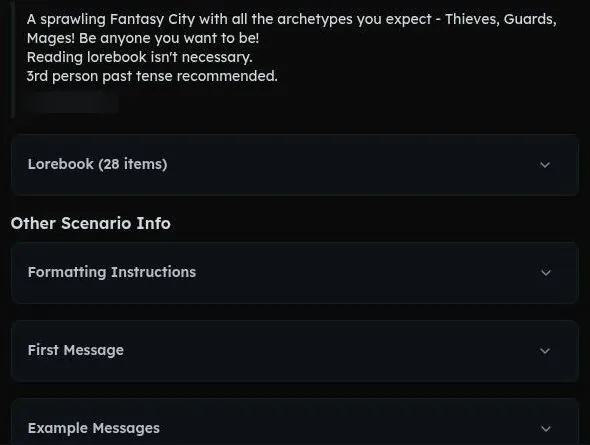
Most companion apps hide the prompt, so a good character feels like a magic trick. Here the trick is printed on the back of the card. You can see how a writer set the tone, which facts they gave the character, and how the first message sets the scene.
An Author's Note is available. It is a small field with an outsized job: a standing instruction that nudges the story without living inside the character itself. I'd compare it to a director's note on a call sheet, short and easy to forget, and the thing everyone remembers when the scene goes wrong.
The Docs cover the character prompt, response formatting, lorebooks, author note, grammars and model parameters. That is the right list of topics. It reads like the syllabus for an evening class in writing characters for a machine.
The odd gap is the practical side. Several docs pages are unfinished, so the theory is there and some of the how-to is missing, which the friction section covers.
My advice for a first character is to copy structure, not content. Pick a public card you like, read how its prompt is built, and write your own in the same shape. The creator rewards patience and plain writing far more than clever adjectives.
What conversations in Backyard AI felt like
A week of colour grading a chatbot
The power-user knobs are everywhere: lorebooks, author's notes, context size, sampler settings. I spent a week tweaking temperature and realized I was basically color-grading a chatbot for fun.
That week had the same rhythm as a grading session. Nudge one control, look at the result, decide it was too warm, nudge it back. At the end I had a character whose replies felt right to me, and no way to explain to anyone else why that setting and not the one next to it.
I don't regret the week. It taught me that most of what people call a bot's personality is really a handful of numbers and a well-written prompt. It also taught me that I will tune anything with a slider, which says more about me than it does about the app.
The controls on offer
Full sampler control covers Min-P, Top-P, Top-K, Temperature, Repetition Penalty, custom context length and prompt templates. GBNF Grammars can force a response structure.
For most people this is too many knobs, and I would not blame anyone for closing the panel and never opening it again. For people who enjoy it, it is a proper control room. The grammar feature is the one I'd point out to writers: forcing a structure is how you stop a character from drifting into a format you did not ask for.
The models behind the replies
Backyard AI uses open-weight roleplay finetunes (Fimbulvetr, Stheno, Euryale, Midnight Rose, Magnum, Command R+) instead of one proprietary model. I like that choice. Each model has its own voice, and picking one is closer to casting an actor than to flipping a switch.
The status page lists models that are not on the pricing page: Cydonia 24B V4.1 (100k context), MN Violet Lotus 12B, GPT-4o Mini (100k) and GPT-5 Nano (100k). GPT-5 Nano showed 0.00s and 0 tok/s on the status page, which looks inactive.
I read that gap as housekeeping rather than a scheme. Still, a model list that does not match the price list is the kind of continuity error I'd flag in a client cut. Before paying for a specific model, I'd check that it appears on the pricing page and not only on the status page.
Time to first token on the status page was about 0.8-7.3s. At the fast end that is a normal pause in a chat. At the slow end it is long enough to wonder whether the other side is typing.
Group chats
Group chats hold up to 4 characters ('Backyard Parties'). I like the name more than I trust the format. Group scenes are where models tend to lose track of who is speaking, so I'd start with two characters and add more once the scene holds.
What users report today
No chat test was possible on 23 September 2026, since chatting needs a social login. What exists instead are user reviews.
An iOS review from Dec 2024 says: "even the free model is unlimited and pretty great ... Responses start streaming in pretty much right away."
| Feature | Free | Paid |
|---|---|---|
| Messages | 300 a week | unlimited |
| Models | 1 included model | 6 on Standard, 12 on Pro |
| Context | 16k tokens | 16,384 tokens on Standard, up to 100k on Pro |
| Group chats (up to 4 characters) | yes | yes |
| Voice calls | listed | listed |
| Lorebooks | yes (unlimited) | yes |
| Advanced samplers | yes | yes |
| Image generation | no | no |
| Ads | none seen | none seen |
| Credit card to start | not required | required |
Limits as listed on 23 September 2026.
That review matches the summer promo era, when the free cloud model was unlimited. The reviews from 2025 and 2026 in the friction section tell a less cheerful story. I'd weigh the newer ones more heavily, because a chat app is only as good as the model it is serving this month.
My own takeaway on quality is simple. The models on offer are open roleplay finetunes tuned for storytelling rather than homework, and with a good prompt and sensible settings they can write a lively scene. With a lazy prompt they write a lazy one, which is less a flaw than the deal this app offers: it hands you the tools and trusts you to use them.
Memory and lorebooks
My favorite character was a burned-out starship mechanic. A lorebook entry about her ship's broken coolant pump got her to fix the pump herself six scenes later without my asking.
I remember the moment clearly because it was so quiet. I had written the entry and forgotten about it, the way you forget a note to yourself in a project file. Then she simply went and fixed the pump, as if it had been bothering her the whole time.
That is what good memory feels like in a story: continuity nobody had to ask for. In editing terms it was a clean match cut between two scenes shot days apart. It is also why the pump became a running joke, since the fix happened in the story and never in my life.
How lorebooks work
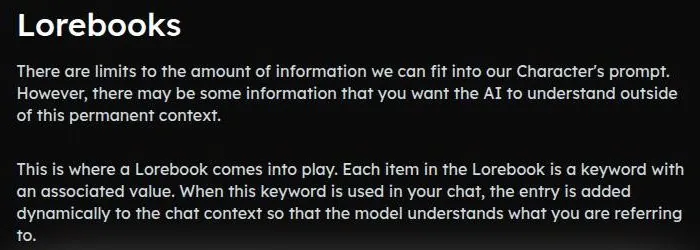
Lorebooks inject context when a keyword is triggered. In practice that means the model does not need to hold the whole world in its head. It only needs the right card pulled from the drawer when a word comes up.
I think lorebooks are the most useful feature in the app, and the least glamorous. They reward boring, specific entries: a broken part, a grudge, a name. Vague entries give vague results.
Context sizes today
Standard has a maximum context of 16,384 tokens. Pro offers a context of "Up to 100k" tokens. Elsewhere the site says context reaches up to 100k tokens.
The status page tells a more detailed story for September 2026. Context runs from 6k on Command R+ 104B to 100k on Cydonia 24B V4.1, Llama 3.3 70B, GPT-4o Mini and GPT-5 Nano, with Fimbulvetr v2 11B at 30k, Mistral Nemo 12B at 65k and several larger models, Midnight Rose 70B, Euryale 70B, Magnum V1 72B and Psyonic Cetacean 20B, at 16k. Stheno 8B and Jamet Blackroot 8B sit at 30k, while MN Violet Lotus 12B and MN BackyardAI Party 12B sit at 24k.
So "up to 100k" is true for a few models, not for the big roleplay names people buy Pro for. I'd check the figure for the exact model before paying for context.
A headline figure that only applies to part of the shelf is a familiar trick in any spec sheet. It is not dishonest, but it rewards the reader who looks at the small print, and the status page is where that small print lives.
Images, voice and video in Backyard AI
No image generator is listed on the plans page or the homepage, and a reviewer also states there is "no in-app image generator". Video is not offered on any official page. For a video editor, that makes this the shortest media section in the review.
I don't count that as a flaw in itself. Backyard is a text app with a writer's toolkit, and it never pretended to be a photo studio. If pictures of a companion matter to you, the right move is to pick a different app rather than wait for this one to grow a camera.
Voice calls use a custom StyleTTS2 with 24 voices, announced Oct 2024. That arrived at the tail end of my five months, so I can't judge the voices from my own time. A text-to-speech engine with a choice of voices is a sensible fit for roleplay, closer to a radio drama than a video call.
A user review says voice calls were later removed; this could not be verified. The plans page still lists voice on every tier, so the paperwork and the users disagree. I'd treat voice as a maybe until someone with an account confirms it.
| Plan | Monthly | Yearly | Notes |
|---|---|---|---|
| Free | $0 | - | 300 messages a week, 1 included model, 16k context, no card needed |
| Standard | $12 | $9 a month ($108 a year) | unlimited messages on the 6 Standard models, 16,384-token context |
| Pro | $35 | $26 a month ($312 a year) | Standard models plus 6 larger models (20B to 104B), context up to 100k tokens |
Prices as published on or before 23 September 2026; sources in the text.
This is where the maintenance question stops being abstract. A feature can be announced, listed on the plans page and quietly switched off, and the only public record of the change is a user review. I'd rather a company said so in a blog post, even a short one.
My advice is to judge Backyard on its text alone. If voice works for you, count it as a bonus. If it does not, the flat price was never really paying for it.
The Backyard AI free tier
The summer I got away with something
During the summer promo, the free cloud plan gave unlimited messages on Fimbulvetr 10.7B. I used it while exports rendered and felt like I was getting away with something.
Those were the best hours of the whole five months. A long export is dead time: the machine is busy, the client is waiting, and I am staring at a progress bar. Having a story running in another window turned that dead time into a small treat.
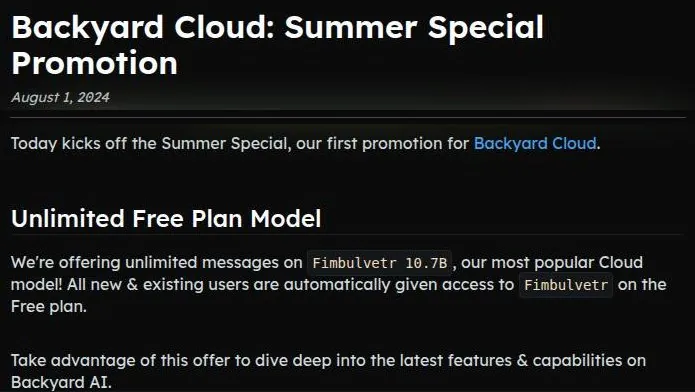
The same 2024 promotion made Fimbulvetr unlimited on the Free plan. The status of that unlimited offer is unknown today, since the pricing page now says 300 messages per week. I think the promo was a loss leader that did its job, at least on me.
What free means on 23 September 2026
The Free plan gives 300 messages per week. It has "1 included model". It has a 16k-token context.
In my own money math, 300 a week is a few dozen messages a day. That is enough to try a character, not enough to run a long evening scene. It is a gym day pass rather than a membership.
For a writer, the message count matters more than it looks. A roleplay scene burns messages fast, because every short reply counts the same as a long one. I'd plan a free week around one or two scenes rather than a string of quick chats.
The pricing FAQ says: "you can try out the models on both plans for free with 300 free messages per week". That line does not sit comfortably next to "1 included model" on the plan card. I can't tell from the outside which one wins, so I'd assume the stricter reading until the app shows otherwise.
| What | Price then | When |
|---|---|---|
| Free cloud plan with unlimited Fimbulvetr 10.7B (summer promo) | $0 | summer 2024 |
| Standard cloud plan | $7 | two months, Jun–Oct 2024 |
| Pro cloud plan (70B-class models, not bought) | $35 a month | Jun–Oct 2024 |
From the author's own notes. Compare with today's prices above.
The pricing page says "Try for Free - No credit card required". There is no free trial of the paid plans. Free is the trial, in other words, and I like that it asks for nothing but a login.
What free includes
Group chats, voice calls, lorebooks and advanced samplers are listed for all tiers. The plans page lists unlimited lorebooks on the Free plan. That is the part I'd call generous: the toolkit is not held back to push an upgrade.
The public site has no ads. A reviewer describes the free tier as generous. I agree for the tools and disagree for the volume, which is a fair trade for a service that is not showing ads.
The absence of ads deserves its own line. Free tiers in this category often pay for themselves with banners, pop-ups or nudges between messages, and none of that appears on the public site here. It makes the free plan feel like a sample rather than a sales floor.
Where free stops
Free stops at the message count and the single model. If the story matters, those two limits arrive together: the scene gets good just as the week runs out. I'd use the free plan to test a character and a model, and pay only once a scene has earned a second week.
My summer promo was a better deal than anything on the price list today. I don't hold that against Backyard, but I'd remind anyone reading old forum posts that the unlimited era is over.
Backyard AI plans and prices
What I paid, and what I skipped
Local models on my 12GB GPU were fine for banter and weaker for long plots. The Pro cloud tier offers 70B-class models, but $35 a month felt steep for a hobby.
That was the whole calculation, done out loud at my desk. Banter was covered at home for free, and long plots were a nice-to-have, not a need. Paying $35 a month for bigger models felt like buying a second gym membership to use the sauna.
So I took the middle road. I paid $7 for Standard in 2024; the same plan costs $12 a month today, or $9 a month billed yearly. Backyard Cloud plans launched on Mar 27, 2024.
My two months on Standard came a few months after that launch, while the cloud side was still new. Standard covered the nights when I wanted a cloud model instead of my own graphics card, and it was cheap enough not to argue with.
The plans on 23 September 2026
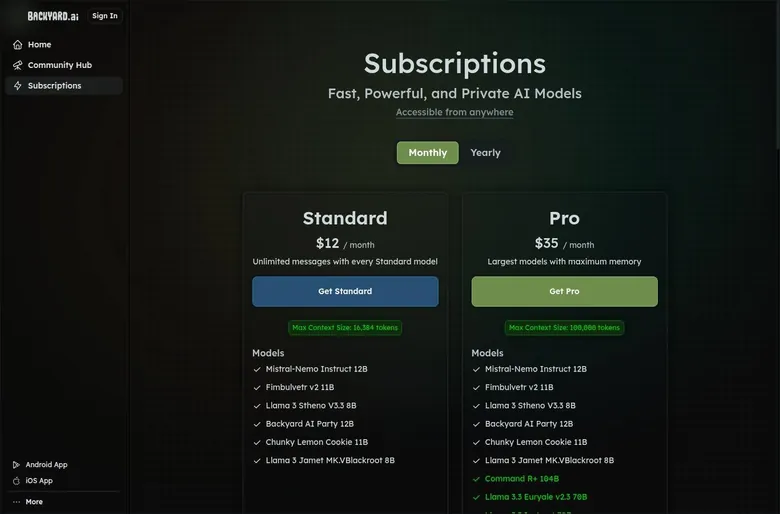
Prices on backyard.ai/plans are in USD. The Free plan costs $0. The Standard plan costs $12 a month.
Billed yearly, Standard costs $9 a month ($108 a year, 25% off). Standard gives unlimited messages on all Standard models.
The Standard models are Mistral-Nemo Instruct 12B, Fimbulvetr v2 11B, Llama 3 Stheno V3.3 8B, Backyard AI Party 12B, Chunky Lemon Cookie 11B and Llama 3 Jamet MK.V Blackroot 8B. In plain terms, that is a shelf of small and mid-sized roleplay models, the kind that run on a good home graphics card.
That is the honest trade of Standard. It buys convenience and unlimited volume, not a jump in intelligence over what a decent home setup can run. For many readers that is exactly the point, since not everyone owns the graphics card or wants the electricity bill.
The Pro plan costs $35 a month. Billed yearly, Pro costs $26 a month ($312 a year). Pro adds Command R+ 104B, Llama 3.3 Euryale v2.3 70B, Llama 3.3 Instruct 70B, Midnight Rose 70B, Magnum 72B and Psyonic-Cetacean Ultra 20B to the Standard models.
Backyard AI pricing
Prices verified .
Free
$0
Just enough to feel the vibe.
- Free plan available
Standard
$12/mo
Billed every month
No discount
- Unlimited messages with every Standard model (6 listed
- 8B-12B); 16,384-token context; group chats; voice calls; lorebooks
Pro
$35/mo
Billed every month
No discount
- Unlimited messages; Standard models plus larger models (e.g. 70B-104B); context up to 100k tokens
Monthly and annual rates differ only in context limits and model tiers; no hidden credits apply.
Is the step up worth it?
Standard is the sensible plan, in my opinion. Unlimited messages at a flat price is the right shape for a writing hobby, and $12 is not outrageous for that. The jump from my old $7 to $12 still stings a little, the way a diner raising the price of the same breakfast does.
Pro is a harder sell. The Pro price has not moved since it felt steep to me, and the bigger models are the ones that fix long plots. If long campaigns are your thing, one month of Pro will tell you more than any review, mine included.
The Pro list also has a quirk worth knowing. Several of its big models show a smaller context on the status page than the "up to 100k" headline suggests, so the extra money buys smarter models more than longer memory.
I would not pay yearly on either plan. The yearly discount is real, but the maintenance signs in the friction section make a long commitment a bet on the company's attention. Monthly costs more and lets you leave the moment the service drifts.
Coins, credits and what the money buys
There are no coin or credit packs. There are no image-generation credits either. The subscription is flat, with no coins or credits.
I think this is one of the best things about Backyard. Coin systems are the vending machines of this category: every button costs a little, and the total only shows up on the bank statement. Here the price on the plan card is the price, and a long night of roleplay costs the same as a short one.
Google Play lists in-app purchases of $11.99 - $309.99 per item, and the subscriptions are sold in-app. With no coin packs on offer, I read that range as the plans priced for the store. It is a wide range for three plans, so I'd look closely before buying through the phone.
Backyard AI scored 6.3 out of 10 in our tests and costs from $12/mo. We have no partner deal with it, so its link is a plain link. Visit the official Backyard AI website
Closest alternative we can recommend

SpicyChat
from $5/mo, free tier available
Score 7.9/10
My practical advice is to compare the store price with the web price before tapping buy. Store billing is convenient, and it also puts a second company between you and a refund conversation. With Terms that have no refund clause, I'd want to know exactly which counter took the money.
What the money buys, in the end, is messages and models, not items. That makes the maths easy: divide the monthly price by the evenings you expect to use it, and decide whether that number feels like a fair ticket.
Discounts, referrals and promo codes
No welcome offer to report
No welcome popup or coupon could be checked because no account could be created. No Backyard e-mails arrived either, since no account was created. So this section cannot say whether a first-purchase discount appears after sign-up.
No promo code field was seen on public pages. No affiliate programme was found.
I find that refreshing. There are no countdown timers, no fake tonight-only banners, and nothing flashing at the checkout. After apps that treat pricing like a used car lot, a plain price card feels almost old-fashioned.
It also means there is no secret cheaper route to hunt for. Anyone offering a Backyard coupon code on a deal site is selling something that the public pages give no sign of.
The yearly discount
Yearly billing is 25% off. It is the only discount on the price list that is plainly real. On Standard it turns $12 into $9 a month.
I'd still skip it. A discount for paying ahead is only a discount if you use the whole year, and a gym that stops updating its equipment is not the place for an annual pass.
The referral programme
A referral programme was announced in the "Summer Special" blog post of Aug 1 2024: "Give 50% off, get 50% off". The programme's current status is unconfirmed.
A referred friend gets half off their first month. The referrer earns $17.50 in promotional credit per Pro referral. The referrer earns $9.00 per Advanced referral, and Advanced is a legacy tier.
The referrer earns $3.50 in promotional credit per Standard referral. The numbers are telling: $17.50 is half of the $35 Pro price, and $3.50 is half of the old $7 Standard price. It looks like the credits were set on the 2024 prices and never restated for today's.
That detail supports my reading of the whole programme. It was part of a summer push in 2024, and it may or may not still be running in the account settings.
Referral credits have no cap. The referral link is in Account settings under "Referral Program". Referral credits apply only to future bills.
Referral credits have no cash value. The referred person must not already have an active subscription.
Are any of these worth chasing?
The referral deal is a fair one on paper, and the lack of a cap is unusual. In practice it only pays off if you know other people who want this app, and the Play review about how few people use it suggests that is a short list.
If a friend sends you a link, I'd use it for the first month and ignore it after that. I would not sign anyone up to earn credits. Credits with no cash value, for a service with a quiet blog, are gift cards for a shop that may change its hours.
Backyard AI content settings and rules
What the marketing promises
The landing page says "Fictional Text & Voice Chats With No Filters". The pricing FAQ goes further: "we do not have a filter like Character.ai. We do not censor or filter text model generations." That is about as direct as a company can be on this subject.
I respect the plain wording. Too many apps promise freedom on the homepage and then bury a strict filter in the settings. Here the promise and the FAQ agree, which is the minimum I expect and more than many apps manage.
The in-app content toggle could not be checked without an account. So I can report what the company says, not how the switch behaves in practice.
That gap matters. A written promise and a working switch are two different things, and only an account shows the second. I'd treat the promise as a strong statement of intent until a reader with an account sees the setting for themselves.
The Hub rules
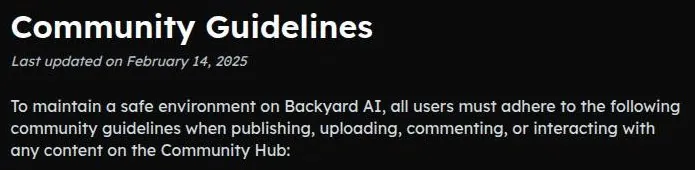
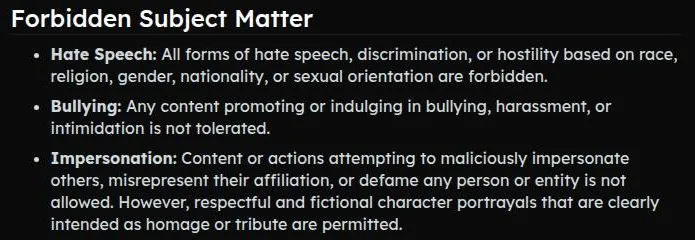
The Community Guidelines, dated Feb 14, 2025, apply to the Hub and require every character to portray an adult: "All characters must represent and portray adults over 18". Hub characters with mature material must be marked "mature content". The same rule appears elsewhere: characters with mature material must be flagged "mature content".
The Hub guidelines ban sexual content without consent, sexual content between relatives, hate speech, bullying, malicious impersonation and photo-realistic sexual imagery. The ban on photo-realistic sexual imagery, content without consent and sexual content between relatives is repeated for the Hub.
The Terms require public Contributions to be free of obscene or violent material. That line sits awkwardly next to the "No Filters" promise. My reading is that private chats are left alone while anything published to the Hub has to follow house rules, which is a reasonable split.
No content breaking the age rule was seen on public pages. That matches what I'd expect from a Hub with written rules and a flagging system.
Store ratings and the age check
The App Store age rating is 16+. The research record lists the iOS app as rated 17+. The research record also lists a Google Play content rating for ages 13 and up.
Three ratings for one app is like three aspect ratios in one timeline. Each store runs its own questionnaire, so the numbers drift apart. None of them matches the Terms, which set the bar at adults only.
Adults only (18+). This page reviews AI companion apps with NSFW features; no explicit images are shown.
The Terms describe no method of confirming age beyond the user's own statement of being "at least 18 years of age". In practice the check is a sentence in the sign-in dialog. I'd call that honest but thin: the rule is clear, and the enforcement is a checkbox in all but name.
Backyard AI terms in plain English
Who runs it and where disputes go
The operator is Ahoy Labs, Inc., "registered in California, United States". The Terms were last updated Oct 29, 2024. A named company in a named state is the baseline I'd want, and Backyard clears it.
The Terms are governed by California law. Disputes go to state or federal courts in California. Claims must be brought within 1 year.
The Terms have no arbitration clause. That is less common than it should be. It means a dispute goes to an ordinary court rather than a private arbitrator, which I count as a point in the company's favour, even if nobody plans to sue over a chatbot.
Age
The Terms ban anyone under 18 from using the site: "Persons under the age of 18 are strictly prohibited from using the Site." That is a clear rule.
A boilerplate clause elsewhere in the Terms still mentions "not under the age of 13" and parental permission, which is inconsistent. It looks like a template paragraph nobody went back to fix. It is the legal version of a continuity error: the actor's shirt changes colour between two shots, and only a careful viewer notices.
Money
The Terms have no refund clause. They only tell unsatisfied users to write in: "If you are unsatisfied ... email [email protected]." So a refund is a request, not a right written into the contract.
The Terms say prices may change at any time: "We may change prices at any time." All charges are in USD. For readers outside the US, that means the bank's exchange rate and possibly a foreign transaction fee on top.
| Topic | What it means for you | What the terms say |
|---|---|---|
| Operator | Ahoy Labs, Inc., registered in California, United States. | "registered in California, United States" |
| Law and courts | California law; state or federal courts in California. | - |
| Deadline for claims | Claims must be brought within 1 year. | - |
| Arbitration | No arbitration clause. | - |
| Age | Adults only. One older boilerplate clause still mentions a lower age with parental permission. | - |
| Renewal | Plans renew and charge automatically until you cancel. | "charging your payment method on a recurring basis ... until you notify us of your cancellation." |
| Cancelling | Access runs to the end of the paid term. | "Your cancellation will take effect at the end of the current paid term." |
| Refunds | No refund clause; unhappy users are told to e-mail support. | "If you are unsatisfied ... email [email protected]." |
| Price changes | Prices can change at any time. | "We may change prices at any time." |
| Your uploads | Public Contributions give Backyard a broad, permanent licence, including resale. | - |
| Account removal | Backyard can delete an account at any time without warning. | "at any time, without warning, in our sole discretion" |
| Chats and training | The privacy policy does not mention chats or AI training at all. | - |
| Data sharing | Data may be shared in business transfers and with affiliates. | - |
| Data deletion | By e-mail to [email protected]. | - |
| Hub rules | Every character must be an adult; mature characters must be flagged. | - |
| Last updated | Terms and privacy policy: Oct 29, 2024. | - |
Terms and privacy policy as published on 23 September 2026.
Your content and your account
User Contributions grant Backyard a broad boilerplate licence, including the right to sell and publish them: "unrestricted, unlimited, irrevocable, perpetual, non-exclusive, transferable, royalty-free ... license to ... sell, resell, publish ... for any purpose, commercial, advertising, or otherwise". That is standard legal boilerplate, and it is still worth reading twice before publishing a character you are proud of.
Backyard can delete an account "at any time, without warning, in our sole discretion". Put those two clauses together and the lesson is simple: keep your own copies of anything you write.
None of this is unusual in isolation. What makes it worth a paragraph is that the Import/Export docs are unfinished, so the easy way out with your work is not documented. A writer who spends months on a character should keep the text somewhere the company cannot switch off.
Privacy
The privacy policy was updated Oct 29, 2024. It says: "We do not process sensitive personal information." The privacy policy does not mention chats, messages or AI training; it neither promises nor discloses anything about them.
That silence is the clause I like least. A companion app's most personal data is the chat log, and the one document that should explain it says nothing either way.
Data may be shared in business transfers and with affiliates. Personal information is kept "for as long as it is necessary for the purposes set out in this privacy notice unless a longer retention period is required or permitted by law", and deletion is by request to support.
The Play Store data-safety section says the app may share personal info and app performance data with third parties. It says the app collects Messages.
The same section says data is encrypted in transit. It says users can request deletion.
So the clearest statement about messages comes from a store form, not from the company's own policy. I'd assume chats are stored on the server, and I'd write nothing there I would mind a stranger reading.
My overall read on the paperwork is mixed rather than bad. The legal basics are in place, with ordinary courts and no arbitration. The weak spots are refunds and chats, which happen to be the two things a paying companion-app user cares about most.
What got in the way
The night the power went out
Then a summer thunderstorm knocked out power in my neighborhood, and the character went silent mid-sentence. It was the most realistic "left on read" I've had from an AI.
The reply simply stopped, halfway through a thought. For a minute I assumed the app had crashed. Then it made sense: the brain of my setup was a PC in a dark house, and no amount of clever software could answer from a machine with no power.
That is the honest weakness of running things at home. A render farm with one power strip is not a farm. I laughed about it at the time, and I still think it was a fair price for a setup that phoned nothing home.
An iOS review from Apr 2025 already reported tethering timeouts. So the connection had problems beyond my local weather.
The beta apps
The mobile apps were in public beta while I used them, and it showed: one update logged me out twice and another made the keyboard cover the send button.
The keyboard one was the funnier bug. I could write a whole reply and then had to dismiss the keyboard to find the button that sends it, like a client portal that hides the approve button under a banner. Being logged out twice after one update was less funny, because a companion app that forgets who you are is missing the one thing it is for.
The mobile apps have not been updated for about a year, with the last updates in Aug 2025. Beta bugs are forgivable when a team is shipping fixes every week. A year of silence turns the same bugs into features.
The front door in 2026
No account could be created on 2026-09-23: sign-in is social-login only (Google, Discord, Apple or X), with no e-mail option. The facts of the 23 September 2026 check come from public pages, app store listings and web search, since no logged-in session was possible.
The missing e-mail sign-up is the main blocker. There is no guest chat, and the Hub list is behind a login. A visitor who does not want to link a social account can read a few public pages and nothing more.
Recent user reviews come from the store listings, not from a session inside the app. That makes them the best available evidence, and I'd read them as such.
Signs of a quiet workshop
The site looks semi-maintained. The site footer still says "(c) 2025". The blog's last post is dated Oct 24, 2024.
The changelog at backyard.ai/changelog returns a 404 error. Several docs pages say "coming soon" or return a 404 error. The Voices, Import/Export and Models docs pages are "coming soon" or return a 404 error.
The site Docs still say "Android App is coming soon" even though a Play Store app exists. The official Discord invite is expired on 2026-09-23. A Play review from Nov 2025 also says Discord invites were paused.
Taken together, the signs of low maintenance are a 404 changelog, empty docs, an expired Discord invite, no blog posts since 2024, a "(c) 2025" footer and docs calling the Android app "coming soon". Any one of these is a missed chore. All of them together look like a shop where the owner comes in now and then to empty the till.
For a paying user, the practical risk is not that the app stops tomorrow. It is that bugs stay unfixed, features fade out without a word, and nobody answers in the one place a community would ask.
What users say now
A Play review from Nov 2025 complains about poor communication, paused Discord invites and voice calls removed without explanation: "lack of communication. Paused Discord invites... Removing voice calls without explanation."
A Play review from Sep 2026 complains about minimal development and bots becoming basic: "minimal development ... bots grow to be extremely basic".
A reviewer reports that one character repeatedly returned blank replies. I can't confirm any of these from inside the app. They do line up with the maintenance signs, which is why they carry weight with me.
Gaps in the paperwork
The Terms have no refund policy. The privacy policy says nothing about how chats are handled. Both matter more for an app that asks you to type personal things into it.
| Criterion | Rating | Why |
|---|---|---|
| Conversation quality | Good | Open roleplay models and deep controls reward a patient writer; newer reviews report stagnation. |
| Memory | Good | Keyword lorebooks kept my story consistent; 100k context applies to only a few models. |
| Free tier | Good | No card, no ads and the full toolkit, but a weekly message cap and a single model. |
| Value for money | Good | Flat price with unlimited messages and no coins; Standard costs more than in 2024. |
| Images and voice | Weak | No image or video generation; voice calls are listed but reported as removed. |
| Privacy and terms | Mixed | Named company, California courts, no arbitration; silence on chat data and a broad content licence. |
| Cancelling and billing | Mixed | Cancel in settings or by e-mail, access to the end of the term, but no refund clause. |
| Content settings | Mixed | Private chats are unfiltered and Hub rules are clear; the age check is a self-declaration. |
Ratings are the author's judgement from his own use and the 23 September 2026 check.
One last trap, and a harmless one. An unrelated app with the same name, "Backyard AI: Backyard Preview" by JanoGroup LLC, is a garden-design app, not this product. If the store shows you lawns and patios, you have the wrong download.
Who Backyard AI suits, and who should skip it
Backyard suits experienced text-roleplay and interactive-fiction users who want fine-grained control of prompts and samplers, lorebooks and a choice of unfiltered open models at a flat price. That is a narrow group, and I am in it. If the phrase "sampler settings" makes you curious rather than tired, you are probably in it too.
It also suits former Faraday users who still want the Hub and cloud models. The toolkit is familiar, the cards are still there, and the price is simple.
It is not for anyone without a Google, Discord, Apple or X account, since there is no e-mail sign-up. It is not for people looking for a local, private or offline app, since the desktop app is deprecated. That second point hurts me the most, because offline was what won me over.
It is not for users who want image generation, visual companions or a polished "girlfriend" app experience. It is not for anyone who needs an active community, support or frequent updates: the Discord invite is expired, the blog has been silent since Oct 2024 and reviews complain about stagnation.
Who Backyard AI is for
Best for
- Experienced text-roleplay and interactive-fiction writers who want control of prompts, samplers and lorebooks.
- Former Faraday users who still want the Character Hub and cloud models at a flat price.
- Writers who learn by reading other people's prompts, since public character pages show the full persona and scenario.
- People who want a flat subscription with no coins, no credits and no ads.
Not for
- Anyone without a Google, Discord, Apple or X account, since there is no e-mail sign-up.
- People who want a local, private or offline app, because the desktop app is deprecated.
- Users who want image generation, visual companions or a polished girlfriend-app experience.
- Anyone who needs an active community, quick support or frequent updates.
My short version: a good tool for writers who can fend for themselves, and a poor choice for anyone who needs someone at the front desk.
If you are unsure which side you are on, the free plan answers the question in an evening. Open a public character, read its prompt, and see whether the idea of adjusting it excites you or bores you.
Cancelling Backyard AI
My 2024 notes cover the two months on Standard and the return to local models, not the cancel screen itself. So this section describes how renewal and cancelling work on 23 September 2026.
Payments go through Stripe, per the privacy policy. That is a familiar processor, which I find reassuring for a small company.
The Terms allow recurring charges until the user cancels: "charging your payment method on a recurring basis ... until you notify us of your cancellation." They also say recurring charges need no prior approval for each charge: "you consent to our charging your payment method on a recurring basis without requiring your prior approval". In plain English, the plan renews every month until you stop it.
A subscription is cancelled on the "Manage Subscription" page or by e-mail. The plans page says: "You can cancel your subscription at any time". The Terms say to cancel "by contacting us".
Those three routes do not quite match, and I'd use the most direct one first. The settings page is fastest; e-mail is the backup, and it leaves a written record.
Backyard AI pros and cons
What worked
- Lorebooks, an Author's Note, grammars and full sampler control make it a proper writer's control room.
- A flat subscription with no coins or credits, so a long story costs the same as a short one.
- Open-weight roleplay models to choose from instead of one proprietary model.
- Public character pages show the whole prompt, which makes the Hub easy to learn from.
- The free plan needs no credit card and includes lorebooks, samplers and group chats.
What did not
- The offline desktop app and phone tethering are deprecated, and the service is cloud-only.
- Sign-up is social login only, with no guest chat and the Hub list behind a login.
- No refund clause in the Terms, and the privacy policy says nothing about chats.
- Signs of low maintenance: a 404 changelog, unfinished docs, an expired Discord invite and a blog silent since 2024.
- No image or video generation, and voice calls are reported as removed.
A cancellation takes effect at the end of the current paid term: "Your cancellation will take effect at the end of the current paid term." You keep access until the date you already paid for, and you should not expect money back for the unused days.
Deletion requests go by e-mail to [email protected]. Cancelling the plan and deleting the account are two separate jobs.
I'd do them in that order and on the same evening. A deletion request sent before the plan ends can leave a renewal running on a card with no account behind it, which is a small mess nobody needs.
My advice before paying: start on the free plan and pay monthly, not yearly. If you use the phone app, check whether the purchase runs through the store rather than the website, since that decides where you cancel. When you leave, cancel first, save your characters, then ask for deletion by e-mail and keep the reply.
My tips for Backyard AI
Start on the free plan and use it as a screen test. Pick one character and one model, run a real scene, and only pay once the scene has earned a second week. The free plan asks for no card, so there is nothing to forget to cancel.
Learn lorebooks before anything else. Short, specific entries do more for a long story than any sampler tweak. A broken part or an old grudge is the sort of entry that pays off scenes later.
Leave the samplers alone for the first few evenings. They are fun, and they will eat a week if you let them. Change one setting at a time, the way you would change one grade setting at a time, or you will never know which change did the work.
Read public character pages like recipes. The prompts are open, and copying the structure of a good card is the fastest way to write your own.
Check the status page before paying for a model or a context size. The model list and the context figures there are more detailed than the pricing page, and they do not always agree with it.
Pay monthly, never yearly. The maintenance signs make a long commitment a bet on the company's attention, and the Terms have no refund clause.
Keep copies of everything you write. The Import/Export docs are unfinished, and the Terms let the company close an account without warning.
For news, the official channels are thin. There is an official X account and an official YouTube channel. The official Discord invite was expired as of 2026-09-23.
There is also an official Hugging Face page with GGUF model quants. For anyone who misses the offline days, that page is where I'd start looking. Support is by e-mail at [email protected]. The site links no Reddit, Instagram, TikTok or Telegram accounts.
The Backyard AI scorecard, explained
Conversation quality rates well because the open roleplay models and the controls let a patient writer shape replies. It is not higher because the newest user reviews describe stagnation, and no current chat could be checked.
Memory is the app's strongest point in practice. Lorebooks did exactly what they promise in my own story, and the context sizes are decent, even if the biggest figures apply to only a few models.
The free tier is good for tools and thin on volume. Every feature is there, but the weekly message cap turns it into a trial rather than a home.
Backyard AI verdict
Overall score
6.3/10
FairThe best set of roleplay dials at a flat price - but the offline desktop app is retired and the service looks half asleep.
Hands-on test, paid plan
- Open roleplay models and full sampler control reward a patient writer; newer store reviews complain of stagnation.
- A lorebook entry got my starship mechanic to fix her coolant pump six scenes later; 100k context fits few models.
- Lorebooks, an Author's Note, grammars, samplers and open character prompts: the deepest toolkit I know here.
- No image or video generation; voice calls are listed on every tier but reported as removed.
- A flat subscription with no coins; Standard went from the $7 I paid to $12 a month, and there is no refund clause.
- A named California company, but the privacy policy is silent on chats and the offline desktop app is deprecated.
- Uptime looks fine, but the beta apps logged me out, tethering died in a storm and the site shows little upkeep.
Bars run from 0 to 10. The total is the weighted mean of the criteria above. Weights are the same for every app. How the apps are checked
Value for money is good because the price is flat and there are no coins. It stops short of strong because the plans cost more than they did, and refunds are not written into the Terms.
Images and voice score low. There is no image or video generation, and voice calls are listed but reported as removed.
Privacy and terms are mixed. A named company, ordinary courts and no arbitration count in its favour; silence on chat data and a broad licence over published work count against it.
Cancelling and billing are mixed, and content settings are mixed for the same reason: clear rules on paper, with thin checks behind them.
How Backyard AI compares
Being closed-source bugs me a little. The SillyTavern crowd on Reddit loves pointing that out, and they're not wrong.
That criticism stuck with me because it is fair. Backyard asks for the trust of a local tool while keeping its code closed, and the retirement of the desktop app shows the risk: when the maker moves on, users of a closed app have nowhere to follow. An open front end would still run today on the same home PC.
The table below lists three other apps from my notes: Candy AI, OurDream AI and Nomi AI. Next to them, Backyard is the odd one out. It is the only one that lived on my own hardware, and the only one whose appeal was dials rather than faces.
Where Backyard is better, in my view, is control and honesty about price. The sampler panel, the lorebooks and the open character prompts give a writer more to work with, and a flat plan with no coins is easier to budget than most.
| App | When I used it | For how long | Cheapest paid plan (record) | Free tier (record) |
|---|---|---|---|---|
| Candy AI | Oct–Nov 2024 | 5 weeks | €3.99/mo (12-Month Plan) | yes |
| OurDream AI | Dec 2025–Jan 2026 | 6 weeks | $9.99/mo (Standard Annual) | yes |
| Nomi AI | Jan–Sep 2026 | 9 months | $5.00/mo (Launch Plan Yearly) | yes |
Periods from the author's own notes; plans and free tiers from the site's app records.
Where it is worse is almost everything a mainstream companion app is judged on. There are no pictures, the voice situation is unclear, the sign-up is social only, and the company looks half asleep. If you want a partner rather than a writing desk, the other three are closer to what you are looking for.
My own ranking follows use, not features. Backyard is the one I'd recommend to a friend who writes interactive fiction, and the one I'd warn a casual user away from.
More on this site: the best AI girlfriend apps, free AI chat apps, the best AI companion apps, AI roleplay chat apps, all AI companion app reviews.
My last word on Backyard AI
Backyard AI was the most satisfying toy in my collection, and it was the kind of toy you build yourself. The best evenings were small ones: a story running while a long export ground on, a character fixing something long forgotten in her notes, a phone at a bar borrowing the brain of a computer at home.
Backyard AI alternatives
Three apps we would try next, and why.

Candy AI
free tier, from €3.99/mo
Score 7.7/10

OurDream AI
free tier, from $9.99/mo
Score 6.6/10

Nomi AI
free tier, from $8.33/mo
Score 7.8/10
What is left today is a decent cloud service with the same good tools and a company that seems to have stepped out for a long lunch. I don't feel cheated by that. It cost me little, gave me a few months of real fun, and taught me more about writing characters than any other app.
My lesson from it goes beyond this one app. The tools a company lets you run yourself are the only ones you really keep.
If you go in with the right expectations, it is still worth a free evening. Just keep your own copies, pay by the month, and don't wait on anyone to fix the coolant pump.
Backyard AI FAQ
Is Backyard AI free?
Yes, with a weekly limit. The Free plan costs $0 and gives 300 messages per week. It has "1 included model" and a 16k-token context. The pricing page says "Try for Free - No credit card required".
The toolkit is not held back. Group chats, voice calls, lorebooks and advanced samplers are listed for all tiers, and the plans page lists unlimited lorebooks on the Free plan. The public site has no ads.
There is no free trial of the paid plans, so the free plan is the trial.
One line does not add up. The pricing FAQ says "you can try out the models on both plans for free with 300 free messages per week", which sits oddly next to the single included model on the plan card. I'd assume the stricter reading until the app shows otherwise.
In 2024 the deal was better. During the summer promo, the free cloud plan gave unlimited messages on Fimbulvetr 10.7B, and I used it while exports rendered. That era is over: the status of the unlimited offer is unknown today, since the pricing page now says 300 messages per week.
For trying a character, free is plenty; for a long evening scene, it runs out fast.
How much does Backyard AI cost in 2026?
Prices on backyard.ai/plans are in USD. The Standard plan costs $12 a month, or $9 a month billed yearly ($108 a year, 25% off). Standard gives unlimited messages on all Standard models, with a maximum context of 16,384 tokens.
The Pro plan costs $35 a month, or $26 a month billed yearly ($312 a year). Pro adds Command R+ 104B, Llama 3.3 Euryale v2.3 70B, Llama 3.3 Instruct 70B, Midnight Rose 70B, Magnum 72B and Psyonic-Cetacean Ultra 20B to the Standard models. There are no coin or credit packs; the subscription is flat.
I stayed on the Standard cloud plan at $7 for two months in 2024, then went back to local-only. The same plan costs $12 a month today. The Pro cloud tier's $35 a month felt steep for a hobby back then, and it is still $35.
My advice is Standard, paid monthly. Unlimited messages at a flat price is the right shape for a writing hobby, and paying monthly keeps you free to leave if the service keeps drifting.
Can Backyard AI still run offline on my own computer?
Not in any supported way. Backyard AI has pivoted to cloud-only. The original local desktop app, formerly Faraday.dev and built on llama.cpp, is officially deprecated.
Its download page says: "Deprecated - The desktop app is deprecated and no longer supported. Visit backyard.ai for the best and most up-to-date experience."
The last desktop build is still downloadable: macOS Intel 288.8 MB, Apple Silicon 282.3 MB and Windows 865.1 MB. A changelog summary says existing desktop chats still open. The Docs overview now lists only the Web App, iOS and Android, with no desktop and no local models.
This is the change that hurts me most. In 2024 the desktop app ran fully offline with no account, and as someone who handles clients' unreleased footage, I appreciated that. Tethering, which let my home PC run the model while my iPhone showed the replies, depended on the desktop app, so it is effectively legacy.
If offline matters to you, I'd look at open local tools instead. Backyard's own Hugging Face page hosts GGUF model quants, which is a reasonable place to start.
Is Backyard AI safe and private?
It is run by a real, named company, but the privacy paperwork has a gap where the chats should be. The operator is Ahoy Labs, Inc., "registered in California, United States". Payments go through Stripe, per the privacy policy.
The privacy policy does not mention chats, messages or AI training; it neither promises nor discloses anything about them. The Play Store data-safety section says the app collects Messages and may share personal info and app performance data with third parties. It also says data is encrypted in transit and users can request deletion.
Data may be shared in business transfers and with affiliates. Deletion requests go by e-mail to [email protected]. Sign-in is social login only, through Google, Discord, Apple or X.
My view: safe enough for fiction, not a diary. I'd assume chats are stored on the server and write nothing there I would mind a stranger reading. The old offline desktop app was the private option, and it is deprecated.
How do I cancel a Backyard AI subscription?
A subscription is cancelled on the "Manage Subscription" page or by e-mail. The plans page says "You can cancel your subscription at any time" via account settings or e-mail. The Terms themselves say to cancel "by contacting us".
Until you cancel, the plan renews on its own. The Terms allow recurring charges "until you notify us of your cancellation" and say recurring charges need no prior approval for each charge. A cancellation takes effect at the end of the current paid term.
Don't expect money back. The Terms have no refund clause and only tell unsatisfied users to e-mail [email protected]. Google Play lists in-app purchases and sells the subscriptions in-app, so a plan bought on the phone may need cancelling through the store as well.
My order of operations would be: cancel in settings, save any characters you wrote, then send a deletion request by e-mail and keep the reply. Cancelling the plan and deleting the account are separate jobs, and I'd do both on the same evening so neither gets forgotten.
Does Backyard AI have a content filter?
Not on private text generations, according to the company. The landing page says "Fictional Text & Voice Chats With No Filters". The pricing FAQ says: "we do not have a filter like Character.ai. We do not censor or filter text model generations."
The in-app content toggle could not be checked without an account.
The public Hub has rules. The Community Guidelines, dated Feb 14, 2025, require every character to portray an adult. Hub characters with mature material must be marked "mature content".
The guidelines ban sexual content without consent, sexual content between relatives, hate speech, bullying, malicious impersonation and photo-realistic sexual imagery.
The App Store rating is 16+. The Terms go further and ban anyone under 18 from using the site. They describe no age check beyond the user's own statement.
I read the split as sensible: private chats are left alone, and anything published to the Hub follows house rules. It suits writers who want the model to follow the story rather than a filter, as long as they accept that the app trusts them to behave.
How good is Backyard AI's memory?
Good, if you do the work. Lorebooks inject context when a keyword is triggered. My favorite character was a burned-out starship mechanic, and a lorebook entry about her ship's broken coolant pump got her to fix the pump herself six scenes later without my asking.
That was the moment the app felt like it had a script supervisor.
Context size depends on the plan and the model. Standard has a maximum context of 16,384 tokens, and Pro offers a context of "Up to 100k" tokens. The status page in September 2026 shows the figures per model: 100k on Cydonia 24B V4.1, Llama 3.3 70B, GPT-4o Mini and GPT-5 Nano, but 16k on Midnight Rose 70B, Euryale 70B and Magnum V1 72B, and 6k on Command R+ 104B.
So the 100k headline applies to a few models, not to the big roleplay names people buy Pro for. I'd check the context of the exact model before paying for it.
My practical advice is to write short, specific lorebook entries: a broken part, a grudge, a name. They do more for a long story than a bigger context window.
Is Backyard AI still maintained in 2026?
The servers run, but the site looks semi-maintained. The status page shows 100% API uptime and 99.99% website uptime over 60 days, and no shutdown notice was found for the cloud service.
The maintenance signs point the other way. The changelog returns a 404 error, several docs pages say "coming soon" or return a 404, and the Docs still say "Android App is coming soon" even though a Play Store app exists. The blog's last post is dated Oct 24, 2024, and the footer still says "(c) 2025". The official Discord invite is expired.
The mobile apps have not been updated for about a year, with the last updates in Aug 2025. A Play review from Sep 2026 complains about "minimal development ... bots grow to be extremely basic". A Play review from Nov 2025 complains about poor communication and voice calls removed without explanation.
My reading: a diner where the grill is hot but nobody has touched the menu in a while. I'd use it month by month and would not pay a year ahead.
Does Backyard AI make images or voice messages?
Images, no. No image generator is listed on the plans page or the homepage, and a reviewer also states there is "no in-app image generator". There are no image-generation credits either.
Video is not offered on any official page.
Voice is less clear. Voice calls use a custom StyleTTS2 with 24 voices, announced Oct 2024. Group chats, voice calls, lorebooks and advanced samplers are listed for all tiers. A user review says voice calls were later removed; this could not be verified.
A Play review from Nov 2025 also mentions "Removing voice calls without explanation."
My advice is to judge Backyard on its text alone. It is a writer's app with a strong toolkit, and it never pretended to be a photo studio. If pictures or live voice matter to you, pick a different app rather than waiting for this one to grow them.
If voice turns out to work on your account, count it as a bonus. The flat price was never really paying for it.