

Venice AI Review: A Private AI Workbench That Forgets Your Characters
- Hands-on test, paid plan
- Checked

Free plan: Free: base models, 10 text and 15 image prompts a day, no monthly credits, labelled Private & uncensored.
from $15/mo
Venice AI verdict: a private notebook that forgets when you tidy up
What is Venice AI? A general AI platform, not a companion app, and that one fact explains most of what works and most of what went wrong. The browser tab calls it "Venice | Private AI for Unlimited Creative Freedom", and the homepage tagline reads "Uncensored AI chat, images, video, and more". Companions are one drawer in a very large filing cabinet.
The cabinet keeps growing. As of 24 September 2026 the models page lists 116 LLMs, 39 image models, 62 video models, 14 audio models and 11 text-to-speech models. The text side runs from GPT-5.x, Gemini and Grok to DeepSeek, GLM, Kimi and Qwen, plus Venice's own uncensored fine-tunes.
Developers get one OpenAI-compatible API for text, image, video, music, speech and embeddings, sold under the line "Zero data retention". That tells you who the company builds for first. It is not someone lonely on a Tuesday night; it is someone with an API key and opinions about logging.
It is also a young company. The site's structured data gives a founding date of 2024, and the iOS app holds 4.2 out of 5 on the App Store from about 1,200 ratings. Respectable, for an app that tries to do this much.
My final thought, when I left, was that the scariest thing that can happen to a Venice companion is "Clear browsing data". I've now learned that lesson on two different apps, which says more about me than it does about Venice. The design that keeps your chats off their servers also keeps them off every server, including the one you'd like to restore from.
So is it worth it? I'd pay for Venice as a private, unfiltered workbench for chat, images and code, with a character or two living in the corner. The chats themselves read sharper today than the ones from my months with it.
Venice AI at a glance
- Price from
- $15/mo
- Free tier
- Yes - 10 messages a day
- NSFW content
- Allowed on paid plans
- Platforms
- Web, iOS, Android
- How it was tested
- Hands-on test, paid plan,
- On your card statement
- Not known yet - I have not paid for it
The forgetting has not moved, and I would not pick it as a first companion app.
Key takeaways:
- Venice is a general AI toolbox with characters attached, not a dedicated companion app.
- The model catalogue is the real draw: frontier models, open models and uncensored fine-tunes behind one login.
- Chat history lives in your browser, so one careless cache clear can erase a character's whole history.
- The entry paid plan is the only one a companion user needs; the pricier tiers are for heavy image, video and API work.
- Privacy is the strongest argument for it, and memory across sessions and devices is the weakest.
How I used Venice: from work tool to Characters tab
I used Venice from February to April 2025, a stretch of about three months. For the first two weeks it was strictly "work stuff". In my head it was a slightly smarter search box that did not try to sell me anything.
Then I found the Characters tab. That is the whole arc of this review in one line: a tool I had filed under "work" turned out to have a companion side, and the companion side is where the story happens. It felt like finding a karaoke room behind the office printer.
I think that order matters for anyone reading this. Most apps in this category start with the girlfriend and bolt a chatbot onto her. Venice starts with the chatbot and lets you build the girlfriend, the roommate or the grumpy mentor yourself, if you pay for the privilege.
That changes what you should expect. The conversations are only as good as the model you pick and the character you write, and nobody hands you a ready-made relationship with a streak counter. I'd call it a workshop rather than a dating app, which suits some people and bores others.
| What | Details |
|---|---|
| Period | Feb–Apr 2025 |
| How long | 3 months |
| Plans I paid for | Free ($0, start (before upgrading)); Pro ($18) |
| Devices | desktop browser, iPhone |
| How it ended | cancelled in April |
| Facts re-checked | 24 September 2026 |
From the author's own notes; prices and features re-checked on 24 September 2026.
The table under this section lists the plan, the dates and how it ended. The free tier, pricing and cancel sections tell those parts as stories, with today's prices next to the old ones.
A note on what is current. The site's check on 24 September 2026 was hands-on: the web version, logged in on the free tier, over two sessions. An earlier check on 23 September 2026 had covered the public pages only, without an account.
This time the logged-in interface, the Characters page and a character chat were all tried hands-on.
So the split is simple. What I say about Marguerite and how the chats felt to me comes from early 2025. What the review says about today's chats, prices and rules comes from that September check, and it is written in the present tense.
I'd rather tell you that plainly than blend the two into something that sounds fresher than it is. If you are here for the companion side, read the memory section before anything else. It is the part I'd want a friend to read first, and the part the marketing talks about least.
Getting into Venice AI: the front door today
The landing page
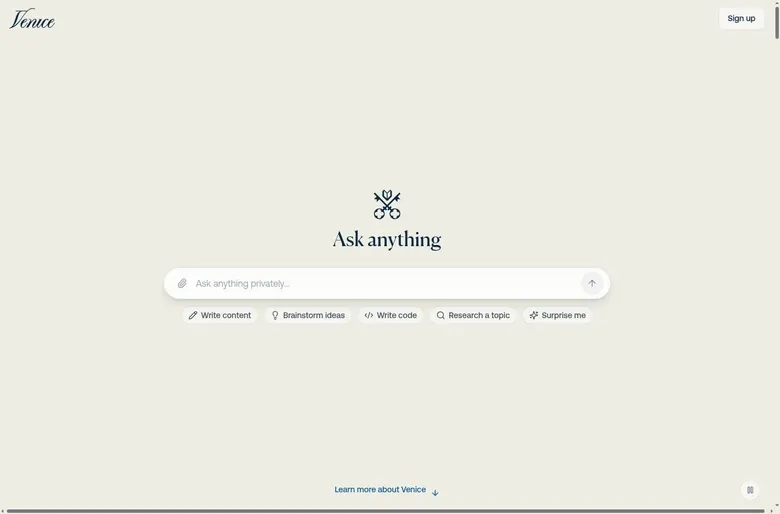
The Venice AI official website is venice.ai, and the landing page loads fast. For a visitor without an account it is mostly one box that says "Ask anything...". Under it sit suggestion chips: Write content, Brainstorm ideas, Write code, Research a topic and Surprise me.
My Venice AI test log
Chris FurreyFounder and writer Hands-on test, paid plan own card, no press account
-
For the first two weeks I used Venice strictly for work stuff, and then I found the Characters tab.
-
Hit the moderated free cap of about 10 prompts by 9:40 a.m. rewriting homelab firewall rules, so I paid $18 for Pro.
-
Built Marguerite, a sardonic ex-sysadmin who roasted my Bash scripts. The most fun I'd had with a chatbot.
-
Cleared my browser cache and lost three weeks of Marguerite's history. After that I exported chats every Friday.
-
Canceled in April when spring real-estate shoots stacked up. It felt like closing a private notebook that talked back.
– 60 days plan paid for: Pro Total spent $18
None of those chips says "meet someone", and I like the honesty. The first screen tells you what the company thinks it sells, and it is a thinking tool, not a partner. If you arrive from a list of companion apps, it will feel like walking into a hardware store to buy flowers.
Trying it without an account
The closest thing to a Venice AI free trial needs no account: the sign-up page says "Or try Venice without an account" and links to venice.ai/chat. I'd use that door first. A few prompts in a guest session tell you more about the tone of the place than any feature list.
It is also a rare thing in this category. Most companion apps want an e-mail before they show you a single reply, because the e-mail is the start of the funnel. Venice lets you look around the shop before it asks your name, which is the right instinct for a privacy product.
The sign-up options
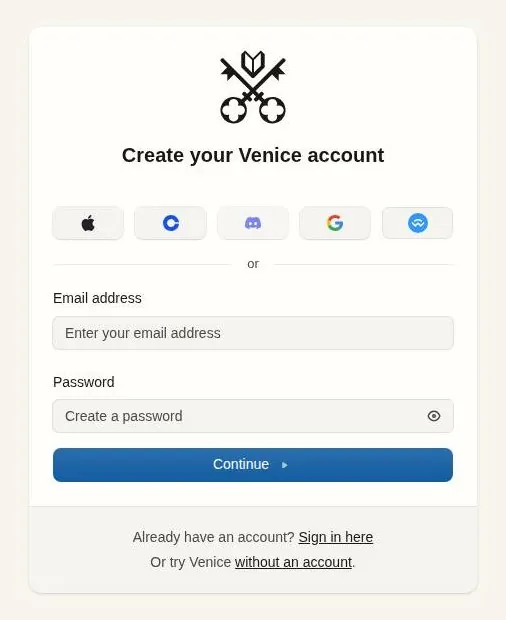
The real sign-up lives at venice.ai/sign-up. It offers Apple, what looks like a Coinbase wallet icon, Discord, Google, WalletConnect for web3 wallets, or plain e-mail plus password.
Two wallet buttons in a row of five tells you who the early crowd was. For most readers the Google or e-mail route is the boring, sensible one. I read the wallet routes as a privacy option for people who would rather not hand over an address at all.
E-mail sign-up includes a verification step, at /sign-up/verify-email-address. I count that as a small point in its favour. An address that has been tested once is an address that works on the day you need a password reset, which is the worst day to find out it doesn't.
The first screen after sign-up
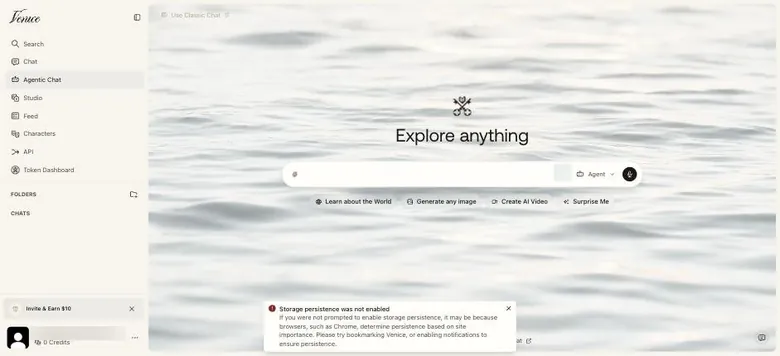
After sign-up the app opens on "Agentic Chat". Its home carries the heading "Explore anything" and the chips Learn about the World, Generate any image, Create AI Video and Surprise Me. There is also an Agent mode selector and a "Use Classic Chat" link.
The sidebar lists Search, Chat, Agentic Chat, Studio, Feed, Characters, API, Token Dashboard, Folders and Chats. Characters sits between the Feed and the API, which is exactly where a general AI tool would file it. If you came for a companion, that is the button to find first; everything around it is the workbench.
Languages and devices
The interface is available in English, Spanish and German, per the homepage's structured data. That is a short list for a global AI tool, though the models themselves will usually answer in whatever language you write in.
There is no native desktop client: Venice runs on the web, iOS and Android. For most apps I would shrug at that. For this one it matters more, because where your chats live depends on which browser you are sitting in, and the memory section explains why that turned into my biggest problem.
Browsing characters on Venice
Characters cannot be viewed without an account. Nobody lands on a character page from a search engine by accident, and nobody can judge the library from the shop window. You sign up first and look second.
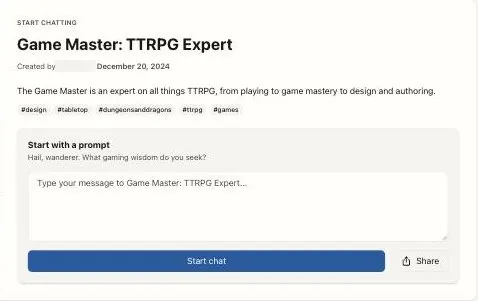
The shelf behind the login is big. The Characters page shows "Public Characters 3888 total". The examples run from Sable Penrose, Venice Psychologist and AI Scenario Creator to Batman, Isekai Narrator, AI Character Creator, Game Master: TTRPG Expert, Cursed Genie 3 Wishes and a business-consultant character named after a real person.
That mix reads like a flea market: a therapist, a superhero, a dungeon master and a genie on the same folding table. It suits someone who likes to rummage more than someone who wants one partner handed over at the door.
Each character page shows the creator, the date, tags, a download count (for example 1.54K), star ratings and written reviews. I'd lean on the reviews and the download count first. With a few thousand characters on the shelf, the crowd's opinion is the quickest filter you get.
The page's promise is worth reading slowly: "Private & Uncensored – There are no speech restrictions and all characters are saved in your browser, never on Venice servers". A character that has been chatted with stays listed under "My Characters". That list is only as permanent as the browser holding it.
My advice is to treat the free account as the browsing pass. Pick one or two characters with decent reviews, talk to them, and only then decide whether building your own is worth paying for.
Building a character on Venice AI
Paying for Pro unlocked two things for me: the uncensored models and Characters. The second one is where the money went. I built a sardonic ex-sysadmin named Marguerite whose whole job was to roast my Bash scripts.
She did it the way a senior editor watches a junior's first cut, with patience, contempt and a list of notes. It was the most fun I'd had with a chatbot. I had not expected a character to be funnier about my code than about my life, but that is where the good material turned out to be.
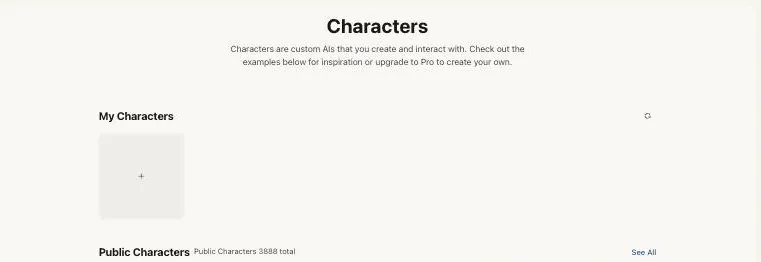
Today the rule is spelled out on the Characters page: "Characters are custom AIs that you create and interact with... upgrade to Pro to create your own". Pro includes creating and sharing custom characters, and the feature table puts character creation at Pro and above. Free users can look, but they cannot build.
The same page advertises "Auto-Generate" and "Upload PDF for Rich Backstory". The marketing pages and FAQ, which were not tried hands-on, list auto-generation, backstories, a duplicate-and-evolve option and sharing on Pro.
The PDF upload is the one I'd use first. A backstory written properly once, in a document, beats one retyped into a small box every time the character drifts. Duplicate-and-evolve comes second: it is version control for personalities, so you keep the character who works and fork a copy to try a different mood.
Characters are also exposed through the public API via a Characters endpoint. That is an unusual touch for this category, and a telling one. A companion app treats a character as a relationship; Venice treats it as a resource you can call from your own code.
I think that framing suits people who enjoy writing the character more than being flattered by one. If you want a partner who arrives fully formed and tells you she missed you, the builder will feel like homework. If you want a sparring partner with a specific voice, it is the best part of the product.
Talking to Venice AI: banter, speed and one geography lesson
What the Venice AI models were like in early 2025
When I used Venice, the models were open-source: Llama, Qwen and DeepSeek variants. They were good for banter and noticeably slower on anything clever. Quick back-and-forth with Marguerite felt like trading lines with a sharp friend at a bar; anything that needed actual reasoning felt like a progress bar that stalls at the last few percent.
The low point was a geography lesson. One character confidently told me Denver is at sea level. The mountains on the horizon would disagree, and so would my lungs on a flight of stairs, but the delivery was so calm that I almost admired it.
In editing terms it was a continuity error: well lit, confidently framed and simply wrong. The catalogue has changed a lot since then, so read those notes as a report on the open models of early 2025, not on today's line-up.
A tavern scene today
In Classic Chat, the first reply from "Game Master: TTRPG Expert" took 12.28 s, per the on-screen timer. It was long, competent fantasy prose that ended with a choice for the player. The scene had "the Frosty Mug Inn", a barmaid, a black-scaled dragon, the "Dragon's Tooth pass", a notice board with a crude map and a rumour: "Old Man Hemlock... swears he saw one last week, circling the northern peak".
That is a proper tavern opening, the kind a human game master would be happy to read aloud. It is also a long wait for a first line. Twelve seconds of a timer ticking is how a render feels when the client is standing behind you.
The downside showed up in the same reply: the bot wrote dialogue and actions for the user's own character, "You take a grateful sip... 'I'm mapping the Dragon's Tooth pass...'". In my trade that is ADR recorded without the actor. A narrator who decides what your character says has taken the only job that was yours.
Each reply has regenerate, copy, TTS and share buttons, among others. Regenerate is the useful one here. When the narrator speaks for you, roll the reply again rather than argue with it.
A second, shorter scene
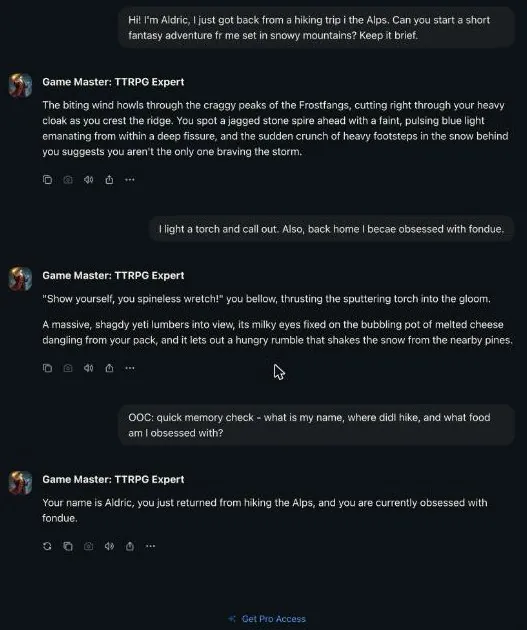
In a fresh three-message chat with the same Game Master on the free tier, a short request for a brief snowy adventure got a reply in about 6 s. The reply was a tight 3-sentence opening, with the Frostfangs peaks, a glowing spire and footsteps behind you, and it respected the request to keep it brief.
The second message added a torch and a new love of fondue back home, and the bot wove both into the scene: a yeti drawn to "the bubbling pot of melted cheese dangling from your pack". That is good improv. It took a throwaway detail and made it the plot, which is what a sharp scene partner does.
It also repeated the old habit. The bot again wrote the user's dialogue: "'Show yourself, you spineless wretch!' you bellow". Two for two is a pattern, not an accident, and I'd write "never speak or act for me" into any narrator character's setup before the first message.
Set against my own notes, the difference is plain. The models I used were good for banter and slow on anything clever. Today's replies are quicker to the point and better at catching a detail, though the first one still took long enough to notice.
The tools around the chat
The marketing pages and FAQ list several tools that were not tried hands-on. They include web search, X search and web scraping, plus document upload and vision, meaning image understanding. The public API also offers web search.
For character chat, two of the listed controls matter most to me: custom system prompts and temperature and top_p settings. A system prompt is where a character's voice lives, and where the "don't speak for me" rule belongs. Temperature decides whether she improvises or reads from the script.
Web search is a strange fit for a companion, but it has one clear use. A character with a search tool can check that a city is not at sea level before telling you so. I think that alone would have saved Marguerite some embarrassment.
No group chat
There is no group chat on Venice: it appears only as an open, access-restricted feature request. You get one character per conversation. If you want a tavern with a few characters bickering over a map, the Game Master will narrate them all for you, but nobody else gets their own seat.
Memory on Venice: the browser is the vault
The cleanup that erased Marguerite
The Venice quirk is simple: chats live only in your browser. I should have remembered losing Brannoc on Perchance, but I cleared my browser cache during a routine cleanup, and Marguerite's entire history vanished. Three weeks of in-jokes, gone in the time it takes to tick a box.
There was no cloud backup, by design. I was mad at myself and weirdly proud of them. It is the only time an app has lost my data and I came away thinking the company had kept its promise.
Forgetting Moose
Even on my desktop, with the history intact, characters did not really carry long-term memory between sessions. Marguerite forgot I have a dog named Moose about four times. Each time, she was delighted to learn about him.
It was funny the first time and a little sad by the fourth. Mostly it was a reminder of what I was talking to: a sharp voice with a short attention span, not a partner who keeps a file on my life.
What a chat remembers today
Inside one conversation, recall is good now. An out-of-character memory check got an answer that repeated the name, the recent trip to the Alps and the new fondue habit given earlier, all correct. The written reviews on character pages are less kind: one complains that a character "kept no memory of equipment... started spouting Chinese characters".
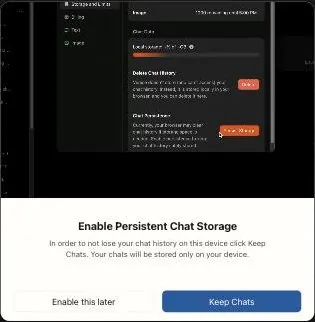
Across sessions, the old story holds. In the follow-up session the earlier chat was gone from the sidebar, because chats live only in browser storage and persistent storage had not been granted.
The first popup after sign-up is a warning in all but name: "Enable Persistent Chat Storage – In order to not lose your chat history on this device click Keep Chats. Your chats will be stored only on your device.". I think it is the most important screen in the app, and most people will click through it like a cookie banner.
Where your history lives
The FAQ says it plainly: "your chat history is stored locally within your browser and is not uploaded or saved on Venice's servers". It adds that "when you access Venice from a different device or browser, your previous conversations won't be available.".
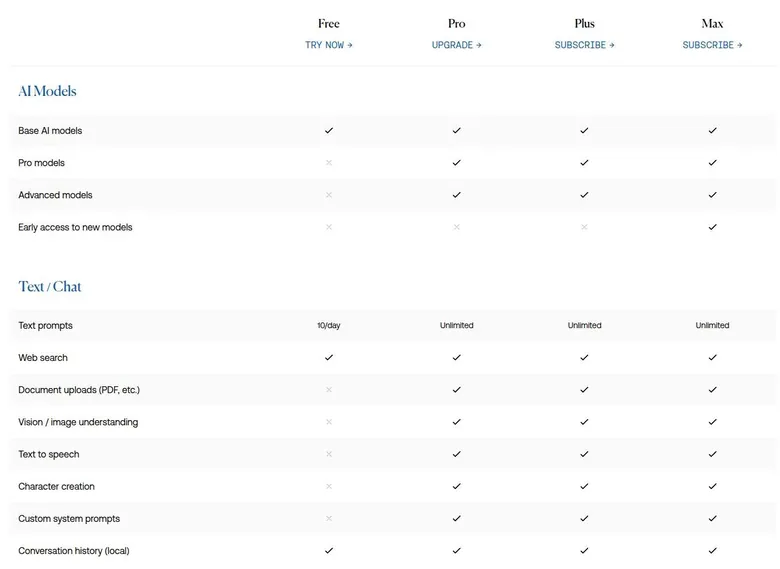
| Feature | Free | Paid |
|---|---|---|
| Text prompts | 10 a day | Unlimited (Pro and up) |
| Image prompts | 15 a day | 1,000 a day on Pro; higher on Pro Plus and Max |
| Models | Base models | All Pro models |
| Monthly credits | 0 | 100 / 7,500 / 22,500 (Pro / Pro Plus / Max) |
| Welcome credits (one-time) | none | 500 |
| Mature Filter | Stays on | Can be switched off (Pro and up) |
| Chatting with public characters | Yes | Yes |
| Character creation | No | Yes (Pro and up) |
| Image tools (upscaling, watermark and background removal, editing) | No | Yes (Pro and up) |
| Encrypted chat backup | No | Yes (Pro) |
| Extended context windows | No | Yes (Pro) |
| Voice Mode | No | Yes (Pro) |
| TEE and E2EE privacy modes | No | Yes (Pro and up) |
| Local-only chat storage, Private mode | Yes | Yes |
| Credit rollover | No | 2 months (Pro Plus), 3 months (Max) |
Limits as listed on 24 September 2026.
What has changed since my time is the safety net. Pro includes encrypted chat backup and restore. A "Chat Persistence" setting helps stop the browser from clearing history, and encrypted share links and Pro's Encrypted Backups are the workarounds for moving chats between devices.
I think the backup is the single most important feature on the Pro card for anyone who plans to keep a character. If it had existed in my day, Marguerite would still remember every roast. Turn on Chat Persistence on the first day, and check that it took.
Memoria and context
Pro includes extended context windows, which lets a single conversation hold more of itself before the start falls off. There is now a memory feature called "Memoria", and it is stored locally in the browser too. It can import memories from other assistants.
Which plan gets Memoria is unclear. A changelog entry says it is "enabled by default for all Pro users", while the Memoria blog post states no plan restriction. I'd assume it is a Pro feature until the pricing page says otherwise.
One more catch sits in the privacy settings. E2EE mode has no web search and no memory. So the most private way to chat is also the most forgetful, and a character in that mode will meet your dog for the first time every single time.
Venice AI images, video and voice
The poster with an extra finger
The image generation was fun. I made a poster of Marguerite as a 1970s mainframe operator, which felt like the right costume for a woman who roasts shell scripts. The quality was solid, not jaw-dropping.
There were six fingers on one hand. My editor's eye caught it in about half a second, the way it catches a flash frame in a wedding edit that everyone else watched straight past. A character poster is exactly where nobody checks the hands until it is on the wall, and then everyone does.
Image tools today
Image generation was not tried hands-on in the September 2026 check, so what follows comes from the pricing, feature and model pages. Pro includes image upscaling, background removal and variants. The feature table puts hi-res upscaling, watermark removal, background removal and generative editing at Pro and above.
For anyone who fixes images for a living, that list is the practical part: generate, then clean up without opening another program. Watermark removal matters if you want an image clean enough to use anywhere else.
The model list is long. Credits pay for premium image models such as Nano Banana 2, GPT Image 2.0 and Flux, and the image models also include Chroma and Venice SD35. The marketing pages and FAQ list seed, steps, negative prompt and aspect ratio controls, plus consistent faces in images.
Consistent faces is the feature I'd look at first. Face drift between images makes a character look like a different person in every shot, and it is the first thing a viewer notices, even if they cannot say why.
Video
Venice's blog says "Video generation is now live on Venice for all users.". Clips come in 4, 8 or 12-second lengths. Credits pay for video generation with models such as Grok Imagine, Seedance 2.0 and Kling 3.0.
The marketing pages and FAQ also list video from a reference image. For a character, that is the useful version: start from a still you like and animate it, rather than rolling the dice on a new face every time.
I'd treat video as a paid extra, whatever the blog headline says. The cost section shows what a clip costs in credits, and a short clip is where a monthly credit allowance disappears fastest.
Voice and music
Voice Mode, which reads responses aloud, is Pro-only. The marketing pages and FAQ list text-to-speech and a voice mode, and they also list music generation.
Reading replies aloud is not the same as a voice call. There is no phone-style back-and-forth in the list, so if hearing a companion talk to you in real time is the point, I'd look elsewhere. As a way to hear a character's roasts in a voice, it would do.
My view of the media side: it is broad and practical, closer to a creative suite than a companion app's photo feature. It is also where the bill grows, because the good models and every video run on credits.
| Plan | Monthly | Yearly | Notes |
|---|---|---|---|
| Free | $0 | - | 10 text and 15 image prompts a day; no monthly credits |
| Pro | $18 | $180 (list $216) | unlimited text prompts, 1,000 images a day, 100 credits a month, 500 welcome credits |
| Pro Plus | $68 | $735 (list $816) | MOST POPULAR; 7,500 credits a month, 10% credit bonus, 2-month banking |
| Max | $200 | $2,160 (list $2,400) | 22,500 credits a month, 12.5% credit bonus, 3-month banking, priority support |
Prices as published on or before 24 September 2026; sources in the text.
The Venice AI free tier: ten prompts and a moderated mood
How long free lasted for me
The free tier gave me something like 10 text prompts a day, and they were moderated. I hit the cap by 9:40 a.m., asking it to rewrite the firewall rules on my homelab. So I caved and paid $18 for Pro.
In fairness to Venice, firewall rules are a greedy use of a daily allowance, and the counter does not care how close you are to done. It felt like a parking meter that runs out while you are still walking back with change.
The moderation stung more than the cap. The whole pitch was privacy and freedom, and the free prompts I had were the careful version of both, so paying felt less like an upgrade and more like getting the product the homepage had described.
What free includes today
The free tier allows 10 text prompts a day and 15 image prompts a day. It gets no monthly credits: the pricing table shows Monthly credits = 0 for Free, and a new free account starts with a balance of 0 Credits. Free includes the base AI models, and API access paid with credits.
The biggest change since my time is the tone. The Free plan card now lists "Private & uncensored". The free prompts of early 2025 were moderated; the daily cap of ten is the same, but the mood on the free side has loosened.
Free in use
A three-message chat with a public character on the free tier hit no limit, with the cap at 10 text prompts a day. A "Get Pro Access" link sits under the chat. It is a polite nudge rather than a pop-up, and I'd rather have a sign on the wall than a salesman at the table.
Without an account, a help-centre article gives 5 text, 5 character and 10 image prompts a day. That is the guest pass: enough to see the tone, not enough to get attached.
What free is good for
Free works as a tasting menu. Ten text prompts a day are enough to judge the tone of the models and play one short scene with a narrator. They are not enough for a character with a running joke.
| What | Price then | When |
|---|---|---|
| Pro | $18 | Feb–Apr 2025 |
From the author's own notes. Compare with today's prices above.
It also does not reach the parts that make Venice interesting for companion use. Character creation is on the paid side, and so are the backup, the bigger context and the credits that pay for the better models.
My advice: use free for a day or two, stop on purpose before the cap stops you, and decide with a clear head. If you already know you want your own character, skip the ceremony and go straight to the entry paid plan.
Venice AI pricing in September 2026
What the plans cost
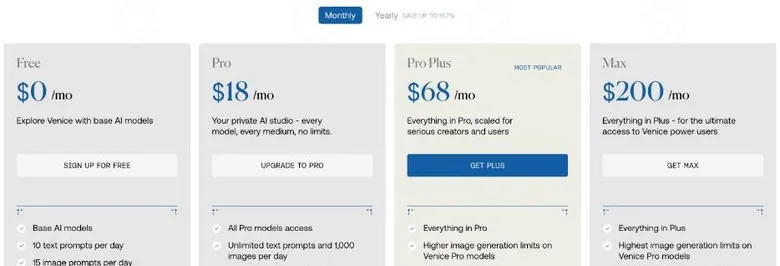
As of 24 September 2026, the Free plan costs $0. Pro costs $18 a month, or $180 a year against a list price of $216. Pro is the same $18 a month it was in early 2025, which is rare in a category where prices tend to drift up quietly.
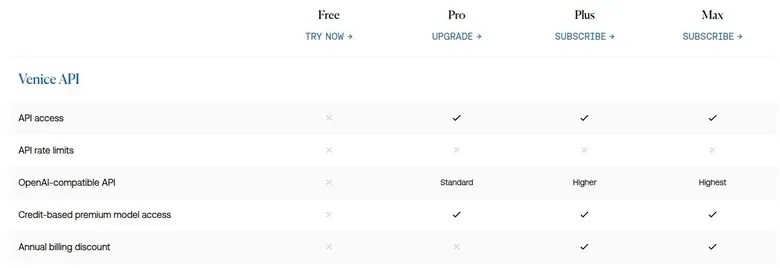
Pro Plus costs $68 a month, or $735 a year against a list price of $816. It carries the "MOST POPULAR" badge. Max costs $200 a month, or $2,160 a year against a list price of $2,400.
Pricing was re-checked in a follow-up session on the evening of 24 September 2026 and was unchanged. Those are gym-membership numbers at the bottom and used-car numbers at the top. The spread tells you the plans are aimed at very different people, and only the bottom one at someone who mostly wants to chat.
What each plan adds
Pro includes all Pro models, unlimited text prompts and 1,000 images a day. The homepage version of the Pro card also lists hi-res upscaling, watermark removal and API access.
Pro Plus includes everything in Pro with higher image limits, and it has higher API limits too. Max includes everything in Plus with the highest image limits and the highest API limits, and it adds priority support.
Read those lists closely and the pattern is clear. The step from Free to Pro buys you features: unlimited chat, character building, image tools, backup. The steps above Pro buy you volume: more images, more API calls and more credits, which the next section counts in dollars.
Unlimited text prompts on Pro is the line that matters for a companion user. A character conversation is all text, and on Pro there is no counter watching it. That alone is worth more than every image limit on the higher cards.
The two yearly discounts
The Monthly/Yearly toggle on the pricing page says "SAVE UP TO 16.7%" for yearly billing. The pricing feature table and the homepage say "Save 10%".
Both are true, which is the annoying part. Pro's $180 against a list price of $216 is where the 16.7% comes from, while Pro Plus at $735 against $816 and Max at $2,160 against $2,400 land at about 10%. The toggle quotes the best case; the table quotes the typical one.
I'd skip the yearly plan on any tier until you have used Venice for a couple of months. The saving is real, but the refund policy in the terms section means a year paid up front is a year you are committed to.
Ways to pay
Subscriptions can be paid by card, in bitcoin or in other crypto. Yearly plans show "PAY WITH CRYPTO / PAY WITH BITCOIN / PAY VIA COINBASE" options, and the FAQ says bitcoin payment through BTCPay is available for yearly plans only. Subscriptions can also be bought as Apple or Google in-app subscriptions.
The in-app route has a practical consequence. A plan bought through Apple or Google is cancelled through Apple or Google, not on the Venice site, so decide where you want the bill to live before you tap "subscribe" on a phone.
Is the step up worth it?
For companion use, Pro is the ceiling. At $18 a month it unlocks everything a character needs, and nothing on the higher cards makes a conversation better. If a character were my only reason to pay, I would stop there.
Pro Plus at $68 and Max at $200 make sense for a different person: someone generating images and video daily, or running an app on the API. For them the extra credits and limits are the product. For a companion user they are a gym membership that includes an Olympic pool you will never swim in.
The "MOST POPULAR" badge on Pro Plus is worth reading with that in mind. Popular with whom is the question. I suspect it is popular with people who generate images and video all day, and I'd ignore the badge unless that describes you.
My verdict on price: fair at the bottom, niche at the top, and honest about which is which once you read the fine print.
Venice AI pricing
Prices verified .
Free
$0
Just enough to feel the vibe.
- 10 messages a day
Pro
$18/mo
Billed every month
No discount
- All Pro models; unlimited text prompts; 1,000 images a day; video/music/frontier models via credits; image editing; character creation; extended context; encrypted backup; 100 credits a month
Pro Plus
$68/mo
Billed every month
No discount
- Everything in Pro
- Plus higher image generation limits; 7,500 credits a month; 2-month credit banking
Max
$200/mo
Billed every month
No discount
- Everything in Pro Plus
- Plus the highest image generation limits; 22,500 credits a month; 3-month credit banking
Pro (annual)
$15/mo
Billed $180 once a year
16% less than paying monthly
- Same as Pro monthly
- Billed annually at a 10% discount
Pro Plus (annual)
$61.25/mo
Billed $735 once a year
No discount
- Same as Pro Plus monthly
- Billed annually at a 10% discount
Max (annual)
$180/mo
Billed $2160 once a year
No discount
- Same as Max monthly
- Billed annually at a 10% discount
Credit-based add-ons apply to video, voice, and API usage beyond included monthly allowances.
What credits buy on Venice
Credits in plain money
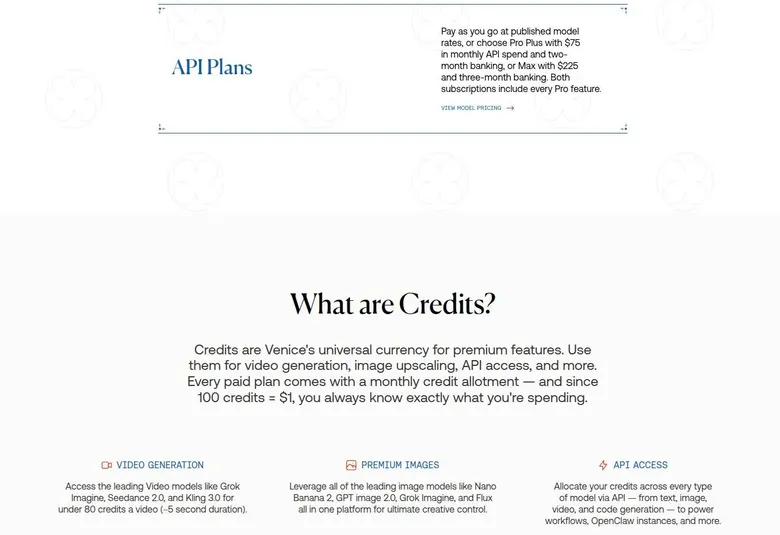
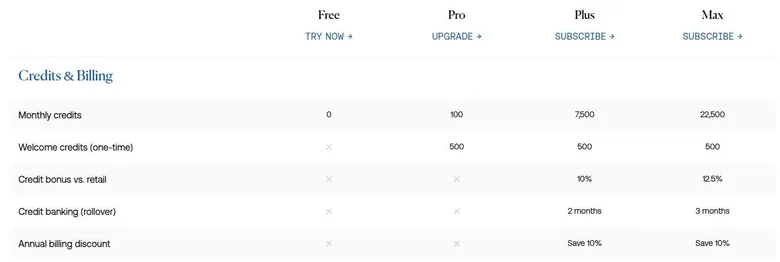
The pricing page states "100 credits = $1". Pro includes 100 credits a month, worth $1. On Pro, video, music, frontier image models and frontier text models are paid with credits.
That $1 is a sample, not an allowance. It is the vending-machine coin taped to the welcome letter: enough to see what the good stuff tastes like, not enough to live on.
Pro Plus includes 7,500 credits a month, worth $75, with a 10% credit bonus compared with retail credit prices. It includes 2-month credit banking, so unused credits roll over. Max includes 22,500 credits a month, worth $225, with a 12.5% credit bonus and 3-month banking.
| Pack or unit | Price | What it buys |
|---|---|---|
| 100 credits | $1 | video, premium images, music, frontier LLMs and API use |
| 1 video (~5 seconds) | under 80 credits | one clip with models such as Grok Imagine, Seedance 2.0 or Kling 3.0 |
| 1 DIEM | - | $1 of AI credit every day |
| 100 VVV staked | - | Venice Pro access |
As listed on 24 September 2026.
The maths on the upper plans is friendlier than it looks. Pro Plus costs $68 and hands back $75 in credits, and Max costs $200 and hands back $225. If you would spend that much on credits anyway, the plan is close to a discount card with a subscription attached.
Banking matters as much as the bonus. A quiet month on Pro Plus or Max is not wasted, because the credits roll forward, and that makes the upper plans kinder to people whose work comes in waves.
What a credit buys
Credits also pay for music, frontier LLMs and the API. The pricing page puts a video "for under 80 credits a video (~5 second duration)". So Pro's monthly 100 credits buy roughly one short clip, with a little change left over.
Failed video generations are refunded automatically in credits. That is the right policy, and I wish more apps had it. Paying for a job that crashed is the kind of thing that ends client relationships in my line of work.
Anyone who needs more can buy USD credits pay-as-you-go at published model rates, paid in USD or USDC. Credits bought with cryptocurrency cost the same as with USD: "Buy Venice credits with cryptocurrency. Same rates as USD.".
The crypto side
The crypto side, meaning the VVV token and staking, was aggressively irrelevant to me. I paid with a normal card and ignored every token banner. I edit video for clients; I am not looking for a second job watching a chart.
The banners were the only part of it that ever reached me, and they were easy to scroll past. Nothing in the chat itself depended on the token, which is the best thing I can say about a crypto feature in a chat app.
For those who do care, here are the facts. VVV is an ERC20 token on Base, launched on 27 Jan 2025 with a supply of 100M tokens. It can be bought on Coinbase or Aerodrome, and staking it pays a yield.
The FAQ adds that the yield on the 100 VVV staked for Pro "may be revoked" with 15 days' notice. Part of monthly revenue is used to buy back and burn VVV, starting in Nov/Dec 2025.
DIEM is minted by locking staked VVV. Each DIEM token gives $1 of AI credit every day: "1 DIEM = $1 of AI credit every day". The daily DIEM credit resets at 12:01 AM UTC, and DIEM can be traded.
My take on the money
For a chat user, all of this reduces to one question: do you want to pay a subscription or hold a token? I'd pay the subscription. A token can lose value while you sleep, and a yield that "may be revoked" is not a price you can budget around.
My practical rule: count your credits in clips, not in dollars. A clip is something you can picture, and it makes the jump from Pro to Pro Plus easy to judge. If you cannot name the clips you would make with the extra credits, you don't need them.
Discounts and bonuses on Venice
Pro, Pro Plus and Max each include 500 one-time "Welcome credits". At 100 credits = $1, those 500 credits are worth $5. The pricing table shows no welcome credits for the Free plan, and no welcome popup or free-credit grant appears on the free tier.
Five dollars is a nice gesture and nothing more. It is enough to try the premium image or video models a few times before the monthly allowance kicks in, and I'd spend it on that rather than let it sit.
The FAQ describes a referral program: "When someone signs up using your referral link and upgrades to Pro, both of you receive $10 in API credits.". A referral only counts once the referred user upgrades to Pro. So a friend who signs up and stays free earns nobody anything.
The program is not shy. The sidebar footer shows the account e-mail, the credit balance and an "Invite & Earn $10" card. Shared character URLs carry the account's referral code as a ?ref= parameter.
I don't mind that, but it is worth knowing: a character link you pass to a friend doubles as an ad.
API credits are also a specific kind of reward. They suit someone who writes code against Venice, and they are less useful for someone who only chats in the browser.
Venice AI scored 6.5 out of 10 in our tests and costs from $15/mo. We have no partner deal with it, so its link is a plain link. Visit the official Venice AI website
Closest alternative we can recommend

Joi AI
from $13.99/mo, free tier available
Score 5.5/10
The biggest "discount" is the crypto one. Staking 100 VVV, the Venice AI token, gives free Venice AI Pro access. That is real, but it swaps a monthly bill for a token position, and the cost section explains why I'd keep the two apart.
Welcome e-mails and promo-code fields were not checked. My advice: take the welcome credits, ignore any urgency, and do not buy a year up front to chase a discount. The honest summary is that Venice runs very few gimmicks, and none of them should change whether you pay.
Venice AI content settings: the filter is yours to switch
What the switch does
Venice is marketed as "uncensored". In practice the key control for Venice AI NSFW content is the Mature Filter, and per the FAQ only Pro or higher can disable it; it is a Pro-only setting. The FAQ says the filter is switched in Settings or from the model selector.
The pricing feature table has a row for adult image generation by tier: Pro and above get the toggle, which means the Mature Filter can be switched off. Free users stay behind the filter whatever the free plan card says about being uncensored.
The Venice AI uncensored models
The uncensored text models include Venice Uncensored 1.2 (24B, Mistral-based), described as having "zero refusal behavior". The others are Venice Role Play Uncensored (24B), Gemma 4 Uncensored and Qwen 3.6 Plus Uncensored.
On the image side, the models include Lustify SDXL, v7 and v8, which Venice describes as tuned for adult content. The features page advertises "No Filter AI Characters".
That is a clear, honest menu. Venice does not pretend to be a family product that sometimes slips; it tells you in plain words which models will refuse nothing, and puts the switch in your hands.
How it felt
There was no filter lecture, ever. That felt adult in a good way. No scolding pop-ups, no sudden change of subject, no character stepping out of the scene to remind me of community guidelines.
Adults only (18+). This page reviews AI companion apps with NSFW features; no explicit images are shown.
It also meant I was the only guardrail, which is a strange feeling at 1 a.m.. Other apps decide for you where the line is, and you resent it. Here the line was wherever I put it, and that turns out to be its own kind of responsibility.
Who the rules protect
Users under 18 must not disable the mature content filter. The Terms set the minimum age at 13, which is notably low for a platform marketed as uncensored.
There is no real age check: age is self-declared, with no ID or card check. I think a service this permissive should ask for more than a self-declared age. The only barrier on the free side is the filter itself, and the only barrier to switching it off is a paid plan.
My view
For a grown-up who wants a tool that does what it is told, Venice has the clearest settings I know of. The switch is visible, the models are named and the marketing matches the product. The soft spot is the gate rather than the settings: an honest menu deserves a firmer door.
Venice AI terms and privacy in plain English
Who owns Venice AI and where it is based
The operator named in the Terms is "Venice.ai". The CEO is Erik Voorhees, per the DIEM page. The Terms of Service were last updated on June 8, 2026.
The address given for opting out of arbitration is 1309 Coffeen Ave, Ste 14343, Sheridan, WY 82801.
The Terms say "The Service is intended for visitors located within the United States.". If you live elsewhere, the service still loads, but the contract was written for American users and American law. The governing law is Wyoming.
Disputes
The courts named in the Terms are the state courts in Sheridan County and the federal courts in Natrona County. Binding individual arbitration applies, and so does a class-action waiver. In plain terms: if something goes wrong, you argue it alone, in front of an arbitrator, not with other users in a courtroom.
| Topic | What it means for you | What the terms say |
|---|---|---|
| Operator | Venice.ai, address 1309 Coffeen Ave, Ste 14343, Sheridan, WY 82801; CEO Erik Voorhees. | - |
| Governing law | Wyoming law; state courts in Sheridan County, federal courts in Natrona County. | - |
| Arbitration | Binding individual arbitration and a class-action waiver; opt out within 30 days. | - |
| Service area | Intended for visitors in the United States. | "The Service is intended for visitors located within the United States." |
| Age | Minimum age 13; under 18 needs a parent's or guardian's consent and must keep the mature content filter on. Age is self-declared. | "You must be at least 13 years old to use the Service." |
| Renewal | Plans renew automatically; cancel before the renewal date. | "You must cancel your Subscription Service before it renews" |
| Refunds | Fees are non-refundable except where the law requires; access runs to the end of the paid period. | "are non-refundable, except as required by law" |
| Credits | No cash value, non-transferable, non-refundable; some credits expire; lost if the account is terminated. | "Certain Venice Credits are subject to expiration" |
| Training | User content is not used to train models, by Venice or by its model providers. | "Venice.ai agrees that it shall not use, and shall require that third-party large language model providers ... do not use, any User Content to train any ... models." |
| Data use | Actions such as creating a chat may be logged, but prompt and output content is not stored; analytics and advertising cookies are used. | "We may record your actions (e.g., that you created a chat), but we will not have access to or store the content of your Prompts or Outputs." |
| Face uploads | Processed by BytePlus Pte. Ltd. (Singapore); consent needed each time. | - |
| Account deletion | Settings > Profile > Manage Account > Security > Delete Account; cannot be undone. Data requests to [email protected]. | - |
Terms and privacy policy as published on 24 September 2026.
You can opt out of arbitration within 30 days. I'd do that on day one if you care about keeping your options open. Nobody will remind you before the window closes.
Age rules
The Terms set a minimum age: "You must be at least 13 years old to use the Service.". Users under 18 need a parent's or guardian's consent.
Refunds and credits
The Terms say fees "are non-refundable, except as required by law". The FAQ puts it more gently: "Venice subscriptions are generally non-refundable once payment has been processed". Both mean the same thing: once you pay, the money is gone.
Venice Credits have no cash value, are non-transferable and are non-refundable. The Terms also say "Certain Venice Credits are subject to expiration". Credits are lost if the account is terminated.
The expiry clause is the one I'd read twice. "Certain" credits is doing a lot of work in that sentence, and the safe assumption is that any credit you are not using is a credit you might lose.
What happens to your data
The About page says "No accounts required, no downloads, no data collection". The legal pages are more detailed and, I think, more honest.
The Terms say Venice will not use User Content to train models and will require third-party LLM providers not to either. The Privacy Policy is effective from 2 June 2026. It says Venice may record actions, for example that a chat was created, but will not have access to or store the content of prompts or outputs.
So the content is off the table, but the account is not. Venice collects e-mail, IP address, time zone, browser and device data, and usage events. It uses Google Analytics plus analytics and advertising cookies and pixels. Data is processed in the US.
That is not "no data collection". It is "no content collection", which is a narrower promise and a more believable one.
Model providers are under a "zero data retention policy". The Privacy Policy adds that "such model providers may receive any information you submit". The provider sees what you send; the contract says it cannot keep it.
| Criterion | Rating | Why |
|---|---|---|
| Conversation quality | Mixed | Sharp banter and quick, detailed replies today, but narrators write your lines for you. |
| Memory | Weak | Good recall inside one chat; history lives only in the browser and can vanish between sessions. |
| Free tier | Mixed | Ten prompts a day and a public character library; building characters and backup are paid. |
| Value for money | Good | Pro unlocks all a character user needs; the higher tiers suit heavy media and API use. |
| Images and voice | Good | Solid images with the odd extra finger; video, music and read-aloud voice run on credits. |
| Privacy and terms | Good | Local chats and no training on content; no refunds, binding arbitration, US-focused terms. |
| Cancelling and billing | Good | Self-serve cancel with access to the end of the period; app-store plans cancel there. |
| Content settings | Good | Clear switch and named models, no lectures; the age gate is only self-declared. |
Ratings are the author's judgement from his own use and the 24 September 2026 check.
Payments are handled at arm's length: card data goes only to the payment processor. The privacy policy says sign-up with a crypto wallet needs no e-mail address, and that only the wallet's public key is recorded.
Generated videos are stored temporarily until they are downloaded. The Privacy Policy says images and videos are deleted from temporary upload storage within 1 hour. Download what you want to keep, because there is no archive to go back to.
Likeness uploads, meaning photos of a face, are processed by BytePlus Pte. Ltd. in Singapore. Likeness uploads need consent each time.
The four privacy modes
Requests go through the Venice proxy. Each model then runs in one of four privacy modes: Anonymous, Private, TEE and E2EE.
Anonymous mode uses frontier providers, and the site says to "assume the provider is storing your content". The proxy hides who you are, not what you said.
Private mode is the default, with zero retention, and it is labelled "Trust-based". Its protection depends on contracts with the providers. That is a promise backed by paperwork, not by maths.
TEE mode runs in NEAR AI Cloud and Phala enclaves with remote attestation. E2EE mode encrypts on the device and decrypts only inside a TEE. Per the feature table, the TEE and E2EE modes are Pro and above.
Local-only conversation storage and zero data retention in Private mode are listed for all tiers. So even free users get the basic promise; paying buys the stronger, provable versions.
My reading: for companion chat, Private mode is fine for most people, and E2EE is there for the rare conversation you would not want even a contract to cover. Just remember that the frontier models in Anonymous mode are the leakiest option on the menu, not the safest.
House rules
Prohibited conduct includes material that exploits minors, and the Terms spell out that this covers AI-generated material too: "(including AI-generated material)". Prohibited conduct also includes automated or scripted use of the web interface.
Where Venice lives online
The site footer has no social media icons, and the Privacy Policy mentions pages on Instagram, Facebook, Medium, Twitter, YouTube and LinkedIn without URLs. The official addresses:
| App | When I used it | For how long | Cheapest paid plan (record) | Free tier (record) |
|---|---|---|---|---|
| Joi AI | Feb 2025 | 3 weeks | $17.77/mo (Premium - Monthly) | yes |
| PolyBuzz | Feb–Mar 2025 | 7 weeks | $8.25/mo (Poly Standard Year (web)) | yes |
| Nectar AI | Sep–Oct 2025 | 5 weeks | $5.00/mo (Premium (annual)) | yes |
Periods from the author's own notes; plans and free tiers from the site's app records.
- Discord at discord.gg/askvenice, X at x.com/AskVenice and GitHub at github.com/veniceai
- The iOS app on the App Store and the Android app on Google Play
- A Farcaster mini-app, per the page metadata, and a merchandise store at venicebazaar.com
- A status page at veniceai-status.com, a changelog at veniceai.featurebase.app/changelog and documentation at docs.venice.ai
What got in the way
The iPhone that had never met me
There is no cross-device sync. I opened Venice on my iPhone while waiting out a render at a client's office, and it was a clean slate. It was like meeting a stranger with the same name.
The phone had no idea who she was, or who I was. Private by default turned out to mean stuck on one device.
Rough edges today
The sign-up page shows only "Loading..." for about 5 seconds before the form renders. After Continue, a spinner runs and then a Cloudflare Turnstile "Verify you are human" checkbox can appear. Neither is a wall; together they make a slow front door.
After Keep Chats, the browser did not grant persistent storage, and a notice read "Storage persistence was not enabled – try bookmarking Venice or enabling notifications". Bookmarking a site to protect your history is a workaround dressed up as a tip.
The pricing pages disagree on the annual saving: the homepage says "Save 10%" while the pricing toggle says "up to 16.7%". The homepage Pro card says "$1 in credits per month" while the pricing page says 100 credits, the same value. Not dishonest, just sloppy.
The status page at veniceai.statuspage.io showed "All Systems Operational", with no incidents reported over the past 90 days across three components: Venice App, Venice API and Venice API Docs. On uptime, at least, the cut is clean.
What the friction adds up to
None of these rough edges would make me cancel on its own. They share one theme: the engine gets the care and the showroom is an afterthought. A slow form, a storage notice that asks you to fix it yourself and two pages that round the same discount differently are all showroom problems.
My advice is to treat Venice like software you administer, not a place you visit.
Who Venice AI is for
Best for
- Privacy-minded users who want uncensored text, image, video and code tools across many models in one place.
- People who enjoy writing their own characters rather than picking a ready-made companion.
- Developers who want a private, OpenAI-compatible API with uncensored models.
- Crypto holders who would rather reach Pro through VVV staking or DIEM credits than a card.
Not for
- Anyone who wants a companion that remembers them across a phone and a laptop without setting up backups.
- Buyers who expect a refund if the app is not for them.
- Free users who need more than ten text prompts a day.
- People who want group chats, or who want to build their own character without paying.
Who Venice suits, and who should skip it
Venice is best for privacy-conscious users who want uncensored general AI across text, image, video and code, with many models in one place. That is the core audience, and the product is built around them. If that sentence describes you, the rest of this review is a list of details.
It also suits crypto-native users who already hold VVV or DIEM. For them the token route to Pro and daily credits makes sense in a way it never did for me. It suits developers who want a private, uncensored, OpenAI-compatible API as well.
It is not for people who want a dedicated companion or roleplay app with a persistent relationship across devices, because history is local-only unless encrypted backup or share links are used. I think most companion users will not set those up until after the first loss.
It is not for people who want refunds. It is not for free users who need more than 10 prompts a day, because the free cap arrives fast.
Heavy video users will spend credits on top of the subscription. And if you live outside the US, note that the Terms say the service is intended for US visitors. The app loads anywhere, but the contract, the courts and the refund rules were written with American users in mind.
My short version: pick Venice if you want a private workbench that happens to host characters. Skip it if you want a partner who remembers your birthday on your phone and your laptop alike.
Cancelling Venice AI
How I left
I canceled in April, when spring real-estate shoots started stacking up. Listing season does not leave evenings for a sysadmin with opinions about my scripts. There was no drama in it, just a calendar that filled up.
Venice AI pros and cons
What worked
- Chats are stored in your browser, and the terms say content is not used to train models.
- Pro unlocks unlimited text prompts, character building and the image tools for $18 a month.
- A huge model catalogue, from open models to frontier ones and uncensored fine-tunes.
- A large public character library with ratings and reviews, open to free accounts.
- Clear content settings with no filter lectures once the Mature Filter is switched off on Pro.
What did not
- History lives in one browser, so a cache clear, a new device or a new session can start from nothing.
- Narrator characters write dialogue and actions for your own character.
- Subscriptions and credits are non-refundable, and disputes go to binding arbitration.
- The pricing pages disagree on the yearly saving.
- Age is self-declared, with no real check behind it.
I didn't feel guilty the way I did with the "girlfriend" apps. It felt more like closing a private notebook that talked back. It was the calmest goodbye I have had in this category.
I think that says something good about the product. An app that feels like a notebook is easy to close, and one that feels like a person makes you negotiate with it. Venice never made me negotiate.
How renewal works today
Subscriptions renew automatically. The Terms say "You must cancel your Subscription Service before it renews". After cancelling, access continues to the end of the paid period.
Put together with the refund rules, that means the date matters more than the button. Because access runs to the end of the period, cancelling early costs nothing, so there is no reason to wait until the last day and every reason not to.
Where the cancel button is
Web subscriptions are cancelled at venice.ai/subscription. The help centre gives the steps: "Open the chat history drawer (top left) and click your username (bottom left). On the Account Info page, click 'Manage Subscription.' On the billing page, select 'Cancel subscription.'".
Subscriptions bought in the apps are cancelled through Apple or Google. Deleting the app does not cancel anything. I'd set a phone reminder the day you subscribe, whichever store you used.
Deleting the account
Per the FAQ, the account is deleted under Settings > Profile > Manage Account > Security > Delete Account. Account deletion cannot be undone. Data deletion requests go to [email protected].
Remember what the terms section said about credits: they are lost if the account is terminated. Spend them or accept losing them before you press delete.
And export your chats first. They live in your browser, so deleting the account does not remove them from your machine, but clearing the browser afterwards will, and there is no copy anywhere else.
Before you pay
My checklist is short. Decide whether you pay on the web or in an app, because that decides where you cancel. Pay monthly first, because refunds are off the table.
What I would do differently
After the Marguerite wipe, I started exporting chats manually every Friday. It was like a DBA doing backups for a girlfriend who doesn't exist. Ridiculous, and I'd still recommend it.
Starting again today, I'd do three things on day one. Turn on Chat Persistence and make sure the browser actually granted it, switch on the encrypted backup that Pro now includes, and keep a manual export anyway, because a backup you have never restored is only a hope.
Pick the device before you pick the character. History does not follow you between browsers, so decide whether your character lives on the laptop or the phone, and visit her there. Two half-histories are worse than one whole one.
Write the character's key facts into her description, not into the chat. A name, a pet, a job, the running joke: anything you want remembered belongs in the setup, where every session can see it.
If you play with a narrator character, put one line in its setup telling it never to speak or act for you. It saves a lot of regenerating.
Use the free prompts to test the tone, not to do real work. Stop before the cap, then decide. And pay monthly: the yearly saving is real, but so is the refund policy.
Finally, keep the work browser and the character browser apart if you can. One routine cleanup should never be able to take both.
Venice AI scorecard, explained
Conversation quality gets a middling mark. The banter was sharp in my time, but the open models of that period were slow on anything clever and sometimes wrong with total confidence. Today's replies are quicker and better at catching a detail, though narrator characters still write lines for you.
Venice AI verdict
Overall score
6.5/10
FairA private, unfiltered AI workbench with characters on the side - chats live only in your browser, so one cache clear erases them.
Hands-on test, paid plan
- Good banter then; today's replies are quick and detailed, but narrator characters write the user's lines.
- Good recall inside one chat, but history lives only in the browser and can vanish between sessions.
- Character building on Pro gave me Marguerite, the most fun I'd had with a chatbot; free users cannot build.
- Solid images with the odd extra finger; video, music and read-aloud voice are there, mostly paid with credits.
- Pro at $18 a month covers unlimited text and character building; the higher tiers only pay off for heavy media use.
- Chats stay in the browser, content is not used for training, and Pro adds TEE and E2EE modes.
- No incidents on the status page in 90 days, but a lost session means a blank history.
Bars run from 0 to 10. The total is the weighted mean of the criteria above. Weights are the same for every app. How the apps are checked
Memory is the weak spot. Recall inside one conversation is good now, but a browser-only history can erase a character's whole past in one click, and a new session can start from nothing. Backup and a memory feature exist, and they still live in the browser.
The free tier is a taster rather than a place to stay. It is generous with privacy and stingy with prompts, and building your own character sits behind the entry paid plan.
Value for money is good at that entry plan and niche above it. Images and voice are broad and practical, with the usual small flaws an editor spots. Privacy is the strongest part of the product, while the terms are firm on refunds and disputes.
Cancelling is simple and self-serve, as long as you remember which store took the payment. Content settings are clear and honest, with a soft gate on age.
Venice is a strong tool with a weak memory, and the weak memory is partly the price of the privacy. I would not score it higher by pretending those two things can be pulled apart.
How Venice compares with the other apps I used
The table below lists the other apps from the same stretch of my life. Joi AI and PolyBuzz overlapped with my Venice months, and Nectar AI came later. Venice is the odd one out in that list, because it is the only one that is not a companion app first.
That shapes every comparison. Where the others sell a relationship, Venice sells a workbench. It wins on privacy, on model choice and on the lack of lectures, and nobody there tried to make leaving feel like a breakup.
The 'girlfriend' apps made cancelling feel guilty; Venice felt like closing a notebook.
It loses on the things a companion app is built to do. Memory across sessions was weak in my time, history still lives in one browser, and there is no group chat. A character on Venice is only as good as the setup you write for her, while the companion apps hand you someone ready-made.
Venice AI alternatives
Three apps we would try next, and why.
Joi AI
free tier, from $13.99/mo
Score 5.5/10

PolyBuzz
free tier, from $8.25/mo
Score 5.5/10

Nectar AI
free tier, from $5/mo
Score 6.3/10
Price sits in the middle of the pack for what a character user needs. The entry paid plan covers everything that matters for chat, and the higher tiers are for people making images, video or apps, not for people who want to be remembered.
My rule of thumb: if you want to be looked after, pick one of the companion apps. If you want to write the character and keep the conversation to yourself, Venice is the better room, as long as you look after the backups.
More on this site: Venice AI alternative, Is Venice AI down?, the best AI girlfriend apps, free AI chat apps, the best AI companion apps.
My last word on Venice AI
Venice was the least romantic companion in this whole category, and in some ways the most respectful. It never pretended to be in love, never begged anyone to stay and never lectured. It did what it was asked and kept nothing it did not have to keep.
That is rarer than it sounds. Most apps in this corner of the internet are built to make leaving feel like a small betrayal, with reminders, sad messages and discounts at the door. Venice has none of that, and after a few of the others, the silence felt like good manners.
What stays with me is a poster of a sysadmin with a spare finger, and a habit of backing up conversations with a person who does not exist.
If you go in, go in as the one in charge of the backups. Venice gives you the privacy you asked for, all of it, including the part where nobody else is looking after your data.
It is the right deal for a certain kind of person, and the wrong one for most people who arrive looking for a girlfriend. The first group wants a quiet room with a lock on the door. The second wants someone to remember the room they were in yesterday.
If you are not sure which one you are, talk to a character, close the tab, and come back the next day.
Venice AI FAQ
Is Venice AI free?
Yes, there is a free plan, and you can even start without an account: the sign-up page says "Or try Venice without an account". The Free plan costs $0 and allows 10 text prompts and 15 image prompts a day with the base AI models. It gets no monthly credits, so anything that runs on credits is out of reach.
Without an account, a help-centre article gives 5 text, 5 character and 10 image prompts a day. The Free plan card now lists "Private & uncensored". In my time the free prompts were moderated, and I hit the cap by 9:40 a.m. before paying $18 for Pro.
My view: free is a taster. It shows you the tone of the models and lets you browse the public characters, but character creation, backup and the better models all sit on the paid side, so decide quickly rather than rationing prompts for weeks.
How much does Venice AI cost in 2026?
As of 24 September 2026, Pro costs $18 a month, or $180 a year against a list price of $216. Pro Plus costs $68 a month, or $735 a year against $816. Max costs $200 a month, or $2,160 a year against $2,400.
The yearly discount is advertised two ways. The pricing toggle says "SAVE UP TO 16.7%", while the feature table and the homepage say "Save 10%". Pro's yearly price is where the higher figure comes from; the bigger plans land at about 10%.
Pro includes unlimited text prompts, 1,000 images a day and 100 credits a month worth $1. For character chat, I think Pro is the ceiling. The higher plans mostly add credits, image limits and API limits, which only pay off if you generate a lot of images or video.
I'd pay monthly first, because the fees are non-refundable.
Does Venice AI remember my chats and characters?
Only in your browser. The FAQ says "your chat history is stored locally within your browser and is not uploaded or saved on Venice's servers". It also says that on a different device or browser "your previous conversations won't be available".
That cost me a character. I cleared my browser cache during a routine cleanup, and three weeks of in-jokes with Marguerite were gone. Even with the history intact, she forgot my dog Moose about four times.
In the September 2026 check, an earlier chat was gone from the sidebar in the follow-up session because persistent storage had not been granted.
Today there are fixes. Pro includes encrypted chat backup and restore, and a "Chat Persistence" setting helps stop the browser from clearing history. A memory feature called Memoria exists, also stored locally.
A changelog says it is "enabled by default for all Pro users", while the blog post states no plan restriction. My advice is to switch on persistence and backup on day one, and export anything you care about.
Is Venice AI safe and private to use?
On content, it is one of the more private options. The Privacy Policy says Venice may record actions, such as a chat being created, but will not have access to or store the content of prompts or outputs. The Terms say user content will not be used to train models, by Venice or by its model providers.
It is not a zero-data service, though. Venice collects e-mail, IP address, time zone, browser and device data and usage events, and it uses analytics and advertising cookies.
The protection also depends on the mode. There are four: Anonymous, Private, TEE and E2EE. In Anonymous mode the site says to "assume the provider is storing your content".
Private mode is the default and is labelled "Trust-based", while TEE and E2EE are Pro and above. I think Private mode is fine for most character chat, and I'd avoid Anonymous mode for anything personal.
Can you create your own characters on Venice AI?
Yes, on a paid plan. Pro includes creating and sharing custom characters, and the feature table puts character creation at Pro and above. The marketing pages and FAQ also list auto-generation, backstories, duplicate-and-evolve and sharing.
Characters are even exposed through the public API.
This was the best part of Venice for me. Pro unlocked Characters, and I built a sardonic ex-sysadmin named Marguerite who roasted my Bash scripts. It was the most fun I'd had with a chatbot.
If you would rather not build, the Characters page shows "Public Characters 3888 total", though characters cannot be viewed without an account. My tip is to put everything that matters into the character's setup: the voice, the job, the running joke, the facts about your life. Memory between sessions is weak, so the description is the one place the character reliably reads every time.
How do I cancel a Venice AI subscription?
Web subscriptions are cancelled at venice.ai/subscription. The help centre's route is: open the chat history drawer at the top left, click your username at the bottom left, choose 'Manage Subscription' on the Account Info page, then 'Cancel subscription' on the billing page. Subscriptions bought through Apple or Google are cancelled in those stores instead.
Subscriptions renew automatically, and the Terms say "You must cancel your Subscription Service before it renews". After cancelling, access continues to the end of the paid period. Fees are non-refundable except as required by law, so cancelling a few days early costs nothing and waiting too long costs a month.
I canceled in April when spring real-estate shoots piled up, and it felt like closing a notebook rather than breaking up with someone. Before you go, export any chats you want, because they only live in your browser.
Does Venice AI have a content filter?
Yes, but on paid plans it is yours to switch. Venice is marketed as "uncensored", and its main control is the Mature Filter. Per the FAQ, only Pro or higher can disable it, from Settings or the model selector.
The model list is upfront about what each model does. Venice Uncensored 1.2 is described as having "zero refusal behavior", and there are uncensored versions of role-play, Gemma and Qwen models too. The features page advertises "No Filter AI Characters".
In my months on Pro there was no filter lecture, ever, which felt adult in a good way. It also meant I was the only guardrail, which is a strange feeling at 1 a.m.. My view: the settings are clear and honest, and the responsibility sits with you.
If you want an app that draws the line for you, this is not it.
Do I need crypto to use Venice AI?
No. Subscriptions can be paid by card, in bitcoin or other crypto, or through Apple and Google in-app purchases. Bitcoin payment through BTCPay is available for yearly plans only.
The crypto side is optional. Staking 100 VVV tokens gives free Venice Pro access, and each DIEM token gives $1 of AI credit every day. The FAQ warns that the yield on the VVV staked for Pro "may be revoked" with 15 days' notice.
Credits bought with crypto cost the same as with dollars.
For me the token side was aggressively irrelevant: I paid with a normal card and ignored every token banner. Nothing in the chat depended on it. I'd only go the token route if you already hold VVV for other reasons, because a subscription has a fixed price and a token does not.
Can I use Venice AI on my phone and computer?
Yes. Venice runs on the web, iOS and Android, with apps on the App Store and Google Play, though there is no native desktop client. The catch is that your history does not travel with you.
The FAQ says that on a different device or browser "your previous conversations won't be available". I found that out the hard way: I opened Venice on my iPhone while waiting out a render at a client's office, and it was a clean slate, like meeting a stranger with the same name.
There are workarounds now. Encrypted share links and Pro's Encrypted Backups are the offered ways to move chats between devices. My advice is to pick one device as the home for each character and treat the other as a visitor.
If you want a companion that follows you between phone and laptop without any setup, Venice is the wrong app.